In this article
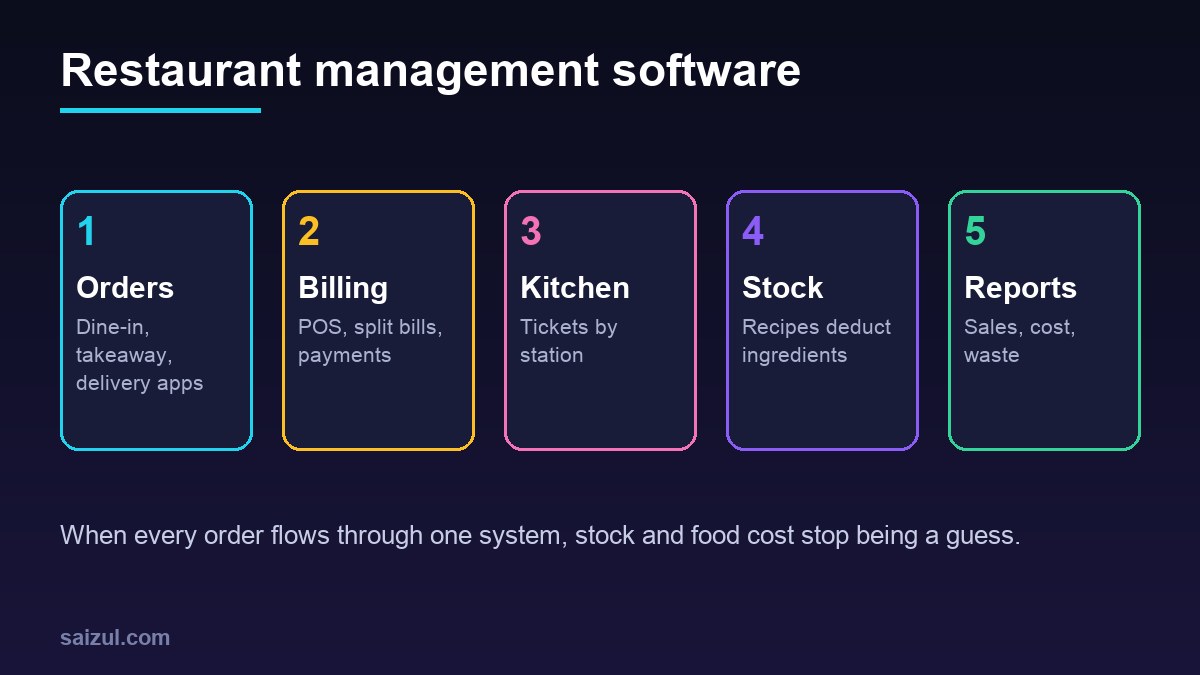
Restaurant management software connects the parts of a food business that usually run on separate tablets, notebooks and spreadsheets: the POS and billing, dine-in and delivery orders, kitchen tickets, ingredient stock, purchasing, staff shifts and the daily sales report. For a single cafe, a busy restaurant, a cloud kitchen or a small chain, the right setup cuts order mistakes, shows real food cost and stops the owner from counting cash and stock late every night. This guide explains the core modules, how a service day runs, where automation and AI help, when ready-made software fits and when custom work pays off, with estimated costs and a checklist.
From my own work: When food business owners show me their numbers, the gap I see most often is between sales and stock. The POS knows what was sold, but nobody knows how much chicken or oil should have been used, so waste and leakage stay invisible. Linking each menu item to a simple recipe is usually the single most valuable change.
If your main channel is online orders on your own website, read my guide on accepting online payments in Bangladesh as well. For general stock principles, my article on inventory management for online stores covers overselling and stockouts in retail; this guide applies the same ideas to ingredients and recipes.
Core modules of restaurant management software
| Module | What it does | Why it matters |
|---|---|---|
| POS and billing | Menu, modifiers, tables, split bills, discounts, VAT, receipts, cash and card | Fast, correct bills and a clean daily close |
| Online and delivery orders | Orders from your website, WhatsApp and delivery apps in one queue | No retyping orders from several tablets |
| Kitchen tickets or display | Sends each item to the right station with timing | Fewer missed or late dishes |
| Recipes and stock | Each item deducts its ingredients; stock counts and waste logs | Real food cost and early leakage alerts |
| Purchasing | Suppliers, purchase orders, goods received, price history | Better buying and fewer emergency purchases |
| Staff and shifts | Roles, logins, shifts, attendance, tips or service charge | Control and accountability |
| Customers and loyalty | Phone numbers, order history, offers | Repeat orders without paying apps every time |
| Reports | Sales by item, hour, channel and branch; food cost; voids and discounts | Decisions based on numbers |
How a service day runs with the system
- Opening: the manager opens the shift, enters the opening cash and checks low-stock alerts from last night.
- Orders: waiters take orders on a tablet or phone; online and delivery orders arrive in the same queue.
- Kitchen: each item goes to its station as a printed ticket or on a kitchen screen, with modifiers such as “no onion” or allergy notes clearly shown.
- Billing: the bill is printed or sent digitally; payment by cash, card or mobile wallet is recorded against it.
- Stock: every sale deducts ingredients by recipe; waste and staff meals are logged.
- Closing: the system shows expected cash, card and wallet totals. The cashier counts and records the difference.
- Next morning: the owner receives a short report with sales, top items, food cost estimate, voids, discounts and low stock. My automated business reporting guide shows how to send this automatically.
Recipe-based stock: the module most restaurants skip
Most restaurants track sales well and stock badly. Recipe-based stock fixes this:
- List your ingredients with a unit: kilogram, litre, piece.
- For each menu item, record the recipe quantity: for example, a portion uses a set weight of rice, chicken and oil.
- Record purchases as goods received, with price.
- Every sale deducts the recipe quantities automatically.
- Do a physical count weekly for expensive items and monthly for the rest.
- The gap between expected and counted stock is your waste, portion drift or leakage. Investigate the biggest gaps first.
Start with your 20 best-selling items and 15 most expensive ingredients. You do not need perfect recipes for every item on day one.
Automation and AI for restaurants
- WhatsApp and Messenger ordering: an assistant shows the menu, takes the order, confirms the address and total, and sends it into the POS queue. See WhatsApp AI agent for business and Messenger AI chatbot in Bangla.
- Reservations: online table booking with reminders reduces no-shows.
- Purchase suggestions: reorder lists based on stock levels and expected sales by day of week.
- Review replies: drafts of replies to online reviews, checked by the manager before posting.
- Menu engineering: reports that combine popularity and margin so you know which items to promote, reprice or remove.
- Supplier invoices: reading supplier bills into purchases. See AI document processing.
Cloud kitchens, multiple brands and branches
Cloud kitchens and growing chains have extra needs that simple POS tools often miss:
- Several brands, one kitchen: different menus and prices per brand, but shared ingredients and stock.
- Many delivery apps: orders from each app arrive in one kitchen queue instead of on separate tablets, with the brand clearly shown on the ticket.
- Central kitchen: prepared items such as sauces and marinated meat are produced centrally, transferred to branches and tracked as stock in both places.
- Branch comparison: sales, food cost, waste and discounts compared across branches on the same report.
- Menu changes from head office: a price or item change made once and pushed to every branch and channel.
These needs are often where a custom module, connected to an existing POS, gives the best value.
Common mistakes to avoid
- Buying hardware before checking which POS it works with.
- Setting up hundreds of recipes before the menu and units are clean.
- Sharing one login among all cashiers, so voids and discounts cannot be traced.
- Ignoring the daily close; small cash differences grow when nobody looks.
- Adding AI ordering before the basic order queue works reliably.
Food safety, allergens and payment security
Software does not make food safe, but it can support your procedures. Many food safety rules are based on models such as the FDA Food Code in the US (FDA Food Code). Allergens are a particular risk for online and delivery orders, where staff cannot speak to the customer face to face. The UK Food Standards Agency publishes allergen guidance for food businesses, including information for distance selling (FSA allergen guidance).
- Store allergen information per menu item and show it on your online menu.
- Make allergy notes impossible to miss on kitchen tickets.
- Never let a chatbot guess allergen information; it should only repeat what you have recorded and pass doubtful questions to staff.
- For card payments, use a payment provider or terminal that handles card data, so card numbers never touch your own system. The PCI Security Standards Council publishes the card data security standards (PCI SSC standards).
- Give every staff member their own login, and log voids, discounts and refunds with the user and reason.
Ready-made POS vs custom restaurant software
| Option | Good for | Watch out for |
|---|---|---|
| Ready-made cloud POS | Single outlet or small chain with standard needs | Monthly fees per terminal, weak recipe stock, limited local payment or delivery app support |
| Ready-made POS plus custom add-ons | Good POS but missing WhatsApp ordering, reports or stock | Depends on the POS having an API |
| Custom restaurant system | Cloud kitchens with many brands, central kitchen plus branches, franchise reporting | Higher upfront cost and ongoing maintenance |
Before buying, check that the POS works offline when the internet drops, prints to your existing kitchen printers and exports your data. My build vs buy software guide helps with the decision.
Restaurant management software cost (2026 estimates)
These ranges are estimates. Prices vary by country, outlets, terminals and modules.
| Option | Typical scope | Estimated cost (USD) |
|---|---|---|
| Ready-made cloud POS | POS, menu, basic reports | Roughly 20 to 150 per outlet per month, plus hardware |
| WhatsApp or website ordering add-on | Menu, cart, address, order into POS or kitchen | 1,500 to 6,000 |
| Custom stock and reporting module | Recipes, purchases, counts, food cost, daily report | 3,000 to 12,000 |
| Full custom restaurant system | POS, orders, kitchen display, stock, multi-branch reports | 12,000 to 50,000+ |
Hardware such as tablets, printers, cash drawers and kitchen screens is extra, as are payment and delivery app fees.
Rollout plan
- Clean the menu: names, prices, modifiers, VAT and allergens.
- Set up POS and kitchen tickets first, and run a quiet day as a test.
- Connect online and delivery orders into one queue.
- Add recipes for top sellers and expensive ingredients.
- Start weekly stock counts and compare with expected stock.
- Turn on the morning report for the owner.
- Add WhatsApp ordering, loyalty or AI features last.
Restaurant management software checklist
- Menu with modifiers, VAT and allergens complete.
- Works offline and syncs when internet returns.
- Supports your kitchen printers or screens.
- All order channels arrive in one queue.
- Recipes for top items and costly ingredients.
- User logins with logged voids, discounts and refunds.
- Card payments handled by a compliant provider.
- Daily close and morning report agreed.
- Data export and support terms in the contract.
Need help with this on your own site or business?
I build and secure WordPress sites, web apps and AI automations end to end, in Bangla and English: a free discovery call, a written scope with a fixed quote, a focused first version, then testing, deployment and monitoring.
See the portfolio and the AI agent services, or tell me what you need.
FAQ
What is restaurant management software?
It is a system that combines POS and billing, dine-in and online orders, kitchen tickets, ingredient stock, purchasing, staff and reports, so a restaurant runs from one source of truth instead of several separate tools.
Do small cafes need restaurant management software?
A small cafe can start with a simple cloud POS. Add recipe-based stock and reports when food cost and waste start to matter, which usually happens sooner than owners expect.
Can WhatsApp orders go straight into the POS?
Yes, if the POS has an API or you use a custom system. A WhatsApp assistant can take the order, confirm the total and address, and send it to the kitchen queue without retyping.
How does recipe-based stock work?
Each menu item has a recipe with ingredient quantities. Every sale deducts those quantities, and regular physical counts show the gap between expected and real stock, which reveals waste or leakage.
How much does restaurant software cost?
Ready-made cloud POS is often roughly 20 to 150 US dollars per outlet per month plus hardware, while custom systems range from a few thousand to 50,000 or more. These are estimates and depend on scope.
Sources

Md Saizul Amin
Digital Systems Strategist · AI Agent Developer · 9+ years in digital & ITMd Saizul Amin is a digital systems strategist and AI automation engineer from Dhaka, Bangladesh. With 9+ years across IT, web development and digital marketing, he writes practical guides on technology, business, education and online growth — and builds the same kinds of systems (AI agents, websites, SEO and ad campaigns) for clients in Bangladesh, the UK and the USA.
Specialist in
Credentials & experience
- 🎓B.Sc. in Computer Science & EngineeringBangladesh University of Business & Technology (BUBT), 2017–2021
- 🤖AI Automation Engineer · Web Developer · SEO SpecialistUnique Mark Limited, Birmingham UK — 2024 to present
- 🌱IT SpecialistGreen Fund Initiative Inc., USA — 2024 to present
- 🏥Junior IT Consultant — Ministry of Health (DGHS)Built the first national Shareable Health Record website; supported 6,000+ facilities
- 🧭Head of ITWEDO Bangladesh — led IT for 50+ staff, 2021–2023