In this article
AI meeting notes turn a recorded call or meeting into a clear summary, a list of decisions and action items with an owner and due date, and then push those tasks into the tools your team already uses. For sales teams, agencies, consultants, project-based businesses and any manager who spends half the day in meetings, the real benefit is not a nicer transcript. It is that follow-ups stop falling through the cracks: the client gets a recap within the hour, the CRM is updated without anyone typing, and every promised task shows up in someone’s list. This guide explains how an AI meeting notes pipeline works, which built-in tools may already be enough, when a custom workflow pays off, how to write summary templates for each meeting type, how to keep the output accurate, and how to handle recording consent and data security, with estimated costs and a checklist.
From my own work: When I look at how a team handles meetings, the summary is rarely the problem. Someone usually writes a few notes. What gets lost is the follow-through: the task nobody owned, the client email that went out three days later, the deal stage never updated. So when I build these workflows, I put most of the effort into the step after the summary, not the summary itself.
New to AI agents? Start with what an AI agent is and my guide to the AI agent for small business. For a broader list of tools, see AI productivity tools for business.
How AI meeting notes automation works
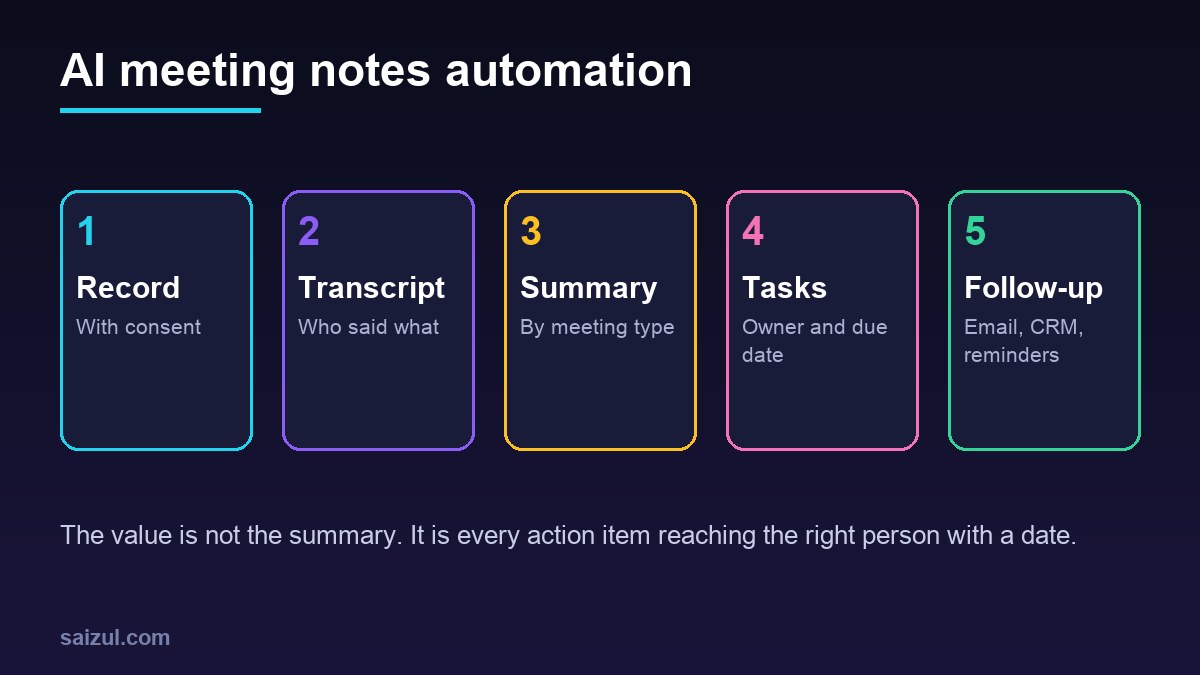
- Record with consent: the meeting platform records or transcribes the call, or a phone app records an in-person meeting after everyone agrees.
- Transcribe: speech becomes text with speaker labels. Meeting platforms such as Google Meet (Meet transcripts) and Microsoft Teams (Teams live transcription) offer transcription on supported plans.
- Summarise by type: the transcript is summarised with a template for that kind of meeting: sales call, client project review, internal team meeting or interview.
- Extract actions: each action item gets a description, an owner, a due date and the customer or project it belongs to. Unclear items are marked as unclear rather than guessed.
- Push to tools: tasks go to your project tool, deal notes and next steps to the CRM, and dates to calendars.
- Follow up: a recap email is drafted for the client or team, reviewed by the meeting owner and sent.
- Remind: owners get reminders before due dates, and overdue items appear in a weekly list.
Built-in tools vs a custom workflow
| Option | Good for | Watch out for |
|---|---|---|
| Built-in meeting platform features | Teams that only need transcripts and a basic summary | Plan requirements, summaries stay inside the meeting tool, little control over format |
| Ready-made note-taker app | Individuals and small teams wanting quick setup | Per-user fees, data stored with another vendor, limited links to your systems |
| Custom workflow | Teams that need tasks in their own tools, CRM updates, Bangla and English meetings, strict data rules | Setup cost, someone must own and maintain it |
A custom workflow is usually built on an automation platform plus a language model, connected to your project tool and CRM. See n8n workflow examples for business for the kind of building blocks involved.
Summary templates by meeting type
One generic summary for every meeting produces vague notes. Give each meeting type its own template:
| Meeting type | What the summary must capture | Where it goes |
|---|---|---|
| Sales or discovery call | Customer need, budget signals, decision makers, objections, next step and date | CRM deal notes and stage |
| Client project review | Decisions, changes to scope, open questions, client approvals, deadlines | Project tool and client recap email |
| Internal team meeting | Decisions, blockers, action items with owners | Task list and team channel |
| Job interview | Factual notes against the role criteria, no personal judgements | Hiring file, access restricted |
| Supplier meeting | Prices discussed, delivery dates, commitments on both sides | Purchasing records |
For sales calls, connecting meeting notes to the CRM is often where the biggest time saving is. My guide on CRM automation for small business covers the CRM side.
Example: one sales call, start to finish
Here is how a typical custom workflow handles a 30-minute discovery call with a new prospect:
- Before the call: the calendar invite mentions recording; the workflow notes the meeting type as a sales call because of the calendar label.
- During the call: the meeting platform transcribes with speaker names.
- Five minutes after: the sales template produces the customer’s need, timeline, budget signals, objections and the agreed next step. Two items are flagged as unclear because nobody said who would send the price list.
- Review: the salesperson opens the draft, fixes one figure, assigns the unclear item to themselves and approves.
- Automatic updates: the CRM deal moves to the next stage with the notes attached, a task for the proposal is created with a due date, and the recap email goes to the prospect.
- Later: if the proposal task is still open two days before the date, the salesperson gets a reminder; if the prospect does not reply in a week, a follow-up draft is prepared.
The whole loop takes the salesperson two or three minutes instead of twenty, and nothing depends on memory.
Getting action items into the right tools
- Project tools: each action item becomes a task in the right project, with the transcript link attached for context.
- CRM: notes, next step and stage go to the matching contact or deal, found by email address.
- Calendar: agreed follow-up meetings become draft invites for the owner to send.
- Team chat: a short summary is posted to the project channel, without sensitive details.
- Weekly digest: every Monday, each person gets their open and overdue items from all meetings.
Keeping AI meeting notes accurate
Transcription and summaries make mistakes, especially with accents, mixed languages, poor audio and numbers. The NIST AI Risk Management Framework is a helpful reference for thinking about these risks (NIST AI RMF). In practice:
- Human review before sending: nothing goes to a client without the meeting owner reading it.
- Check numbers and dates: prices, quantities and deadlines are highlighted for review, because they are the costliest errors.
- Speaker names: map speakers to real names; wrong owners mean wrong tasks.
- Flag uncertainty: the template instructs the model to write “unclear” instead of guessing an owner or a date.
- Quote, do not paraphrase, commitments: for important promises, include the exact sentence from the transcript.
- Better audio: a decent microphone in meeting rooms improves everything downstream.
Recording consent and the law
Recording laws differ by country and, in the US, by state: some require consent from one party, others from everyone on the call. The Reporters Committee for Freedom of the Press publishes a state-by-state recording guide (RCFP recording guide). Check the rules where you and your participants are, and take legal advice if you are unsure.
- Announce recording at the start of every meeting, and in the calendar invite.
- Let participants decline; have a manual note-taking fallback.
- Under the GDPR, people must be told about the processing of their data, including the purpose and how long it is kept (GDPR Article 13). Put this in your privacy notice.
- Never record HR, medical or legal conversations without a clear policy and explicit agreement.
Data security and retention
- Decide where recordings and transcripts are stored, and who can see them.
- Delete raw audio after a short period once the summary is approved; keep the summary and tasks.
- Restrict sensitive meetings such as interviews and board meetings to named people.
- Check whether your AI provider uses your data for training, and choose settings or plans that do not.
- Log every automated action, such as a CRM update, so you can trace mistakes.
AI meeting notes cost (2026 estimates)
These ranges are estimates for planning, not quotes. Real prices depend on the number of users, meeting hours, integrations and your AI provider.
| Option | Typical scope | Estimated cost (USD) |
|---|---|---|
| Built-in platform features | Transcripts and basic summaries | Often included in higher business plans |
| Ready-made note-taker | Recording, summaries, simple integrations | Roughly 10 to 40 per user per month |
| Custom workflow | Templates by meeting type, tasks to your tools, CRM update, recap drafts | 2,000 to 8,000 to build |
| Running costs for custom | Transcription and model usage, hosting | Usually tens to a few hundred per month, depending on meeting hours |
If you are weighing whether to hire someone to build this, read how to hire an AI automation developer.
Rollout plan
- Pick one meeting type with clear follow-ups, usually sales calls or client reviews.
- Write the summary template and the action item format with the people who run those meetings.
- Test on ten real meetings with consent, and compare AI notes with human notes.
- Connect tasks and CRM updates, with review before anything is sent externally.
- Add reminders and a weekly overdue list.
- Extend to other meeting types once the first one is trusted.
AI meeting notes checklist
- Recording consent process and announcement agreed.
- Summary template for each meeting type.
- Action items with owner, due date and project or customer.
- Unclear items flagged, never guessed.
- Numbers and dates highlighted for review.
- Tasks pushed to your project tool and CRM automatically.
- Recap emails reviewed before sending.
- Retention period for audio and transcripts set.
- Access limits for sensitive meetings and an action log.
Need help with this on your own site or business?
I build and secure WordPress sites, web apps and AI automations end to end, in Bangla and English: a free discovery call, a written scope with a fixed quote, a focused first version, then testing, deployment and monitoring.
See the portfolio and the AI agent services, or tell me what you need.
FAQ
What are AI meeting notes?
They are summaries, decisions and action items created automatically from a meeting recording or transcript, usually with owners and due dates, and often sent on to task tools, CRMs and recap emails.
Do I need a separate app, or are built-in features enough?
If you only need a transcript and a short summary, the features in your meeting platform may be enough. A custom workflow pays off when you want tasks in your own tools, CRM updates and templates for each meeting type.
Is it legal to record meetings for AI notes?
It depends on where you and the participants are. Some places require everyone’s consent. Announce recording, let people decline and check local law before you start.
Can AI meeting notes handle Bangla and English mixed meetings?
Modern transcription handles many languages, but accuracy drops with mixed languages and poor audio. Test with your real meetings and always review names, numbers and dates.
How long does it take to set up?
Built-in features take minutes to switch on. A custom workflow for one meeting type with task and CRM integration usually takes two to five weeks, including testing on real meetings.
Sources

Md Saizul Amin
Digital Systems Strategist · AI Agent Developer · 9+ years in digital & ITMd Saizul Amin is a digital systems strategist and AI automation engineer from Dhaka, Bangladesh. With 9+ years across IT, web development and digital marketing, he writes practical guides on technology, business, education and online growth — and builds the same kinds of systems (AI agents, websites, SEO and ad campaigns) for clients in Bangladesh, the UK and the USA.
Specialist in
Credentials & experience
- 🎓B.Sc. in Computer Science & EngineeringBangladesh University of Business & Technology (BUBT), 2017–2021
- 🤖AI Automation Engineer · Web Developer · SEO SpecialistUnique Mark Limited, Birmingham UK — 2024 to present
- 🌱IT SpecialistGreen Fund Initiative Inc., USA — 2024 to present
- 🏥Junior IT Consultant — Ministry of Health (DGHS)Built the first national Shareable Health Record website; supported 6,000+ facilities
- 🧭Head of ITWEDO Bangladesh — led IT for 50+ staff, 2021–2023