In this article
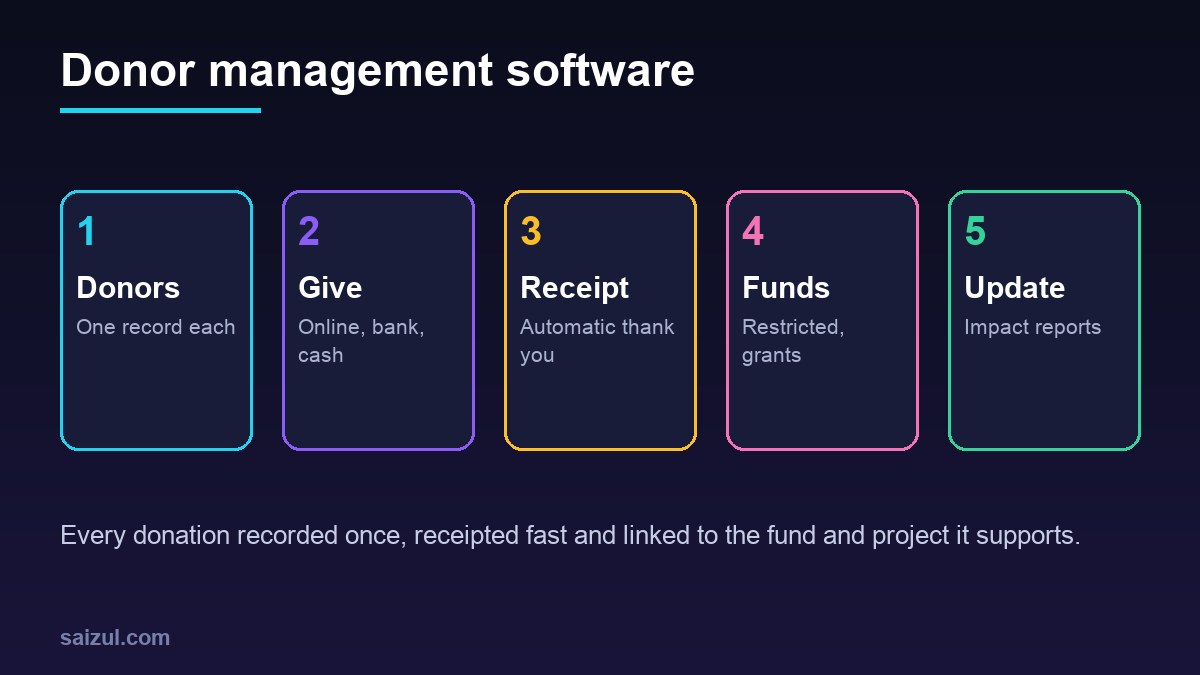
Donor management software keeps every donor, donation, receipt, fund and grant in one place, so an NGO or charity can thank people quickly, report honestly on how money was used and keep supporters giving year after year. For NGOs, charities, foundations, mosques and temples, schools raising funds and community organisations, it replaces scattered spreadsheets, receipt books and bank statements that nobody has matched. The practical benefits are clear: no donor is thanked twice or forgotten, restricted money is spent only on the purpose it was given for, and audit and donor reports take hours instead of weeks. This guide explains the core modules, how to bring online and offline donations together, how to handle receipts, restricted funds and grants, where automation and AI help, how to respect consent and privacy, and when ready-made software is enough, with estimated costs and a checklist.
From my own work: When NGO teams show me their donor records, the same person often appears four or five times: once from a bank transfer, once from an event list, once from the website and once in someone’s phone. Before any automation, I spend time merging those into one record per donor. It is unglamorous work, but every report and thank-you message after that is correct.
If you already use a general CRM, read CRM automation for small business to see what can be reused. For collecting donations online, see how to accept online payments in Bangladesh.
Core modules of donor management software
| Module | What it does | Why it matters |
|---|---|---|
| Donor records | Individuals, families, companies and foundations, with contact details, preferences and history | One true record per supporter |
| Donations | Amount, date, method, campaign, fund and receipt status | Every gift recorded once |
| Online giving | Donation pages and forms, one-time and monthly | Easy giving with automatic records |
| Receipts | Automatic receipts and yearly statements in the format your rules require | Trust and compliance |
| Funds and projects | Restricted and unrestricted funds, linked to projects | Money used as donors intended |
| Grants | Applications, agreements, budgets, deadlines and reports for institutional donors | No missed reporting dates |
| Communication | Thank-you messages, newsletters, appeals, segmented lists | Donors who feel informed give again |
| Reports | Income by campaign, fund, donor type and period | Board, audit and donor reports |
Bringing every donation into one place
Most organisations receive money in many ways. Each one needs a clear path into the system.
- Online donations: the donation form creates or updates the donor record and the donation automatically, with the campaign and fund chosen by the donor.
- Bank transfers: the bank statement is imported; the system suggests matches by reference, name and amount, and staff confirm.
- Mobile wallets: transaction exports are imported the same way, matched by phone number and reference.
- Cash and cheques: entered at the office with a receipt number, ideally on the same day, by someone other than the person who counts the cash.
- Events and collections: a simple mobile form records donor name, phone and amount, then syncs.
- Monthly reconciliation: donation totals in the system are compared with the bank and accounts, and any difference is explained.
Receipts and tax rules
Receipt rules depend on your country, and you should confirm them with your accountant or regulator. Some examples show why the software needs to be flexible:
- United States: the IRS explains that a donor needs a written acknowledgment from the charity for any single contribution of $250 or more, with specific content (IRS written acknowledgments).
- United Kingdom: charities can claim Gift Aid on eligible donations, which requires a donor declaration and records that support the claim (GOV.UK Gift Aid).
- Bangladesh: organisations receiving foreign donations work under the NGO Affairs Bureau, which handles registration and project approval (NGO Affairs Bureau). Keep foreign and local funds clearly separated in the system.
Whatever the rules, the system should number receipts, store a copy, send them automatically and produce a yearly statement per donor on request.
Restricted funds, projects and grants
Restricted money must be spent on the purpose the donor chose. Mixing it with general funds is one of the fastest ways to lose donor trust.
- Every donation is tagged with a fund: general, a specific project, an emergency appeal or a named grant.
- Project spending is linked to funds, either in the system or through your accounting software.
- Fund balances show what has been received, spent and is still available.
- Grants have their own records: agreement, budget lines, reporting dates, documents and the people responsible.
- Reminders go out well before every grant report is due.
In-kind gifts, volunteers and events
Not every gift is money. Donated goods, food, medicines, equipment and volunteer time all matter to your work and often to your reports.
- In-kind gifts: record the item, quantity, an estimated value where your rules allow it, the donor and where it was used. Ask your accountant how in-kind gifts should be valued and receipted locally.
- Volunteers: keep volunteer records with skills, availability, hours and consent, separate from donor marketing lists unless they agree to both.
- Events: track registrations, tickets, sponsorships and donations per event, so you know what each event really raised after costs.
- Corporate partners: companies often give money, goods and staff time together; keep them in one organisation record with named contacts.
Donor communication and retention
Keeping a donor is cheaper than finding a new one. Use the records to communicate with care:
| Moment | Message | Channel |
|---|---|---|
| Right after a gift | Thank you and receipt | Email or SMS |
| First gift | Welcome and what their gift supports | |
| Project milestone | Short update with photos, shared with consent | Email or WhatsApp |
| Monthly donor card expiring | Polite request to update | |
| No gift in 12 to 18 months | Update and gentle invitation to give again | Email or call |
| Year end | Annual statement and thanks |
My guide on email marketing automation explains how to set up these sequences.
Automation and AI for NGOs
- Duplicate detection: the system flags likely duplicates by name, phone and email for a person to merge.
- Automatic thank-you: sent within minutes for online gifts and within a day for offline gifts.
- Drafted updates: AI drafts a donor update from your project reports and photos; staff check every fact before sending.
- Grant report drafts: AI pulls figures from the system into your grant template for staff to review.
- Board reports: monthly income and fund summaries sent automatically. See automated business reporting.
- WhatsApp questions: an assistant answers how to donate and sends receipts on request, handing anything sensitive to staff.
Never let AI invent impact numbers, beneficiary stories or quotes. Every figure in a donor message must come from your records.
Consent, privacy and payment security
Donor data shows who gives, how much and often their beliefs. Treat it carefully. Under the GDPR, every use of personal data needs a lawful basis, such as consent or legitimate interests (GDPR Article 6), and many other laws follow similar ideas.
- Record how each donor wants to be contacted and whether they agreed to marketing.
- Respect requests to be anonymous in public lists.
- Get written consent before sharing beneficiary photos or stories.
- Use a payment provider that handles card data under PCI DSS (PCI Security Standards Council); never store card numbers yourself.
- Give staff and volunteers separate logins with only the access they need.
Ready-made vs custom donor management software
| Option | Good for | Watch out for |
|---|---|---|
| Spreadsheets | Very small groups with few donors | Duplicates, no receipts, no history, easy to lose |
| Ready-made nonprofit CRM | Organisations in countries the product is built for | Local payment methods, local receipt formats, per-contact pricing |
| Custom system | Local wallets and banks, foreign and local fund separation, grant tracking, Bangla and English | Higher upfront cost, maintenance agreement needed |
Donor management software cost (2026 estimates)
These ranges are estimates for planning, not quotes. Real prices depend on donor numbers, payment methods, integrations and your country.
| Option | Typical scope | Estimated cost (USD) |
|---|---|---|
| Ready-made nonprofit CRM | Donor records, donation forms, receipts, email | Roughly 0 to 300 per month, depending on contacts and users |
| Donation website | Campaign pages, donation forms, local payment gateways | 1,500 to 6,000 |
| Custom donor system | Donors, donations, reconciliation, receipts, funds, reports | 6,000 to 25,000 |
| Grants and AI add-on | Grant tracking, reminders, drafted reports and updates | 2,000 to 8,000 |
Some software vendors offer nonprofit discounts; always ask. My custom software development cost guide explains how to budget for hosting and maintenance.
Rollout plan
- Collect donor lists from every source and merge duplicates.
- Define funds, campaigns and receipt rules with your finance team.
- Connect online donations and send automatic receipts.
- Import past bank and wallet records and match them.
- Add communication sequences and board reports.
- Add grant tracking and AI drafts once the data is clean.
Donor management software checklist
- One record per donor, duplicates merged.
- Online, bank, wallet and cash donations all recorded.
- Receipts numbered, stored and sent automatically.
- Every donation tagged with a fund and campaign.
- Grant deadlines with reminders.
- Contact preferences and marketing consent recorded.
- Card data handled by a compliant provider.
- Monthly reconciliation with accounts.
- Roles, backups and data export agreed.
Need help with this on your own site or business?
I build and secure WordPress sites, web apps and AI automations end to end, in Bangla and English: a free discovery call, a written scope with a fixed quote, a focused first version, then testing, deployment and monitoring.
See the portfolio and the AI agent services, or tell me what you need.
FAQ
What is donor management software?
It is a system that stores donor records, donations, receipts, funds and grants in one place, so an NGO or charity can thank donors quickly, use restricted money correctly and report accurately.
How is it different from a normal CRM?
A normal CRM tracks sales leads and deals. Donor management software adds donations, receipts, tax rules, restricted funds, campaigns and grant reporting, which nonprofits need every day.
Can donor management software accept mobile wallet donations?
Yes, if it connects to your payment gateway or imports wallet transaction files. Custom systems are often built for local wallets and banks that international products do not support well.
Is AI safe to use for donor communication?
It is useful for drafting updates and reports from your own records, but staff must check every fact. AI must never invent impact figures, stories or quotes.
How long does it take to set up donor management software?
A ready-made system can run in a few weeks once donor data is cleaned. A custom system with reconciliation, funds and grants usually takes two to four months.
Sources

Md Saizul Amin
Digital Systems Strategist · AI Agent Developer · 9+ years in digital & ITMd Saizul Amin is a digital systems strategist and AI automation engineer from Dhaka, Bangladesh. With 9+ years across IT, web development and digital marketing, he writes practical guides on technology, business, education and online growth — and builds the same kinds of systems (AI agents, websites, SEO and ad campaigns) for clients in Bangladesh, the UK and the USA.
Specialist in
Credentials & experience
- 🎓B.Sc. in Computer Science & EngineeringBangladesh University of Business & Technology (BUBT), 2017–2021
- 🤖AI Automation Engineer · Web Developer · SEO SpecialistUnique Mark Limited, Birmingham UK — 2024 to present
- 🌱IT SpecialistGreen Fund Initiative Inc., USA — 2024 to present
- 🏥Junior IT Consultant — Ministry of Health (DGHS)Built the first national Shareable Health Record website; supported 6,000+ facilities
- 🧭Head of ITWEDO Bangladesh — led IT for 50+ staff, 2021–2023