In this article
Cash on delivery still dominates online shopping in Bangladesh, but more customers now want to pay in advance with bKash, Nagad or a card, and sellers want to stop chasing cash and refused parcels. The options range from sharing a personal wallet number on Facebook to a full payment gateway on a website that accepts cards, mobile banking and internet banking. Each step up costs more to set up but saves manual work and looks more trustworthy to buyers. This guide explains the options, what you need for each, how to add payments to a website, and which fees and terms to compare before you sign.
From my own work: When I add payments to a client’s WooCommerce store, the coding is rarely the slow part. The time goes into collecting documents, waiting for the merchant account to be approved, and testing what happens when a payment fails or a customer closes the page halfway through.
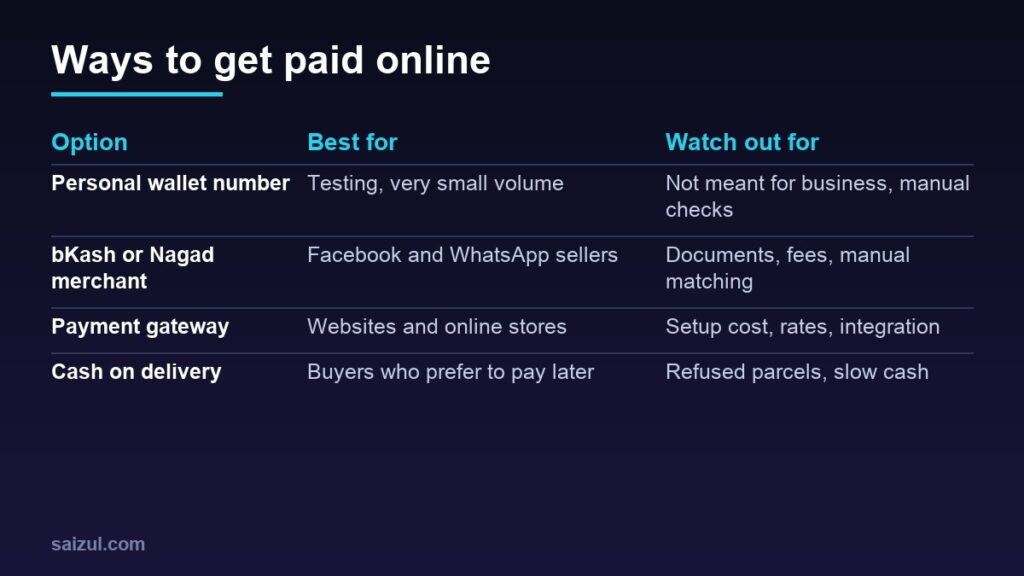
The main options
- Personal wallet number. Many new sellers ask customers to “send money” to a personal bKash or Nagad number. It is simple, but personal accounts are not designed for business receipts, and you must match every payment to an order by hand.
- Merchant or business account. bKash and Nagad both offer accounts for businesses. Customers pay using the merchant payment option, and you get a business dashboard to see payments.
- Mobile wallet checkout on a website. bKash offers a checkout that websites and apps can integrate through its developer APIs (bKash developer portal).
- Payment gateway. A gateway such as SSLCommerz lets a single checkout accept cards, mobile banking and internet banking.
- Cash on delivery, which you will probably keep alongside online payment. See cash on delivery management for reducing fake orders and returns.
Which option fits your business?
| Your situation | Sensible starting point |
|---|---|
| Just testing, a handful of orders a month | Cash on delivery, with advance payment for delivery charges if needed |
| Selling through Facebook, Instagram or WhatsApp | A bKash or Nagad merchant or retail account |
| A website or WooCommerce or Shopify store | A payment gateway, plus bKash checkout if many buyers prefer it |
| Selling services, courses or bookings | A gateway or payment links, so customers can pay before the service |
| Selling to customers abroad | Check which international cards and currencies the gateway supports |
Step 1: Open a bKash or Nagad business account
bKash’s online business sign-up form asks for your business name, address and type, whether you have an NID, a valid trade licence and a bank account, and your website, Facebook page or app link. If you do not have a trade licence, bKash points you to its Personal Retail Account instead (bKash online business). If you already have a merchant account, you sign up for the bKash Business Dashboard.
Nagad has a similar “become a merchant” application on its website. For both, check the current account types, requirements, transaction charges and settlement times directly with the provider, because they change and can differ by account type.
- Prepare your NID, trade licence if you have one, bank account details and a working page or website.
- Use the same business name everywhere, so customers recognise the payment.
- Ask how payments move from the wallet to your bank account, and how long it takes.
Step 2: Apply for a payment gateway if you have a website
A gateway handles the payment page and passes the result back to your website. SSLCommerz, for example, says it accepts debit, credit and prepaid cards, a range of mobile banking and internet banking brands and e-wallets, describes its onboarding as fully online, and states that it holds a payment system operator licence from Bangladesh Bank (SSLCommerz). Other gateways and banks also offer card acceptance, so compare more than one.
What gateways usually ask for:
- A live website with clear product or service pages and prices.
- Visible policies: terms, privacy, delivery, and returns and refunds. My guides to a privacy policy and a returns and refunds policy help here.
- Contact details, including a physical address.
- Business documents such as a trade licence and the owner’s ID, plus a bank account in the business or owner’s name. Ask the provider for its exact list.
Step 3: Compare fees and terms carefully
Do not choose only on the headline rate. Ask each provider, in writing:
- Setup or yearly fees, and whether they are refundable.
- Transaction rates for each method: local cards, international cards, mobile banking and internet banking can be charged differently.
- Settlement time: how many days until the money reaches your bank account.
- Refunds and chargebacks: how refunds are processed and who pays the fee when a customer disputes a card payment.
- Integration support: plugins for your platform, test accounts and help during setup.
Rates change, so check the provider’s current pricing page or your contract rather than any figure you read in a blog post, including this one. Then add the fees to your product costs; see how to price products for an online store.
Step 4: Add payments to your website
- Check your platform. WooCommerce and Shopify both support local gateways through plugins or apps, but availability varies. See WooCommerce vs Shopify if you have not chosen yet.
- Use the sandbox first. SSLCommerz offers a sandbox account for testing before going live (SSLCommerz developer docs), and bKash’s developer portal documents its checkout, refund and payment status APIs.
- Confirm payments on the server. SSLCommerz, for example, sends an instant payment notification and advises merchants to call its order validation API to check the notification is genuine before marking an order as paid. Never mark an order paid just because the customer returned to a “success” page.
- Test every path: a successful payment, a failed payment, a cancelled payment, a customer who closes the page, and a refund.
- Keep HTTPS and security in place across the whole site. My WordPress security checklist covers the basics.
Step 5: Make customers comfortable paying in advance
- Show the payment logos you accept on product pages and at checkout.
- Explain what happens after payment: confirmation message, delivery date and how to contact you.
- Offer a small incentive for advance payment, such as free delivery, if your margin allows.
- Keep cash on delivery for buyers who are not ready to pay first, at least while you build trust.
- Send a receipt or confirmation for every payment. A clear checkout also helps reduce cart abandonment.
Protect yourself from payment fraud
- Check payments in your own merchant dashboard or app, not from a screenshot or SMS a customer forwards.
- Never share PINs, OTPs or dashboard passwords with anyone, including people claiming to be from the provider.
- Limit dashboard access to the people who need it, and remove access when staff leave.
- Watch for unusual orders, such as high-value orders with mismatched names and addresses.
Common mistakes
- Running a growing business on a personal wallet number.
- Marking orders paid without checking the payment on the server or dashboard.
- Going live without testing failed and cancelled payments.
- Forgetting transaction fees when setting prices.
- Missing policy pages, which can delay gateway approval.
Quick checklist
- Decide which methods your customers actually want to use.
- Prepare NID, trade licence, bank details and a working page or site.
- Open a bKash or Nagad business account, and apply for a gateway if you have a website.
- Compare setup fees, transaction rates, settlement time and refund terms in writing.
- Test in a sandbox, including failed payments and refunds.
- Verify payments server-side before marking orders paid.
- Keep cash on delivery as an option while trust grows.
Need help with this on your own site or business?
I build and secure WordPress sites, web apps and AI automations end to end, in Bangla and English: a free discovery call, a written scope with a fixed quote, a focused first version, then testing, deployment and monitoring.
See the portfolio and the AI agent services, or tell me what you need.
FAQ
Can I accept bKash payments without a trade licence?
According to bKash’s online business page, sellers without a trade licence can open a bKash Personal Retail Account. Check the current requirements and limits with bKash before applying.
What does a payment gateway cost in Bangladesh?
It depends on the provider and plan. Gateways usually charge some combination of a setup or yearly fee and a percentage per successful transaction, which can differ by payment method. Check each provider’s current pricing.
Can a Facebook page seller use a payment gateway?
Some gateways and wallets offer payment links that work without a full website, but many require a website with policy pages. Ask the provider what it needs for your setup.
Is it safe to accept payment screenshots from customers?
No. Screenshots and forwarded SMS can be faked. Always confirm the payment in your own merchant app or dashboard before sending the order.
Sources

Md Saizul Amin
Digital Systems Strategist · AI Agent Developer · 9+ years in digital & ITMd Saizul Amin is a digital systems strategist and AI automation engineer from Dhaka, Bangladesh. With 9+ years across IT, web development and digital marketing, he writes practical guides on technology, business, education and online growth — and builds the same kinds of systems (AI agents, websites, SEO and ad campaigns) for clients in Bangladesh, the UK and the USA.
Specialist in
Credentials & experience
- 🎓B.Sc. in Computer Science & EngineeringBangladesh University of Business & Technology (BUBT), 2017–2021
- 🤖AI Automation Engineer · Web Developer · SEO SpecialistUnique Mark Limited, Birmingham UK — 2024 to present
- 🌱IT SpecialistGreen Fund Initiative Inc., USA — 2024 to present
- 🏥Junior IT Consultant — Ministry of Health (DGHS)Built the first national Shareable Health Record website; supported 6,000+ facilities
- 🧭Head of ITWEDO Bangladesh — led IT for 50+ staff, 2021–2023