
In this article
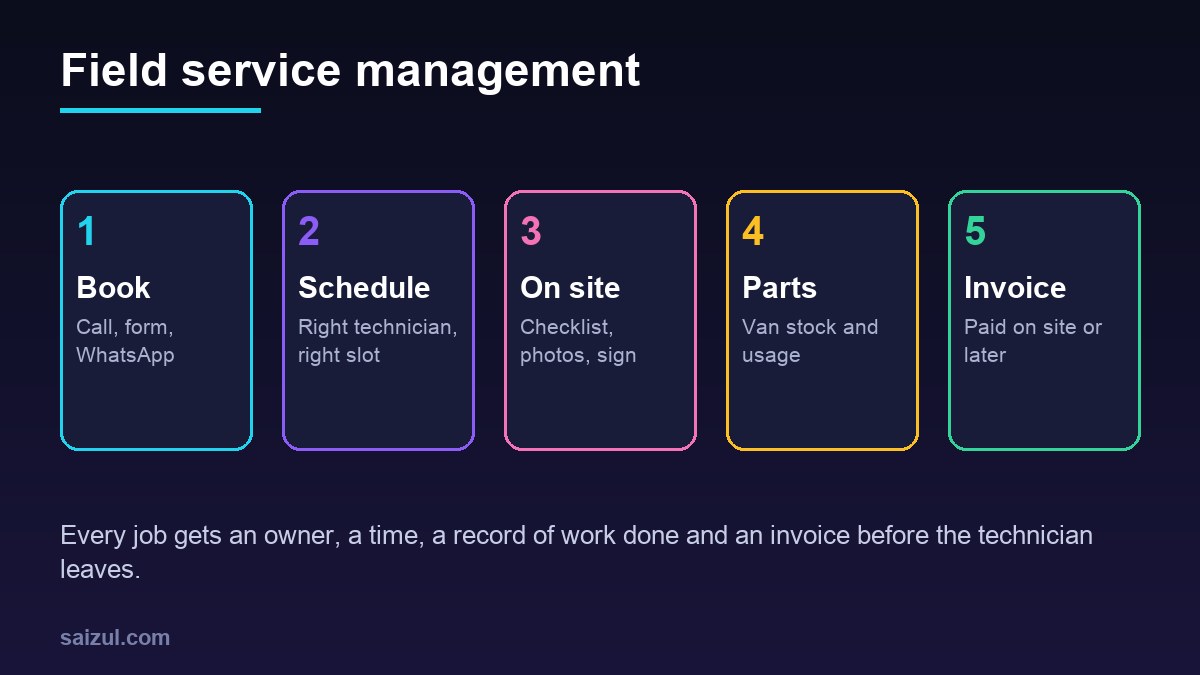
Field service management software runs the work that happens at the customer’s location: taking the job request, scheduling the right technician, guiding the visit with a mobile job sheet, recording parts used and photos, getting the customer’s sign-off and sending the invoice. It suits AC and appliance repair, electrical and plumbing contractors, solar, CCTV and network installers, generator and lift maintenance, cleaning and pest control companies, and equipment suppliers with service teams. Without it, jobs live in a notebook and a WhatsApp group, technicians call the office for addresses, parts disappear and invoices go out days late. This guide explains the core modules, how a job runs from call to payment, how to handle maintenance contracts, where automation and AI help, estimated costs and a rollout checklist.
From my own work: When I map a service company’s jobs, the costly gap is usually between the job being finished and the office knowing about it. The technician fixes the unit, takes cash or promises an invoice, and the details arrive in the office a day later, if at all. A simple mobile job sheet that closes the job on site usually recovers more money than any scheduling feature.
If your customers book fixed time slots, like a salon or clinic, appointment booking automation covers that side. This guide is for businesses where the work happens on site and each job has parts, labour and a report. For the wider picture of automating processes, see the business process automation guide.
Core modules of field service management software
| Module | What it does | Who uses it |
|---|---|---|
| Job intake | Requests from phone, website, WhatsApp and email become jobs with customer, address, problem and priority | Call centre, office |
| Customers and sites | Customer details, multiple sites, installed equipment with model and serial number, service history | Office, technicians |
| Scheduling and dispatch | Calendar by technician, skills, area and availability; drag-and-drop assignment | Dispatcher |
| Technician mobile app | Job list, address and map, checklist, photos, notes, customer signature | Technicians |
| Parts and van stock | Warehouse and van stock, parts used per job, reorder | Store, technicians |
| Quotes and approvals | On-site quote for extra work, customer approval before starting | Technicians, office |
| Maintenance contracts | Annual or monthly contracts with scheduled visits and coverage rules | Office, sales |
| Invoicing and payment | Invoice from the job sheet, payment on site or by link | Accounts, technicians |
| Reports | Jobs per technician, first-time fix rate, revenue by service, overdue contracts | Owner, manager |
How a job runs from call to payment
- Request: a customer calls or messages: “the AC is leaking” or “install two cameras”. The office creates a job, or an online form does it automatically.
- Triage: the job gets a type, priority and estimated duration. For known equipment, the history shows past visits and parts.
- Schedule: the dispatcher, or the system, picks a technician with the right skill, in the right area, with a free slot. The customer receives a confirmation with the date and time window.
- Prepare: the technician sees the job, the history and the parts likely needed, and checks the van stock.
- On the way: the customer gets a message when the technician leaves for the site.
- On site: the technician follows the checklist, takes before and after photos, records findings and parts used, and creates a quote if extra work is needed.
- Sign-off: the customer signs on the phone, or confirms by code.
- Invoice and payment: the invoice is created from the job sheet and sent at once. The customer pays on site by card or wallet, or later by link. See accounts receivable automation for reminders.
- Follow-up: a short satisfaction message, and a review request for happy customers; my guide on how to get more Google reviews covers the wording.
Scheduling and dispatch that technicians accept
Scheduling rules should reflect how your business really works:
- Skills: not every technician can service every brand or system. Tag skills and certifications.
- Areas: assign by zone first to cut travel time. For larger teams, route optimisation services can assign visits across technicians; Google Maps Platform documents a Route Optimization API for this (Route Optimization API).
- Job duration: estimate by job type, then adjust using real data after a few months.
- Emergency slots: keep some capacity free each day for urgent breakdowns.
- Calendars: if your team already uses shared calendars, the system can sync jobs to them; the Google Calendar API is one common option (Google Calendar API).
Show technicians tomorrow’s jobs the evening before. Last-minute changes are normal, but each change should notify both the technician and the customer.
The mobile job sheet: the most valuable screen
A good job sheet is short, works offline in basements and plant rooms, and captures what the office and the customer need:
- Arrival and finish times.
- Equipment identified by model and serial number, or by scanning a label you stick on installed units.
- A checklist per job type, for example gas pressure, filter cleaning and drainage for an AC service.
- Photos before and after, attached to the job automatically.
- Parts used, picked from van stock so stock updates at once.
- Findings and recommendations, which can become a quote for follow-up work.
- Customer name and signature.
An AI assistant can turn the technician’s short notes or voice memo into a clean service report for the customer, which the technician checks before sending.
Maintenance contracts and recurring visits
Annual maintenance contracts are steady income for service businesses, but only if visits actually happen on time.
- Record each contract with customer, sites, equipment covered, visit frequency, what is included and the end date.
- The system creates the scheduled visits for the whole contract period.
- Visits appear in the schedule a few weeks before they are due.
- Breakdown calls under contract are checked for coverage, so included work is not billed and excluded work is quoted.
- Renewal reminders go to the customer and the sales person before the contract ends, with a summary of visits completed.
Automation and AI for service businesses
- Job intake assistant: on WhatsApp or your website, collects the problem, equipment, address, photos and preferred time, and creates a draft job. See WhatsApp AI agent for business.
- After-hours calls: an AI voice agent can take emergency details at night and alert the on-call technician.
- Troubleshooting help: a technician assistant that answers from your own manuals and past job notes.
- Parts forecasting: suggested reorder lists based on parts used by job type and season.
- Report writing: clean customer reports from short notes, checked by the technician.
Keep safety decisions with qualified people. AI can suggest likely causes, but it should not tell a technician that electrical or gas work is safe. Workplace safety rules apply to field work; in the US, OSHA sets and enforces workplace safety standards (OSHA). Check the rules where you operate.
Technician privacy and customer data
- If the app records technician location, tell staff what is tracked and why, track only during working hours and keep the history for a short period. The GDPR principles of purpose limitation and data minimisation are a good model (GDPR Article 5).
- Customer addresses, home photos and access codes are sensitive. Show technicians only the jobs assigned to them.
- Use individual logins and remove access on the same day a technician leaves.
- Ask your vendor or developer which security standard they follow; the OWASP ASVS is a practical checklist (OWASP ASVS).
Ready-made vs custom field service software
| Option | Good for | Watch out for |
|---|---|---|
| Ready-made field service app | Small teams with simple jobs and standard invoices | Per-user fees, limited local payment and language support, rigid job sheets |
| Ready-made plus custom add-ons | Good core tool missing WhatsApp intake, contracts or custom reports | Depends on the tool’s API |
| Custom system | Installers and maintenance firms with contracts, equipment history, parts stock and their own checklists | Higher upfront cost, offline app needs careful testing |
My build vs buy software guide helps with this decision.
Field service management software cost (2026 estimates)
These ranges are estimates for planning. Costs depend on team size, modules, offline needs and integrations.
| Option | Typical scope | Estimated cost (USD) |
|---|---|---|
| Ready-made subscription | Jobs, scheduling, mobile app, invoices | Roughly 20 to 70 per user per month |
| Custom job and technician app | Job intake, scheduling, mobile job sheet, photos, signatures, invoices | 5,000 to 15,000 |
| Full custom field service system | Plus parts and van stock, contracts, equipment history, customer portal, reports | 15,000 to 50,000+ |
| AI intake and report add-on | WhatsApp or web intake, report drafting, manual search | 2,000 to 8,000 |
Add hosting, map and messaging charges and yearly maintenance. My custom software development cost guide explains how to budget the first year.
Rollout plan
- List job types with typical duration, skills and checklists.
- Import customers, sites and, where possible, installed equipment.
- Start with job intake, scheduling and the mobile job sheet for one team.
- Add invoicing from the job sheet once technicians use the app daily.
- Add parts and van stock, then maintenance contracts.
- Add AI intake and report drafting last.
Field service management software checklist
- Every request becomes a job with an owner and status.
- Technician skills and areas recorded for scheduling.
- Mobile job sheet works offline, with photos and signature.
- Parts used update van stock.
- Extra work quoted and approved before it starts.
- Invoice sent from the job sheet the same day.
- Maintenance visits generated from contracts.
- Customer messages for confirmation, on the way and completed.
- Location tracking policy written and shift-limited.
- Reports on first-time fix rate and jobs per technician.
Need help with this on your own site or business?
I build and secure WordPress sites, web apps and AI automations end to end, in Bangla and English: a free discovery call, a written scope with a fixed quote, a focused first version, then testing, deployment and monitoring.
See the portfolio and the AI agent services, or tell me what you need.
FAQ
What is field service management software?
It is a system that manages on-site work from request to payment: job intake, technician scheduling, mobile job sheets with photos and signatures, parts used, maintenance contracts and invoices.
Which businesses need field service management software?
Any business whose staff work at customer sites: AC and appliance repair, electrical and plumbing, solar and CCTV installation, lift and generator maintenance, cleaning and pest control, and equipment suppliers with service teams.
Does the technician app work without internet?
A good one does. Technicians often work in basements and plant rooms, so the app should save job sheets, photos and signatures offline and sync when the signal returns.
Can it handle annual maintenance contracts?
Yes. The system can store each contract, create the scheduled visits automatically, check whether a breakdown is covered and remind you before the contract ends.
How long does it take to set up field service software?
A ready-made app can be running in two to four weeks. A custom system with parts stock, contracts and equipment history usually takes three to five months, starting with one team.
Sources

Md Saizul Amin
Digital Systems Strategist · AI Agent Developer · 9+ years in digital & ITMd Saizul Amin is a digital systems strategist and AI automation engineer from Dhaka, Bangladesh. With 9+ years across IT, web development and digital marketing, he writes practical guides on technology, business, education and online growth — and builds the same kinds of systems (AI agents, websites, SEO and ad campaigns) for clients in Bangladesh, the UK and the USA.
Specialist in
Credentials & experience
- 🎓B.Sc. in Computer Science & EngineeringBangladesh University of Business & Technology (BUBT), 2017–2021
- 🤖AI Automation Engineer · Web Developer · SEO SpecialistUnique Mark Limited, Birmingham UK — 2024 to present
- 🌱IT SpecialistGreen Fund Initiative Inc., USA — 2024 to present
- 🏥Junior IT Consultant — Ministry of Health (DGHS)Built the first national Shareable Health Record website; supported 6,000+ facilities
- 🧭Head of ITWEDO Bangladesh — led IT for 50+ staff, 2021–2023