In this article
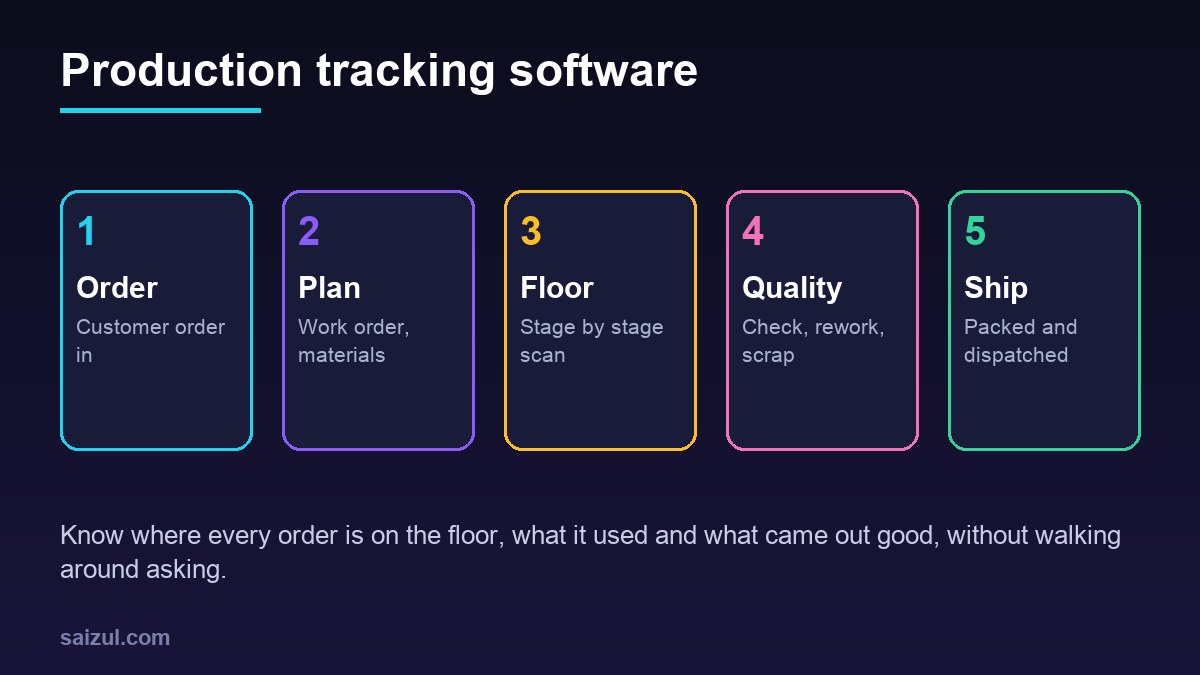
Production tracking software follows every order through your factory or workshop: which work order it belongs to, which stage it is at, which machine or team is working on it, what materials it used, how many pieces passed quality and when it will be ready to ship. For garment and textile units, furniture and metal workshops, printing and packaging, food processing, plastics and any contract manufacturer, it replaces the production register, the whiteboard and the phone calls to supervisors. The owner gets a live view of the floor, sales can give customers honest delivery dates, and waste and delays finally show up as numbers. This guide explains what to track, how to capture data on the floor without slowing workers down, how to handle materials and quality, which simple metrics matter, where automation and AI help, and when ready-made software is enough, with estimated costs and a checklist.
From my own work: When I walk a small factory floor with the owner, the question nobody can answer quickly is simple: where is this customer’s order right now? The answer lives in a supervisor’s head or a register at the far end of the building. A scan at the start and end of each stage is usually enough to change that, and it is far easier for workers than filling in forms.
If you also hold finished goods for online sales, my guide on inventory management for online stores covers the stock side. For the wider picture of automating a business, see the business process automation guide.
What production tracking software tracks
| Area | Manual today | With software |
|---|---|---|
| Orders | Order book and chat messages | Every order with product, quantity, due date and customer |
| Work orders | Job cards written by hand | Printed or digital job cards with a QR code and the stage route |
| Job status | Supervisor walks around and asks | Live board showing each order’s current stage and quantity |
| Materials | Store register, issued by memory | Materials issued against a work order, compared with the standard |
| Output | End-of-day tally | Good, rework and scrap counts per stage and shift |
| Downtime | Rarely recorded | Machine stops with a reason and duration |
| Reports | Prepared at month end, if at all | Daily output, delays, wastage and on-time delivery |
Work orders and routing
A work order is the instruction to make a quantity of one product for one or more customer orders. Routing is the list of stages it passes through. Get these two right and the rest of the system follows.
- Define products: each product has a bill of materials (what goes into it and how much) and a routing (cutting, stitching, finishing, packing, for example).
- Create work orders from sales orders: the system suggests quantities and due dates; the planner confirms.
- Check materials: before release, the system shows whether materials are in stock and creates a purchase request for shortages.
- Release to the floor: a job card with a QR code is printed or shown on a tablet at the first stage.
- Track by stage: each stage records start, finish, quantity in and quantity out.
- Close: finished quantity moves to finished goods stock and the work order shows actual material used and time taken.
Capturing data on the shop floor
Production tracking only works if recording is faster than not recording. Workers will not type paragraphs on a phone with oily hands.
- Scan, do not type: a shared tablet or a cheap Android phone at each stage scans the job card QR code; the worker taps start or finish and enters a quantity.
- Big buttons: large, clear screens in the local language, with pictures for common reasons such as machine breakdown or waiting for material.
- Supervisor entry: where workers cannot record, the line supervisor updates a batch of jobs every hour. Less precise, still far better than nothing.
- Offline first: factory Wi-Fi is often weak. The app should store entries and sync when the connection returns.
- Machine signals later: counting cycles directly from machines is possible, but start with people and add sensors only where they clearly pay off.
When your system grows to connect planning with machines and control systems, the ISA-95 standard describes how enterprise systems and manufacturing operations exchange information (ISA-95). You do not need to implement it to start, but it is a useful map for naming data and planning integrations.
Materials, wastage and costing
For many small manufacturers, the margin is lost in materials, not labour. Production tracking shows where:
- Materials are issued from the store against a specific work order, not handed out loosely.
- Actual usage is compared with the bill of materials; large differences are flagged.
- Offcuts, scrap and returns to store are recorded per stage.
- The real cost of each work order, materials plus recorded time, is compared with the price you quoted.
Once you see the cost per order, quoting improves. My guide to the AI quotation generator explains how to turn those real costs into faster, more accurate quotes.
Quality checks and rework
- Define checkpoints: incoming material, after key stages and final inspection.
- For each checkpoint, list what is checked and the common defect types.
- Inspectors record pass, rework or reject with a defect reason, and a photo when useful.
- Rework creates a small task that goes back to the right stage, so it is not lost.
- Weekly reports show defects by product, stage and shift, so you fix causes rather than symptoms.
Simple metrics that matter
Overall Equipment Effectiveness (OEE) combines availability, performance and quality into one measure of how well a machine or line is used (Lean Enterprise Institute). It is useful, but for most small factories a few plain numbers come first:
| Metric | What it shows | How it is calculated |
|---|---|---|
| On-time delivery | Whether customers get orders when promised | Orders shipped by due date divided by orders shipped |
| Output per shift | Real capacity | Good pieces completed per stage per shift |
| First-pass yield | Quality at source | Pieces passing inspection first time divided by pieces inspected |
| Downtime by reason | Where time is lost | Total stopped minutes grouped by reason |
| Material variance | Wastage | Actual material used minus standard, per work order |
If you want help improving processes as well as software, the NIST Manufacturing Extension Partnership supports small and medium manufacturers in the US (NIST MEP); many countries have similar productivity programmes.
Automation and AI in production tracking
- Daily report: a short summary to the owner each morning: output, late orders, top downtime reasons and wastage. See automated business reporting.
- Late order alerts: when a work order falls behind its planned stage, the planner and sales get a message.
- Customer updates: buyers get a status update when their order passes key stages.
- Document reading: supplier delivery notes and purchase orders are read automatically into the system for a person to check. See AI document processing for business.
- Ask the data: an AI assistant answers questions such as which product had the most rework last month, from your own records.
Keep a clear line: AI can summarise, alert and draft, but planners decide priorities and inspectors decide quality.
Security and reliability
Production data includes customer designs, prices and supplier terms. Use individual logins with roles, keep an audit log of changes, back up daily and plan for what happens if the server or internet goes down. The NIST Cybersecurity Framework is a useful checklist for small manufacturers organising their security (NIST CSF).
Ready-made vs custom production tracking software
| Option | Good for | Watch out for |
|---|---|---|
| Spreadsheet with forms | Very small workshops testing the idea | Breaks with many users, no real-time view, easy to overwrite |
| Ready-made manufacturing software | Standard discrete manufacturing with clean product data | Per-user fees, rigid stages, weak offline support, hard local language |
| Custom tracking system | Made-to-order work, unusual stages, garment bundles, buyer-specific reports, links to your accounting | Higher upfront cost, needs a maintenance agreement |
Read build vs buy software before deciding.
Production tracking software cost (2026 estimates)
These ranges are estimates for planning, not quotes. Real prices depend on the number of stages, users, products and integrations, and on your country.
| Option | Typical scope | Estimated cost (USD) |
|---|---|---|
| Ready-made subscription | Work orders, stages, basic stock and reports | Roughly 20 to 100 per user per month |
| Custom starter system | Orders, work orders, QR stage tracking, live board, daily report | 5,000 to 15,000 |
| Custom full system | Plus materials, quality, costing, purchase requests, accounting link | 15,000 to 50,000+ |
| Reporting and AI add-on | Daily summaries, late alerts, questions over your data | 1,500 to 6,000 |
Add tablets or phones, label printers, hosting and yearly maintenance. See my custom software development cost guide.
Rollout plan
- Map your stages on paper with supervisors, and agree what counts as start and finish.
- Set up products, bills of materials and routings for your top products only.
- Pilot on one line or product for two weeks, with job cards and stage scans.
- Fix the screens and reasons workers find confusing.
- Add materials issue, quality checkpoints and the daily report.
- Roll out to the rest of the floor, then add costing and AI questions.
Production tracking software checklist
- Every order has a work order with a due date and routing.
- Job cards with QR codes at every stage.
- Start, finish and quantity recorded in seconds.
- App works offline and in the local language.
- Materials issued against work orders, variance flagged.
- Quality checkpoints with defect reasons and rework tasks.
- Downtime reasons recorded.
- Daily owner report and late order alerts.
- Roles, audit log, backups and data export agreed.
Need help with this on your own site or business?
I build and secure WordPress sites, web apps and AI automations end to end, in Bangla and English: a free discovery call, a written scope with a fixed quote, a focused first version, then testing, deployment and monitoring.
See the portfolio and the AI agent services, or tell me what you need.
FAQ
What is production tracking software?
It is a system that follows every order through your factory: work orders, the stage each job is at, materials used, quality results and finished output, so owners and sales see progress without asking supervisors.
Do workers need to type a lot to use it?
No. Good systems use a QR code on the job card and a shared tablet or phone at each stage. Workers scan, tap start or finish and enter a quantity in a few seconds.
Is production tracking software the same as an ERP?
Not exactly. An ERP covers accounting, purchasing and sales across the business. Production tracking focuses on what happens on the floor. Many small factories start with tracking and connect it to their accounting later.
Can a small workshop afford production tracking software?
Yes. A focused system covering work orders, stage tracking and a daily report is affordable, and the savings from fewer late orders and less wastage often show within months.
How long does it take to implement?
A pilot on one line can run in four to eight weeks. A full custom system with materials, quality and costing usually takes three to six months, rolled out in stages.
Sources

Md Saizul Amin
Digital Systems Strategist · AI Agent Developer · 9+ years in digital & ITMd Saizul Amin is a digital systems strategist and AI automation engineer from Dhaka, Bangladesh. With 9+ years across IT, web development and digital marketing, he writes practical guides on technology, business, education and online growth — and builds the same kinds of systems (AI agents, websites, SEO and ad campaigns) for clients in Bangladesh, the UK and the USA.
Specialist in
Credentials & experience
- 🎓B.Sc. in Computer Science & EngineeringBangladesh University of Business & Technology (BUBT), 2017–2021
- 🤖AI Automation Engineer · Web Developer · SEO SpecialistUnique Mark Limited, Birmingham UK — 2024 to present
- 🌱IT SpecialistGreen Fund Initiative Inc., USA — 2024 to present
- 🏥Junior IT Consultant — Ministry of Health (DGHS)Built the first national Shareable Health Record website; supported 6,000+ facilities
- 🧭Head of ITWEDO Bangladesh — led IT for 50+ staff, 2021–2023