In this article
The build vs buy software decision is rarely about which option is cheaper this month. Buy an off-the-shelf SaaS tool when your process is common and the tool fits it well; build custom software when the process is what makes your business different, when SaaS forces costly workarounds, or when the total cost of subscriptions over several years is higher than building and maintaining your own. This guide shows how to compare the total cost of ownership honestly and gives you a checklist to score your own case.
From my own work: When a client asks me to build something custom, I usually ask first which tools they have already tried and where exactly those tools failed them. Fairly often the answer is a small gap that a connection between two existing tools can close, and building the whole system would have been the expensive way to solve it.
I wrote a shorter guide on custom software vs SaaS that explains when building makes sense in principle. This article goes deeper into the numbers: what you really pay for each option over time, and how to score the decision.
Build vs buy software: the three real options
- Buy: use a SaaS product as it is, adjusting your process to fit it.
- Build: commission software designed around your process, which you own.
- Hybrid: buy the standard parts, such as accounting, email or payments, and build only the part that is special to you, connected through APIs and automation.
The UK government’s service manual suggests working out what you need to build and what you can buy or get for free, and aiming to minimise total cost of ownership while avoiding long contracts that lock you in (GOV.UK: Choosing technology). That advice is written for government teams, but it works just as well for a small business.
What is total cost of ownership (TCO) for software?
Total cost of ownership is everything you will pay to get a tool working, keep it working and eventually leave it, over a fixed period. Three to five years is a sensible period for business software. A simple formula:
TCO = upfront cost + (yearly running cost × years) + (internal time × hourly cost) + exit cost
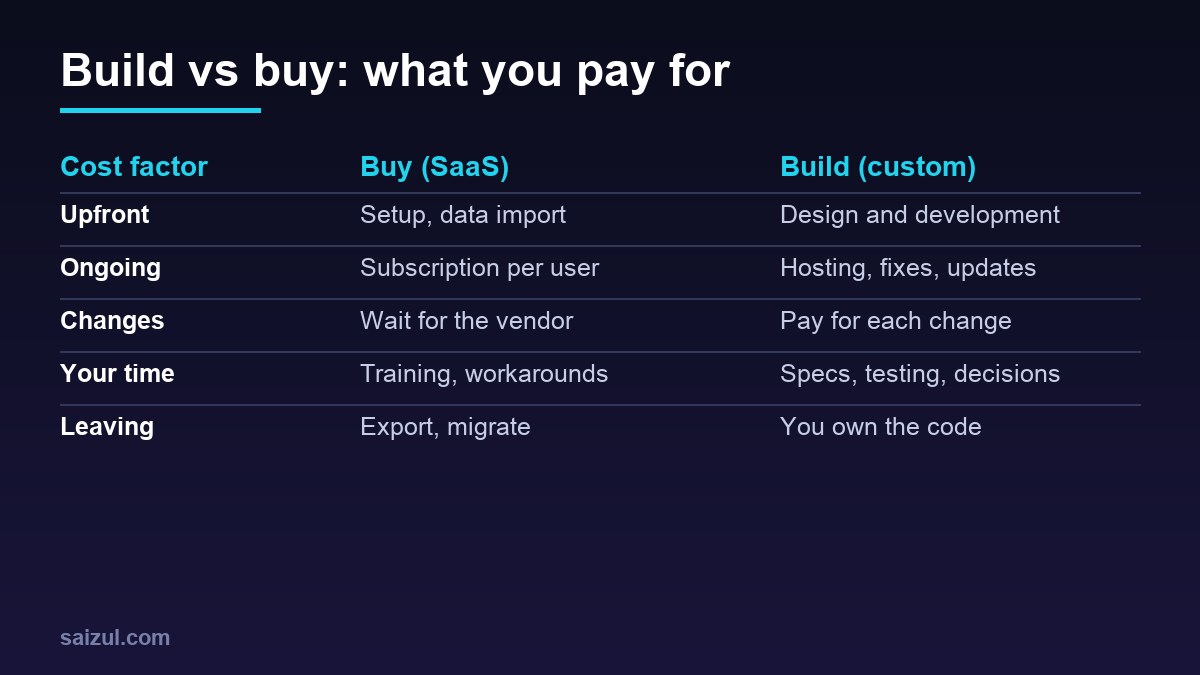
Costs to include when you buy SaaS
- Subscription, usually per user or per usage level, and how it grows as you add staff or customers.
- Higher plans you will need for features such as API access, more storage or user roles.
- Setup, data import and training.
- Add-ons, plugins and connector tools.
- Workarounds: staff time spent on manual steps the tool does not cover.
- Exit: exporting your data and moving to something else later.
Costs to include when you build
- Discovery, design and development of the first version.
- Hosting, domain, email sending, backups and monitoring.
- Maintenance: security updates, bug fixes, and keeping up with changes in the services it connects to.
- New features and changes as the business grows.
- Your own time on specifications, testing and decisions.
- Risk: what happens if the developer is no longer available. Good documentation and ownership of the code reduce this.
Security is a running cost, not a one-off. Custom web software should be built and reviewed with common risks in mind, such as those in the OWASP Top Ten (OWASP Top Ten), and kept updated afterwards. My guide to website security basics covers the owner’s side.
How to compare the two: a worked method
Rather than invent figures, here is the method with placeholders. Fill in your own quotes.
- Fix the period: for example, three years.
- SaaS total: setup + (monthly subscription for the users you will have, × 36) + add-ons + estimated hours of workaround per month × 36 × hourly staff cost + export cost.
- Custom total: build quote + (monthly hosting and maintenance × 36) + an allowance for changes each year + your own hours × hourly cost.
- Add value, not just cost: estimate extra sales or hours saved that one option gives and the other does not.
- Run a “what if”: what if your team doubles, or the SaaS price rises, or you need a feature the vendor does not plan to add?
Often the SaaS option is clearly cheaper for the first year and the gap narrows as users grow. Sometimes custom only wins after many years, which may be longer than your plans are certain. That is a useful answer too.
When buying SaaS is the better choice
- The process is standard: accounting, payroll, email marketing, helpdesk, video calls.
- A well-known tool covers most of what you need without heavy workarounds.
- You are still testing the business and the process may change.
- You do not have anyone to own a custom system after launch.
- Compliance or security work is better handled by a specialist vendor.
When building custom software is the better choice
- The process is your advantage: how you price, match, schedule or serve customers is different from your competitors.
- You are paying for several tools and staff still copy data between them by hand.
- Per-user pricing grows painfully as your team or customer base grows.
- You need control over data, hosting location or how customers experience the product.
- You plan to sell the software to others as your own SaaS.
The hybrid answer: buy the core, build the edges
For many small and growing businesses the best answer is a mix. Keep proven tools for the standard work and build a small custom layer on top: a customer portal, an internal dashboard, or automations that move data between your tools. Using open standards and documented APIs between the parts makes it easier to change one piece later; the UK Technology Code of Practice makes the same point about open standards (Technology Code of Practice). See n8n vs Zapier vs Make for the tools that usually do the connecting.
Lock-in and data: questions to ask either way
- Can I export all my data in a standard format, including history and files?
- Who owns the code, designs and data? Is that written in the contract?
- What happens to my data if I stop paying or the vendor closes?
- Is there an API so other tools can connect?
- Where is the data stored, and who can access it?
Decision checklist: score your case
Score each statement from 0 (not true) to 2 (very true). A higher total points towards building, a lower one towards buying.
- This process is a real advantage over competitors.
- No tool we tried fits without major workarounds.
- Staff spend hours each week copying data between tools.
- Subscription cost will grow a lot as we add users or customers.
- We need control over data, hosting or the customer experience.
- The process is stable and we understand it well.
- We have budget for maintenance every year, not just the build.
- Someone in the business can own the system and make decisions.
If you score low on the last three, buy or go hybrid for now, even if the first five are high. A custom system without a stable process, a maintenance budget and an owner tends to become a problem.
How to reduce the risk if you build
- Start with the smallest version that solves the main problem.
- Get a written scope, fixed milestones and a clear list of what is not included.
- Own your domain, hosting, code repository and accounts from day one.
- Ask for documentation and a handover session.
- Agree a maintenance plan before launch.
For the hiring side, see how to hire a web developer.
Common mistakes
- Comparing a SaaS monthly fee with a one-time build quote, and ignoring maintenance.
- Ignoring staff time spent on workarounds.
- Building before the process is stable.
- Buying a tool with no data export.
- No owner for the system after launch.
Need help with this on your own site or business?
I build and secure WordPress sites, web apps and AI automations end to end, in Bangla and English: a free discovery call, a written scope with a fixed quote, a focused first version, then testing, deployment and monitoring.
See the portfolio and the AI agent services, or tell me what you need.
FAQ
Is it cheaper to build or buy software?
Buying is usually cheaper at the start. Building can become cheaper over several years if subscriptions grow with users or workarounds cost a lot of staff time. Compare the total cost over the same period to know for your case.
What is total cost of ownership in software?
It is everything you pay to set up, run, change and eventually leave a tool over a fixed period, including staff time, not just the licence or build price.
Can I start with SaaS and build later?
Yes, and it is often the safest path. Use SaaS while you learn the process, make sure you can export your data, then build the parts that clearly need it.
How long should I plan for when comparing costs?
Three to five years is a sensible period for most business software, because it covers growth, price changes and at least one round of major updates.
Sources

Md Saizul Amin
Digital Systems Strategist · AI Agent Developer · 9+ years in digital & ITMd Saizul Amin is a digital systems strategist and AI automation engineer from Dhaka, Bangladesh. With 9+ years across IT, web development and digital marketing, he writes practical guides on technology, business, education and online growth — and builds the same kinds of systems (AI agents, websites, SEO and ad campaigns) for clients in Bangladesh, the UK and the USA.
Specialist in
Credentials & experience
- 🎓B.Sc. in Computer Science & EngineeringBangladesh University of Business & Technology (BUBT), 2017–2021
- 🤖AI Automation Engineer · Web Developer · SEO SpecialistUnique Mark Limited, Birmingham UK — 2024 to present
- 🌱IT SpecialistGreen Fund Initiative Inc., USA — 2024 to present
- 🏥Junior IT Consultant — Ministry of Health (DGHS)Built the first national Shareable Health Record website; supported 6,000+ facilities
- 🧭Head of ITWEDO Bangladesh — led IT for 50+ staff, 2021–2023