In this article
From my own builds: I’m Saizul Amin, an AI agent developer and automation engineer. I run AI agent systems in production on self-hosted n8n and Docker (Messenger, WhatsApp, Telegram and email), so the advice below comes from operating them, not from reading about them. Last reviewed: October 2026.
In Bangladesh, Facebook Messenger is where many customers ask first: “price koto?”, “delivery hobe?”, “ekhon available?” If nobody replies for hours, they message the next page. A Messenger AI chatbot that answers in Bangla within seconds, collects the details and hands over to a human when needed can recover a lot of those lost enquiries.
I run a live Messenger agent that replies in fluent Bangla, remembers the conversation state, saves leads to Google Sheets and hands the chat to a person on request. This guide shows how such a system works and how to build one properly, including the parts that trip people up.
What the chatbot should (and should not) do
- Answer common questions from facts you supply: prices, delivery areas, opening hours, how to order.
- Collect leads: name, phone number, product or service and a short note, saved to a sheet or CRM.
- Guide the next step: order form, booking, or WhatsApp call.
- Hand over to a person for complaints, refunds, special requests or when asked.
- Not invent prices, stock, offers or policies, and not pretend to be human.
How it works
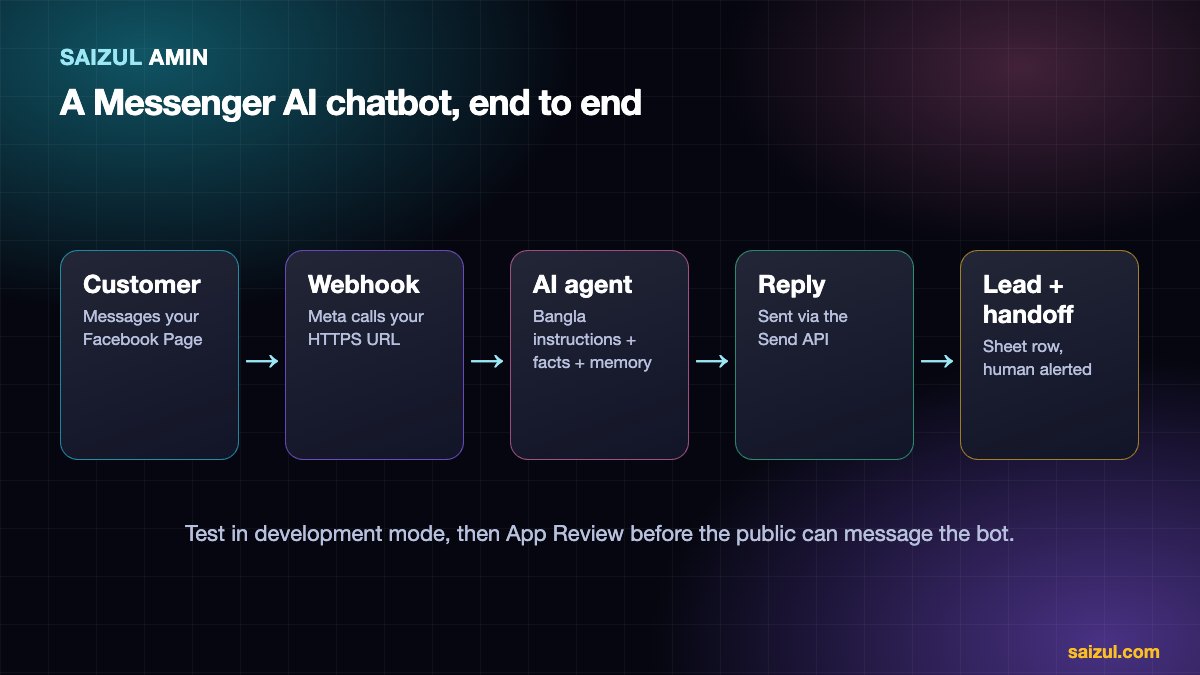
- A customer messages your Facebook Page.
- Meta sends the message event to your webhook (a public HTTPS URL).
- Your workflow (n8n, for example) passes the text to an AI agent with your instructions, memory and tools.
- The agent drafts a Bangla reply and may call tools: save the lead, check availability, notify a human.
- The reply is sent back through Meta’s Send API.
The workflow side is explained in how to build an AI agent with n8n; the concept in what is an AI agent.
The Messenger rules you must know
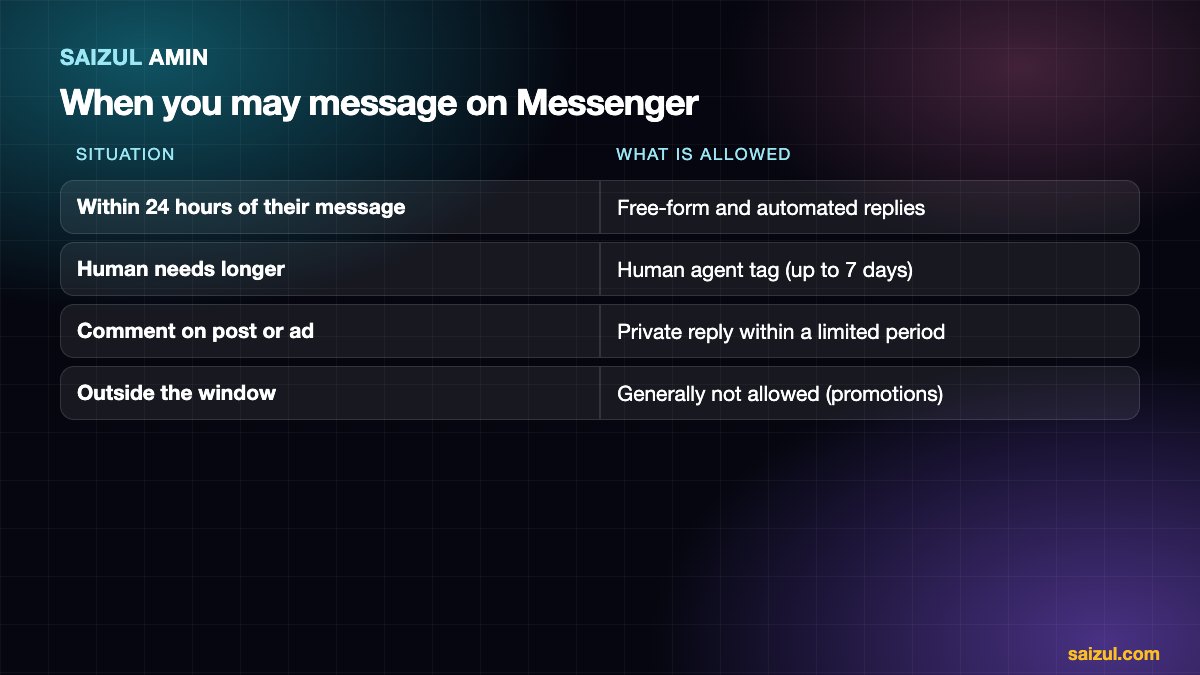
| Situation | What is allowed |
|---|---|
| Customer messaged you within the last 24 hours | Free-form replies, including automated AI replies (the standard messaging window) |
| Longer than 24 hours, a human needs to reply | The human agent tag allows a person to respond for a longer period (up to 7 days after the customer’s message) |
| Customer commented on a post or ad | You can send a private reply to the comment within a limited period, one per comment |
| Outside the window, promotional messages | Generally not allowed without a permitted use case; Meta restricts message tags and has been tightening them |
The exact limits, tags and policies change, so read Meta’s Messenger Platform policy before launch. Breaking them can limit or disable your Page’s messaging.
Step-by-step setup
- Prepare the Page and Business account. You need admin access to the Facebook Page and a Meta Business account.
- Create a Meta developer app and add the Messenger product. Connect your Page and generate a Page access token.
- Build the webhook. Meta needs a callback URL and a verify token you choose. Your server must answer the verification request, then receive events. Subscribe the app to message events (
messages, andmessaging_postbacksif you use buttons). Verify request signatures in production. - Build the workflow that receives the event, ignores echoes and non-text events safely, runs the AI agent and sends the reply with the Send API.
- Test in development mode with accounts that have a role on the app (admins, developers, testers).
- Go live. To serve the public, the app needs the right permissions (for example
pages_messaging) approved through Meta’s App Review and typically business verification. Allow time for this.
See Meta’s Messenger Platform documentation for the current steps and screens.
Making it reply well in Bangla
- Write the instructions in clear English and specify the output language, including whether to answer in Bangla script, Banglish (romanised Bangla) or to mirror the customer.
- Give examples of real customer messages and good replies, including spelling variations, mixed language and short messages like “price?”.
- Keep replies short and polite. One or two sentences and one question at a time suits the Messenger screen.
- Handle voice notes and images: decide whether to transcribe voice notes, and what to do with photos (for example product screenshots).
- Test on real conversations from your inbox before launch.
A shortened instruction example:
You are the Messenger assistant for [Business], a [type of shop] in Bangladesh.
Reply in the customer's language: Bangla (Bangla script) or Banglish if they write that way.
Be friendly and brief. Use ONLY the information below.
If the answer is not below, say a team member will reply soon and use the handoff tool.
Never invent prices, stock or delivery times.
Ask for name and phone number when the customer wants to order, then save the lead.
If the customer is angry, asks for a person, or mentions refund/complaint: hand over.
Lead capture and handoff
- Conversation memory: key it by the sender’s page-scoped ID, so each customer has their own history.
- Save leads (name, phone, product, note, time) to Google Sheets or your CRM and alert your team on Telegram or email.
- Handoff: mark the conversation as needing a human, tell the customer someone will reply, and let your team answer from the Page inbox. Pause the bot for that thread so it does not interrupt.
Common mistakes
- Going live before App Review and wondering why the public cannot message the bot.
- No human fallback, so frustrated customers loop.
- Letting the AI answer from general knowledge instead of your facts.
- Sending promotions outside the allowed window.
- Replying to the bot’s own echo events, which creates loops.
- No logging, so you cannot see what customers actually asked.
Launch checklist
| Check | Done when |
|---|---|
| Facts file | Prices, policies, delivery and hours are current and complete |
| Test set | 30–50 real messages in Bangla, English and mixed pass |
| Handoff | A human is alerted with context, and the bot pauses |
| Permissions | App Review approved; Page connected; webhook verified |
| Privacy | Privacy policy updated; only necessary data stored |
| Monitoring | Error alerts and daily review of conversations in week one |
Want this built for your business?
I design, build, deploy and maintain custom AI agents and automations, on infrastructure I operate myself (self-hosted n8n and Docker), in Bangla and English.
- Customer-support and sales agents on WhatsApp, Facebook Messenger, Telegram, web chat and email.
- Knowledge (RAG) assistants that answer from your documents with sources.
- Workflow automation: lead capture, CRM and sheet sync, reporting, document processing and monitoring.
- Hosting and DevOps for n8n and Docker: security, backups, updates and monitoring.
The process: a free discovery call, a written scope and fixed quote, a focused first version, testing on your real conversations, then deployment with monitoring. See live examples on the AI agent services page, browse the portfolio, or tell me about the job you want automated.
Frequently asked questions
Is a Messenger chatbot allowed by Facebook?
Yes, when it uses the official Messenger Platform and follows Meta’s policies on the messaging window, opt-in and content. Unofficial automation that logs into accounts is not.
Will the chatbot reply to comments too?
It can send a private reply to a comment within the allowed period, and you can reply publicly to comments with a separate flow. Both must follow Meta’s rules.
Can it work with the free Meta Business Suite automations?
Meta Business Suite offers basic features such as instant replies and away messages. An AI chatbot goes further: it understands free text, uses your data and runs your logic.
How long does it take to build?
A focused Messenger agent can often be built within days to a couple of weeks, plus the time Meta needs for App Review.
Can the same system serve WhatsApp too?
Yes, the same agent and tools can be connected to several channels. See WhatsApp AI chatbot for business.
Sources and further reading
- Meta: Messenger Platform documentation
- Meta: Messenger Platform policy
- n8n documentation: Advanced AI
How this article was written
I wrote this myself from hands-on experience building and running AI agents and automations for clients. Product behaviour, policies and pricing models were checked against the official documentation linked above in October 2026. Tools, policies and prices change quickly; if you notice something out of date, email info@saizul.com and I will correct it.
About the author
Saizul Amin is an AI agent developer, automation engineer and digital growth partner based in Bangladesh. He has built 7 production AI systems on self-hosted n8n, developed 50+ websites and managed 150K+ USD in advertising spend for clients across markets including the UK, the USA and Bangladesh. Learn more about Saizul, see his work, or get in touch.

Md Saizul Amin
Digital Systems Strategist · AI Agent Developer · 9+ years in digital & ITMd Saizul Amin is a digital systems strategist and AI automation engineer from Dhaka, Bangladesh. With 9+ years across IT, web development and digital marketing, he writes practical guides on technology, business, education and online growth — and builds the same kinds of systems (AI agents, websites, SEO and ad campaigns) for clients in Bangladesh, the UK and the USA.
Specialist in
Credentials & experience
- 🎓B.Sc. in Computer Science & EngineeringBangladesh University of Business & Technology (BUBT), 2017–2021
- 🤖AI Automation Engineer · Web Developer · SEO SpecialistUnique Mark Limited, Birmingham UK — 2024 to present
- 🌱IT SpecialistGreen Fund Initiative Inc., USA — 2024 to present
- 🏥Junior IT Consultant — Ministry of Health (DGHS)Built the first national Shareable Health Record website; supported 6,000+ facilities
- 🧭Head of ITWEDO Bangladesh — led IT for 50+ staff, 2021–2023