In this article
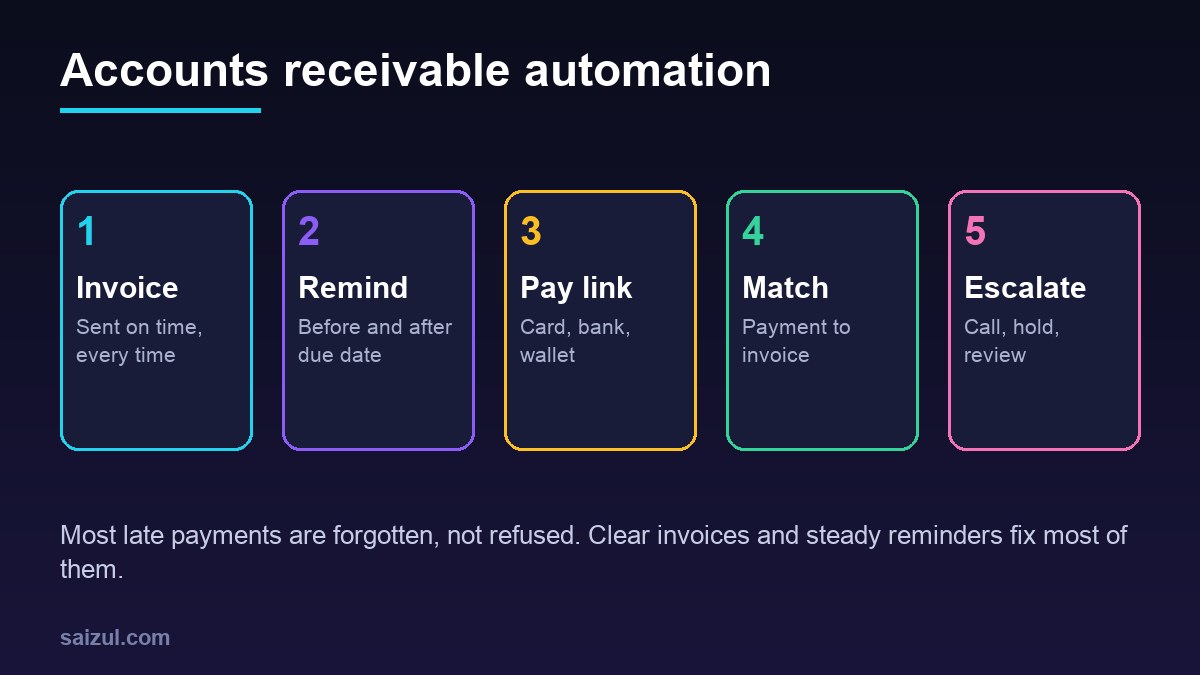
Accounts receivable automation means software sends your invoices on time, reminds customers before and after the due date, gives them an easy way to pay, matches each payment to the right invoice and tells you which accounts need a phone call. For many small and medium businesses, money owed by customers is the biggest asset nobody is managing. Invoices go out late, reminders depend on someone remembering, and the owner only notices when cash runs short. This guide explains what to automate, how a reminder schedule should look, how to match payments, when to escalate, what it costs and how to roll it out without upsetting good customers.
From my own work: When I review how a business collects money, I usually find that the invoices themselves cause much of the delay: missing purchase order numbers, unclear due dates, or no simple way to pay. Fixing the invoice and adding a payment link often helps before a single reminder is automated.
This guide sits between two others. CRM automation for small business covers the path from lead to invoice, and AI document processing covers the other side, supplier bills you need to pay.
What accounts receivable automation covers
| Step | Manual today | Automated version |
|---|---|---|
| Create invoice | Typed after the job, often days later | Created when an order ships, a job is marked done or a subscription renews |
| Send invoice | Attached to an email by hand | Sent automatically by email, with a portal or payment link |
| Reminders | Whoever remembers, in whatever tone | Fixed schedule with polite, clear templates |
| Payment | Bank transfer details in a PDF | Payment link for card, bank or mobile wallet |
| Matching | Checking bank statements line by line | Payments matched to invoices by reference, amount and customer |
| Escalation | Owner calls when cash is short | Overdue list with owner, next action and notes |
| Reporting | Built at month end | Aging report and expected cash every week |
Fix the invoice first
An invoice that is hard to understand or hard to pay will be paid late, no matter how many reminders you send. Every invoice should have:
- A unique invoice number and the customer’s reference or purchase order number, if they use one.
- A clear issue date, payment terms and due date.
- Line items the customer will recognise, matching the quote or order.
- Tax shown correctly for your country.
- How to pay: a payment link plus bank details, with the invoice number as the reference.
- A contact person for questions.
Most invoicing tools and payment providers can create a link the customer clicks to pay. For example, Stripe documents Payment Links for collecting payments without building a checkout page (Stripe Payment Links). In Bangladesh, local gateways and mobile wallets can serve the same purpose; see how to accept online payments in Bangladesh.
A reminder schedule that stays polite
The goal is steady, friendly contact, not pressure. A schedule like this works for many business-to-business invoices; adjust the days to your terms.
| When | Channel | Message |
|---|---|---|
| Invoice day | Invoice attached, due date, payment link | |
| 3 days before due | Friendly heads-up with the link | |
| Due date | Email or WhatsApp | Due today, link, contact for questions |
| 7 days overdue | Email and WhatsApp or SMS | Polite reminder, ask if anything is wrong with the invoice |
| 14 days overdue | Email plus task for a person to call | Firmer tone, mention terms |
| 30 days overdue | Owner or manager call | Agree a date or a plan; decide on account hold |
Payment platforms often include reminder features. Stripe, for example, documents sending invoices and reminder emails (Stripe invoice emails) and automatic collection options such as retrying failed card payments (Stripe automatic collection). Accounting tools usually have similar settings. A custom automation is useful when you need reminders on WhatsApp, in Bangla, or based on data from several systems.
If you send reminders on WhatsApp, use approved message templates and only message customers who agreed to be contacted that way, as WhatsApp’s business messaging policy requires (WhatsApp Business Messaging Policy). My WhatsApp Business API vs app guide explains templates and pricing.
Stop rules that protect relationships
- Stop reminders the moment a payment arrives or a person marks the invoice as disputed.
- Pause reminders when a customer has agreed a payment date.
- Do not send automated reminders to key accounts without the account manager’s approval.
- Never send reminders late at night or on public holidays.
Matching payments to invoices
Matching is the step that takes the most hidden time. Customers pay two invoices in one transfer, pay a slightly different amount after bank charges, or forget the reference. A good matching process:
- Pulls payments from the payment gateway, bank feed or statement file every day.
- Matches exact amount plus invoice number automatically.
- Suggests likely matches for partial payments, combined payments or missing references.
- Sends unclear payments to a person in a simple review list.
- Marks the invoice paid, sends a thank-you receipt and stops reminders.
AI can help with suggestions, for example reading a bank narration and guessing the customer, but a person should confirm uncertain matches.
Escalation, credit limits and late fees
- Overdue owner: every overdue invoice beyond a set number of days gets a named person and a next action date.
- Credit limits: set a limit per customer; new orders above the limit or with old overdue invoices need approval.
- Account hold: decide in advance when to pause new work or shipments.
- Late payment interest: in some countries businesses can claim interest on late commercial payments. In the UK, for example, GOV.UK explains how statutory interest on late commercial payments works (GOV.UK late payment interest). Rules differ by country, so check with your accountant or lawyer.
- Consumer debts: collecting from individual consumers often has stricter rules than business-to-business invoices. Take local advice before automating it.
Reports that show your cash
- Aging report: amounts current, 1 to 30, 31 to 60, 61 to 90 and over 90 days overdue.
- Days sales outstanding (DSO): how long, on average, customers take to pay. Track the trend, not one month.
- Expected cash this week and next: based on due dates and each customer’s past behaviour.
- Top overdue customers with the next action and owner.
- Disputes by reason, so you can fix invoice and delivery problems at the source.
My automated business reporting guide shows how to send these to the owner every Monday.
Sample reminder wording
Short, specific messages work better than long ones. Adapt these to your tone and language:
- Before due: “Hello, a quick note that invoice 1042 for 25,000 taka is due on Thursday. You can pay here: [link]. Thank you.”
- On due date: “Invoice 1042 is due today. If you have already paid, please ignore this message. Any questions, reply here.”
- 7 days overdue: “We have not yet received payment for invoice 1042, due last Thursday. Is there anything on the invoice we should correct?”
- 14 days overdue: “Invoice 1042 is now 14 days overdue. Our accounts team will call you this week to agree a payment date.”
The amounts and numbers here are examples only. Asking whether something is wrong with the invoice often surfaces disputes early, which is better than silence.
Common mistakes to avoid
- Automating reminders before customer contact details are cleaned.
- Reminding customers about invoices they have already paid because matching is slow.
- Using the same harsh tone for a loyal customer and a new one.
- No named person for escalation, so overdue lists grow without action.
- Changing payment details on invoices without warning customers, which can look like fraud.
Accounts receivable automation cost (2026 estimates)
These figures are estimates for planning. Your cost depends on invoice volume, the systems involved and the channels you use.
| Scope | Includes | Estimated cost (USD) |
|---|---|---|
| Use built-in tool features | Reminder settings and payment links in your accounting or payment tool | Setup time only, plus tool fees |
| Reminder automation | Email, SMS or WhatsApp reminders from your invoice data, stop rules, logs | 1,000 to 4,000 |
| Matching and overdue workflow | Bank or gateway feed, matching rules, review list, escalation tasks | 3,000 to 10,000 |
| Custom receivables module | Customer portal, credit limits, aging, forecasts, multi-company | 8,000 to 30,000+ |
Running costs include messaging charges, payment fees and maintenance. If you want to compare quotes, see custom software development cost.
Step-by-step rollout
- Export your open invoices and check customer contacts and emails are correct.
- Fix the invoice template and add payment links.
- Write reminder templates for each step, in the languages your customers use.
- Turn on reminders for a small group of customers first and review replies for two weeks.
- Add payment matching from your gateway and bank.
- Add the overdue list, credit limits and weekly aging report.
- Review monthly: DSO, disputes and which reminder step gets the most payments.
Accounts receivable automation checklist
- Invoices created automatically from orders, jobs or renewals.
- Clear due date, reference and payment link on every invoice.
- Reminder schedule and polite templates agreed.
- Stop rules for payments, disputes and agreed dates.
- Consent for WhatsApp or SMS reminders recorded.
- Daily payment matching with a review list for unclear cases.
- Named owner for every overdue account.
- Credit limits and hold rules agreed.
- Weekly aging report and expected cash view.
- Local rules on late fees and consumer debts checked.
Need help with this on your own site or business?
I build and secure WordPress sites, web apps and AI automations end to end, in Bangla and English: a free discovery call, a written scope with a fixed quote, a focused first version, then testing, deployment and monitoring.
See the portfolio and the AI agent services, or tell me what you need.
FAQ
What is accounts receivable automation?
It is software that sends invoices, reminds customers on a schedule, provides payment links, matches incoming payments to invoices and shows which overdue accounts need a person to follow up.
Will automated payment reminders annoy my customers?
Not if they are polite, clear and stop as soon as a payment arrives or a question is raised. Many customers appreciate reminders because late payment is often simply forgotten.
Can I send invoice reminders on WhatsApp?
Yes, using the WhatsApp Business Platform with approved templates and customer consent. It works well where customers reply faster on WhatsApp than email, but keep email as the formal record.
How does automatic payment matching work?
The system reads payments from your gateway or bank and matches them to open invoices using the reference, amount and customer. Unclear payments go to a person for review before the invoice is closed.
How much does accounts receivable automation cost?
Using built-in features of your accounting or payment tool may cost only setup time. Custom reminder and matching workflows are often a few thousand US dollars, and full modules more. These are estimates.
Sources

Md Saizul Amin
Digital Systems Strategist · AI Agent Developer · 9+ years in digital & ITMd Saizul Amin is a digital systems strategist and AI automation engineer from Dhaka, Bangladesh. With 9+ years across IT, web development and digital marketing, he writes practical guides on technology, business, education and online growth — and builds the same kinds of systems (AI agents, websites, SEO and ad campaigns) for clients in Bangladesh, the UK and the USA.
Specialist in
Credentials & experience
- 🎓B.Sc. in Computer Science & EngineeringBangladesh University of Business & Technology (BUBT), 2017–2021
- 🤖AI Automation Engineer · Web Developer · SEO SpecialistUnique Mark Limited, Birmingham UK — 2024 to present
- 🌱IT SpecialistGreen Fund Initiative Inc., USA — 2024 to present
- 🏥Junior IT Consultant — Ministry of Health (DGHS)Built the first national Shareable Health Record website; supported 6,000+ facilities
- 🧭Head of ITWEDO Bangladesh — led IT for 50+ staff, 2021–2023