In this article
Hotel booking software keeps every room, rate and reservation in one calendar, takes bookings directly from your own website, syncs availability with booking sites and runs the front desk from check-in to the final bill. For a small hotel, guesthouse, resort, hostel or serviced apartment business, it replaces the register book, the wall chart and the phone full of booking messages. The two biggest wins are usually simple: no more double bookings, and more guests booking directly instead of paying a commission to an online travel agency on every stay. This guide explains the modules that matter, how the booking flow should work, how to keep booking sites in sync, how to handle deposits and cancellations, where automation and AI help, and when ready-made software is enough, with estimated costs and a checklist.
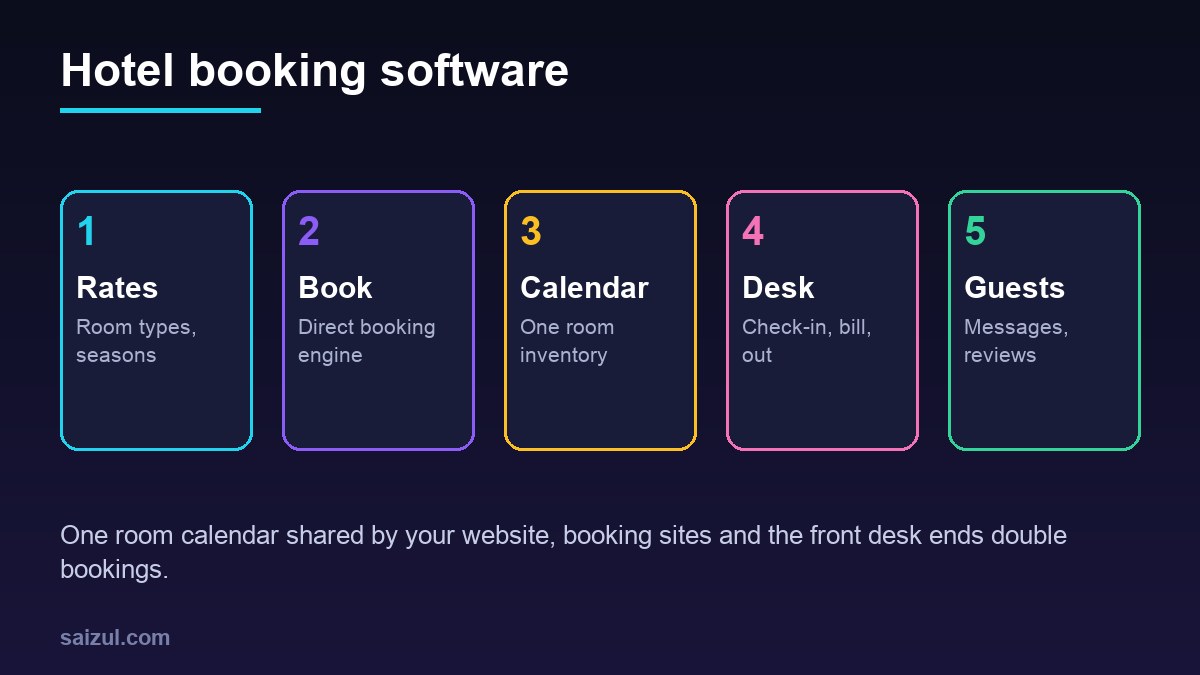
From my own work: When guesthouse owners show me how they take bookings, the room calendar usually lives in three places at once: a register at reception, a booking site extranet and the owner’s phone. Double bookings happen in the gaps between them. Moving everything into one calendar that every channel reads from fixes more problems than any other feature, so I always build or set that up first.
If your guests mostly message you before booking, read my guide on a WhatsApp AI agent for business. For taking deposits online, see how to accept online payments in Bangladesh.
Core modules of hotel booking software
| Module | What it does | Why it matters |
|---|---|---|
| Rooms and room types | Each physical room, its type, beds, maximum guests, view and status | Sell types online, assign actual rooms at the desk |
| Rates and seasons | Base price per room type, weekend and season rates, minimum stay, extra-person charge | Correct prices without manual calculation |
| Booking engine | Search dates, choose room, pay a deposit, get a confirmation | Direct bookings with no commission |
| Room calendar | One grid of every room and night, colour-coded by status | Ends double bookings |
| Channel sync | Sends availability and rates to booking sites and pulls their bookings in | One inventory across every channel |
| Front desk | Check-in, guest details, room assignment, extras, folio, check-out | Faster arrivals and correct bills |
| Housekeeping | Clean, dirty and inspected status per room, daily task list | Rooms ready on time |
| Reports | Occupancy, average rate, revenue per channel, arrivals and departures | Know what is working |
The direct booking flow
A direct booking on your own website is the cheapest booking you can get, but only if the flow is fast and trustworthy. A good booking engine works like this:
- Search: the guest picks check-in, check-out and number of guests. Only room types that are free for every night are shown.
- Choose: each room type has real photos, bed type, size, what is included and the total price for the stay, with taxes shown clearly.
- Details: name, phone, email, arrival time and special requests. Nothing more at this stage.
- Deposit or guarantee: the guest pays a deposit or the full amount through a payment gateway, or books with pay-at-hotel if you allow it.
- Confirmation: an instant email and message with the booking number, dates, address, map link, check-in time and the cancellation rule.
- Calendar update: the room type is reduced for those nights everywhere, including booking sites, within a minute or two.
Help search engines understand your property. Schema.org has types for a Hotel and for a LodgingReservation, which you can use for structured data on your site and in confirmation emails. Google also runs hotel listings and campaigns through Hotel Center, which needs accurate prices and availability from your system (Google Hotel Center Help). Keep your Google Business Profile photos and booking link current as well.
Channel sync and stopping double bookings
Most small hotels sell on their own website, two or three booking sites, by phone and to walk-in guests. Every one of those channels must read and write the same room calendar.
- Channel manager connection: the proper way. Availability, rates and restrictions are pushed to each booking site, and their reservations are pulled in automatically. Ready-made systems include this, and custom systems usually connect to a channel manager rather than to each site directly.
- Calendar file sync: some platforms support simple calendar feeds. They are cheap but slow to update, so they suit holiday rentals with few bookings, not busy hotels.
- Allotments: if a booking site gets a fixed number of rooms, record that allotment so you do not oversell it twice.
- Phone and walk-in bookings: staff enter them in the same calendar, never on paper first.
- Stop-sell rule: when only one room of a type is left, decide whether to close it on booking sites and keep it for direct guests.
Test sync before going live: make a booking on each channel and watch the calendar, then cancel and check that the room comes back everywhere.
How a front desk day runs
- Morning: the dashboard shows arrivals, departures, rooms to clean and unpaid balances.
- Housekeeping: departing rooms are marked dirty; cleaners update status from a phone, and the desk sees which rooms are ready.
- Check-in: the guest’s booking is found by name or number, ID details are recorded as your local law requires, a room is assigned and the balance is shown.
- During the stay: extras such as meals, laundry, airport pickup and late check-out are added to the guest folio.
- Check-out: the folio is reviewed, payment taken, the invoice emailed and the room released to housekeeping.
- Night audit: no-shows are marked, the day’s cash and card totals are closed and tomorrow’s arrivals are checked.
Rates, deposits and cancellations
Write your rules before you configure anything: how much deposit, when the balance is due, what a guest pays if they cancel late or do not arrive, and how refunds are made. The software should apply them automatically and print them on every confirmation.
| Rule | Typical options | What the system does |
|---|---|---|
| Deposit | First night, a percentage or full prepayment | Takes payment at booking or sends a payment link |
| Cancellation | Free until a set number of days before arrival, then a charge | Calculates the refund automatically |
| No-show | Charge first night or forfeit deposit | Marks no-shows at night audit |
| Non-refundable rate | Lower price, no refund | Shown clearly before payment |
Never store full card numbers in your own system. Use a payment provider that handles card data under the PCI Data Security Standard (PCI Security Standards Council), and keep only the payment reference.
Guest messaging, automation and AI
- Pre-arrival message: two days before arrival, directions, check-in time and an option to share an arrival time or request airport pickup.
- Booking enquiries on WhatsApp: an AI agent can check real availability and prices from the calendar, answer questions about rooms, parking and breakfast, and send a booking link. It hands over to staff for group bookings, complaints and discounts.
- Upsells: offer room upgrades, early check-in or meal packages, only when they are actually available.
- Post-stay: a thank-you with a review request. See how to get more Google reviews.
- Rate suggestions: reports that show which dates are filling fast, so you can raise or lower rates. Keep the final price decision with a person.
The AI must never confirm a booking that is not in the calendar or promise a price that is not in the rate table. It reads from the system; it does not invent.
Guest data and privacy
Hotels collect names, phone numbers, ID or passport details, and sometimes payment data. The GDPR principles of data minimisation and limited storage are a sensible model everywhere (GDPR Article 5).
- Collect ID details only as your local registration law requires, and restrict who can see them.
- Give every staff member their own login; log who opened or changed a booking.
- Do not send ID photos over personal chat apps.
- Delete or anonymise old guest records after your required retention period.
- Back up daily, encrypted, away from the reception computer.
Ready-made vs custom hotel booking software
| Option | Good for | Watch out for |
|---|---|---|
| Ready-made hotel system | Small hotels and guesthouses with standard rooms | Monthly fees per room, local payment gateway support, booking engine design |
| Ready-made system plus custom website | Properties that want a strong brand site with an embedded booking engine | Booking engine must match your site and load fast on mobile |
| Custom system | Resorts with packages and activities, multiple properties, serviced apartments with monthly stays, unusual pricing | Higher upfront cost, channel manager connection, maintenance |
My build vs buy software guide walks through the decision in more detail.
Hotel booking software cost (2026 estimates)
These ranges are estimates for planning, not quotes. Real prices depend on the number of rooms and properties, channels, payment providers and your country.
| Option | Typical scope | Estimated cost (USD) |
|---|---|---|
| Ready-made subscription | Calendar, booking engine, front desk, basic channel sync | Roughly 30 to 300 per property per month |
| Booking website with engine | Fast mobile site, room pages, embedded booking, payments | 1,500 to 6,000 |
| Custom booking system | Rooms, rates, booking engine, front desk, housekeeping, reports | 8,000 to 30,000+ |
| WhatsApp AI booking agent | Availability answers, booking links, handover to staff | 1,500 to 6,000, plus messaging and usage fees |
Add channel manager fees, payment gateway charges, hosting and yearly maintenance. My custom software development cost guide explains how to budget the first year.
Rollout plan
- List every room, room type and rate rule, including seasons and extra-person charges.
- Move all future bookings from every channel into the new calendar and check them twice.
- Connect booking sites through the channel manager and test bookings and cancellations.
- Launch the direct booking engine on your website with deposits.
- Train front desk and housekeeping on a quiet day.
- Add guest messages, the AI agent and reports once the calendar has run cleanly for two weeks.
Hotel booking software checklist
- One room calendar used by every channel, including phone and walk-ins.
- Room types, rates, seasons and minimum stays configured.
- Deposit, cancellation and no-show rules written and automatic.
- Booking engine fast on mobile, with total price before payment.
- Channel sync tested with real bookings and cancellations.
- Card data handled only by a compliant payment provider.
- Housekeeping status visible to the front desk.
- Staff logins, audit log and guest data retention rule.
- Daily encrypted backups and data export in the contract.
Need help with this on your own site or business?
I build and secure WordPress sites, web apps and AI automations end to end, in Bangla and English: a free discovery call, a written scope with a fixed quote, a focused first version, then testing, deployment and monitoring.
See the portfolio and the AI agent services, or tell me what you need.
FAQ
What is hotel booking software?
It is a system that manages rooms, rates and reservations in one calendar, takes direct bookings from your website, syncs with booking sites and runs check-in, billing and check-out at the front desk.
How does hotel booking software prevent double bookings?
Every channel reads and writes the same room calendar. Bookings from your website, booking sites, phone and walk-ins reduce availability everywhere within minutes, usually through a channel manager connection.
Is a booking engine on my own website worth it?
Usually yes. Direct bookings avoid commission, give you the guest’s contact details and let you offer your own packages. The engine must be fast on mobile and show the full price clearly.
Can an AI agent take hotel bookings?
It can answer availability and price questions from the live calendar and send a booking link or hold a room for payment. It should hand group bookings, discounts and complaints to staff.
How long does it take to set up hotel booking software?
A ready-made system for a small property can run in one to three weeks. A custom system with a booking engine and channel connection usually takes two to four months, including testing.
Sources

Md Saizul Amin
Digital Systems Strategist · AI Agent Developer · 9+ years in digital & ITMd Saizul Amin is a digital systems strategist and AI automation engineer from Dhaka, Bangladesh. With 9+ years across IT, web development and digital marketing, he writes practical guides on technology, business, education and online growth — and builds the same kinds of systems (AI agents, websites, SEO and ad campaigns) for clients in Bangladesh, the UK and the USA.
Specialist in
Credentials & experience
- 🎓B.Sc. in Computer Science & EngineeringBangladesh University of Business & Technology (BUBT), 2017–2021
- 🤖AI Automation Engineer · Web Developer · SEO SpecialistUnique Mark Limited, Birmingham UK — 2024 to present
- 🌱IT SpecialistGreen Fund Initiative Inc., USA — 2024 to present
- 🏥Junior IT Consultant — Ministry of Health (DGHS)Built the first national Shareable Health Record website; supported 6,000+ facilities
- 🧭Head of ITWEDO Bangladesh — led IT for 50+ staff, 2021–2023