In this article
Gym management software keeps member records, membership plans, payments, renewals, check-in, class bookings and trainer schedules in one system, so the front desk stops working from a register, a receipt book and a phone full of chat messages. It suits gyms, fitness and yoga studios, martial arts and dance centres, swimming clubs and sports academies. The biggest benefit is usually not the check-in screen; it is knowing exactly whose membership ends this week, who has stopped coming, and who still owes money. This guide explains the core modules, how a gym day and a renewal month run, where automation and AI help, how to protect member data, when ready-made software fits and when custom work pays off, with estimated costs and a checklist.
From my own work: When gym owners show me their records, the gap I see most is at renewal time. Memberships expire quietly, the member keeps coming for a few weeks because nobody checks, and then stops without anyone calling. A daily list of expiring and inactive members, with a named person to contact them, usually matters more than any app feature.
Classes and personal training sessions are a form of appointment, so my guide to appointment booking automation is useful background. For keeping members over time, many ideas in customer retention strategies apply to gyms too.
Core modules of gym management software
| Module | What it does | Who uses it |
|---|---|---|
| Member records | Profile, photo, contact, emergency contact, plan history, notes | Front desk, manager |
| Plans and pricing | Monthly, quarterly and yearly plans, class packs, family and student plans, off-peak plans | Owner, manager |
| Payments and renewals | Admission fee, plan fees, auto-renew or manual renewal, receipts, dues | Front desk, accounts, members |
| Freeze and transfer | Pause a membership for travel or injury, transfer to another member if allowed | Manager |
| Check-in | QR code, card, PIN or access device; blocks expired members | Members, front desk |
| Classes and booking | Class timetable, capacity, waiting list, cancellations | Members, instructors |
| Trainers and PT | Trainer schedules, personal training packages, session counts, commissions | Trainers, manager |
| Leads and trials | Enquiries, trial passes, tours, follow-up | Sales, front desk |
| Reports | Active members, renewals due, churn, revenue by plan, attendance by hour | Owner |
Renewals and payments: where gym revenue is won or lost
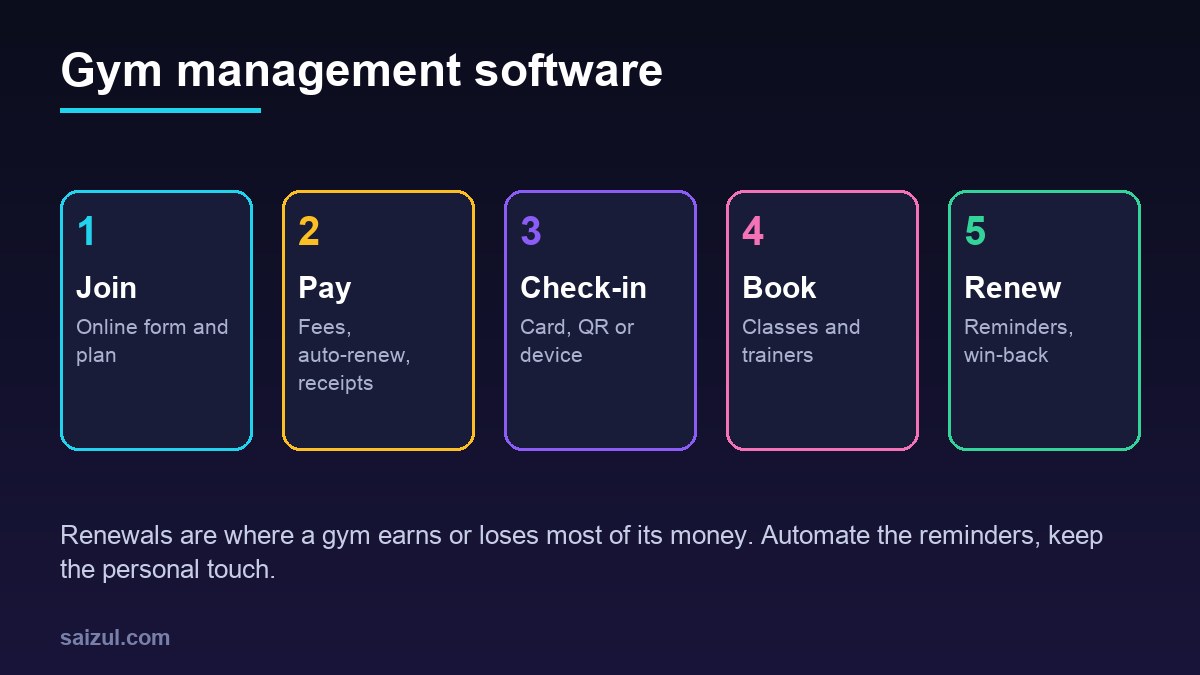
A gym’s income depends on members renewing. Good software makes renewal the default, not an afterthought.
- Clear plan end dates: every membership has a start date, end date and status: active, frozen, expired, cancelled.
- Reminders before expiry: a message seven days and one day before the end date, with a payment link.
- Automatic renewal where members agree: card or bank subscriptions renew without the member visiting the desk. Payment platforms handle the billing cycle; Stripe, for example, explains how subscriptions and recurring payments work (Stripe subscriptions). In Bangladesh and similar markets, many members prefer to pay each month by mobile wallet, so a payment link reminder may work better; see accepting online payments in Bangladesh.
- Grace period: decide how many days an expired member may still check in, and enforce it at the door.
- Failed payments: retry, notify the member, and create a task for the desk if it fails again.
- Easy, honest cancellation: make cancelling as clear as joining. Hidden cancellation steps damage reviews and can break consumer rules in some countries.
For card payments, use a payment provider that handles card data, so card numbers never sit in your own system. The PCI Security Standards Council publishes the card data security standards (PCI SSC standards).
How a gym day runs with the system
- Opening: the manager sees today’s classes, trainer schedule, memberships expiring this week and members with unpaid dues.
- Check-in: members scan a QR code on their phone, tap a card or use an access device. Expired or frozen members are stopped politely and sent to the desk.
- Classes: members book from the app or website; the instructor sees the list and marks attendance. Waiting-list members are notified when a spot opens.
- Personal training: trainers see their sessions, and each completed session is deducted from the member’s package.
- Front desk: new enquiries are logged, trial passes issued, renewals taken and receipts sent.
- Closing: collection by cash, card and wallet is checked against the system.
- Next morning: the owner gets a summary: check-ins, new members, renewals, expired members and revenue. My automated business reporting guide shows how.
Retention automation that does not feel robotic
- Welcome sequence: a message on day one with the timetable, day seven asking how it is going, and day 30 offering a free trainer check-in.
- Inactive alert: a member who has not checked in for 10 or 14 days gets a friendly message, and the desk gets a task to call regulars who stop.
- Milestones: a short note after 50 or 100 visits.
- Win-back: a message a few weeks after a membership expires, once, not every week.
- Referral: a simple referral code with a reward both sides understand.
Send these by SMS, email or WhatsApp only to members who agreed to receive them, and make opting out easy. If you plan to use WhatsApp at scale, read WhatsApp Business API vs app first.
Where AI helps a gym
- Enquiry assistant: answers questions about plans, prices, timings, ladies-only hours or parking on your website and WhatsApp, books trial visits and passes complex questions to staff.
- Churn signals: highlights members whose visits are dropping, so staff can reach out before they leave.
- Timetable insights: shows which classes fill up and which hours are empty, to plan off-peak offers.
- Drafting messages: renewal and win-back messages in Bangla or English, reviewed by the manager.
AI should not give medical advice or design programmes for members with health conditions. Those questions should go to a qualified trainer or a doctor.
Member data, biometrics and security
Gyms often hold more sensitive data than they realise: photos, health questionnaires, injury notes and sometimes fingerprint or face data at the door. Under the GDPR, biometric data used to identify a person and health data are special categories with stricter rules (GDPR Article 9). Even outside Europe, treat them carefully:
- Offer a non-biometric option, such as a QR code or card, for members who do not want fingerprint or face check-in.
- Keep health questionnaires separate from general records, visible only to trainers who need them.
- Give each staff member their own login, with roles for desk, trainer and manager.
- Use two-step login for anyone who can change payments or export member lists.
- Ask your vendor or developer which security standard they follow; the OWASP ASVS is a practical checklist for web applications (OWASP ASVS).
Ready-made vs custom gym management software
| Option | Good for | Watch out for |
|---|---|---|
| Ready-made cloud software | Single gyms and studios with standard plans | Monthly fees that grow with members, limited local payment support, access device compatibility |
| Ready-made plus custom add-ons | Good core tool missing WhatsApp reminders, local wallets or custom reports | Depends on an API or data export |
| Custom gym system | Multi-branch clubs, academies with batches and coaches, mixed facilities such as pool, courts and gym | Higher upfront cost and ongoing maintenance |
Check that the software works with your existing turnstile or access device before you buy. My custom software vs SaaS guide covers the long-term cost comparison.
Gym management software cost (2026 estimates)
These ranges are estimates for planning. Prices vary by members, branches, access hardware and modules.
| Option | Typical scope | Estimated cost (USD) |
|---|---|---|
| Ready-made subscription | Members, plans, payments, check-in, basic booking | Roughly 30 to 200 per location per month |
| Custom single-gym system | Members, plans, renewals, QR check-in, reminders, reports | 3,000 to 12,000 |
| Custom club or academy system | Branches, classes, coaches, facilities, member app, access device integration | 12,000 to 40,000+ |
| AI enquiry and retention add-on | Website and WhatsApp assistant, trial booking, inactive alerts | 2,000 to 8,000 |
Add access hardware, payment fees, SMS or WhatsApp charges and maintenance. If your gym appears in local search, structured data such as the schema.org ExerciseGym type can describe your location and hours (Schema.org ExerciseGym), alongside a well-kept Google Business Profile.
Rollout plan
- Clean the member list: one record per person, with plan, start and end dates and dues.
- Define plans, freezes, grace period and cancellation rules in writing.
- Start with members, payments and renewals.
- Add check-in once records are correct, so nobody active is blocked by mistake.
- Add classes, trainers and the member app.
- Add retention messages and the AI enquiry assistant last.
Gym management software checklist
- Every member has a plan, end date and status.
- Renewal reminders and payment links set up.
- Grace period and expired-member rule enforced at check-in.
- Freeze and cancellation rules clear and easy to follow.
- Card payments handled by a compliant provider.
- Non-biometric check-in option available.
- Staff roles and individual logins.
- Inactive member alerts with a named person to call.
- Daily collection check and morning report.
- Data export and support terms in the contract.
Need help with this on your own site or business?
I build and secure WordPress sites, web apps and AI automations end to end, in Bangla and English: a free discovery call, a written scope with a fixed quote, a focused first version, then testing, deployment and monitoring.
See the portfolio and the AI agent services, or tell me what you need.
FAQ
What is gym management software?
It is a system that manages gym members, plans, payments, renewals, check-in, class bookings and trainer schedules in one place, with reports showing active members, renewals due and revenue.
Can gym software renew memberships automatically?
Yes, if members agree to recurring card or bank payments. Where members prefer to pay each month by mobile wallet or cash, the system can send reminders with a payment link before the plan ends.
Do I need fingerprint or face check-in?
No. QR codes and cards work well and avoid storing biometric data. If you use biometrics, get clear consent, protect the data and offer members another option.
Is gym management software worth it for a small studio?
Usually yes once you have more than a few dozen members, because missed renewals and unpaid dues add up quickly. A ready-made tool is often enough at that size.
How long does it take to set up gym management software?
A ready-made system can be running within one to three weeks once the member list is clean. A custom system for a multi-branch club or academy usually takes two to four months.
Sources

Md Saizul Amin
Digital Systems Strategist · AI Agent Developer · 9+ years in digital & ITMd Saizul Amin is a digital systems strategist and AI automation engineer from Dhaka, Bangladesh. With 9+ years across IT, web development and digital marketing, he writes practical guides on technology, business, education and online growth — and builds the same kinds of systems (AI agents, websites, SEO and ad campaigns) for clients in Bangladesh, the UK and the USA.
Specialist in
Credentials & experience
- 🎓B.Sc. in Computer Science & EngineeringBangladesh University of Business & Technology (BUBT), 2017–2021
- 🤖AI Automation Engineer · Web Developer · SEO SpecialistUnique Mark Limited, Birmingham UK — 2024 to present
- 🌱IT SpecialistGreen Fund Initiative Inc., USA — 2024 to present
- 🏥Junior IT Consultant — Ministry of Health (DGHS)Built the first national Shareable Health Record website; supported 6,000+ facilities
- 🧭Head of ITWEDO Bangladesh — led IT for 50+ staff, 2021–2023