In this article
AI document processing reads business documents such as invoices, receipts, purchase orders, delivery notes, application forms and contracts, pulls out the information you need, checks it and sends it into your accounting, ERP or CRM system. Instead of a person typing supplier names, dates, totals and line items by hand, the system does the first pass and a person only reviews the cases it is unsure about. This guide explains how it works, which documents suit it best, how to measure and control accuracy, what it costs and how to roll it out safely in a small or medium business.
From my own work: In document projects I have worked on, the AI reading step was rarely the hardest part. The hard part was agreeing the rules: which supplier names are the same company, what to do when VAT is missing, and who approves an invoice above a certain amount. Once those rules were written down, the automation became predictable.
If you want a hands-on technical build, my tutorial on automated PDF invoice OCR and accounting sync with n8n shows one way to wire it up. This article is the business view: what to automate, how to keep control and how to judge results.
What is AI document processing?
Older systems used OCR (optical character recognition) to turn an image into text, plus fixed templates that said “the total is always in this box”. That works for one supplier’s layout and breaks when the layout changes. AI document processing adds a model that understands the meaning of the page, so it can find the invoice number, date, supplier, tax and total even when every supplier uses a different design.
Cloud services for this exist from several large providers. For example, Google Cloud describes Document AI as a platform that turns unstructured document content into structured data (Google Cloud Document AI), and Microsoft describes Azure AI Document Intelligence as a service that extracts text, key-value pairs, tables and structure from documents, with prebuilt models for invoices and receipts (Azure AI Document Intelligence). Open-source OCR such as Tesseract can also be run on your own server (Tesseract OCR), usually combined with an AI model that reads the text.
Which documents suit AI document processing?
| Document | Typical fields | Where the data goes | Difficulty |
|---|---|---|---|
| Supplier invoices | Supplier, invoice number, date, due date, tax, total, line items | Accounting, accounts payable | Medium |
| Receipts and expense slips | Merchant, date, amount, category | Expense records | Medium, poor photos are common |
| Purchase orders and delivery notes | PO number, items, quantities | Inventory, ERP | Medium |
| Application and KYC forms | Name, address, ID details, signatures | CRM, onboarding | Higher, sensitive data |
| Contracts | Parties, dates, renewal, notice period, key terms | Contract register, reminders | Higher, needs legal review |
| Bank statements | Date, description, debit, credit, balance | Reconciliation | Medium, many formats |
The best first project is usually the document you receive most often, in the largest volume, with clear fields and a clear destination. For most businesses that is supplier invoices or receipts.
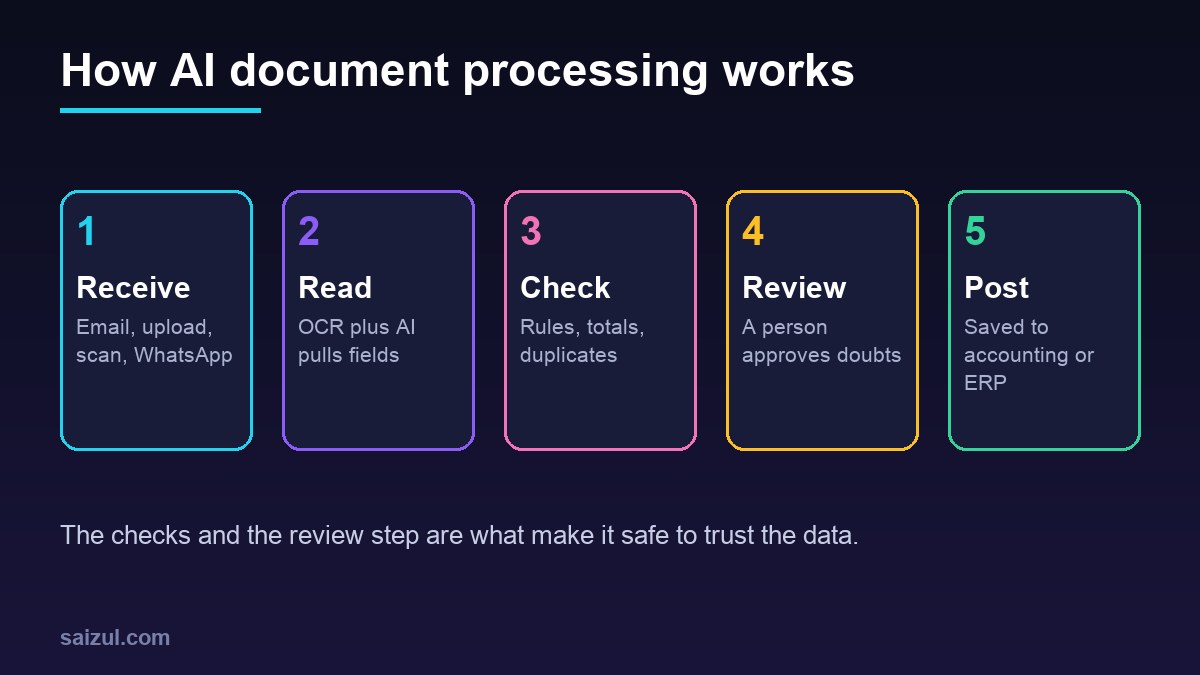
How an AI document processing workflow runs
- Receive: documents arrive by a dedicated email address, an upload form, a shared folder, a scanner or a WhatsApp number. Pick one main entry point so nothing is missed.
- Read: text is extracted from PDFs and images. Workflow tools can do part of this; for example, n8n’s Extract From File node can pull data from PDFs and spreadsheets in a workflow (n8n Extract From File). Scanned images need OCR first.
- Extract: the AI model maps the text into fixed fields in a format your system expects, such as a list of named fields and line items.
- Check: business rules run on the result. Do the line items add up to the total? Is the tax rate valid? Is this invoice number already in the system? Is the supplier known?
- Review: anything that fails a check, or where the model reports low confidence, goes to a person in a simple review screen with the original document next to the extracted data.
- Post: approved data is created as a bill, expense, order or record in your accounting software, ERP or CRM, with a link back to the original file.
- Learn: corrections are logged so you can see which suppliers or fields cause trouble and fix the rules.
Accuracy, confidence and human review
No system reads every document perfectly. Faded receipts, handwritten notes, stamps over totals and phone photos taken at an angle all cause errors. Plan for this instead of hoping it will not happen.
- Measure field accuracy, not document accuracy. A document with 12 fields where 11 are right is not “wrong”, but the one wrong field might be the total.
- Set stricter rules for money fields. Totals, tax and bank details should always be checked against a calculation or a known value.
- Use thresholds. High confidence and passing all checks: post automatically. Anything else: review. Start with everything going to review, then relax as you trust it.
- Never auto-pay. Extraction can create a draft bill. Payment should still need a human approval, especially if bank details change. Changed bank details on an invoice are a common fraud pattern.
- Keep the original. Every record should link to the source file for audits and disputes.
A realistic test before you commit
Collect 100 to 200 real documents from the last few months, covering your main suppliers and some bad photos. Type the correct values into a spreadsheet once. Run the system on the same set and compare field by field. This gives you a real accuracy number for your documents, not a vendor’s demo number.
Privacy and security rules
Documents often contain personal data, bank details and prices you would not want leaked. Under the GDPR principles, personal data should be collected for specified purposes, limited to what is necessary, kept no longer than needed and protected with appropriate security (GDPR Article 5). Even if GDPR does not apply to you, these are good rules.
- Know which provider processes the files, in which region, and whether they keep copies or use them for training.
- For very sensitive documents, consider running OCR and a local AI model on your own server. My guide to local private document AI assistants covers that approach.
- Restrict who can see the review screen and the stored files.
- Set a retention period and delete files you no longer need to keep by law.
- Log who approved what and when.
What AI document processing costs
Costs come in three parts. These are rough 2026 estimates and vary by provider and volume:
| Cost part | What it covers | Estimated range |
|---|---|---|
| Setup and build | Workflow, extraction rules, checks, review screen, integration | About 1,500 to 15,000 USD, depending on document types and systems |
| Per-document processing | OCR and AI model usage | Often a fraction of a US cent to a few cents per page; check current provider pricing |
| Running and support | Hosting, monitoring, rule updates for new suppliers | A small monthly fee or a few support hours per month |
To judge value, compare with the time spent today. If a staff member spends three to four minutes per invoice on typing and checking, and you receive 1,000 invoices a month, that is roughly 50 to 65 hours a month. If automation cuts that to under a minute per invoice for review, the saving is easy to calculate. My guide to business process automation shows how to map and price a process like this before you build.
How to roll out AI document processing: step by step
- Pick one document type and one destination system.
- Write down today’s process, including who checks what and the approval limits.
- List the fields you need and the rules each must pass.
- Build a test set of real documents with correct values.
- Build the workflow with every document going to review at first.
- Run in parallel with the manual process for two to four weeks and compare.
- Turn on automatic posting only for documents that pass all checks with high confidence.
- Review errors weekly, then add the next document type.
For more ideas on what else can run in the same workflow tool, see my list of n8n workflow examples for business.
Common mistakes
- Starting with the hardest documents, such as contracts, instead of high-volume invoices.
- Trusting a demo on clean sample PDFs instead of testing your own scans and photos.
- No duplicate check, so the same invoice is entered twice.
- Letting the system create payments without approval.
- Many entry points, so some documents never reach the workflow.
- No owner for the review queue, so it fills up and nobody looks.
Quick checklist
- One document type and one destination chosen.
- Fields and business rules written down.
- Test set of 100 or more real documents with correct values.
- Duplicate, total and tax checks in place.
- Review screen with the original file beside the data.
- No automatic payments; bank detail changes flagged.
- Provider data handling and retention checked.
- Parallel run completed and accuracy measured.
- Named owner for the review queue.
Need help with this on your own site or business?
I build and secure WordPress sites, web apps and AI automations end to end, in Bangla and English: a free discovery call, a written scope with a fixed quote, a focused first version, then testing, deployment and monitoring.
See the portfolio and the AI agent services, or tell me what you need.
FAQ
Is AI document processing the same as OCR?
No. OCR turns an image into text. AI document processing goes further: it understands which text is the supplier, date, tax or total, puts it into fixed fields, and can run checks before saving it to your system.
Can AI read Bangla documents and handwriting?
Many OCR engines and AI models support Bangla print, but quality varies and handwriting is harder in any language. Test with your own documents before deciding, and keep human review for unclear cases.
How accurate is AI invoice extraction?
It depends on document quality and layout variety. Clean digital PDFs usually extract well; faded scans and phone photos cause more errors. Measure field-level accuracy on 100 to 200 of your own documents to get a real number.
Can I run AI document processing without sending files to the cloud?
Yes. You can run open-source OCR and a local AI model on your own server. It needs more setup and suitable hardware, but keeps sensitive documents inside your own systems.
Will it replace my accounts staff?
Usually it removes typing, not judgment. Staff move to reviewing exceptions, handling supplier questions and approving payments, which is more valuable work.
Sources

Md Saizul Amin
Digital Systems Strategist · AI Agent Developer · 9+ years in digital & ITMd Saizul Amin is a digital systems strategist and AI automation engineer from Dhaka, Bangladesh. With 9+ years across IT, web development and digital marketing, he writes practical guides on technology, business, education and online growth — and builds the same kinds of systems (AI agents, websites, SEO and ad campaigns) for clients in Bangladesh, the UK and the USA.
Specialist in
Credentials & experience
- 🎓B.Sc. in Computer Science & EngineeringBangladesh University of Business & Technology (BUBT), 2017–2021
- 🤖AI Automation Engineer · Web Developer · SEO SpecialistUnique Mark Limited, Birmingham UK — 2024 to present
- 🌱IT SpecialistGreen Fund Initiative Inc., USA — 2024 to present
- 🏥Junior IT Consultant — Ministry of Health (DGHS)Built the first national Shareable Health Record website; supported 6,000+ facilities
- 🧭Head of ITWEDO Bangladesh — led IT for 50+ staff, 2021–2023