In this article
Selling something you do not have is one of the fastest ways to lose a customer. So is running out of your best seller during a busy week. Both problems come from the same place: the stock numbers on your website do not match what is on your shelf. For a small online store, inventory management does not need expensive software. It needs a few clear habits, one reliable stock record and the stock features already built into your store platform.
From my own work: In the small stores I work with, overselling usually starts when orders come from several places at once: the website, Facebook messages and a phone call. Each one is handled by a different person, and only one of them updates the stock.
What poor inventory costs you
- Overselling: cancelled orders, refunds, angry messages and wasted ad spend.
- Stockouts: lost sales on your best products, often at the moment demand is highest.
- Dead stock: money tied up in items that do not sell.
- Listing problems: Google Merchant Center requires the availability in your product data to match your product page, and a mismatch can get products disapproved (availability attribute).
Step 1: Give every item a SKU
A SKU (stock keeping unit) is your own code for each sellable version of a product. A shirt in three sizes and two colours is six SKUs, because each one can run out separately.
- Keep codes short and readable, for example
PNJ-BLU-Mfor a blue panjabi in medium. - Use the same SKU everywhere: website, packing slips, supplier orders and your stock sheet.
- In your store, set products with sizes or colours up as variations, each with its own SKU and stock.
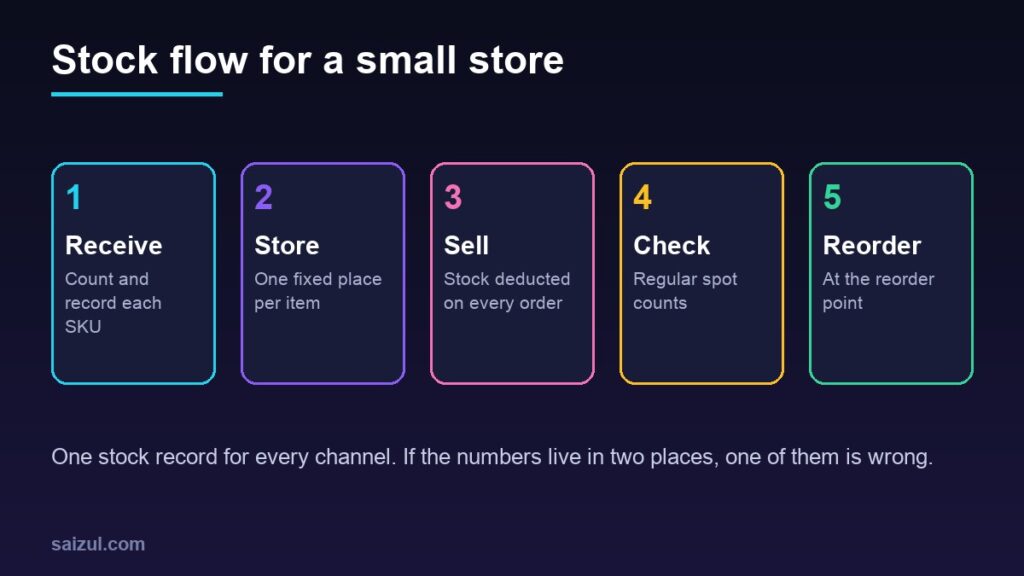
Step 2: Keep one stock record for every channel
Decide which system holds the official stock number. For most small stores that should be the website itself, because it deducts stock automatically when an order is placed. Then make every other channel feed into it:
- Enter Facebook, Instagram, WhatsApp and phone orders as orders in the store admin, not only in a notebook. This also gives you one order history for customer retention.
- If you have a physical shop too, record counter sales in the same system or update the stock at the end of each day.
- Give one person responsibility for stock adjustments.
Step 3: Turn on your platform’s stock features
In WooCommerce, the Inventory settings under Products include (Products settings):
| Setting | What it does |
|---|---|
| Manage stock | Turns on stock counts that go down with sales |
| Hold stock (minutes) | Reserves stock for unpaid orders in “Pending payment” and releases it after the time you set |
| Notifications and recipients | Emails for low stock, out of stock and backorders |
| Low stock threshold | The count that triggers a low stock alert |
| Out of stock threshold | The count at which a product becomes out of stock |
| Out of stock visibility | Hides sold-out items from the catalogue |
| Stock display format | Shows the quantity always, only when low, or never |
Each product can also have its own stock quantity, threshold and backorder setting. Shopify and most other store platforms have similar stock tracking built in; look for low stock alerts and an adjustment history so you can see when and why a quantity changed. If you are still choosing a platform, see WooCommerce vs Shopify.
Step 4: Set a reorder point
A reorder point tells you when to buy more, before you run out. A simple version:
Reorder point = average daily sales × supplier lead time in days + safety stock
An illustrative example: you sell about 4 units a day, your supplier takes 10 days to deliver, and you keep 15 units as a buffer for busy days. The reorder point is 4 × 10 + 15 = 55 units. When stock falls to 55, place the order. Set the low stock threshold in your store close to this number so the alert reminds you.
Recalculate before seasons such as Eid, when daily sales and supplier lead times both change.
Step 5: Count regularly
- Spot counts: every week, count a handful of fast-moving SKUs and compare with the website.
- Full count: at least a few times a year, count everything when the store is quiet.
- Record differences: damage, loss and returns that were never restocked. A repeated difference points to a process problem.
- Remember the courier: parcels on their way back from failed deliveries are not on your shelf yet. My COD management guide covers tracking them.
Step 6: Deal with slow stock
Once a month, sort products by units sold in the last 90 days. Fast sellers deserve the safety stock. Items that have barely moved need a bundle, a small discount, better photos or a decision to stop reordering. Check the margin before discounting; my pricing guide shows how.
Pre-orders and backorders
Selling before stock arrives is fine if you are honest about dates. State the expected shipping date on the product page and in the confirmation message. If you list products on Google, use the preorder or backorder value with an availability date, and show the same date on the page (availability attribute).
Quick checklist
- Every sellable variation has its own SKU and stock quantity.
- One system holds the official stock number; all channels feed into it.
- Manage stock, low stock alerts and out of stock threshold turned on.
- Reorder point calculated for top sellers.
- Weekly spot counts and periodic full counts.
- Returned and damaged items recorded separately.
- Pre-order dates shown on the product page.
Need help with this on your own site or business?
I build and secure WordPress sites, web apps and AI automations end to end, in Bangla and English: a free discovery call, a written scope with a fixed quote, a focused first version, then testing, deployment and monitoring.
See the portfolio and the AI agent services, or tell me what you need.
FAQ
Do I need inventory software for a small online store?
Usually not at first. WooCommerce or Shopify stock features plus a simple stock sheet are enough. Consider dedicated software when you sell across several marketplaces or warehouses.
How do I stop overselling when I also take orders on Facebook?
Enter every Facebook, WhatsApp or phone order in the store admin so stock is deducted from the same record as website orders.
What is safety stock?
Extra units kept to cover busy days or a late supplier. Base it on how much your sales and delivery times vary.
Should I hide out of stock products?
Hide them if they will not return. If they will be restocked soon, keep the page visible, show the expected date or offer a back-in-stock alert.
Sources

Md Saizul Amin
Digital Systems Strategist · AI Agent Developer · 9+ years in digital & ITMd Saizul Amin is a digital systems strategist and AI automation engineer from Dhaka, Bangladesh. With 9+ years across IT, web development and digital marketing, he writes practical guides on technology, business, education and online growth — and builds the same kinds of systems (AI agents, websites, SEO and ad campaigns) for clients in Bangladesh, the UK and the USA.
Specialist in
Credentials & experience
- 🎓B.Sc. in Computer Science & EngineeringBangladesh University of Business & Technology (BUBT), 2017–2021
- 🤖AI Automation Engineer · Web Developer · SEO SpecialistUnique Mark Limited, Birmingham UK — 2024 to present
- 🌱IT SpecialistGreen Fund Initiative Inc., USA — 2024 to present
- 🏥Junior IT Consultant — Ministry of Health (DGHS)Built the first national Shareable Health Record website; supported 6,000+ facilities
- 🧭Head of ITWEDO Bangladesh — led IT for 50+ staff, 2021–2023