In this article
The choice in WhatsApp Business API vs app comes down to scale and automation. The free WhatsApp Business app suits a small team replying by hand, with a catalog, greeting and away messages and quick replies. If you want a real chatbot or AI agent, connections to your store or CRM, several staff on one number, or automated order updates, you need the WhatsApp Business Platform, usually through Meta’s Cloud API, which follows stricter rules and charges per delivered message. This guide explains both, the rules that matter, and how pricing works without guessing at rates.
From my own work: A common request I get is to “add a bot” to a number that a shop already uses in the Business app. The first thing we usually discuss is whether they really need the API yet, because for some shops the app’s quick replies and a tidy catalog are enough for now, and moving a number to the platform is a bigger change than people expect.
If you sell online and mainly need a catalog, labels and order confirmation, start with my guide to WhatsApp Business for e-commerce. If you have already decided on the API and want to design the bot itself, see how to build a WhatsApp AI chatbot customers like. This article sits between the two: which product you need, and what the rules and costs look like.
What is the difference between the WhatsApp Business app and the API?
WhatsApp Business app
A free app for Android and iPhone, designed for a business owner or a small team. You can set up a business profile, show products in a catalog, greet people when they start a chat and reply when you are away (WhatsApp Business app). It also has quick replies and labels for organising chats. Everything is still done by people on a phone or linked devices. There is no way to connect your own chatbot or system to the app.
WhatsApp Business Platform (Cloud API)
The Business Platform is for software. Meta’s Cloud API lets developers programmatically message and call on WhatsApp: send text, media and interactive messages, send order updates, appointment reminders and one-time passwords, and receive replies through your own system (Cloud API overview). It needs a Meta business portfolio and a business phone number. Many businesses connect through a Business Solution Provider, which adds a shared inbox and tools on top, usually for its own fee.
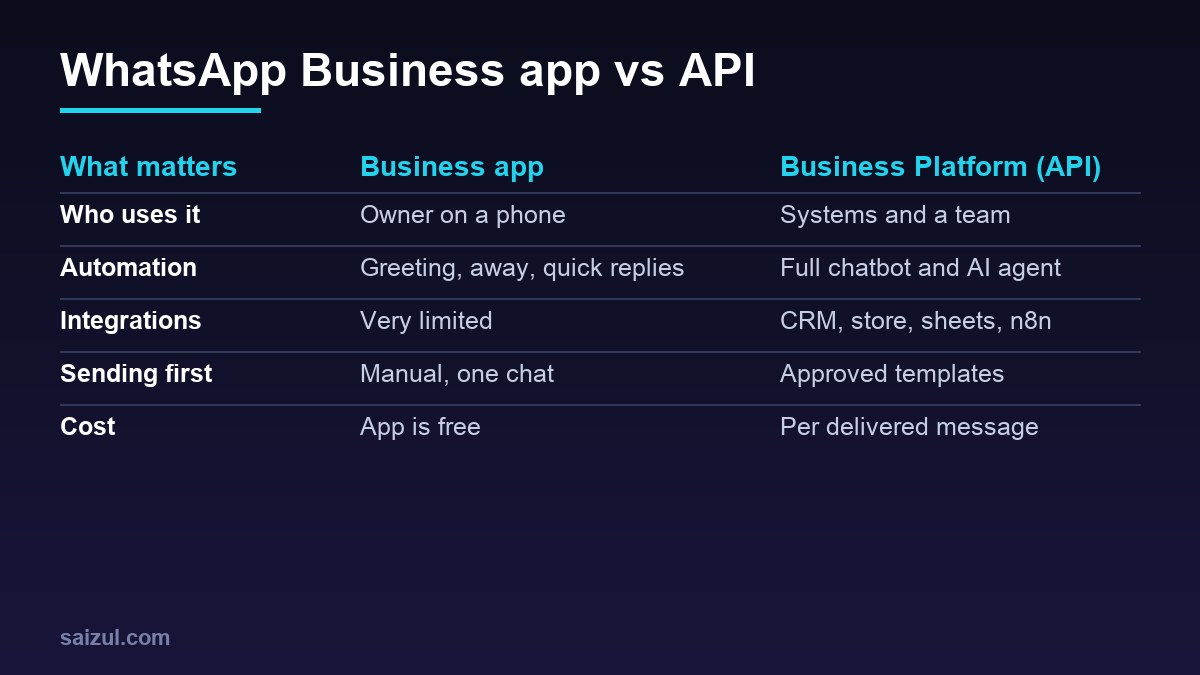
WhatsApp Business API vs app: side by side
| Question | Business app | Business Platform (API) |
|---|---|---|
| Who replies? | People, by hand | A chatbot, AI agent or people in a shared inbox |
| Automation | Greeting and away messages, quick replies | Full conversation flows, AI, actions in other systems |
| Connect to your store or CRM | No | Yes, through the API or a provider |
| Starting a conversation | Message people manually | Approved message templates, within messaging limits |
| Setup | Download and register a number | Business portfolio, number, app setup, often a developer or provider |
| Cost model | App is free to use | Meta charges per delivered message, by category and country |
What a WhatsApp chatbot on the API can automate
- Common questions: prices, delivery areas, opening hours, sizes, payment methods, returns.
- Orders: take order details step by step, confirm the total, and save the order to your store or sheet.
- Order and delivery updates: confirmation, dispatch with tracking link, delivery day reminders.
- Bookings: check available slots, book, remind and reschedule.
- Lead qualification: ask a few questions, then pass hot leads to sales with a summary.
- Payment links and one-time passwords for login or verification.
- Handover to a person in a shared inbox, with the conversation history.
Messenger has a similar path from built-in tools to a full bot. See Messenger automation for small businesses.
The official rules you must follow on the API
1. Get opt-in first
The WhatsApp Business Messaging Policy says you may contact people only if you have received opt-in permission from them (WhatsApp Business Messaging Policy). Collect it clearly, for example with a checkbox at checkout or when the customer messages you first, and keep a record. Meta’s best practice is to ask for separate opt-ins for different kinds of messages, such as order updates and offers.
2. The 24-hour customer service window
When a customer messages you, a 24-hour customer service window opens, and each new message from them resets it. Inside the window you can reply with normal free-form messages. Outside it, you can only send pre-approved template messages (pricing documentation). This is why order updates and reminders are set up as templates.
3. Offer a clear way to reach a person
Automation is allowed, but the policy also requires prompt, clear and direct escalation paths, such as a transfer to a human agent in the chat, a phone number, email or a support form. A bot with no way out breaks the rules and annoys customers.
4. Messaging limits for new accounts
Meta limits how many unique users a business can message outside a customer service window in a moving 24-hour period. New business portfolios start at 250 unique recipients. You can raise this to 2,000 by verifying your business, among other routes, and after that the limit can scale further automatically if your message quality stays high (messaging limits). Plan your launch with this in mind, especially for broadcasts.
5. Rules on AI providers
Meta’s terms for the Business Platform include a section on AI providers. It prohibits using the platform where a general AI model or assistant is the primary functionality being offered, as opposed to incidental or ancillary, as Meta decides (Meta Terms for WhatsApp Business Platform). A business using AI to answer questions about its own products and orders is a different case from offering a general chatbot to the public, but read the current terms before you build, and do not allow platform data to be used to train AI models, which the same section restricts.
6. Content and product rules
The policy prohibits certain content and restricted goods and services. Check that your products and messages are allowed before you apply.
How WhatsApp Business API pricing works
I will not quote rates here, because they differ by country and Meta updates them. What matters is the model, as described in Meta’s pricing documentation:
- Per message. Since 1 July 2025, Meta charges per delivered message, not per conversation. You are not charged for messages customers send to you, and you are only charged when a message is delivered.
- By category and country. The rate depends on the message category and the recipient’s country calling code. Template categories are marketing, utility and authentication. Replies inside the customer service window are service messages.
- Service messages and the free tier. From 1 October 2026, service messages are charged again, with a free tier of 1,000 delivered service messages per business phone number per month. Unused free messages do not roll over.
- Utility messages in the window. Utility templates sent inside an open customer service window were free from July 2025, and are charged from 1 October 2026.
- Free entry points. When a customer messages you from a Click to WhatsApp ad, a free entry point window opens that can stay open for up to 7 days, during which most message categories are free.
- Volume tiers lower utility and authentication rates as your monthly volume grows.
- Rate changes happen only on the first day of a quarter, with advance notice. The current rate cards are published on the pricing page.
Your total cost also includes any provider or inbox subscription, the build of the chatbot, the AI model usage if you use one, and hosting for your automation. To estimate it, count how many messages of each category you expect per month, multiply by the published rate for your customers’ country, and add the fixed costs.
Which one does your business need?
Stay on the Business app if
- One to a few people handle all chats and keep up.
- You do not need to connect WhatsApp to your store, CRM or booking system.
- Your message volume is modest and mostly customers messaging you first.
Move to the Business Platform if
- Customers wait too long because the same questions arrive all day.
- You want automatic order confirmations, delivery updates or reminders.
- Several staff need to share one number with assignment and history.
- You want a chatbot or AI agent that takes actions in your systems.
How to move to the API: step by step
- Decide which number to use. A number registered on the platform is managed differently from one in the app, so check Meta’s current guidance on using or migrating an existing number before you start.
- Create or verify your Meta business portfolio.
- Choose Cloud API directly, or a Business Solution Provider if you want a ready inbox.
- Write your opt-in wording and add it to checkout and forms.
- Create and submit message templates for order updates and reminders.
- Build the chatbot flows and the handover to a person.
- Test with internal numbers, then launch to a small group.
- Watch quality, opt-outs and costs each week.
Common mistakes
- Moving to the API before the business needs it.
- Sending offers to people who never opted in.
- A bot with no route to a person.
- Using marketing templates for messages that should be utility, or the other way round.
- Forgetting the messaging limit when planning a launch broadcast.
- Estimating cost from old conversation-based pricing.
Quick checklist
- Decided whether the Business app is still enough.
- Business portfolio ready and, ideally, verified.
- Opt-in collected and recorded.
- Templates written for updates outside the 24-hour window.
- Clear handover to a person in every flow.
- AI use checked against Meta’s current terms.
- Monthly message estimate by category, using the current rate card.
- Weekly review of quality, opt-outs and cost.
Need help with this on your own site or business?
I build and secure WordPress sites, web apps and AI automations end to end, in Bangla and English: a free discovery call, a written scope with a fixed quote, a focused first version, then testing, deployment and monitoring.
See the portfolio and the AI agent services, or tell me what you need.
FAQ
Is the WhatsApp Business API free?
No. The app is free to use, but on the Business Platform Meta charges per delivered message by category and country, after a monthly free tier for service messages. Providers may also charge their own fees.
Can I use a chatbot on the WhatsApp Business app?
The app offers greeting messages, away messages and quick replies, but you cannot connect your own chatbot or AI agent to it. For that you need the Business Platform through the Cloud API or a provider.
Can I send bulk messages with the WhatsApp Business API?
You can send approved template messages to people who have opted in, within your messaging limit. New accounts start with a limit of 250 unique users in 24 hours outside a customer service window, which can grow over time.
Do I need a developer for the WhatsApp Business API?
For a simple shared inbox, a Business Solution Provider may be enough. For a custom chatbot or AI agent connected to your store, CRM or other systems, you will usually need a developer.
Can I keep my existing WhatsApp number?
Often yes, but moving a number from the app to the platform changes how it is used. Check Meta’s current guidance and back up anything you need before you migrate.
Sources

Md Saizul Amin
Digital Systems Strategist · AI Agent Developer · 9+ years in digital & ITMd Saizul Amin is a digital systems strategist and AI automation engineer from Dhaka, Bangladesh. With 9+ years across IT, web development and digital marketing, he writes practical guides on technology, business, education and online growth — and builds the same kinds of systems (AI agents, websites, SEO and ad campaigns) for clients in Bangladesh, the UK and the USA.
Specialist in
Credentials & experience
- 🎓B.Sc. in Computer Science & EngineeringBangladesh University of Business & Technology (BUBT), 2017–2021
- 🤖AI Automation Engineer · Web Developer · SEO SpecialistUnique Mark Limited, Birmingham UK — 2024 to present
- 🌱IT SpecialistGreen Fund Initiative Inc., USA — 2024 to present
- 🏥Junior IT Consultant — Ministry of Health (DGHS)Built the first national Shareable Health Record website; supported 6,000+ facilities
- 🧭Head of ITWEDO Bangladesh — led IT for 50+ staff, 2021–2023