In this article
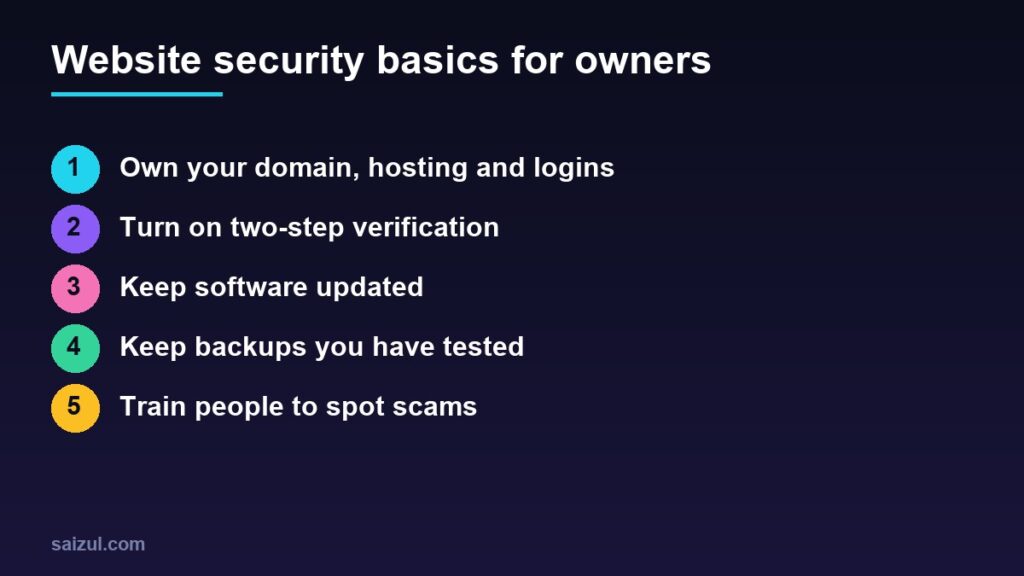
Many business owners assume website security is something the developer handles, or that their business is too small for anyone to bother attacking. Neither is safe. Most attacks on small business sites are automated: bots scan thousands of websites for old software, weak passwords and leaked logins, without caring who owns them. And many of the most important protections are not technical at all. They are decisions only the owner can make: who owns the domain, who has the passwords, whether backups exist, and what staff do with a suspicious email. This guide covers those basics in plain language.
From my own work: When a business owner contacts me about a hacked or locked website, the hardest part is often not the cleanup. It is finding out who registered the domain, which email the hosting account belongs to, and whether a former freelancer still holds the only admin login.
If your site runs on WordPress and you want the technical steps, my WordPress security checklist covers plugins, hardening and firewalls in detail. This article is the owner’s side of the same job.
Why small businesses are targets
The UK National Cyber Security Centre’s Small Business Guide makes the point that small organisations are not too small to be targeted, that many protective steps take only minutes, and that security should not be left to one person. A hacked site can redirect visitors to scams, be flagged by browsers, lose its search rankings, leak customer data and take days to recover.
Step 1: Make sure you own the important accounts
These accounts control your website. Each should be in the business’s name, using an email address the business controls, not a developer’s personal email:
| Account | Why it matters |
|---|---|
| Domain registrar | Whoever controls it controls your website address and email |
| Hosting | Holds the site files, database and backups |
| DNS or Cloudflare | Decides where your domain points |
| Website admin | Full control of the site content and settings |
| Business email | Password resets for everything else are sent here |
| Payment gateway and analytics | Money, customer data and tracking |
- Keep a private list of these accounts, the login email for each and who has access.
- Give developers and agencies their own user accounts instead of sharing yours, so access can be removed later.
- Turn on auto-renew for the domain and keep the payment card up to date. An expired domain can take the website and email offline.
Using an email on your own domain makes this easier; see how to create a business email.
Step 2: Protect logins with two-step verification
CISA’s Cyber Essentials guide for small business leaders recommends requiring multi-factor authentication for accessing your systems whenever possible. In practice:
- Turn on two-step verification on your business email first, then the domain registrar, hosting, website admin, payment dashboards and social media accounts.
- Use an authenticator app or passkey where offered, rather than SMS only.
- Use a password manager so every account has a long, unique password.
- Never reuse the website admin password anywhere else.
- Store backup or recovery codes somewhere safe and offline.
Step 3: Keep software updated
Old software is one of the most common ways in. CISA advises enabling automatic updates whenever possible. For a website that means:
- The platform itself, such as WordPress, plus every theme and plugin.
- Removing plugins and themes you no longer use, rather than just deactivating them.
- Avoiding “nulled” or pirated premium plugins, which often contain hidden malware.
- Updating the computers and phones you use to log in, because a compromised laptop can leak every password on it.
If you do not want to handle this yourself, agree a maintenance plan with someone who will. My website maintenance checklist lists what should be done weekly, monthly and yearly.
Step 4: Keep backups you have actually tested
CISA recommends a backup solution that automatically and continuously backs up critical data and system configurations. For a website:
- Back up both the files and the database, automatically, at least daily for a store that takes orders.
- Keep at least one copy away from the hosting account, so a hacked or cancelled account does not take the backups with it.
- Keep several days or weeks of copies, not only the latest one, because problems are often found late.
- Test a restore at least occasionally. A backup you cannot restore is not a backup.
Ask your host what it backs up and for how long; my guide on how to choose web hosting includes the questions to ask.
Step 5: Use HTTPS and a basic firewall
- Make sure the whole site loads over HTTPS with a valid certificate. Most hosts install a free one.
- A service such as Cloudflare can add a free layer of protection against bad traffic. See the Cloudflare setup guide.
- Limit login attempts and keep the admin area for the people who need it.
Step 6: Train people to spot scams
Many attacks start with a person, not a server. CISA tells leaders to learn about risks like phishing and business email compromise, and the NCSC guide treats spotting scams as one of its core topics. Teach everyone who has access to:
- Be suspicious of urgent emails about domain expiry, hosting suspension, copyright claims or account verification, especially with a login link. Go to the provider’s site directly instead.
- Never share one-time codes or passwords by phone, chat or email, whoever asks.
- Confirm payment or bank detail changes by calling a known number.
- Report anything odd quickly, without fear of blame.
Step 7: Collect less data and limit access
- Collect only the customer data you need, and delete what you no longer use.
- Do not store card details on your own site; let the payment gateway handle them.
- Give each staff member the lowest access level that lets them do their job, and remove access the day they leave.
- Explain what you collect in a clear privacy policy.
If something goes wrong
- Do not panic or delete things. Note what you saw and when.
- Change passwords for email, hosting and the website admin from a clean device, and sign out other sessions.
- Contact your host and developer, and restore from a clean backup if needed.
- Check Google Search Console for security warnings; see Search Console for beginners.
- Tell affected customers if their data may have been exposed, and check what the law requires where you operate.
For WordPress sites, the WordPress security checklist lists the hardening steps to apply once the site is clean, so the same problem does not return.
Common mistakes
- Letting a developer register the domain in their own name.
- Sharing one admin login among several people.
- Relying only on the host’s backups and never testing a restore.
- Installing pirated plugins or themes.
- Ignoring update notices for months.
- Believing the business is too small to be targeted.
Quick checklist
- Domain, hosting, DNS and admin accounts owned by the business.
- Domain auto-renew turned on.
- Two-step verification on email, hosting, registrar and admin.
- Unique passwords stored in a password manager.
- Automatic updates, and unused plugins removed.
- Daily off-site backups, with a tested restore.
- HTTPS everywhere and a basic firewall.
- Staff trained to spot phishing, with access removed when they leave.
Need help with this on your own site or business?
I build and secure WordPress sites, web apps and AI automations end to end, in Bangla and English: a free discovery call, a written scope with a fixed quote, a focused first version, then testing, deployment and monitoring.
See the portfolio and the AI agent services, or tell me what you need.
FAQ
Is my small business website really at risk?
Yes. Most attacks are automated and look for weak passwords and outdated software on any site, regardless of size. The basics in this guide block a large share of them.
Is the hosting company responsible for my website security?
Partly. A good host secures its servers and may offer backups and firewalls, but you are usually responsible for your logins, updates to your site software and who has access.
Do I need an expensive security service?
Not usually for a small site. Two-step verification, updates, tested backups and careful access control cover most of the risk. Add paid tools if your site handles payments or a lot of customer data.
What should I do if my website is hacked?
Change passwords from a clean device, contact your host and developer, restore a clean backup, check Google Search Console for warnings, and inform customers if their data may be affected.
Sources

Md Saizul Amin
Digital Systems Strategist · AI Agent Developer · 9+ years in digital & ITMd Saizul Amin is a digital systems strategist and AI automation engineer from Dhaka, Bangladesh. With 9+ years across IT, web development and digital marketing, he writes practical guides on technology, business, education and online growth — and builds the same kinds of systems (AI agents, websites, SEO and ad campaigns) for clients in Bangladesh, the UK and the USA.
Specialist in
Credentials & experience
- 🎓B.Sc. in Computer Science & EngineeringBangladesh University of Business & Technology (BUBT), 2017–2021
- 🤖AI Automation Engineer · Web Developer · SEO SpecialistUnique Mark Limited, Birmingham UK — 2024 to present
- 🌱IT SpecialistGreen Fund Initiative Inc., USA — 2024 to present
- 🏥Junior IT Consultant — Ministry of Health (DGHS)Built the first national Shareable Health Record website; supported 6,000+ facilities
- 🧭Head of ITWEDO Bangladesh — led IT for 50+ staff, 2021–2023