In this article
A software requirements document describes what a piece of software must do, for whom, and how you will know it works, before anyone writes code. For a business owner planning custom software, it is the single most useful thing you can prepare: it gives developers the same picture of the job, makes quotes comparable, and gives you something to point to when there is a disagreement later. This guide shows what to put in a software requirements document, a simple template you can copy, how to write user stories and acceptance criteria, examples from typical business systems, and a checklist to review it before you send it out.
From my own work: Some of the smoothest projects I have built started with a client sending me a rough document of only three or four pages, with screenshots of their current spreadsheets and a list of what annoyed their staff. It did not need to be formal. It needed to be specific. The hardest projects started with one sentence such as “like that big app, but for our business”.
If you are still deciding whether to build software at all, start with my guide to build vs buy software. If you plan a phone app, my article on how to plan a mobile app for business covers the extra app store decisions.
Why a software requirements document matters
- Better quotes: developers price what they can see. Vague requests get padded prices or low prices that grow later.
- Fewer surprises: writing it down forces decisions that would otherwise come up in the middle of the build.
- A shared reference: when a feature is “not what we meant”, the document shows what was agreed.
- Easier handover: a new developer or team can understand the system faster.
There is a formal international standard for requirements engineering, ISO/IEC/IEEE 29148, which defines processes and the content of requirements documents for systems and software (ISO/IEC/IEEE 29148). Most small and medium business projects do not need that level of formality, but the same ideas apply: clear, testable, consistent requirements.
Software requirements document template: the sections
| Section | What to write | Typical length |
|---|---|---|
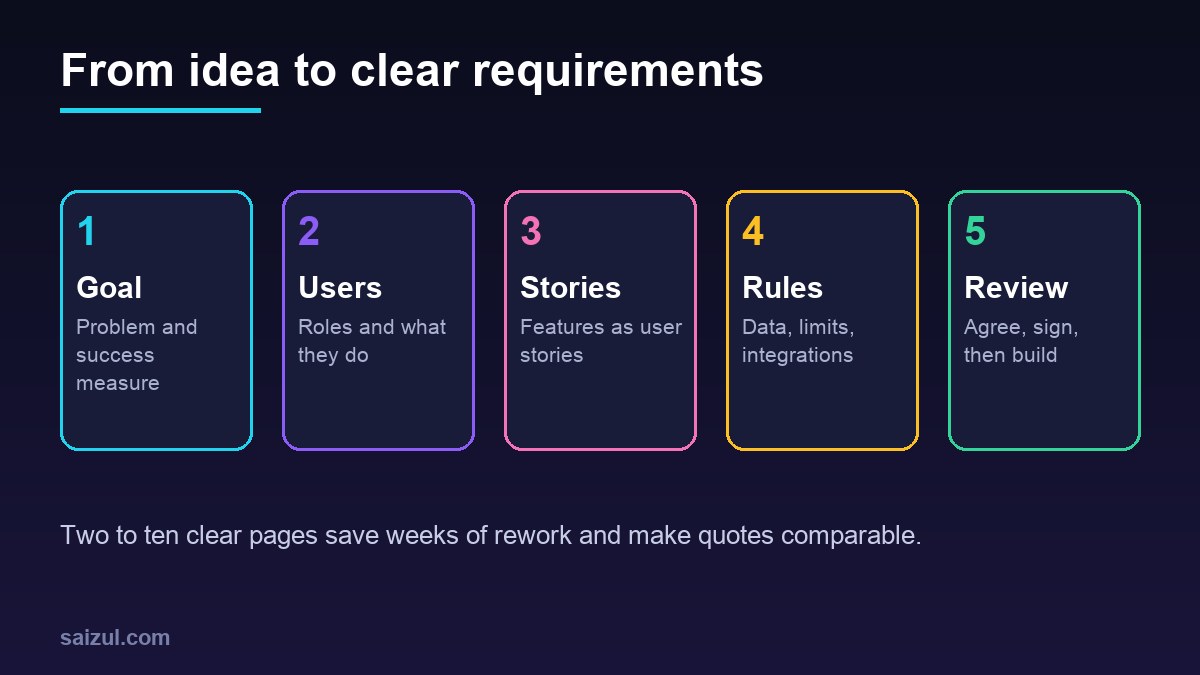
| 1. Background and goal | The business, the problem, what success looks like in numbers | Half a page |
| 2. Users and roles | Every type of user and what each can see and do | Half a page |
| 3. Current process | How the work is done today, with screenshots or sample files | Half to one page |
| 4. Features as user stories | What each user needs to do, with acceptance criteria | One to five pages |
| 5. Data and business rules | Main records, fields, calculations, approvals, limits | One page |
| 6. Integrations | Other systems to connect, with provider names | Short list |
| 7. Non-functional requirements | Speed, security, languages, devices, accessibility, backups | Half a page |
| 8. Out of scope and later | What is deliberately not in version one | Short list |
| 9. Constraints | Budget range, deadline, hosting, who owns the code | Short list |
Section 1 to 3: goal, users and the current process
Start with the business, not the software. A good goal statement names the problem and a measure:
“Our three branches record sales in separate spreadsheets. Stock counts are wrong every week, and the owner spends about a day each month combining reports. We want one system where all branches record sales and stock, and the owner sees a daily summary.”
Then list the users. For example: owner, branch manager, sales staff, accountant. For each, write one line about what they do and what they must not see, such as “sales staff cannot see purchase prices”.
Finally, describe today’s process. Attach real examples: a blank and a filled spreadsheet, a printed invoice, a screenshot of the WhatsApp messages used to place orders. Developers learn more from one real sample than from a paragraph of description.
Section 4: write features as user stories
A user story describes a feature from the point of view of the person using it. The common format is: As a [type of user], I need to [do something], so that [reason]. The GOV.UK Service Manual recommends this style and says each story should be small enough to deliver, with clear acceptance criteria (GOV.UK: Writing user stories). Atlassian’s guide also explains user stories as a way to describe features in terms of the value they give a user (Atlassian: User stories).
Example user stories with acceptance criteria
Story: As a branch manager, I need to record a stock transfer to another branch, so that both branches show the right stock.
- The manager selects products, quantities and the receiving branch.
- Stock is reduced at the sending branch immediately.
- The receiving branch sees the transfer as “in transit” and confirms receipt.
- Stock is added only after confirmation.
- The owner can see all transfers with dates and the names of both managers.
Story: As the owner, I need a daily sales summary on WhatsApp at 9pm, so that I know each branch’s sales without logging in.
- The message lists total sales, number of orders and top five products for each branch.
- It is sent only to the owner’s number.
- If a branch has no sales recorded, the message says so clearly.
Acceptance criteria are the most valuable lines in the whole document. They turn “stock transfer feature” into something that can be tested and signed off.
Prioritise every story
Mark each story as Must, Should or Later. Version one should contain only the Must stories. This one step often cuts the first budget by a third or more, and the Later list becomes your roadmap.
Section 5 and 6: data, business rules and integrations
List the main records the system holds, such as customers, products, orders, invoices and payments, with the important fields for each. Then write the rules in plain words:
- “An order above 50,000 taka needs manager approval.”
- “VAT is calculated per line at the product’s rate.”
- “A customer cannot be deleted if they have invoices; they can be marked inactive.”
- “Invoice numbers run in sequence per branch and cannot be reused.”
For integrations, name each system and what moves between them: “Send order confirmation by SMS through our current provider”, “Export daily sales to our accounting software”, “Accept bKash and card payments”. Note whether you already have accounts and API access, because getting approval from some providers takes time.
Section 7: non-functional requirements
These describe how well the system must work, not what it does. They are easy to forget and expensive to add later.
- Devices: desktop, mobile browser, Android app, iOS app.
- Languages: Bangla, English, or both, including number and date formats.
- Speed: for example, main screens load in under two seconds on a normal mobile connection.
- Users and volume: how many people log in at once, how many orders per day now and in three years.
- Security: login method, two-factor login for admins, audit log of changes. The OWASP Application Security Verification Standard is a useful checklist your developer can work from (OWASP ASVS).
- Accessibility: for customer-facing screens, aim to follow WCAG 2.2, the W3C guidelines for making web content accessible to people with disabilities (WCAG 2.2).
- Backups and recovery: how often data is backed up and how quickly it must be restored.
- Hosting and ownership: where it runs, and that you own the code, domain and server accounts.
Section 8 and 9: out of scope and constraints
Writing down what is not included is as important as what is. “No mobile app in version one”, “No payroll”, “Reports beyond the five listed are exported to a spreadsheet”. Then add your budget range, any hard deadline such as a sales season, and preferred hosting. Sharing a budget range is not a weakness; it lets a developer suggest what fits instead of guessing. My custom software vs SaaS guide helps if the budget looks too small for a full build.
How to use the document with developers
- Send the same document to every developer you ask for a quote.
- Ask them to list their questions and assumptions. Good developers will find gaps. Add the answers to the document.
- Ask for the quote broken down by story or module, so you can drop items to fit the budget.
- Attach the final version to the contract and agree how changes are handled.
- Keep it updated during the project. Each change request should edit the document.
For questions to ask and red flags during hiring, see my guides on how to hire a web developer and how to hire an AI automation developer.
Common mistakes in a software requirements document
- Describing the solution (“add a dropdown”) instead of the need (“choose the branch”).
- Vague words such as “fast”, “easy” or “modern” with no measure.
- Everything marked as Must.
- No acceptance criteria, so nobody can say when a feature is done.
- Forgetting roles and permissions until late in the build.
- Ignoring data migration from the old system.
- Writing 50 pages nobody reads. Short and specific beats long and general.
Software requirements document checklist
- Goal written with a measurable result.
- All user roles listed, with what each must not see.
- Current process described with real sample files.
- Features written as user stories with acceptance criteria.
- Every story marked Must, Should or Later.
- Main records, fields and business rules listed.
- Integrations named, with account and API status.
- Devices, languages, speed, security, accessibility and backups covered.
- Out-of-scope list written.
- Budget range, deadline, hosting and code ownership stated.
Need help with this on your own site or business?
I build and secure WordPress sites, web apps and AI automations end to end, in Bangla and English: a free discovery call, a written scope with a fixed quote, a focused first version, then testing, deployment and monitoring.
See the portfolio and the AI agent services, or tell me what you need.
FAQ
What is a software requirements document?
It is a written description of what a software system must do, who uses it, the business rules it follows and how well it must perform. It is also called an SRS or a requirements specification.
How long should a software requirements document be?
For most small and medium business projects, two to ten pages is enough if it is specific. Larger systems with many departments may need more, but clarity matters more than length.
Can I write a requirements document without technical knowledge?
Yes. Describe your business, users, current process and needs in plain language with real examples. A good developer will ask questions and help turn it into technical detail.
What is the difference between functional and non-functional requirements?
Functional requirements describe what the system does, such as recording a stock transfer. Non-functional requirements describe how well it does it, such as speed, security, languages and backups.
Should the developer write the requirements document for me?
Many developers offer a paid discovery phase to do this with you. That is often worth it. Either way, you should review and approve it, because you know the business best.
Sources

Md Saizul Amin
Digital Systems Strategist · AI Agent Developer · 9+ years in digital & ITMd Saizul Amin is a digital systems strategist and AI automation engineer from Dhaka, Bangladesh. With 9+ years across IT, web development and digital marketing, he writes practical guides on technology, business, education and online growth — and builds the same kinds of systems (AI agents, websites, SEO and ad campaigns) for clients in Bangladesh, the UK and the USA.
Specialist in
Credentials & experience
- 🎓B.Sc. in Computer Science & EngineeringBangladesh University of Business & Technology (BUBT), 2017–2021
- 🤖AI Automation Engineer · Web Developer · SEO SpecialistUnique Mark Limited, Birmingham UK — 2024 to present
- 🌱IT SpecialistGreen Fund Initiative Inc., USA — 2024 to present
- 🏥Junior IT Consultant — Ministry of Health (DGHS)Built the first national Shareable Health Record website; supported 6,000+ facilities
- 🧭Head of ITWEDO Bangladesh — led IT for 50+ staff, 2021–2023