
In this article
Business process automation means using software to run repeated steps of your work, such as copying data, sending updates or creating documents, so people only handle the parts that need judgement. The best way to start is to list your repeated tasks, score them on volume, time, errors and risk, map the top five step by step, and estimate the return with a simple formula before you build anything. This guide walks through each stage with a template you can copy.
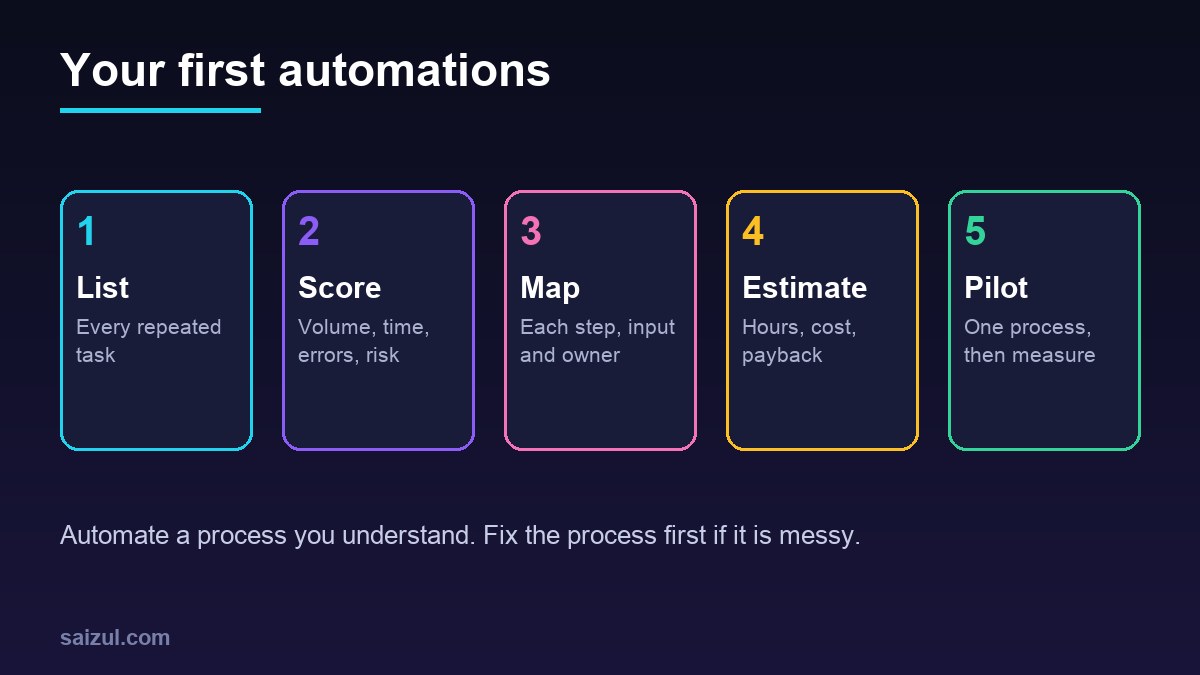
From my own work: When I start an automation project, I ask the team to keep a rough log for a week of the small tasks they repeat. The list is almost always longer than anyone expected, and the most valuable item is often something boring, like copying order details from one place to another, rather than the task the owner first had in mind.
If you want quick ideas first, see my list of AI automation workflows for small business. This guide is about method: how to choose and plan your own.
What is business process automation?
A business process is a repeated set of steps that turns an input into a result: an enquiry into a booked call, an order into a delivered parcel, an invoice into a recorded payment. Automation takes over steps that follow clear rules, using connections between your tools. Some automations now include AI for steps that involve reading free text, such as sorting emails by topic or pulling fields out of a PDF.
Automation is not the same as digitising. Moving a paper form to a Google Form is digitising. Having that form create a CRM record, notify the right person and send a confirmation is automation.
Step 1: List the repeated tasks in your business
Ask each person, or each department, to write down for one or two weeks every task they do more than once a week. Common examples:
- Sales: entering leads, sending quotes, follow-up reminders.
- Orders: copying orders from messages, creating courier bookings, sending tracking links.
- Finance: creating invoices, matching payments, chasing overdue invoices.
- Support: answering the same questions, logging complaints.
- Admin and HR: onboarding forms, leave requests, weekly reports.
- Marketing: posting content, collecting reviews, sending newsletters.
Step 2: Score each process to find the first five
Give each task a score from 1 to 5 on these questions:
| Factor | Question | High score means |
|---|---|---|
| Volume | How often does it happen? | Many times a day or week |
| Time | How long does each one take? | Several minutes or more |
| Rules | Does it follow clear rules? | Same steps nearly every time |
| Errors | Do mistakes happen and cost money? | Errors are common or expensive |
| Risk | How bad is it if automation fails? | Low harm, easy to fix (score high) |
Add the scores, sort the list and look at the top ten. From those, pick five that use tools you already have, and that do not depend on one another. Leave very sensitive processes, such as payments out of your account, for later.
Step 3: Map each process before you automate it
A process map shows every step, who does it, which tool is used and what decision is made. You can use sticky notes, a whiteboard or a simple diagram. If you want a standard notation, BPMN, Business Process Model and Notation, is the widely used standard for business process diagrams (OMG BPMN). For most small businesses, a simple list is enough:
- Trigger: what starts the process? A new form, a message, an order, a date.
- Inputs: what information is needed, and where does it come from?
- Steps: each action, in order, with the tool used.
- Decisions: where does someone choose between options, and on what basis?
- Exceptions: what happens when information is missing or something goes wrong?
- Output: what is the finished result, and who needs to know?
- Owner: who is responsible for the process?
Mapping often shows steps that are not needed at all. Remove those first. Automating a messy process just makes the mess faster.
Step 4: Estimate the ROI of business process automation
You do not need industry statistics. Use your own numbers:
Hours saved per month = (minutes per task × tasks per month × share automated) ÷ 60
Monthly value = (hours saved × hourly staff cost) + monthly cost of errors avoided
Payback in months = one-time setup cost ÷ (monthly value − monthly running cost)
“Share automated” is the part of the work the automation will really take over, because some cases will still need a person. Be conservative. Running cost includes tool subscriptions, hosting, AI usage and a little time to check the automation each month.
Write down the value you cannot easily price too: faster replies to customers, fewer late invoices, staff doing more useful work. These often matter more than the hours.
If the payback is long or the value is unclear, move to the next process on your list.
Step 5: Choose the right tools
- Built-in automation first. Your store, CRM, email platform and accounting software often have automation features already. Use them before adding another tool.
- Connector platforms such as n8n, Zapier and Make link many apps without full custom development. See my comparison of n8n vs Zapier vs Make.
- Self-hosted workflow tools such as n8n can run on your own server, which can help with cost at higher volumes and with control over data.
- AI steps for reading emails, documents or messages, inside a workflow with clear rules around them.
- Custom code when no tool fits, volumes are high or the logic is complex.
In n8n, a workflow is a set of connected nodes, and each run is recorded as an execution you can review (n8n workflows). Whatever tool you use, make sure you can see a history of runs and failures.
Step 6: Run a pilot and plan for failure
- Build the first process and run it alongside the manual process for a week or two. Compare results.
- Set up error alerts. n8n, for example, lets you set an error workflow for each workflow that runs when an execution fails, starting with an Error Trigger node (n8n error handling). Send those alerts to a person who will act on them.
- Write a short note for each automation: what it does, which accounts it uses, who owns it and how to switch it off.
- Measure the hours and errors after a month and compare with your estimate.
Examples of first processes that often score well
- Website and social enquiries saved to a CRM with an instant reply and a task for sales.
- New orders creating a courier booking and sending a tracking message.
- Invoices created from completed orders, with automatic payment reminders.
- A weekly sales and stock report sent every Monday morning.
- Welcome emails and onboarding steps for new customers. See email marketing automation.
Common mistakes
- Automating before mapping, and copying broken steps.
- Choosing the hardest process first.
- No error alerts, so failures go unnoticed for weeks.
- Automations built on one person’s personal accounts.
- No owner and no documentation.
- Estimating savings with someone else’s statistics instead of your own numbers.
Quick checklist
- A list of repeated tasks from every department.
- Each task scored on volume, time, rules, errors and risk.
- Top five chosen and mapped, with unnecessary steps removed.
- Hours saved, monthly value and payback estimated with your own numbers.
- Built-in features checked before adding tools.
- Pilot run alongside the manual process.
- Error alerts, an owner and a short note for each automation.
- Results measured after a month.
Need help with this on your own site or business?
I build and secure WordPress sites, web apps and AI automations end to end, in Bangla and English: a free discovery call, a written scope with a fixed quote, a focused first version, then testing, deployment and monitoring.
See the portfolio and the AI agent services, or tell me what you need.
FAQ
What is business process automation with an example?
It is software doing the repeated steps of a process. For example, when a customer places an order, the system books the courier, saves the tracking number and messages the customer, without anyone copying details by hand.
Which processes should I automate first?
Ones that happen often, take real time, follow clear rules and do little harm if something goes wrong. Order handling, lead capture, invoice reminders and weekly reports are common first choices.
How do I calculate the ROI of automation?
Work out the hours saved per month from your own task times and volumes, multiply by staff cost, add the cost of errors avoided, then compare that with the setup and running cost to find the payback period.
Do I need a developer for business process automation?
Simple automations can be built with connector tools by a careful non-developer. A developer helps when you need custom logic, self-hosting, AI steps, high volumes or reliable error handling.
Will automation replace my staff?
Usually it removes repeated copying and checking, so staff can spend more time on customers and decisions. Someone still needs to own each process and handle the exceptions.
Sources

Md Saizul Amin
Digital Systems Strategist · AI Agent Developer · 9+ years in digital & ITMd Saizul Amin is a digital systems strategist and AI automation engineer from Dhaka, Bangladesh. With 9+ years across IT, web development and digital marketing, he writes practical guides on technology, business, education and online growth — and builds the same kinds of systems (AI agents, websites, SEO and ad campaigns) for clients in Bangladesh, the UK and the USA.
Specialist in
Credentials & experience
- 🎓B.Sc. in Computer Science & EngineeringBangladesh University of Business & Technology (BUBT), 2017–2021
- 🤖AI Automation Engineer · Web Developer · SEO SpecialistUnique Mark Limited, Birmingham UK — 2024 to present
- 🌱IT SpecialistGreen Fund Initiative Inc., USA — 2024 to present
- 🏥Junior IT Consultant — Ministry of Health (DGHS)Built the first national Shareable Health Record website; supported 6,000+ facilities
- 🧭Head of ITWEDO Bangladesh — led IT for 50+ staff, 2021–2023