In this article
Every growing business reaches this point: the spreadsheet is breaking, three SaaS tools do not talk to each other, and someone asks, “should we just build our own?” Sometimes yes, often no. This guide gives you a way to decide, based on the systems I build and the ones I advise clients not to build.
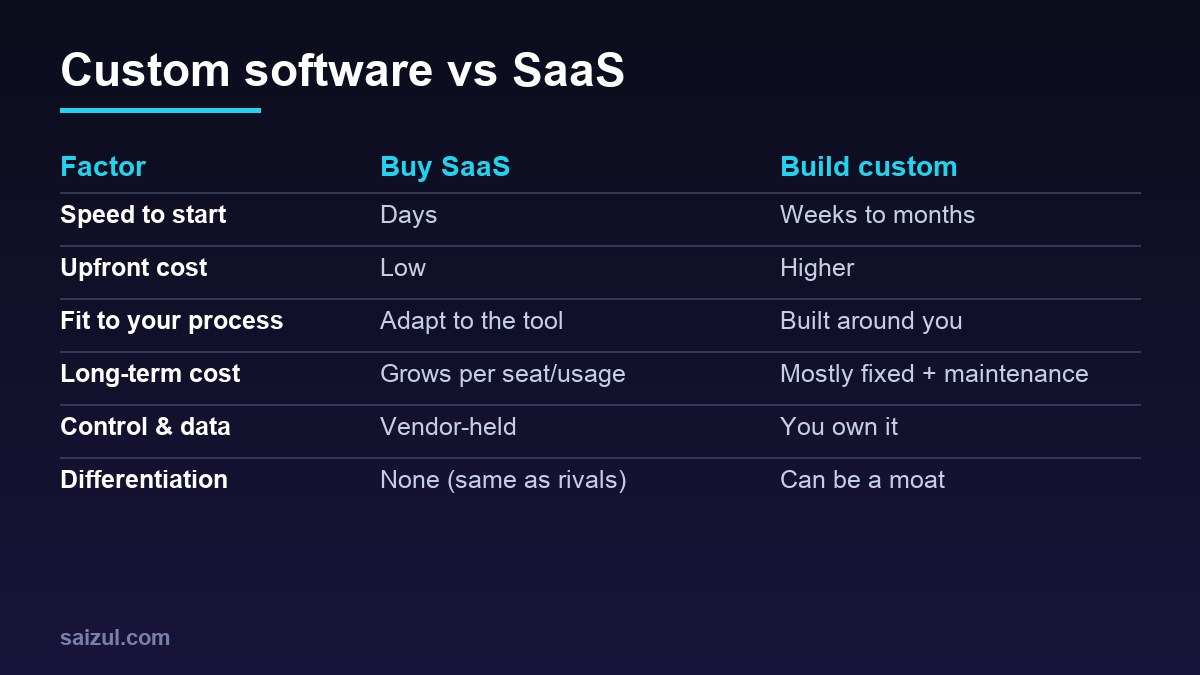
The default: buy SaaS first
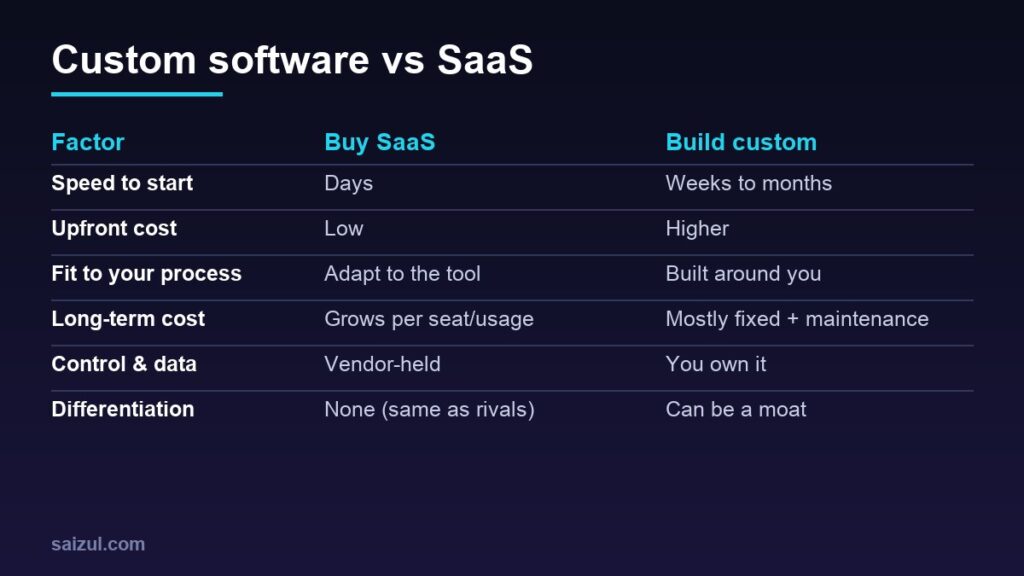
If a mature product does 80 percent of what you need, buy it. You get speed, ongoing development, security work and support for a predictable fee. Building something that already exists is rarely a good use of your money.
When building custom makes sense
- Your process is the advantage. If how you work is what customers pay for, forcing it into a generic tool erodes that edge.
- You are bending the tool. If you spend more time on workarounds, exports and duplicate entry than on the work itself.
- Costs scale badly. Per-seat or per-usage pricing that grows with every employee or customer.
- You need integration and automation across systems no vendor connects.
- Data control or compliance requires hosting and handling you decide.
- Product potential: the internal tool could become something you sell (ShobFree started as a product idea, not a purchase decision).
When not to build
- A solved, commodity problem (email, accounting basics, video calls).
- No one to own and maintain it. Software is never “done”.
- Unclear requirements; a prototype or a no-code workflow should come first.
- You cannot fund maintenance (typically a meaningful share of the build cost every year).
The best answer is often hybrid
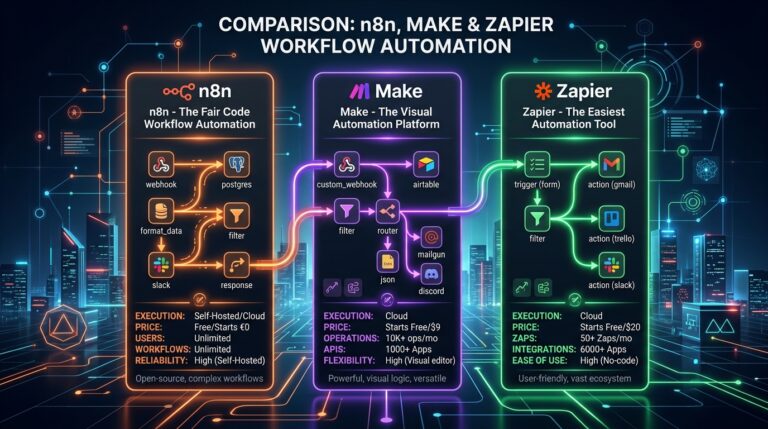
Keep SaaS for commodity functions and build a thin custom layer where you differ: dashboards over your data, automations between tools, a customer portal, an AI agent in front of your processes. Workflow platforms such as n8n (see n8n vs Zapier vs Make) are ideal glue and let you start small.
Think in total cost, not price
| Cost | SaaS | Custom |
|---|---|---|
| Initial | Setup and training | Discovery, design, build, testing |
| Recurring | Subscriptions that grow | Hosting, maintenance, improvements |
| Hidden | Workarounds, lock-in, migration | Key-person risk, technical debt |
Run the maths over three years. Include the staff time the current tool wastes.
Reduce the risk of building
- Write the problem and the success metric before the features.
- Prototype with the smallest version that proves value.
- Choose boring, well-supported technology and host it in a way you control (containers and a managed VPS are enough for most).
- Own the code, the data and the accounts; document everything.
- Plan maintenance and backups from day one.
Decision checklist
| Question | If yes… |
|---|---|
| Does a SaaS cover 80%+ of the need at a fair price? | Buy it |
| Is the process a competitive advantage? | Lean custom |
| Will per-seat costs balloon? | Evaluate custom or open-source |
| Do you have an owner for the software? | Required for custom |
| Can a workflow or no-code layer solve it first? | Start there |
Want something like this built for your business?
I design, build and deploy products and automations end to end: web apps and tool platforms, AI agents, workflow automation and the hosting behind them, in Bangla and English. The process is a free discovery call, a written scope and fixed quote, a focused first version, testing and deployment with monitoring.
See the ShobFree case study, the AI agent services and the portfolio, or tell me what you want to build.
FAQ
How much does custom software cost?
It depends entirely on scope. A focused internal tool is a small project; a full platform is much larger. Scope and a fixed quote come first.
Can I start with SaaS and move to custom later?
Yes. Choose tools with good export and APIs so migration stays possible.
Is open source a middle path?
Often. You get control and no per-seat fees, but you take on hosting and upkeep.
Sources

Md Saizul Amin
Digital Systems Strategist · AI Agent Developer · 9+ years in digital & ITMd Saizul Amin is a digital systems strategist and AI automation engineer from Dhaka, Bangladesh. With 9+ years across IT, web development and digital marketing, he writes practical guides on technology, business, education and online growth — and builds the same kinds of systems (AI agents, websites, SEO and ad campaigns) for clients in Bangladesh, the UK and the USA.
Specialist in
Credentials & experience
- 🎓B.Sc. in Computer Science & EngineeringBangladesh University of Business & Technology (BUBT), 2017–2021
- 🤖AI Automation Engineer · Web Developer · SEO SpecialistUnique Mark Limited, Birmingham UK — 2024 to present
- 🌱IT SpecialistGreen Fund Initiative Inc., USA — 2024 to present
- 🏥Junior IT Consultant — Ministry of Health (DGHS)Built the first national Shareable Health Record website; supported 6,000+ facilities
- 🧭Head of ITWEDO Bangladesh — led IT for 50+ staff, 2021–2023