In this article
Planning a mobile app for business starts with one question: what will customers or staff do in the app that they cannot do well on your website? If you have a clear answer, choose how to build it (native, cross-platform or a progressive web app), keep the first version small, set up the App Store and Google Play accounts early, and budget for maintenance from day one. This guide walks through each decision in plain English, explains the store rules that most often delay launches, and shows what drives the cost without inventing prices.
From my own work: When a business asks me for an app, I usually ask what the first hundred users will open it for every week. Sometimes the honest answer is that a fast mobile website or a WhatsApp flow does the job, and the app can wait. When there is a clear repeat use, such as reordering, booking or staff checklists, an app is often worth it.
Do you need a mobile app for business?
An app makes sense when people use it often and it does something a website does badly. Good reasons:
- Repeat use: customers reorder, book, track or check something every week.
- Device features: camera scanning, location, offline use, Bluetooth devices, reliable push notifications.
- Staff and field work: delivery riders, sales reps or technicians who need forms, photos and checklists on the go.
- Loyalty and accounts: points, saved addresses, order history and fast checkout for regular buyers.
Weak reasons are “competitors have one” or “it looks professional”. People install few new apps, so a one-time visitor will rarely download yours. If most of your customers buy once, put the effort into your website first; my guide on why website speed matters for sales is a good place to start.
Native vs cross-platform vs PWA: which should you choose?
Native apps
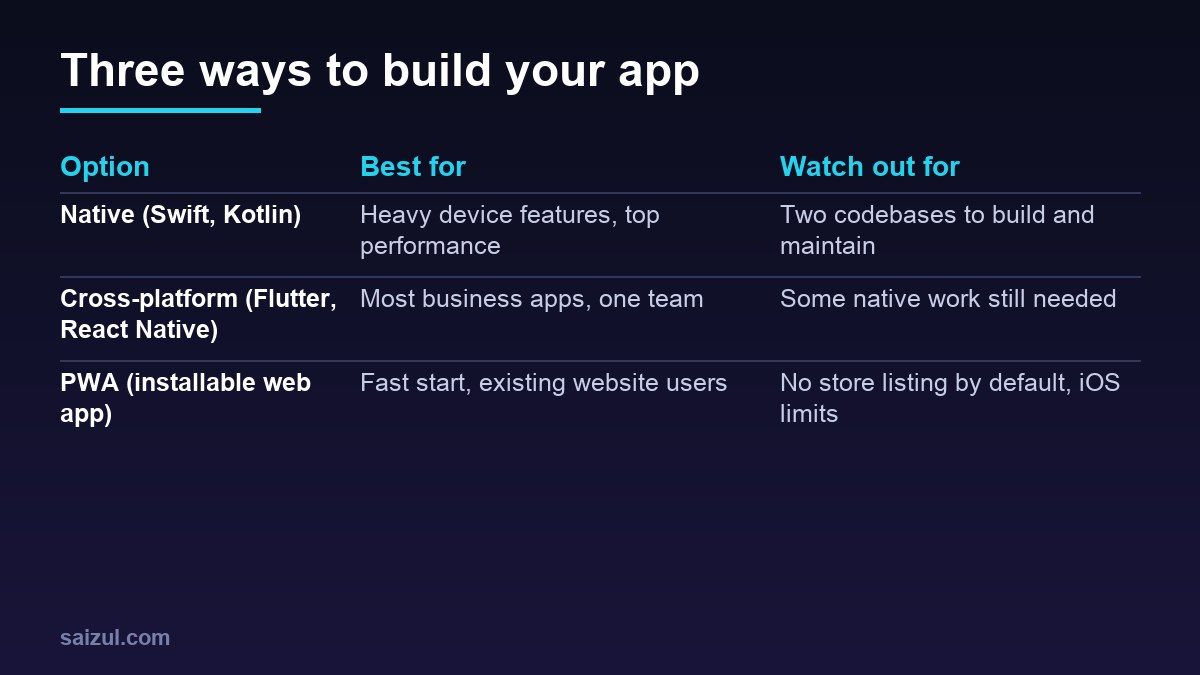
Built separately for iPhone (Swift) and Android (Kotlin). They give the best performance and full access to device features, but you build and maintain two codebases. Choose native for heavy graphics, complex device integration, or when one platform matters far more than the other.
Cross-platform apps
Built once with a framework such as Flutter or React Native and released to both stores. For most business apps (ordering, booking, accounts, dashboards, staff tools) this is the practical default: one team, one codebase, close to native quality. Some features still need small pieces of native code.
Progressive web apps (PWA)
A PWA is a website built so it can be installed on the home screen, work partly offline and feel like an app, from one web codebase. It is the fastest and cheapest route if you already have a good website, and updates go live without store review. The trade-offs: it is not listed in the app stores unless you wrap it, and some features, such as push notifications and background work, are more limited on iPhone than in a native app.
| Question | Native | Cross-platform | PWA |
|---|---|---|---|
| Codebases | Two | One | One (web) |
| In App Store and Google Play | Yes | Yes | Not by default |
| Device features | Full | Most | Limited, varies by browser |
| Updates | Through store review | Through store review | Instant |
| Typical fit | Demanding apps | Most business apps | First version, simple tools |
What should be in your app’s first version (MVP)?
An MVP (minimum viable product) is the smallest version that lets real users complete the main job. Write the main job in one sentence, for example “a regular customer can reorder and pay in under a minute”, then include only what that sentence needs.
- Usually in: sign-in, the one core flow, payment if it is part of that flow, basic notifications, a simple profile, analytics and crash reporting, account deletion.
- Usually later: chat, referral programs, multiple languages beyond your main two, complex filters, dark mode, social sharing, admin reports beyond the basics.
- Do not forget the back office: the admin panel where staff manage products, orders, bookings or users is often as much work as the app.
Plan payments early. In Bangladesh, that may mean bKash, Nagad or a gateway such as SSLCOMMERZ; see how to accept online payments in Bangladesh.
App Store and Google Play accounts and policies
Developer accounts
- Apple: the Apple Developer Program, which you can join as an individual or organisation, costs $99 per year according to Apple (Apple Developer Program). Enrol in your business’s name if the app represents the business.
- Google Play: Google lists a US$25 one-time registration fee and an identity verification step that may ask for a government ID and a card in your legal name (Play Console: Get started).
- Testing rule for new personal Play accounts: developers with personal accounts created after 13 November 2023 must run a closed test with at least 12 testers opted in for at least 14 days before applying for production access (Play Console: App testing requirements). Plan those two weeks into your timeline, or use an organisation account.
Store rules that often cause rejections
Apple’s App Store Review Guidelines are worth reading before you design anything (App Store Review Guidelines). A few points that matter for business apps:
- Not just a website in a wrapper: guideline 4.2 expects features and content beyond a repackaged website.
- Account deletion: if users can create an account, they must be able to delete it inside the app (5.1.1(v)).
- Payments: digital content and features unlocked in the app must use in-app purchase (3.1.1), while physical goods and services used outside the app must use other payment methods (3.1.3(e)).
- Working demo account: if the app has a login, reviewers need demo account details and a working back end (2.1).
- Privacy: both stores require a privacy policy and honest data disclosures. See how to write a privacy policy.
What drives the cost of a business app?
Instead of a price list, look at the factors that make one app cost several times more than another:
- Number of user types and screens: customer app, staff app and admin panel are three products.
- Integrations: payments, couriers, CRM, accounting, maps, SMS and existing databases.
- Real-time features: live tracking, chat and instant updates need more back-end work.
- Offline support: syncing data safely when the connection returns is complex.
- Design depth: a custom design system costs more than a clean standard interface.
- Platform choice: two native apps cost more than one cross-platform app.
- Security and compliance: health, finance or children’s data raise the bar.
For hiring and comparing quotes, the same principles as my guide on how to hire a web developer apply: a written brief, a fixed scope per milestone and ownership of the code.
Maintenance after launch
An app is never finished. Each year, iOS and Android release new versions, and the stores raise their minimum requirements; Google Play, for example, regularly raises the Android version new apps and updates must target. Budget for:
- Updates for new OS versions and store requirements.
- Bug fixes from crash reports and reviews.
- Server hosting, database backups and security updates.
- Renewing the Apple membership and keeping certificates valid.
- Small improvements based on how people actually use the app.
How to plan your app: step by step
- Write the main job in one sentence and list who uses the app.
- Check the alternatives: could a mobile website, PWA or WhatsApp flow do it for now?
- Choose the approach: native, cross-platform or PWA, based on features and budget.
- List MVP features and a separate “later” list.
- Sketch the main screens and test them with a few real users.
- Open store accounts early, in the business’s name, and plan the testing period.
- Build in milestones, with a working demo at each one.
- Launch, measure and improve with a maintenance plan in place.
Common mistakes
- Building an app for one-time customers who will never install it.
- An MVP with every idea in it, so launch takes far too long.
- Forgetting the admin panel and back end in the budget.
- Store accounts opened in a developer’s personal name.
- Ignoring store payment and account deletion rules until review.
- No budget for updates after launch.
Quick checklist
- A clear, repeated job the app does better than your website.
- Approach chosen: native, cross-platform or PWA, with reasons.
- MVP list and a “later” list agreed.
- Admin panel and back end included in scope.
- Payments planned to match store rules.
- Apple and Google accounts in the business’s name, testing period planned.
- Privacy policy, data disclosures and in-app account deletion ready.
- Analytics and crash reporting in the first release.
- Code, accounts and keys owned by the business.
- Yearly maintenance budget agreed.
Need help with this on your own site or business?
I build and secure WordPress sites, web apps and AI automations end to end, in Bangla and English: a free discovery call, a written scope with a fixed quote, a focused first version, then testing, deployment and monitoring.
See the portfolio and the AI agent services, or tell me what you need.
FAQ
Should I build a native app or a cross-platform app?
For most business apps, such as ordering, booking, accounts and staff tools, a cross-platform app built with Flutter or React Native is the practical choice. Choose native when you need heavy device features or the best possible performance.
Is a PWA enough instead of an app?
Often, for a first version or a simple tool, especially if you already have a good website. If you need a store listing, deep device features or reliable push notifications on iPhone, a store app is the safer choice.
How long does it take to build a business app?
It depends on the features, integrations and admin panel. A focused MVP with one core flow is much faster than a full product. Add time for store review and, for new personal Google Play accounts, a 14-day closed test.
How much does it cost to publish an app?
Apple lists the Apple Developer Program at $99 per year, and Google lists a US$25 one-time Play Console registration fee. Development, hosting and maintenance are separate and usually much larger.
Who should own the app store accounts?
Your business. Open both developer accounts in the business’s name and give your developer limited access, so you keep control of the app if you change developer later.
Sources

Md Saizul Amin
Digital Systems Strategist · AI Agent Developer · 9+ years in digital & ITMd Saizul Amin is a digital systems strategist and AI automation engineer from Dhaka, Bangladesh. With 9+ years across IT, web development and digital marketing, he writes practical guides on technology, business, education and online growth — and builds the same kinds of systems (AI agents, websites, SEO and ad campaigns) for clients in Bangladesh, the UK and the USA.
Specialist in
Credentials & experience
- 🎓B.Sc. in Computer Science & EngineeringBangladesh University of Business & Technology (BUBT), 2017–2021
- 🤖AI Automation Engineer · Web Developer · SEO SpecialistUnique Mark Limited, Birmingham UK — 2024 to present
- 🌱IT SpecialistGreen Fund Initiative Inc., USA — 2024 to present
- 🏥Junior IT Consultant — Ministry of Health (DGHS)Built the first national Shareable Health Record website; supported 6,000+ facilities
- 🧭Head of ITWEDO Bangladesh — led IT for 50+ staff, 2021–2023