In this article
CRM automation for small business means letting your customer system handle the repeated admin around each deal: saving every new lead, assigning it to the right person, reminding staff to follow up, sending quotes and creating the invoice when a deal is won. The best place to start is usually the gap where leads get lost, between the first enquiry and the first reply. This guide walks the full journey from lead capture to invoice, shows what to automate first, compares the common tools and lists the mistakes I see most often.
From my own work: When I look at a small business’s sales process, the leads are usually spread across a Facebook inbox, WhatsApp on two phones, an email account and a notebook. Before any clever automation, simply getting every enquiry into one list with an owner and a next step tends to make the biggest difference.
What does CRM automation for small business include?
A CRM (customer relationship management) system is a shared record of your contacts, companies, deals and conversations. On its own it is just a database that someone has to keep updated. CRM automation adds rules and workflows that update it for you and move work forward: when something happens, do this.
- When a website form is submitted, create a contact and a deal.
- When a deal is created, assign it and alert the owner.
- When no reply has been sent in a few hours, remind the owner.
- When a deal moves to “won”, create the invoice and the onboarding task.
Some of this is built into CRMs. The rest is usually done with an automation tool such as n8n, Make or Zapier, connecting the CRM to your forms, chat channels, email and accounting software. For a wider view of automation beyond sales, see my business process automation guide.
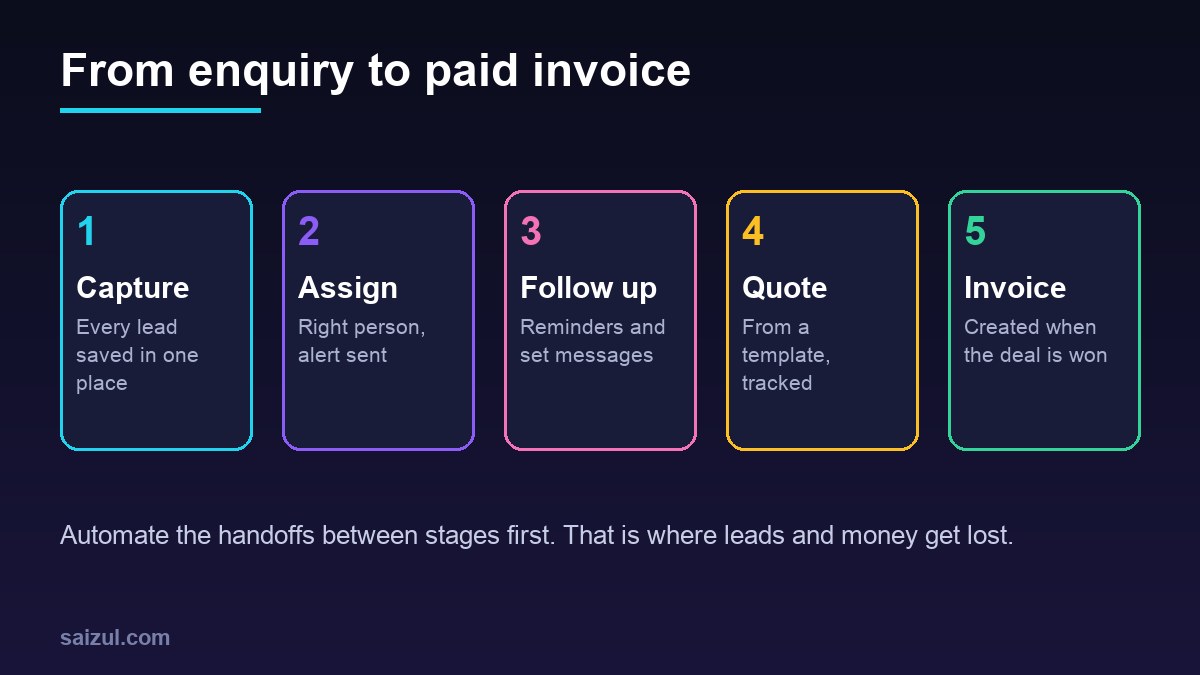
The journey from lead capture to invoice
| Stage | What usually goes wrong | What to automate |
|---|---|---|
| Capture | Leads stay in inboxes and phones | Every form, ad lead and chat creates a CRM record |
| Assign | Nobody knows whose lead it is | Rules by service, area or round robin, plus an alert |
| Follow up | Leads go cold after one message | Tasks, reminders and approved follow-up messages |
| Quote | Quotes typed from scratch, not tracked | Quote from a template, status tracked in the deal |
| Win or lose | No reason recorded | Required reason field, lost-deal follow-up later |
| Invoice and payment | Invoice forgotten or late | Invoice created on “won”, payment reminders |
| After the sale | No review request or repeat offer | Thank-you, review request, check-in reminder |
What should you automate first in your CRM?
Pick automations that happen often, follow clear rules and fail quietly today. In most small businesses, this order works well:
- Lead capture into one place. Website forms, Facebook and Instagram lead ads, WhatsApp and Messenger enquiries all create a contact and deal automatically, with the source recorded. My guide to an AI lead generation agent covers how to qualify these leads in conversation.
- Instant alert and owner. The right person is told within a minute, on the channel they actually watch.
- First reply. An immediate acknowledgement that confirms you received the enquiry and says what happens next.
- Follow-up reminders. A task when a deal sits in one stage too long, so nothing is forgotten.
- Quote and invoice creation. Templates filled from the deal record, sent for approval before they go out.
- Payment reminders and after-sale messages. Polite, approved wording, stopped automatically once paid.
Leave complex scoring, AI summaries and forecasting until the basics are reliable. If you want ideas for what comes next, my list of n8n workflow examples for business has several that start from a CRM.
Common CRM tools and how they connect
- HubSpot: popular, with a free tier and many integrations. Automation tools connect easily; for example, n8n’s HubSpot node can create and update contacts, companies, deals, tickets and engagements, and submit form data (n8n HubSpot node).
- Zoho CRM and Pipedrive: common choices for small sales teams, with pipelines and built-in workflow rules on paid plans.
- Odoo or similar suites: useful when you want CRM, invoicing and inventory in one system.
- A spreadsheet plus automation: a structured Google Sheet with n8n can be a fair first step for a very small team, as long as you plan to move to a real CRM as you grow.
- A custom CRM: worth it when your process is unusual, you need Bangla-first screens, or per-user pricing grows too high. See build vs buy software before deciding.
Check current plans and limits on each vendor’s own pricing page, because features that need automation are often on higher tiers.
How to automate follow-up without annoying people
Send from your own domain with authentication set up. Google’s sender guidelines require all senders to set up SPF or DKIM and keep spam rates low, and senders of more than 5,000 messages a day to Gmail accounts must also use DMARC and one-click unsubscribe for marketing messages (Google email sender guidelines). Even below that volume, following these rules helps your emails land in the inbox. For sequences, see my guide to email marketing automation.
Automated WhatsApp messages need the WhatsApp Business Platform, not the phone app, and permission from the person. The WhatsApp Business Messaging Policy says you may contact people only if they gave you their number and you received opt-in permission, and automated chats must offer clear ways to reach a person (WhatsApp Business Messaging Policy). My comparison of the WhatsApp Business API vs app explains the difference.
Good follow-up rules
- Stop the sequence as soon as the person replies, books or buys.
- Keep a human check on anything that mentions price changes or discounts.
- Space messages out, and give a clear way to say “not now”.
- Record every automated message on the contact’s timeline so staff see it.
How to set up CRM automation: step by step
Step 1: Draw your pipeline
Write the stages a deal really goes through, from new to paid, with a short definition for each. Five to seven stages is enough for most small businesses.
Step 2: Clean and define your fields
Decide the fields every deal needs: source, service, value, owner, next step date. Use drop-down choices instead of free text where possible, so automation can rely on them.
Step 3: Connect your lead sources
Connect each form, ad and chat channel, and match new leads to existing contacts by phone or email to avoid duplicates.
Step 4: Add alerts, tasks and the first reply
Start with the automations that stop leads being forgotten. Test with real examples from each source.
Step 5: Add quotes, invoices and reminders
Connect your accounting or invoicing tool. Keep an approval step before anything with money goes out.
Step 6: Watch for failures
Automations break quietly when a password changes or an app updates. In n8n, an error workflow that starts with the Error Trigger node runs whenever a linked workflow fails, so you can send yourself an alert (n8n error handling). Review a weekly report of new leads, overdue tasks and failed runs.
Common CRM automation mistakes
- Automating a messy process instead of fixing it first.
- Too many stages and fields, so staff stop updating the CRM.
- Duplicate contacts because sources are not matched by phone or email.
- Follow-up sequences that keep running after the customer replied.
- Sending WhatsApp or SMS without permission.
- No alerts when an automation fails.
- Everything built in one person’s account, with no documentation.
Quick checklist
- Pipeline stages written down with clear definitions.
- Required fields defined, with drop-down values.
- Every lead source creates a CRM record with the source recorded.
- Duplicates matched by phone or email.
- Owner assigned and alerted within minutes.
- Follow-up stops on reply, booking or purchase.
- Email authenticated; WhatsApp only with opt-in.
- Quote and invoice templates with an approval step.
- Error alerts and a weekly pipeline report.
- Accounts and workflows owned by the business, documented.
Need help with this on your own site or business?
I build and secure WordPress sites, web apps and AI automations end to end, in Bangla and English: a free discovery call, a written scope with a fixed quote, a focused first version, then testing, deployment and monitoring.
See the portfolio and the AI agent services, or tell me what you need.
FAQ
What is the best CRM for a small business?
There is no single best one. Choose the CRM your team will actually update, that connects to your lead sources and invoicing tool, and whose automation features are on a plan you can afford. Try two options with your real pipeline before committing.
Can I automate my CRM without coding?
Yes. Built-in workflow rules and tools such as n8n, Make or Zapier let you connect forms, chat channels and invoicing without writing code. Complex logic or custom systems may still need a developer.
What should I automate first in a CRM?
Start with lead capture into one place, instant alerts to the right owner and a first reply. These stop leads being lost. Then add follow-up reminders, quotes, invoices and payment reminders.
Can a CRM send WhatsApp messages automatically?
Yes, through the WhatsApp Business Platform and a provider or integration, but only to people who opted in, mostly with approved templates outside the 24-hour customer service window.
How do I stop duplicate contacts in my CRM?
Match new leads against existing contacts by phone number and email before creating a record, store phone numbers in one format with the country code, and run a regular duplicate check.
Sources

Md Saizul Amin
Digital Systems Strategist · AI Agent Developer · 9+ years in digital & ITMd Saizul Amin is a digital systems strategist and AI automation engineer from Dhaka, Bangladesh. With 9+ years across IT, web development and digital marketing, he writes practical guides on technology, business, education and online growth — and builds the same kinds of systems (AI agents, websites, SEO and ad campaigns) for clients in Bangladesh, the UK and the USA.
Specialist in
Credentials & experience
- 🎓B.Sc. in Computer Science & EngineeringBangladesh University of Business & Technology (BUBT), 2017–2021
- 🤖AI Automation Engineer · Web Developer · SEO SpecialistUnique Mark Limited, Birmingham UK — 2024 to present
- 🌱IT SpecialistGreen Fund Initiative Inc., USA — 2024 to present
- 🏥Junior IT Consultant — Ministry of Health (DGHS)Built the first national Shareable Health Record website; supported 6,000+ facilities
- 🧭Head of ITWEDO Bangladesh — led IT for 50+ staff, 2021–2023