In this article
A slow website does not show up as a line in your accounts, which is why it is easy to ignore. But every customer who taps an ad, waits, and goes back is a sale you paid for and did not get. Most of your buyers are on phones, often on mobile data, and they do not wait patiently. The good news is that the biggest speed problems on small business sites are usually simple ones, and many can be fixed without rebuilding the site.
From my own work: When I audit slow business sites, the cause is usually not one dramatic problem. It is a pile of small ones: full-size photos, a slider on the home page, a chat widget, several tracking scripts and a few plugins nobody remembers installing.
Why speed affects sales
Speed shapes the first impression before anyone reads a word. Google’s web.dev team collects published case studies on this (Why speed matters). A few examples from that page:
- Vodafone reported that a 31% improvement in Largest Contentful Paint increased sales by 8%.
- redBus reported a 7% increase in sales after improving Interaction to Next Paint.
- The BBC found it lost an additional 10% of users for every extra second its site took to load.
These are large companies, and your numbers will be different. The direction is consistent, though: when pages load and respond faster, more visitors stay and more of them buy. Speed also costs you twice when you run ads, because you pay for the click whether or not the page loads in time. For the rest of the page design, see landing page best practices.
Measure speed the right way
Google measures real-world experience with three Core Web Vitals (Web Vitals):
| Metric | What it measures | Good |
|---|---|---|
| Largest Contentful Paint (LCP) | How quickly the main content appears | 2.5 seconds or less |
| Interaction to Next Paint (INP) | How quickly the page responds to taps and clicks | 200 milliseconds or less |
| Cumulative Layout Shift (CLS) | How much the layout jumps while loading | 0.1 or less |
A page passes when it meets these targets for at least 75% of visits, measured separately on mobile and desktop.
Open PageSpeed Insights and enter your home page and your most important product or service page. The report has two parts (About PageSpeed Insights):
- Real-user data at the top comes from Chrome users over the previous 28 days. This is what your visitors actually experienced. Small sites may not have enough traffic, in which case it is missing or shown for the whole site.
- Lab data below comes from a single simulated test. It is useful for finding causes, but one run can differ from the next.
Do not chase a perfect score of 100. Aim for the real-user metrics to be in the green, and use the lab suggestions as a to-do list. Search Console also has a Core Web Vitals report that groups your slow pages; my Search Console guide explains the setup.
What owners can do
You do not need to understand the code to make most of these decisions. Many are about removing things.
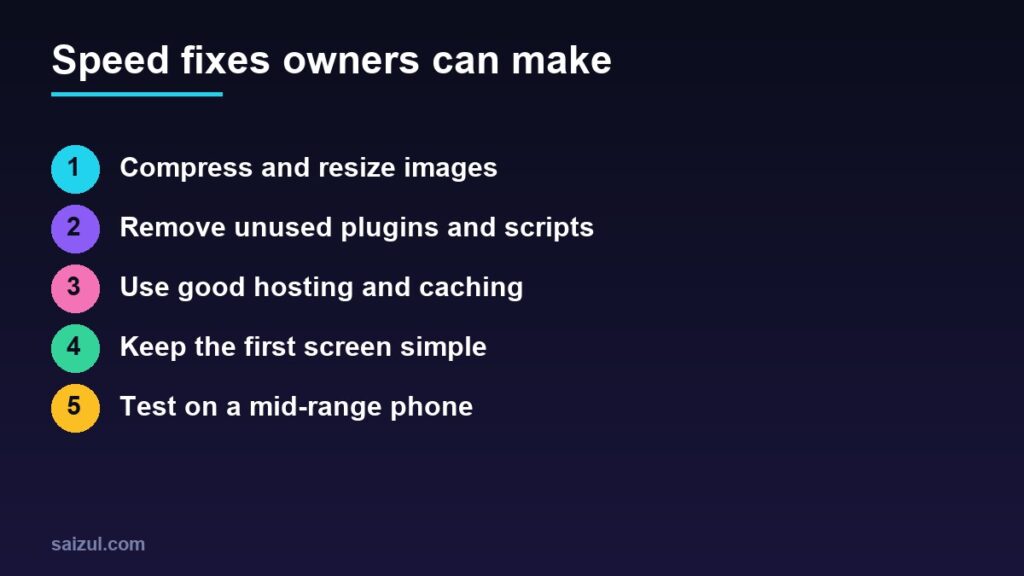
1. Fix images first
Photos uploaded straight from a phone are often several megabytes each. Resize them to the size they are displayed at, compress them and use WebP. This alone often makes the largest difference on product and home pages.
2. Remove what you do not use
- Delete inactive plugins and replace several small ones with one that does the job.
- Review third-party scripts: chat widgets, pop-ups, heatmaps, old tracking tags. Keep only those you actually use. Each one adds work the phone must do before the page responds.
- Replace a home page slider with one strong image and a clear button.
3. Get the basics of hosting and caching right
Cheap overcrowded hosting makes every page slow, however well it is built. Choose hosting with servers near your customers and enough resources (see how to choose web hosting), turn on page caching and consider a CDN. For WordPress, my WordPress speed guide covers the settings.
4. Keep the first screen simple
- Use one or two web fonts, not five.
- Give images and banners fixed sizes so the layout does not jump.
- Avoid large video backgrounds on mobile.
5. Test like your customers
Open your site on a mid-range Android phone using mobile data, not on office Wi-Fi with a new laptop. Tap through the path a buyer takes: ad, product, cart, checkout. Note every point where you wait.
What to ask your developer
- Which three issues hurt LCP and INP on our key pages, and what will each fix change?
- Which plugins and scripts can we remove?
- Is page caching active, and are images served in modern formats at the right size?
- Can you test on a staging copy before changing the live site?
Quick checklist
- PageSpeed Insights run on the home page and top product or service pages, mobile first.
- Real-user Core Web Vitals checked, not only the lab score.
- Images resized, compressed and in WebP.
- Unused plugins, widgets and tracking tags removed.
- Page caching on, hosting suitable for your traffic.
- Slider and heavy video removed from the first screen.
- Full purchase path tested on a mid-range phone on mobile data.
Need help with this on your own site or business?
I build and secure WordPress sites, web apps and AI automations end to end, in Bangla and English: a free discovery call, a written scope with a fixed quote, a focused first version, then testing, deployment and monitoring.
See the portfolio and the AI agent services, or tell me what you need.
FAQ
What is a good page load time?
Use Core Web Vitals as the target: main content visible in 2.5 seconds or less, responses to taps within 200 milliseconds and almost no layout shift, for at least 75% of visits.
Does website speed affect Google rankings?
Google says page experience, including Core Web Vitals, aligns with what its ranking systems reward, but relevance and content quality matter more. Speed mainly helps visitors stay and buy.
Why is my PageSpeed score different every time?
The lab score comes from a single simulated test, so it varies between runs. Rely on the real-user data at the top of the report for decisions.
Will a caching plugin fix everything?
No. Caching helps the server respond faster, but heavy images, too many scripts and a slow theme still need to be fixed.
Do I need to rebuild my site to make it fast?
Usually not. Image fixes, plugin and script cleanup, caching and better hosting solve most problems on small business sites.
Sources

Md Saizul Amin
Digital Systems Strategist · AI Agent Developer · 9+ years in digital & ITMd Saizul Amin is a digital systems strategist and AI automation engineer from Dhaka, Bangladesh. With 9+ years across IT, web development and digital marketing, he writes practical guides on technology, business, education and online growth — and builds the same kinds of systems (AI agents, websites, SEO and ad campaigns) for clients in Bangladesh, the UK and the USA.
Specialist in
Credentials & experience
- 🎓B.Sc. in Computer Science & EngineeringBangladesh University of Business & Technology (BUBT), 2017–2021
- 🤖AI Automation Engineer · Web Developer · SEO SpecialistUnique Mark Limited, Birmingham UK — 2024 to present
- 🌱IT SpecialistGreen Fund Initiative Inc., USA — 2024 to present
- 🏥Junior IT Consultant — Ministry of Health (DGHS)Built the first national Shareable Health Record website; supported 6,000+ facilities
- 🧭Head of ITWEDO Bangladesh — led IT for 50+ staff, 2021–2023