In this article
Almost every business website collects personal data, even a simple one. A contact form collects names and phone numbers. An online store collects addresses and order history. Google Analytics, the Meta Pixel and embedded videos collect information about visitors in the background. A privacy policy tells people what you collect, why, who sees it and what they can do about it. It is often a legal requirement, it is required by tools you probably use, and customers increasingly look for it before they share their details. This guide explains what to include and how to write it in plain language.
Please note: this is general information to help you prepare, not legal advice. Privacy law depends on where you are and where your customers are, so have a qualified lawyer review your final policy, especially if you sell abroad or handle sensitive data.
From my own work: When I build or audit small business sites, I often find a privacy policy copied from another website, naming tools the business does not use and missing the ones it does. The useful work is not the wording; it is first listing what the site actually collects.
Why a small business needs one
- The law, in many places. Rules such as the EU and UK GDPR require clear information for people whose data you collect. Bangladesh issued a Personal Data Protection Ordinance in late 2025, and the details of how and when it applies are still being worked out, so check the current position.
- The tools you use. Google Analytics requires sites to disclose that they use it and how it collects and processes data (privacy disclosures policy). Advertising platforms, payment gateways and app stores have similar requirements.
- Trust. A customer about to enter an address and phone number is reassured by a clear, honest page.
Step 1: List the data your website actually collects
Do this before writing a single sentence. Walk through your site and your back office:
| Where | Typical data |
|---|---|
| Contact and quote forms | Name, phone, email, message |
| Checkout and accounts | Name, address, phone, order history, payment status |
| Newsletter sign-up | Email address, consent record |
| Analytics and ad pixels | Device, pages viewed, approximate location, cookie IDs |
| Chat widgets and WhatsApp buttons | Messages, phone number |
| Embeds and plugins | Data collected by YouTube, maps, reviews or security tools |
Check your plugins, your tracking setup and any third-party scripts. If you installed tracking with my GA4 setup guide or the Meta Pixel and Conversions API guide, include both.
Step 2: Cover what a privacy notice should include
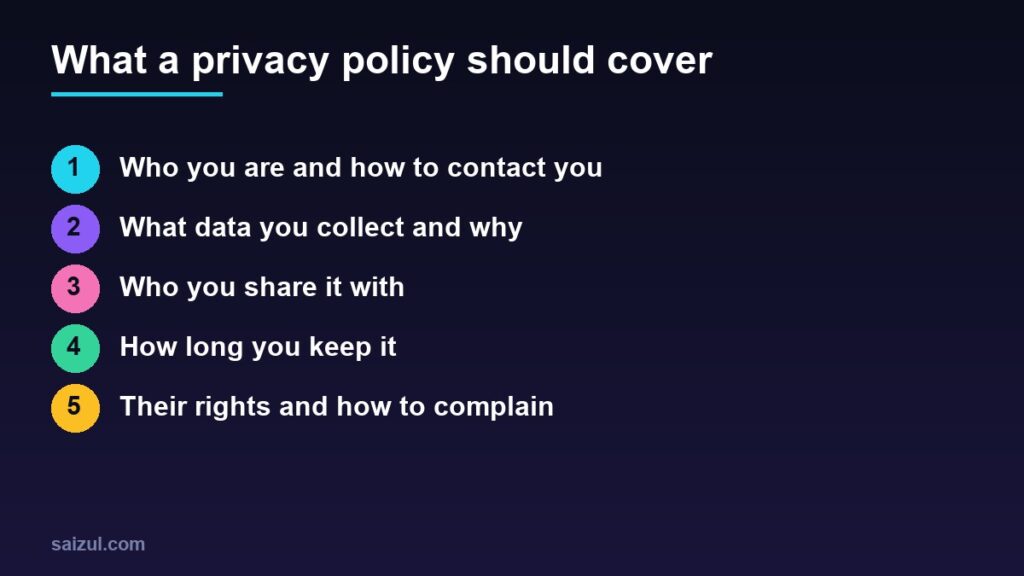
The UK Information Commissioner’s Office gives a clear list for small organisations (how to write a privacy notice). Even if you are not in the UK, it is a sensible structure:
- Who you are and how to contact you about privacy.
- What personal data you collect, and where you got it if not from the person.
- Why you use it, and under GDPR-style laws, your lawful basis, such as consent, a contract or legitimate interests.
- Who you share it with: couriers, payment providers, email platforms, hosting, analytics and ad platforms.
- How long you keep it before deleting it securely.
- People’s rights, such as access, correction, deletion and withdrawing consent.
- How to complain, to you first and to the relevant regulator where one exists.
Add a few practical sections that customers often look for: how you protect data, whether you transfer it to other countries (most hosting and email tools store data abroad), cookies, and the date of the last update.
Step 3: Explain analytics, pixels and cookies honestly
- Name the tools: for example Google Analytics, Meta Pixel, your email platform.
- Say what they do in plain words: “to understand which pages are visited”, “to measure and show our ads on Facebook and Instagram”.
- Explain how people can opt out, such as browser settings or your cookie banner.
- If you have visitors from the EU, UK or Switzerland, Google’s EU user consent policy requires you to obtain legally valid consent for cookies where required and for ad personalisation, keep records of that consent and identify each party that uses the data. In practice that means a proper consent banner, not only a policy page.
Step 4: Write it in plain language
- Use short sentences and headings that match the questions above.
- Write in the language your customers use. If your site is in Bangla and English, offer the policy in both.
- Say “we” and “you”, not “the data controller” and “the data subject”, unless your lawyer insists.
- Be specific. “We share your name, phone and address with our courier to deliver your order” is better than “we may share data with partners”.
- Do not promise what you do not do, such as “we never share your data” when you use a courier.
For an example of the layout, you can look at this site’s own privacy policy.
Step 5: Publish it where people will find it
- Link it in the footer of every page.
- Link it next to forms, checkout and newsletter sign-ups, where people decide to share data.
- On WordPress, set it under Settings → Privacy so themes and plugins can link to it automatically.
- Keep it separate from your terms and your returns policy; each answers a different question. See returns and refunds policy for that one.
Make your practice match the policy
A policy only helps if the business does what it says.
- Collect only what you need. A contact form rarely needs a date of birth.
- Limit who can see order and customer data, and remove access when staff leave.
- Delete old data you no longer need, on the schedule you stated.
- Add a clear opt-in for marketing emails and messages; see email marketing automation.
- Keep plugins and the site updated, with backups. My website maintenance checklist covers this.
Common mistakes
- Copying another company’s policy with their name or tools still in it.
- Leaving out analytics, pixels or chat widgets.
- Hiding the policy where nobody can find it.
- Never updating it after adding a new tool or a new country.
- Relying on an online generator without checking the output against your real setup.
Quick checklist
- A list of all data your site and tools collect.
- Who you are, what you collect, why, who you share it with, how long you keep it.
- People’s rights and how to contact you or complain.
- Analytics, pixels and cookies named and explained.
- Linked in the footer and next to every form.
- A last-updated date and a review whenever tools change.
- Final version reviewed by a lawyer.
Need help with this on your own site or business?
I build and secure WordPress sites, web apps and AI automations end to end, in Bangla and English: a free discovery call, a written scope with a fixed quote, a focused first version, then testing, deployment and monitoring.
See the portfolio and the AI agent services, or tell me what you need.
FAQ
Does a small business website legally need a privacy policy?
In many countries, yes, if you collect personal data, and almost every site does through forms or analytics. Tools such as Google Analytics also require a disclosure. Check your local law with a lawyer.
Can I use a free privacy policy generator?
It can be a starting point, but check every line against what your site actually collects, remove anything that does not apply, and have the final version reviewed.
Is a privacy policy the same as a cookie banner?
No. The policy explains how you handle data. A cookie banner asks for consent where the law requires it before certain cookies are set. Many sites need both.
How often should I update my privacy policy?
Whenever you add a new tool, form or market, and at least once a year. Show the date of the last update on the page.
Sources

Md Saizul Amin
Digital Systems Strategist · AI Agent Developer · 9+ years in digital & ITMd Saizul Amin is a digital systems strategist and AI automation engineer from Dhaka, Bangladesh. With 9+ years across IT, web development and digital marketing, he writes practical guides on technology, business, education and online growth — and builds the same kinds of systems (AI agents, websites, SEO and ad campaigns) for clients in Bangladesh, the UK and the USA.
Specialist in
Credentials & experience
- 🎓B.Sc. in Computer Science & EngineeringBangladesh University of Business & Technology (BUBT), 2017–2021
- 🤖AI Automation Engineer · Web Developer · SEO SpecialistUnique Mark Limited, Birmingham UK — 2024 to present
- 🌱IT SpecialistGreen Fund Initiative Inc., USA — 2024 to present
- 🏥Junior IT Consultant — Ministry of Health (DGHS)Built the first national Shareable Health Record website; supported 6,000+ facilities
- 🧭Head of ITWEDO Bangladesh — led IT for 50+ staff, 2021–2023