In this article
When someone searches for a restaurant, clinic, tailor or repair shop, the star rating and the latest reviews are often the first things they read. Reviews help people trust you, and they give Google more information about your business. The good news is that most happy customers will leave a review if you ask clearly and make it easy. The bad news is that many businesses try shortcuts that break Google’s rules. This guide shows the safe way.
From my own work: When I set up Google Business Profiles for local businesses, the owners who get steady reviews are rarely the ones with a clever trick. They are the ones who ask every satisfied customer, in the same simple way, with the link ready to share.
Why Google reviews matter
- Trust: a new customer cannot test your service before paying, so they borrow the experience of earlier customers.
- Visibility: reviews are part of how your profile appears in Maps and local results. They work together with the basics covered in my local SEO guide.
- Feedback: reviews tell you what customers actually notice, good and bad.
Before asking for reviews, make sure your profile is verified and complete. Only verified businesses can reply to reviews. If yours is not ready, start with Google Business Profile optimization.
Know the rules first
Google treats fake engagement as a policy violation (prohibited and restricted content). In plain language, these are not allowed:
- Paying for reviews or offering discounts, gifts or free products in exchange for them.
- Writing reviews for your own business, or asking staff to do it.
- Posting negative reviews about a competitor.
- “Review gating”: asking only happy customers to review, or steering unhappy ones away from Google.
- Buying reviews in bulk from agencies or freelancers.
Breaking these rules can lead to reviews being removed and restrictions on your profile. It is also simply dishonest to future customers. What is allowed, and encouraged by Google itself, is reminding customers to leave an honest review and making it easy to do so (tips to get more reviews).
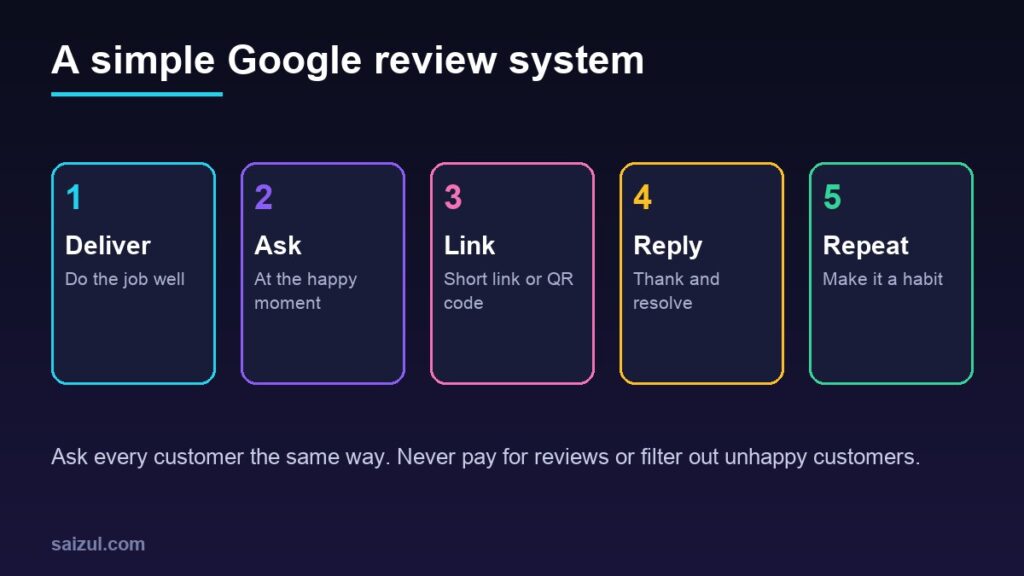
Step 1: Get your review link and QR code
- Search for your business name on Google while signed in to the account that manages the profile.
- In the profile controls, open the reviews section and choose the option to get more reviews (the wording changes from time to time, for example “Ask for reviews”).
- Copy the short link. Google also offers a QR code for the same link.
Save the link somewhere your whole team can reach it: a pinned note, a WhatsApp quick reply, your email signature.
Step 2: Ask at the right moment
The best moment is right after the customer has seen the value: the food was good, the AC is working again, the parcel arrived as described. A request one month later feels like homework.
| Business type | Good moment | How to ask |
|---|---|---|
| Restaurant, salon, clinic | At payment, when the customer is satisfied | QR code at the counter or on the bill |
| Repair, home service | After the job is checked and working | WhatsApp or SMS with the link |
| Online store | A few days after delivery | Message with the link, card in the parcel |
| Freelancer, agency | At project handover | Email with the link |
Step 3: Use simple wording
You do not need a long message. Keep it personal and neutral. Ask for an honest review, not a five-star review.
- In person: “If you were happy with the service, a Google review would really help us. You can scan this code.”
- WhatsApp or SMS: “Thank you for choosing us. Could you share your honest experience on Google? It takes one minute: [your link]”
- Email: a short thank-you, one sentence asking for feedback and one clear button with the link.
If you message customers on WhatsApp, do it with their consent and from a proper business account. I explain the setup in WhatsApp Business for e-commerce.
Step 4: Put the link where customers already look
- A printed QR code at the counter, on the table, on the invoice or on the packaging.
- A “Review us on Google” link in the website footer and on the thank-you page.
- Your email signature and the automatic delivery confirmation message.
- A short reminder in staff training, so asking becomes part of closing a sale.
Step 5: Reply to every review
You can reply from the same profile controls (manage customer reviews). Replies are public, so write them for future customers as much as for the reviewer.
- Positive review: thank the person by name and mention something specific about the visit or order.
- Negative review: stay calm, apologise where it is fair, explain briefly and invite them to contact you directly. Never argue, and never share private details about the customer.
- Be quick: a reply within a few days shows the business is active.
What to do about fake or abusive reviews
You cannot delete a review just because you disagree with it. You can report reviews that break Google’s policies, such as spam, off-topic content, hate speech or reviews from people who were never customers. Use the flag option next to the review in your profile, then wait for Google to assess it. In the meantime, post a short, polite reply saying you have no record of the experience and asking the reviewer to contact you. Readers notice the tone.
Common mistakes
- Asking for reviews in one big burst instead of a few every week.
- Setting up a tablet in the shop so every review comes from one device and location.
- Copy-pasting the same reply under every review.
- Ignoring the complaints. A pattern in negative reviews usually points to a real problem you can fix.
Need help with this on your own site or business?
I build and secure WordPress sites, web apps and AI automations end to end, in Bangla and English: a free discovery call, a written scope with a fixed quote, a focused first version, then testing, deployment and monitoring.
See the portfolio and the AI agent services, or tell me what you need.
FAQ
Can I offer a discount in exchange for a Google review?
No. Google’s policies do not allow incentives for reviews. You can ask for an honest review, but you cannot reward it.
How many Google reviews do I need?
There is no fixed number. Aim for a steady flow of recent, genuine reviews rather than a one-time target; fresh reviews matter to customers who are comparing businesses.
Can I remove a bad review?
Only Google can remove it, and only if it breaks their policies. Report it if it does; otherwise reply professionally and fix the issue behind it.
Sources

Md Saizul Amin
Digital Systems Strategist · AI Agent Developer · 9+ years in digital & ITMd Saizul Amin is a digital systems strategist and AI automation engineer from Dhaka, Bangladesh. With 9+ years across IT, web development and digital marketing, he writes practical guides on technology, business, education and online growth — and builds the same kinds of systems (AI agents, websites, SEO and ad campaigns) for clients in Bangladesh, the UK and the USA.
Specialist in
Credentials & experience
- 🎓B.Sc. in Computer Science & EngineeringBangladesh University of Business & Technology (BUBT), 2017–2021
- 🤖AI Automation Engineer · Web Developer · SEO SpecialistUnique Mark Limited, Birmingham UK — 2024 to present
- 🌱IT SpecialistGreen Fund Initiative Inc., USA — 2024 to present
- 🏥Junior IT Consultant — Ministry of Health (DGHS)Built the first national Shareable Health Record website; supported 6,000+ facilities
- 🧭Head of ITWEDO Bangladesh — led IT for 50+ staff, 2021–2023