In this article
Appointment booking automation lets customers book, confirm, reschedule and get reminders for appointments without a staff member handling every message or call. For clinics, salons, consultants, tutors, repair services and other appointment-based businesses, it usually means three things: an online booking page that only shows free slots, instant confirmations, and reminders on WhatsApp, SMS or email that reduce no-shows. This guide explains how each part works, how AI can answer booking questions in chat, how to handle deposits and cancellations, and which numbers show whether it is working.
From my own work: When I look at how a service business handles bookings today, the problem is rarely the calendar itself. It is the back-and-forth: a customer asks for a time on WhatsApp, staff check a paper diary, reply an hour later, and the customer has already booked somewhere else. Cutting that delay is often worth more than any advanced feature.
If most of your bookings come through WhatsApp, my guides to a WhatsApp AI agent for business and WhatsApp Business API vs the app explain what each option can automate. This article covers the full booking journey across channels.
Who benefits most from appointment booking automation?
- Clinics and dental practices: many short appointments, several doctors, high cost of no-shows.
- Salons, spas and barbers: different services with different lengths and staff.
- Consultants, lawyers and accountants: paid calls or meetings, often online.
- Tutors and training centres: recurring weekly sessions.
- Repair, cleaning and home services: visits in time windows and service areas.
- Showrooms and property viewings: booked visits with a sales person.
The common pattern: time is the product. An empty slot cannot be sold later, so every no-show or slow reply costs money.
The parts of an appointment booking system
| Part | What it does | Simple option | Custom option |
|---|---|---|---|
| Booking page | Shows services, staff and free slots | Hosted booking tool | Booking page on your own site, linked to your system |
| Calendar | Single source of truth for availability | Shared Google or Outlook calendars | Own database with staff schedules, rooms and equipment |
| Confirmations and reminders | Messages at booking and before the visit | Built-in email or SMS | WhatsApp templates, SMS and email from a workflow |
| Chat replies | Answers questions and books in chat | Saved replies | AI assistant that checks slots and books |
| Payments | Deposits or full prepayment | Payment link | Integrated gateway with automatic refunds or credits |
| Records | Customer history and notes | Spreadsheet | CRM or clinic system |
Many small businesses start with a hosted booking tool and add automation around it. A custom build makes sense when you have rules a hosted tool cannot handle, such as rooms plus staff plus equipment, multi-branch scheduling, or a link to an existing patient or customer system.
Calendar sync and double-booking rules
The booking system must know when each person is free. Most systems sync with Google Calendar or Microsoft calendars. Google’s Calendar API lets software read and create events and check free and busy times (Google Calendar API), which is how a booking page avoids offering a slot that is already taken.
Write these rules before you build:
- Length of each service, plus buffer time for cleaning or travel.
- Which staff can do which service.
- Working hours, breaks, holidays, and how far ahead people can book.
- Minimum notice, for example no same-day bookings after 2pm.
- Maximum bookings per day for each staff member.
- What happens if staff add a personal event: it should block the slot.
Reminders that reduce no-shows
Reminders are the part with the clearest return. A typical pattern:
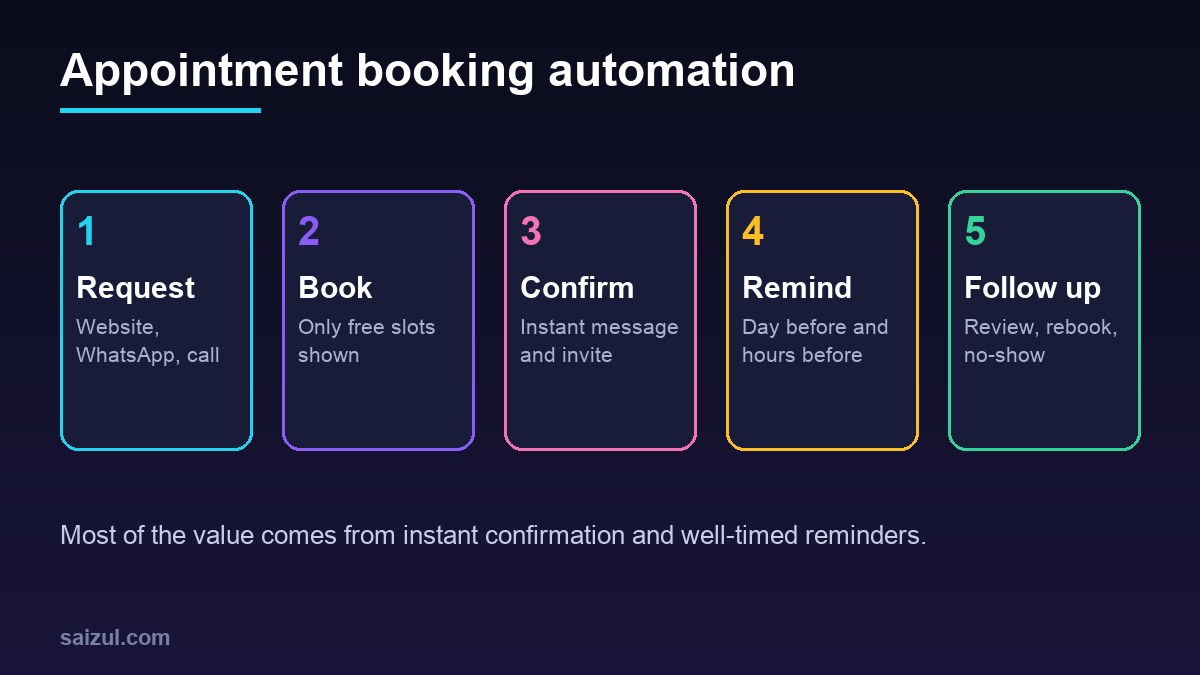
- Instant confirmation with date, time, address or meeting link, and how to reschedule.
- Reminder the day before, with a one-tap way to confirm or reschedule.
- Reminder two to three hours before for same-day visits.
- Follow-up after the visit: thanks, aftercare notes, a review request or a rebooking link.
- No-show message: a polite note with a link to rebook.
Scheduled messages are simple to run in a workflow tool. For example, n8n’s Schedule Trigger node starts a workflow at fixed intervals or times (n8n Schedule Trigger), so a workflow can check tomorrow’s bookings every evening and send reminders.
WhatsApp reminder rules
WhatsApp is often the channel customers actually read in Bangladesh and many other countries, but it has rules. Through the WhatsApp Business Platform, messages you start outside a recent customer conversation must use pre-approved message templates (WhatsApp message templates). The WhatsApp Business Messaging Policy also requires that people have agreed to receive messages from you and lets them opt out (WhatsApp Business Messaging Policy). Ask for consent on the booking form, keep reminders useful rather than promotional, and offer SMS or email as a fallback.
How AI helps with booking
An AI assistant on WhatsApp, Messenger or your website can handle the questions that come before a booking: prices, which service to choose, location, parking, what to bring. A more capable agent can also check real availability and make the booking through the same system your staff use.
- Good tasks for AI: answering common questions from your approved content, suggesting free slots, booking and rescheduling, collecting details before the visit.
- Hand to a person: medical or legal questions, complaints, refunds, unusual requests, upset customers.
- Keep it honest: tell customers they are talking to an assistant, and make it easy to reach a person.
If many bookings still come by phone, my guide to an AI voice agent for business calls explains what phone automation can and cannot do.
Deposits, cancellations and rescheduling
- Cancellation policy: state it on the booking page and in the confirmation, for example free changes up to 24 hours before.
- Deposits: for long or high-value appointments, take a deposit or prepayment through a payment link or gateway. Keep it reasonable and explain whether it is refundable or kept as credit.
- Self-service rescheduling: a link in every message lets customers move a booking without calling, which frees the slot for someone else.
- Waitlist: when a slot is freed, offer it automatically to people waiting for that day.
Privacy and data
Booking data can be sensitive, especially for health services. Collect only what you need for the appointment. Under the GDPR, processing personal data needs a lawful basis, such as consent or what is necessary for a contract the person asked for (GDPR Article 6). Do not put diagnosis details in reminder messages, since phone screens show previews. Limit who can see notes, and check where your booking tool stores data.
What to measure
| Metric | How to calculate | Why it matters |
|---|---|---|
| No-show rate | No-shows divided by booked appointments | Main reason to add reminders |
| Online booking share | Online bookings divided by all bookings | Shows how much staff time is freed |
| Time to confirm | Time from request to confirmed slot | Slow replies lose customers |
| Slot fill rate | Booked hours divided by available hours | Shows real capacity use |
| Rebooking rate | Customers who book again within a set period | Shows retention |
Measure for four weeks before launch so you have a baseline, then compare. After-visit messages are also a good moment to ask for reviews; my guide on how to get more Google reviews covers that, and connecting bookings to your CRM automation keeps customer history in one place.
What booking automation costs
Costs depend on how much is ready-made. These are rough 2026 estimates, not quotes:
- Hosted booking tool: many charge a monthly fee per staff member or location, from free basic plans to a few tens of US dollars per user per month.
- Messaging: SMS and WhatsApp template messages are usually billed per message or per conversation, at rates that differ by country. Check your provider’s current price list.
- Automation around a hosted tool: reminders, CRM sync and reports in a workflow tool often take a few days to a couple of weeks of setup.
- Custom booking system: with staff, rooms, branches, payments and an admin panel, budgets commonly start in the low thousands of US dollars and rise with complexity.
Compare this with the value of the appointments you lose each month to no-shows and slow replies. For most busy service businesses, a few recovered appointments a week cover the running cost.
How to set up appointment booking automation: step by step
- List services, durations, staff and working hours.
- Write booking, cancellation and deposit rules.
- Choose a hosted tool or a custom build based on your rules.
- Connect staff calendars and test double-booking.
- Write confirmation and reminder messages; get WhatsApp templates approved.
- Add the booking link to your website, Google Business Profile, WhatsApp and social pages.
- Add AI chat replies only after the basic flow works.
- Train staff to use the same system for walk-ins and phone bookings.
- Track the numbers weekly and adjust reminder timing.
Quick checklist
- Services, durations and buffers defined.
- One calendar per staff member, synced and tested.
- Confirmation sent instantly with a reschedule link.
- Reminders the day before and hours before.
- Consent captured for WhatsApp and SMS.
- Cancellation and deposit policy visible.
- No sensitive details in message previews.
- Staff use the system for every booking, not a side diary.
- Baseline no-show rate recorded.
Need help with this on your own site or business?
I build and secure WordPress sites, web apps and AI automations end to end, in Bangla and English: a free discovery call, a written scope with a fixed quote, a focused first version, then testing, deployment and monitoring.
See the portfolio and the AI agent services, or tell me what you need.
FAQ
Do appointment reminders really reduce no-shows?
Reminders help many people remember and give them an easy way to reschedule instead of simply not coming. The effect varies by business, so record your no-show rate before launch and compare it after a few weeks.
Can customers book appointments through WhatsApp automatically?
Yes. With the WhatsApp Business Platform, an assistant can show free slots, take a booking and send confirmations. Messages you start later, such as reminders, need approved templates and customer consent.
Should I use a ready-made booking tool or custom software?
Start with a ready-made tool if your rules are simple. Choose a custom system when you need rules it cannot handle, such as rooms plus staff plus equipment, several branches or a link to an existing customer system.
How far in advance should reminders be sent?
A common pattern is one reminder the day before and another two to three hours before the visit. Test the timing with your own customers and adjust.
Can AI book appointments without staff?
An AI assistant can book standard appointments when it is connected to your real availability and rules. Keep a clear handover to staff for unusual requests, complaints and sensitive questions.
Sources

Md Saizul Amin
Digital Systems Strategist · AI Agent Developer · 9+ years in digital & ITMd Saizul Amin is a digital systems strategist and AI automation engineer from Dhaka, Bangladesh. With 9+ years across IT, web development and digital marketing, he writes practical guides on technology, business, education and online growth — and builds the same kinds of systems (AI agents, websites, SEO and ad campaigns) for clients in Bangladesh, the UK and the USA.
Specialist in
Credentials & experience
- 🎓B.Sc. in Computer Science & EngineeringBangladesh University of Business & Technology (BUBT), 2017–2021
- 🤖AI Automation Engineer · Web Developer · SEO SpecialistUnique Mark Limited, Birmingham UK — 2024 to present
- 🌱IT SpecialistGreen Fund Initiative Inc., USA — 2024 to present
- 🏥Junior IT Consultant — Ministry of Health (DGHS)Built the first national Shareable Health Record website; supported 6,000+ facilities
- 🧭Head of ITWEDO Bangladesh — led IT for 50+ staff, 2021–2023