In this article
An AI chatbot for website visitors answers questions in plain language, at any hour, using your own pages, policies and product details as its source. A good one handles the repeated questions about services, prices, delivery and booking, says clearly when it does not know, and passes the conversation to a person with the details already collected. This guide explains what it can answer, how it learns from your content, how handover and privacy should work, and how to measure whether it is actually helping.
From my own work: When I add a chatbot to a client’s site, most of the work is not the chat window. It is collecting the real questions customers ask, finding where the answers are written down, and noticing that some answers are not written down anywhere yet. Fixing that content usually improves the site for human visitors too.
If you mainly talk to customers on WhatsApp or Facebook, a chatbot there may matter more than one on your site. See my guides to a WhatsApp AI chatbot and Messenger automation. This article is about the chat window on your own website.
What can an AI chatbot for website visitors answer?
A website chatbot is strongest on questions that are frequent, have a written answer, and do not need a decision from a manager. Typical examples:
- Services and products: what you offer, who it is for, what is included, sizes, features and differences between options.
- Prices and packages: published prices, what affects a quote, and what information you need to give one.
- Process: how ordering, booking or a project works, step by step, and how long each step usually takes.
- Policies: delivery areas, payment methods, returns, warranty, cancellation.
- Practical details: opening hours, location, contact options, documents to bring.
- Lead questions: asking a visitor what they need, their timeline and contact details, then passing that to sales.
It should not be the one deciding on refunds, discounts, complaints, legal or medical questions, or anything where a wrong answer costs money or trust. For those, its job is to collect the facts and hand over.
How does a website chatbot learn from your content?
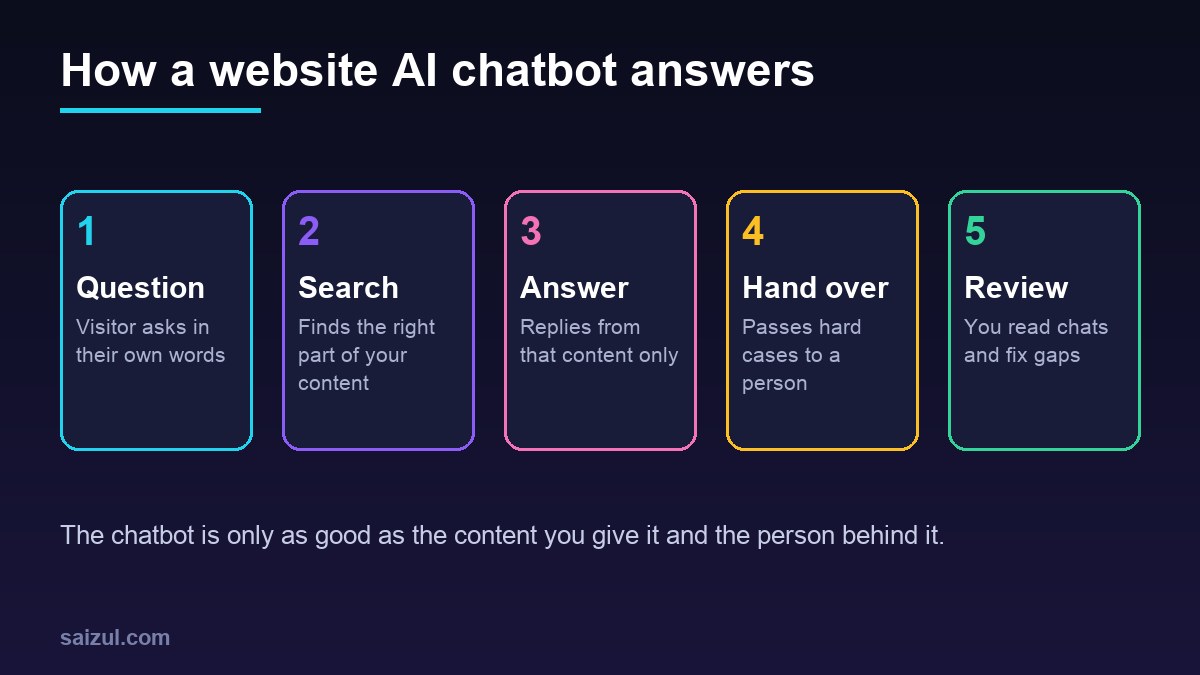
A chatbot does not “read your site once and remember it”. Most business chatbots use a method called retrieval-augmented generation, or RAG. In plain words, it works like a careful new staff member with a good filing cabinet:
- Collect: you choose the sources, such as service pages, FAQ, policy pages, price lists and product data.
- Split and index: the content is cut into small sections and stored in a searchable index, often a vector database that finds text by meaning, not only by exact words.
- Search: when a visitor asks a question, the system finds the few sections most related to it.
- Answer: the language model writes a reply using only those sections, ideally with a link to the page it came from.
- Refuse or hand over: if nothing relevant is found, it should say so and offer a person, instead of guessing.
Because answers come from your content each time, you update the chatbot by updating the content and re-indexing it. You do not need to retrain a model. My longer guide, RAG explained: an AI chatbot that answers from your own documents, goes deeper into accuracy and when RAG is the wrong tool.
What content should you give it?
- Pages that are current and that you would be happy to show a customer word for word.
- A clear FAQ written in the way customers actually ask, including Bangla and English versions if you serve both.
- Policies with dates, so you know which version it is using.
- Not internal notes, staff chats, customer records or anything private. If it is in the index, assume it can appear in an answer.
When should the chatbot hand over to a person?
A chatbot without a clear way to reach a person frustrates people quickly. Decide the handover rules before you build:
- Always hand over for complaints, refunds, payment problems, angry messages and sensitive topics.
- Hand over when unsure: no matching content, the same question asked twice, or the visitor types “human”, “agent” or similar.
- Hand over for sales-ready leads: someone asking for a quote or a call should reach a person fast.
How the handover works matters as much as when. Good options are a live chat inbox where staff take over the same conversation, a message to WhatsApp or email with a summary, or a booking link. Tell the visitor what will happen next and roughly when, especially outside working hours. My guide to customer service response times and reply templates helps you set realistic promises.
Privacy, security and being honest that it is a bot
- Say it is an assistant. Visitors should know they are talking to software. In the EU, the AI Act’s transparency rules say people should be made aware when they interact with a machine such as a chatbot, and the European Commission says these rules come into effect in August 2026 (European Commission: AI Act). Even if you do not serve EU visitors, it is simply good practice.
- Collect only what you need. A name and a phone number or email for follow-up is usually enough. Do not ask for card numbers, passwords or national ID details in the chat.
- Check where conversations go. Know which AI provider processes the messages, where logs are stored, for how long, and who can read them. Mention this in your privacy policy.
- Expect manipulation. Some visitors will try to make the bot ignore its instructions or reveal hidden information. OWASP lists prompt injection, sensitive information disclosure and system prompt leakage among the top risks for LLM applications (OWASP Top 10 for LLM Applications). Keep secrets out of the instructions and give the chatbot read-only access unless an action is truly needed.
- Limit cost abuse. Put rate limits on the chat so a script cannot run up your AI bill. OWASP calls this unbounded consumption.
How to add an AI chatbot to your website: step by step
Step 1: Collect your top questions
Go through your inbox, WhatsApp, Messenger and call notes for the last few months. List the questions that come up again and again, with the answer your best staff member gives.
Step 2: Fix and publish the answers
If an answer only lives in someone’s head, write it into an FAQ or service page. This step alone often reduces the questions you receive.
Step 3: Choose the build
You can use a hosted chatbot product, or build your own with a workflow tool and an AI model. For example, n8n’s Chat Trigger node has an embedded mode that works with n8n’s chat widget or your own interface, plus an allowed-origins setting and options to load the previous session from memory (n8n Chat Trigger node). A custom build costs more upfront but lets you connect your own systems, such as bookings or order status. My AI agent cost guide explains what drives the budget.
Step 4: Write the instructions
Tell it who it is, which topics it covers, the tone, the languages, when to hand over and what it must never do. Keep it short and specific.
Step 5: Test with real questions before launch
Run a set of real past questions, including tricky and off-topic ones, and mark each answer as right, wrong, or should have handed over. Fix the content or instructions and test again.
Step 6: Launch, then read the chats
For the first weeks, read conversations every day. Each wrong or missing answer is a content gap to fix.
How to measure an AI chatbot for your website
“People are using it” is not a result. Measure what changed for the business. In Google Analytics 4, an event measures a specific interaction on your site, and a key event is one that matters particularly to your business (Google Analytics: About events). Send chatbot actions, such as chat opened, lead submitted or handover requested, as events so you can compare them with the rest of your site.
| Measure | What it tells you | Where to get it |
|---|---|---|
| Resolved without a person | How much repeated work it takes off staff | Chat logs, tagged by outcome |
| Handover rate and reasons | Content gaps and topics it should not touch | Chat logs |
| Wrong answers found in review | Accuracy and risk | Weekly manual review of a sample |
| Leads and bookings from chat | Sales value | Analytics key events, CRM source field |
| Time to first reply | Speed customers feel | Chat tool or inbox reports |
| Questions to staff on other channels | Whether it reduces workload overall | Compare with weeks before launch |
Common mistakes
- Pointing the chatbot at the whole site, including old pages and outdated prices.
- No handover, so visitors get stuck in a loop.
- Hiding that it is a bot, or giving it a fake human name and photo.
- Letting it promise discounts or delivery dates it cannot keep.
- Launching without testing on real questions.
- Never reading the chats after launch.
- A pop-up that opens on every page and covers the content, especially on mobile.
Quick checklist
- Top customer questions collected, with approved answers.
- Missing answers written into FAQ or service pages.
- Only current, public content in the knowledge source.
- Clear handover rules and a named person or inbox behind them.
- Visitors told it is an assistant, with a way to reach a person.
- No sensitive data requested in chat; logs and provider terms checked.
- Rate limits and read-only access by default.
- Tested on real past questions before launch.
- Chat events tracked in analytics and leads tagged in your CRM.
- Daily review at first, then weekly.
Need help with this on your own site or business?
I build and secure WordPress sites, web apps and AI automations end to end, in Bangla and English: a free discovery call, a written scope with a fixed quote, a focused first version, then testing, deployment and monitoring.
See the portfolio and the AI agent services, or tell me what you need.
FAQ
Can an AI chatbot answer from my own website content?
Yes. Most business chatbots use RAG: your pages and documents are indexed, the chatbot searches them for each question and answers from what it finds. When you update the content and re-index it, the answers change too.
Can a website chatbot reply in Bangla?
Current language models can read and write Bangla and mixed Bangla and English. Quality depends on the model and on your content, so give it Bangla versions of key answers and test with real customer messages.
Will a chatbot hurt my website speed or SEO?
It can slow pages if the script is heavy and loads immediately. Load the chat widget after the main content, keep it from covering the page on mobile, and check your page speed before and after.
What happens when the chatbot does not know the answer?
A well-built chatbot says it is not sure and offers a person, through live chat, WhatsApp, email or a booking link. Each of these cases is also a sign of content you should add.
How do I know if my website chatbot is working?
Track how many questions it resolves without a person, how many leads or bookings start in chat, why it hands over, and how many wrong answers you find in a weekly review. Compare with the weeks before launch.
Sources

Md Saizul Amin
Digital Systems Strategist · AI Agent Developer · 9+ years in digital & ITMd Saizul Amin is a digital systems strategist and AI automation engineer from Dhaka, Bangladesh. With 9+ years across IT, web development and digital marketing, he writes practical guides on technology, business, education and online growth — and builds the same kinds of systems (AI agents, websites, SEO and ad campaigns) for clients in Bangladesh, the UK and the USA.
Specialist in
Credentials & experience
- 🎓B.Sc. in Computer Science & EngineeringBangladesh University of Business & Technology (BUBT), 2017–2021
- 🤖AI Automation Engineer · Web Developer · SEO SpecialistUnique Mark Limited, Birmingham UK — 2024 to present
- 🌱IT SpecialistGreen Fund Initiative Inc., USA — 2024 to present
- 🏥Junior IT Consultant — Ministry of Health (DGHS)Built the first national Shareable Health Record website; supported 6,000+ facilities
- 🧭Head of ITWEDO Bangladesh — led IT for 50+ staff, 2021–2023