In this article
HR and payroll automation means letting software collect attendance, track leave, apply your salary rules and produce payslips and bank payment files, so the owner or accountant no longer rebuilds the same spreadsheet every month. For a business with 10 to 300 staff, the monthly payroll often takes days of copying punch-in times, checking leave forms, adding overtime and fixing formula mistakes. This guide explains what to automate first, how the pieces connect, where a person must still approve, when ready-made payroll software is enough and when a custom system makes sense, with estimated costs and a rollout checklist.
From my own work: When I look at a small company’s payroll, the slow part is rarely the salary formula itself. It is the chasing: missing punch records, leave approved on WhatsApp but never written down, and late-joining staff whose first month is calculated by hand. Fixing where the data comes from usually saves more time than any clever calculation.
If you are still deciding whether to buy a tool or build one, read build vs buy software first. For a wider view of where automation fits across departments, see AI agent for small business.
What HR and payroll automation covers
HR and payroll are usually treated as one job in a small business, but they are made of several smaller processes. Each one can be automated on its own, and they become much more useful once they share the same employee records.
| Process | Manual today | Automated version |
|---|---|---|
| Employee records | Files, spreadsheets, scattered documents | One profile per person with contract, salary, bank details and documents |
| Attendance | Paper register or device export copied by hand | Fingerprint, face, card or mobile check-in synced daily |
| Leave | Verbal or chat approval, balances in a notebook | Request form, manager approval, live balance per leave type |
| Overtime and shifts | Calculated at month end from memory | Shift rules applied to each day’s attendance |
| Salary calculation | Spreadsheet with fragile formulas | Rules engine for basic, allowances, deductions, advances and bonus |
| Payslips | Typed or printed one by one | PDF payslips sent by email or shown in an employee portal |
| Bank payment | Typing amounts into internet banking | Bank upload file or payment list for approval |
| Reports | Built when the accountant asks | Monthly cost by branch, department and pay component |
What to automate first
Do not try to automate everything in one project. The order below works for most small businesses because each step makes the next one more accurate.
- Clean employee master data. One record per person with joining date, designation, department, branch, salary structure and bank details. Every later step reads from here.
- Attendance capture. If you already have a fingerprint or face device, most can export logs or connect over a network. If staff work in the field, a mobile check-in with location can work, but tell staff clearly what is recorded and why.
- Leave requests and balances. A simple form, an approval step and an automatic balance removes most month-end arguments.
- Salary rules. Write your rules down in plain language first: how late arrival is treated, how overtime is paid, how unpaid leave is deducted, how a mid-month joiner is calculated.
- Payslips and bank file. Once the calculation is trusted, generating payslips and the payment list is quick.
- Reports and alerts. Monthly salary cost, overtime trends, absent-without-leave alerts. My guide on automated business reporting shows how to send these on a schedule.
Write your payroll rules before any software
Most failed payroll projects fail because the rules were never agreed. Before you talk to a vendor or developer, fill in a one-page rules sheet like this:
- Working days and hours per branch or shift, and weekly holidays.
- Grace time for late arrival, and what happens after it (warning, half day, deduction).
- Overtime: when it starts, the rate, and whether it needs pre-approval.
- Leave types (annual, sick, casual, maternity, unpaid), yearly entitlement, carry-forward and encashment rules.
- Allowances: house rent, transport, mobile, meal, and whether they are fixed or attendance-based.
- Deductions: advances and loans, tax, provident fund or pension contributions, other agreed deductions.
- Festival bonus or incentive rules and when they are paid.
- Final settlement rules when someone leaves.
Your rules must follow the employment and tax law where you operate. In Bangladesh the main reference is the Bangladesh Labour Act, 2006 (Laws of Bangladesh). In the UK, employers run payroll through PAYE and report to HMRC (GOV.UK PAYE for employers). In the US, the IRS explains federal employment tax duties for employers (IRS Employment Taxes). Software can apply rules, but an accountant or HR adviser who knows your local law should confirm them.
How an automated payroll month runs
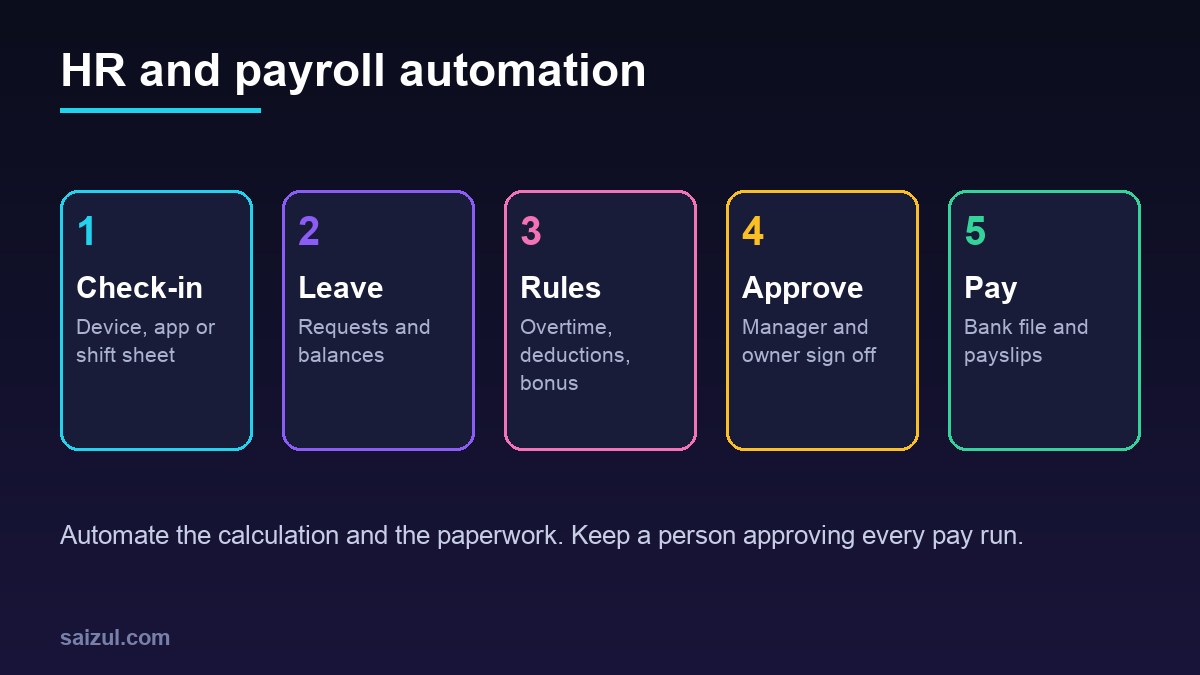
- Daily: attendance logs sync from devices or the mobile app into the system. Missing punches create a task for the employee or manager to explain.
- During the month: leave and overtime requests are submitted and approved inside the system, not in chat.
- Cut-off day: the system locks the attendance period and lists exceptions: missing punches, unapproved overtime, negative leave balances.
- Draft run: salaries are calculated with a breakdown for every employee, and compared with last month. Big changes are flagged.
- Review: HR or the accountant checks the flagged cases. The owner sees a summary: total cost, change from last month, top differences.
- Approve and lock: once approved, the run is locked so nobody can change it silently.
- Pay: the system creates the bank upload file or payment list. A person still releases the payment in the bank.
- Payslips: each employee gets a payslip by email or in a portal. Questions go into a ticket, not a phone call.
Where AI helps in HR, and where it should not
AI is useful around payroll, but the salary calculation itself should be plain, testable rules, not a model’s guess. Good uses of AI include:
- An HR assistant for staff questions: “How many casual leave days do I have?” or “When is the bonus paid?”, answered from your policy and the employee’s own data. My guide to a chatbot that answers from your own documents explains how that works.
- Reading documents: pulling details from scanned joining forms or certificates into the employee profile, with a person checking.
- Spotting anomalies: an overtime figure three times higher than usual, or the same bank account on two employees.
- Drafting letters: appointment, confirmation and experience letters from a template, reviewed before sending.
Avoid letting an AI system make decisions about hiring, firing, pay changes or discipline on its own. Those decisions need a person who can explain them.
Ready-made payroll software vs custom HR system
| Option | Good for | Watch out for |
|---|---|---|
| Ready-made payroll software | Standard rules, one country, fewer than a few hundred staff | Local rules not supported, per-employee monthly fees, limited device support |
| Ready-made tool plus automation | Good core tool but manual steps around it | Integrations break when either side changes |
| Custom HR and payroll system | Unusual shifts, multiple branches or companies, piece-rate or commission pay, local rules | Higher upfront cost, you own maintenance and law changes |
For many businesses in Bangladesh and South Asia, the deciding factor is local fit: festival bonuses, attendance devices, bank file formats and Bangla payslips. If a ready-made tool covers those, use it. If not, a focused custom system can be cheaper over a few years. My custom software vs SaaS guide walks through the comparison.
What HR and payroll automation costs (2026 estimates)
These ranges are estimates for planning, not quotes. Your real price depends on staff count, branches, devices and how complex your rules are.
| Scope | What it includes | Estimated cost (USD) |
|---|---|---|
| Automation around existing tools | Device export to spreadsheet or payroll tool, leave form, payslip emails | 800 to 4,000 |
| Custom attendance and leave module | Device sync, mobile check-in, leave approvals, balances, reports | 4,000 to 15,000 |
| Full custom HR and payroll system | Profiles, attendance, leave, salary rules, payslips, bank file, portal | 10,000 to 40,000+ |
| AI HR assistant add-on | Policy and balance questions for staff, with access control | 2,000 to 8,000 |
Add running costs: hosting, SMS or email sending, and a yearly maintenance budget for rule and law changes. My custom software development cost guide explains how to budget for the first year.
Security, privacy and audit rules
Payroll data is some of the most sensitive data a business holds: salaries, bank accounts, national ID numbers and sometimes health information for sick leave. Under the GDPR principles, personal data should be limited to what is necessary, kept accurate, stored no longer than needed and protected with appropriate security (GDPR Article 5). Even where GDPR does not apply, these are sensible rules.
- Role-based access: managers see their team’s attendance and leave, not salaries. Only payroll staff see pay.
- Two-step login for anyone who can approve or export payroll.
- An audit log of every change to salary, bank details and approved runs.
- Alerts when an employee’s bank details change, and a second person confirming it. Changed bank details are a common fraud route.
- Encrypted backups and a tested restore.
- A retention policy. Employers often have legal duties to keep payroll and employment records for set periods; for example the US EEOC publishes recordkeeping requirements for employers (EEOC recordkeeping). Check the periods that apply to you.
HR and payroll automation checklist
- Employee master data cleaned and owned by one person.
- Payroll rules written in plain language and checked by an accountant.
- Attendance source chosen for every branch and field team.
- Leave types, entitlements and approval chain agreed.
- Cut-off date and exception process defined.
- Parallel run planned: at least one month calculated both old and new way.
- Approval and lock step before any payment.
- Bank file format confirmed with your bank.
- Access roles, two-step login and audit log in place.
- Payslip format agreed, in Bangla and English if needed.
- Maintenance plan for law and rule changes.
Need help with this on your own site or business?
I build and secure WordPress sites, web apps and AI automations end to end, in Bangla and English: a free discovery call, a written scope with a fixed quote, a focused first version, then testing, deployment and monitoring.
See the portfolio and the AI agent services, or tell me what you need.
FAQ
What is HR and payroll automation?
It is software that collects attendance and leave, applies your salary rules, and produces payslips and bank payment files automatically, with people reviewing and approving each pay run instead of calculating it by hand.
Can a small business with 15 staff benefit from payroll automation?
Yes, if payroll takes more than a few hours a month or mistakes cause disputes. At that size, a ready-made tool or light automation around your spreadsheet is usually enough. Custom systems make sense when rules are unusual or staff numbers grow.
Can my fingerprint attendance device connect to payroll software?
Many devices can export logs or connect over the network, but support varies by model. Check the exact model and export options before choosing software, and test a full month of logs.
Should AI calculate salaries?
No. Salary should be calculated with clear rules that can be tested and explained. AI is better for answering staff questions, reading documents and flagging unusual numbers for a person to check.
How long does it take to automate payroll?
A light setup around existing tools can take two to four weeks. A custom HR and payroll system usually takes two to five months, including a parallel run where old and new calculations are compared.
Sources

Md Saizul Amin
Digital Systems Strategist · AI Agent Developer · 9+ years in digital & ITMd Saizul Amin is a digital systems strategist and AI automation engineer from Dhaka, Bangladesh. With 9+ years across IT, web development and digital marketing, he writes practical guides on technology, business, education and online growth — and builds the same kinds of systems (AI agents, websites, SEO and ad campaigns) for clients in Bangladesh, the UK and the USA.
Specialist in
Credentials & experience
- 🎓B.Sc. in Computer Science & EngineeringBangladesh University of Business & Technology (BUBT), 2017–2021
- 🤖AI Automation Engineer · Web Developer · SEO SpecialistUnique Mark Limited, Birmingham UK — 2024 to present
- 🌱IT SpecialistGreen Fund Initiative Inc., USA — 2024 to present
- 🏥Junior IT Consultant — Ministry of Health (DGHS)Built the first national Shareable Health Record website; supported 6,000+ facilities
- 🧭Head of ITWEDO Bangladesh — led IT for 50+ staff, 2021–2023