In this article
An AI agent for small business is software that reads a request, decides which steps to take, and uses your tools, such as your inbox, order sheet, CRM or WhatsApp, to finish a task with limited supervision. For most small businesses, the best first agents answer common customer questions, qualify leads, move data between systems and prepare reports, while a person keeps control of money, complaints and anything unusual. This guide goes department by department, explains what an agent cannot do yet, and shows how to start with one small, low-risk job.
From my own work: When business owners ask me for an AI agent, the first conversation is usually about one specific annoyance: the same questions answered fifty times a day, or orders typed by hand from messages into a sheet. Starting with that one problem has worked far better for my projects than trying to automate a whole department at once.
If the term is new to you, read my plain-English guide what is an AI agent first. This article assumes you know the basic idea and want to know where it fits in a small business.
What does an AI agent for small business actually do?
A normal automation follows fixed rules: when a form is submitted, add a row and send an email. An AI agent adds a language model in the middle that can read messy input, such as a customer message in Bangla and English mixed, and decide what to do with it. It then calls tools you have connected: look up an order, check a calendar, create a CRM contact, or hand over to a person.
Tools such as n8n describe this directly. Its AI Agent node lets you connect a chat model and tools, and the agent decides which tools to call to complete a task; the documentation also says you must connect at least one tool (n8n AI Agent node). That is a useful way to think about it: an agent is only as useful as the tools and data you give it.
For a small business, an agent usually has four parts:
- A channel where requests arrive: website chat, WhatsApp, Messenger, email or a form.
- Knowledge: your prices, policies, product details and FAQs, kept up to date.
- Tools: the systems it may read or change, with clear limits.
- A handover to a named person when it is unsure or the request is sensitive.
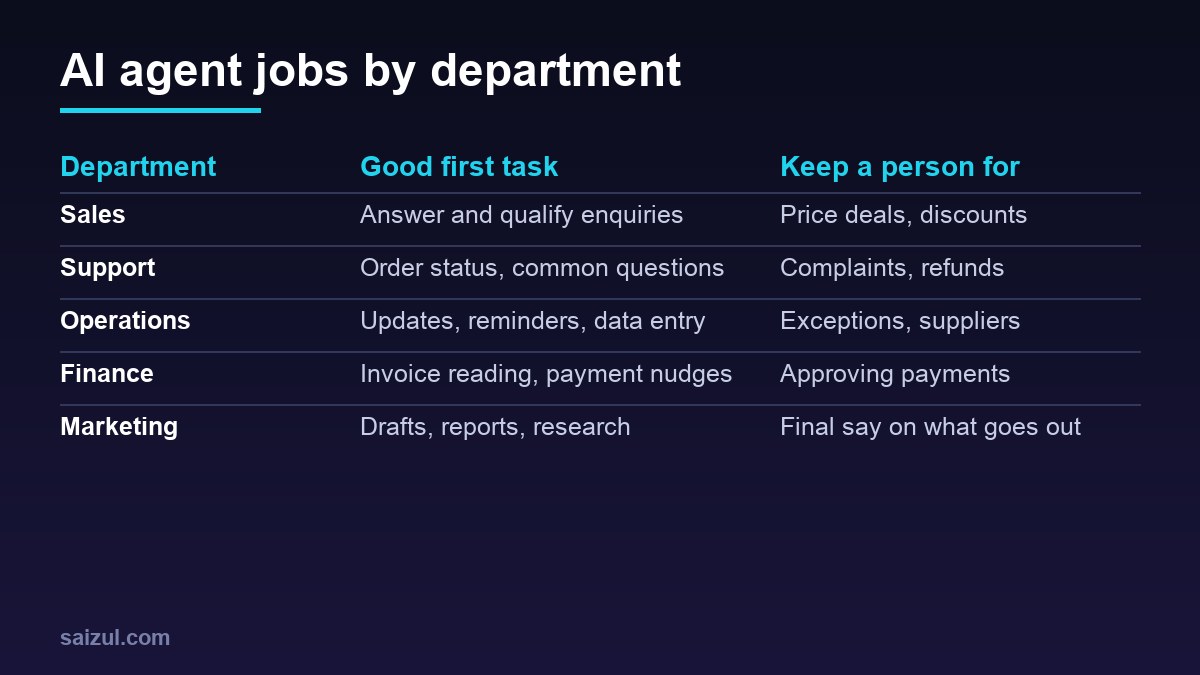
AI agent use cases by department
Sales and lead handling
- Reply to new enquiries within seconds, at any hour, and ask the questions your sales person would ask: what they need, budget range, location, timeline.
- Score or tag leads and add them to your CRM or sheet with a short summary.
- Book a call or visit into a shared calendar.
- Send polite follow-ups to leads who went quiet, within the rules of each channel.
My guide to an AI lead generation agent covers this one in detail.
Customer support
- Answer repeated questions about delivery areas, timings, sizes, payment options and returns, from your own written policies.
- Look up order status from your store or courier panel and reply with the tracking link.
- Collect the details of a complaint, such as order number, photos and what went wrong, then pass it to a person with everything in one place.
An agent that answers from your own documents is often built with a method called RAG. See RAG explained.
Operations
- Turn order messages into structured rows in your order sheet or system.
- Send appointment reminders and delivery updates.
- Warn you when stock for a product falls below a level you set.
- Read supplier emails and pull out dates, quantities and prices for review.
Finance and admin
- Read invoices and receipts and prepare entries for your accountant to check.
- Send payment reminders for overdue invoices, using wording you approved.
- Prepare a weekly summary of sales, refunds and outstanding payments.
Marketing
- Draft social posts, product descriptions and email newsletters for a person to edit.
- Summarise customer reviews and common questions into ideas for content.
- Prepare a weekly report from your ads and analytics accounts.
HR and internal help
- Answer staff questions about leave rules, office hours and processes from your internal handbook.
- Guide new staff through an onboarding checklist.
What an AI agent cannot do (yet)
Being honest about limits saves money and reputation. In 2026, a well-built agent still:
- Can be wrong with confidence. Language models sometimes produce answers that sound right but are not. OWASP lists misinformation among its top risks for LLM applications (OWASP Top 10 for LLM Applications).
- Can be manipulated. Prompt injection, where a message or document tricks the model into ignoring its instructions, is the first item on the same OWASP list. An agent that reads customer messages must assume some of them are hostile.
- Should not have more power than it needs. OWASP calls this “excessive agency”. An agent that can issue refunds, delete records or send bulk messages without checks is a risk.
- Does not know what you have not told it. If your prices or policies change and nobody updates its knowledge, it will give old answers.
- Cannot replace judgement and relationships. Negotiating with a key customer, handling an angry complaint or deciding on a refund still needs a person.
NIST’s AI Risk Management Framework is a free, voluntary framework for thinking about these risks (NIST AI RMF). You do not need to adopt it formally, but its core idea, to map, measure and manage risks and decide who is responsible, works for a small business too.
How to start small with an AI agent: step by step
Step 1: Pick one narrow, repeated task
Good first tasks are frequent, follow a pattern, have clear right answers and do little harm when wrong. “Answer delivery and payment questions on WhatsApp” is a good first task. “Handle all customer service” is not.
Step 2: Write down how a person does it today
List the questions that arrive, the answers your best staff member gives, the systems they check and when they ask a manager. This document becomes the agent’s instructions and knowledge.
Step 3: Set limits and a handover
- What can the agent read? What can it change? What must it never do?
- Which topics always go to a person: complaints, refunds, legal or medical questions, anything about money.
- Who receives the handover, and how fast will they respond?
Step 4: Build a small version and test it with real examples
Collect fifty or a hundred real past messages and run them through the agent before customers see it. Mark each answer as correct, wrong or should have handed over. Fix the instructions and knowledge, then test again.
Step 5: Launch to part of your traffic and watch it
Start with one channel or certain hours. Read the conversations every day for the first weeks. Keep a log of mistakes and what you changed.
Step 6: Measure, then expand
Compare the time your team spends, response times and the share of conversations handled without a person, against the weeks before. Only add a second task once the first one is stable.
If you want to see what a build looks like, my guide on how to build an AI agent with n8n walks through one. For budgets, see how much an AI agent costs.
Data, privacy and customer trust
- Tell customers when they are talking to an automated assistant, and how to reach a person.
- Send only the data the agent needs to the AI service, and check the provider’s data and retention terms.
- Give the agent its own accounts and keys with limited permissions, not an owner login.
- Keep logs of conversations and actions so you can check what happened.
- Update your privacy policy to mention automated processing. See how to write a privacy policy.
AI agent or simple automation: which do you need?
Not every job needs AI. If the input is already structured, such as a form with fixed fields, a normal rule-based workflow is cheaper, faster and more predictable. Use an agent when the input is free text, varies a lot, or needs a decision between several next steps. Many good systems mix both: rules for the predictable parts and an agent only where reading or judgement is needed. My list of AI automation workflows for small business shows several of each.
Common mistakes
- Starting with a big, vague goal instead of one task.
- Giving the agent write access to everything on day one.
- No clear handover, so customers get stuck in a loop.
- Launching without testing on real past messages.
- Never updating the knowledge after prices or policies change.
- Measuring success by how clever it sounds rather than by time saved and customer results.
Quick checklist
- One narrow, frequent task chosen, with a clear owner.
- Current process written down, with answers and escalation rules.
- Agent permissions limited to what the task needs.
- Handover to a named person, with a response time.
- Tested on real past examples before launch.
- Customers told they are talking to an assistant.
- Daily review in the first weeks, then weekly.
- Time saved and errors measured before adding a second task.
Need help with this on your own site or business?
I build and secure WordPress sites, web apps and AI automations end to end, in Bangla and English: a free discovery call, a written scope with a fixed quote, a focused first version, then testing, deployment and monitoring.
See the portfolio and the AI agent services, or tell me what you need.
FAQ
Is an AI agent worth it for a small business?
It can be, if you start with a task that takes real staff time every week and has clear answers. Estimate the hours it takes today and compare that with the build and running cost before you decide.
Can an AI agent reply in Bangla?
Current language models can read and write Bangla, including mixed Bangla and English. Test it with your own real customer messages, because quality varies by model and by how the instructions are written.
Will an AI agent replace my staff?
In most small businesses it takes over repeated questions and data entry, so staff can spend more time on sales, complaints and work that needs judgement. It still needs a person to supervise it.
What is the difference between a chatbot and an AI agent?
A simple chatbot mostly answers questions. An AI agent can also take actions with tools you connect, such as checking an order, updating a CRM or booking an appointment, within limits you set.
How long does it take to set up a simple AI agent?
A narrow first agent with one channel and a few tools can often be built and tested in a few weeks. Most of the time goes into writing the knowledge, testing with real examples and setting up the handover.
Sources

Md Saizul Amin
Digital Systems Strategist · AI Agent Developer · 9+ years in digital & ITMd Saizul Amin is a digital systems strategist and AI automation engineer from Dhaka, Bangladesh. With 9+ years across IT, web development and digital marketing, he writes practical guides on technology, business, education and online growth — and builds the same kinds of systems (AI agents, websites, SEO and ad campaigns) for clients in Bangladesh, the UK and the USA.
Specialist in
Credentials & experience
- 🎓B.Sc. in Computer Science & EngineeringBangladesh University of Business & Technology (BUBT), 2017–2021
- 🤖AI Automation Engineer · Web Developer · SEO SpecialistUnique Mark Limited, Birmingham UK — 2024 to present
- 🌱IT SpecialistGreen Fund Initiative Inc., USA — 2024 to present
- 🏥Junior IT Consultant — Ministry of Health (DGHS)Built the first national Shareable Health Record website; supported 6,000+ facilities
- 🧭Head of ITWEDO Bangladesh — led IT for 50+ staff, 2021–2023