In this article
Delivery tracking software helps a business that delivers with its own riders, bikes or vans see every order from the moment it is packed to the moment it is handed over: who is carrying it, where they are, when it will arrive, and how much cash was collected. It suits distributors supplying retailers, restaurants and cloud kitchens, pharmacies, grocery shops, furniture and appliance sellers, and any online store that runs part of its own delivery. This guide explains what the software does, how a delivery day runs, how to handle routes, proof of delivery and cash on delivery, how to respect rider privacy, when ready-made tools are enough and when custom software makes sense, with estimated costs and a checklist.
From my own work: When I look at a business running its own deliveries, the biggest leak is usually not the route. It is the end of the day: nobody can say which orders were really delivered, which came back, and whether the cash each rider hands over matches. A simple rider app with a delivery status and a cash total per rider often fixes more than any route planner.
If you hand parcels to third-party couriers instead, my guide on how to choose a courier service in Bangladesh is the better starting point. Many businesses do both: their own riders inside the city and couriers for everywhere else. This guide covers the own-fleet side and how to connect the two.
What delivery tracking software does
| Feature | Manual today | With software |
|---|---|---|
| Order intake | Orders on paper, chat and phone | Every order in one list with address, phone, items and payment type |
| Dispatch | Manager shouts names and hands over slips | Orders assigned to riders or vans on screen, by area and load |
| Routes | Rider decides on the way | Suggested stop order, with time windows respected |
| Tracking | Phone calls to riders and customers | Live rider location for the office, tracking link for the customer |
| Proof of delivery | Signature on a slip that gets lost | Photo, signature or code in the app, with time and location |
| Failed deliveries | “Customer did not answer” with no record | Reason codes, call attempts logged, reschedule or return |
| Cash collection | Counted at night, differences argued | Expected cash per rider calculated, handover recorded |
| Reports | None | Deliveries per rider, on-time rate, failed reasons, cost per drop |
How a delivery day runs
- Orders arrive from your website, shop counter, phone, WhatsApp or sales reps. The system checks the address and phone and flags anything incomplete.
- Cut-off and batching: at set times, orders are grouped into delivery waves, for example morning and afternoon.
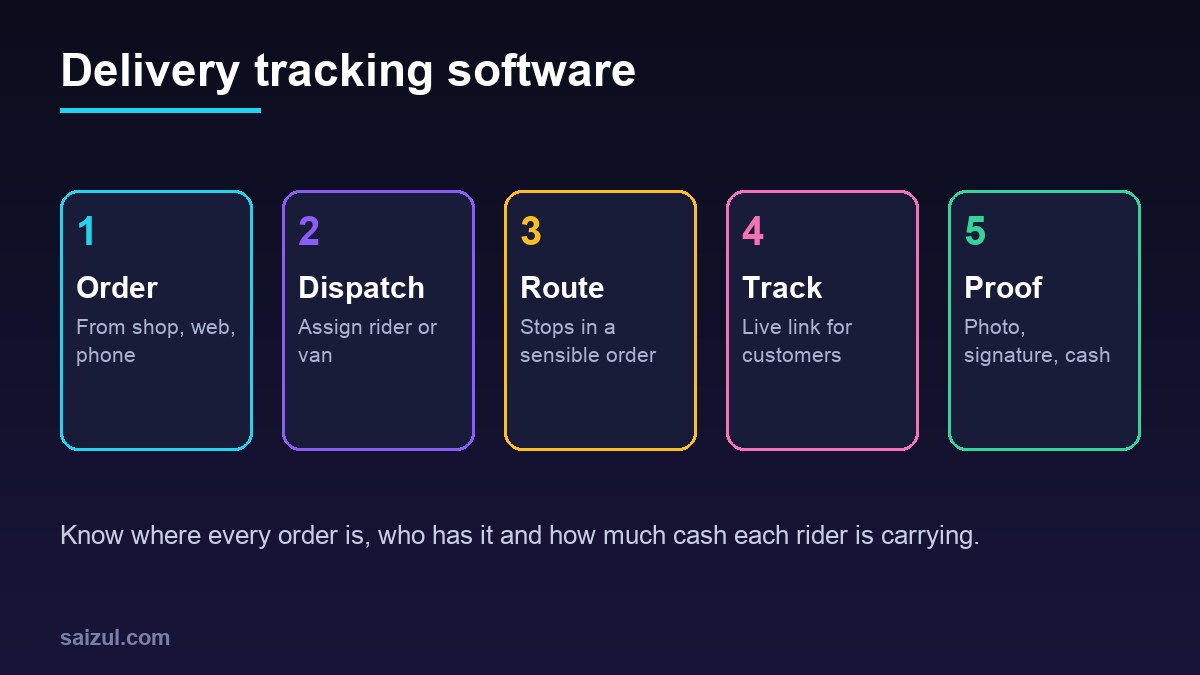
- Dispatch: the dispatcher assigns orders by area, vehicle size and rider workload. A route suggestion puts the stops in a sensible order.
- Loading: riders scan each parcel or invoice as they load it, so missing items are caught at the warehouse, not at the customer’s door.
- On the road: the rider app shows the next stop, the customer phone, notes and the amount to collect. Customers get a message with a tracking link when the rider is on the way.
- Hand-over: the rider records the result: delivered with photo or signature, partly delivered, refused, or not reachable, with a reason.
- Return to base: undelivered parcels are scanned back in, and cash is handed over against the expected total.
- Report: the manager and owner see the day’s numbers the next morning.
Route planning without overcomplicating it
Route optimisation sounds like the main feature, but for most small fleets a good-enough stop order is enough. Map platforms offer APIs for this: Google Maps Platform documents a Routes API for directions and travel times (Routes API) and a separate Route Optimization API for assigning stops across vehicles (Route Optimization API). These are paid services, so estimate the monthly usage before you build on them.
- Start with zones: divide your city into delivery areas and assign riders by zone. This alone removes most wasted trips.
- Add time windows for customers who need delivery before a certain hour, such as shops that open at ten.
- Use vehicle limits for weight or volume if you deliver bulky goods.
- Let riders reorder stops when they know a road is closed; record the change rather than forbid it.
- Save good addresses: once a customer location is confirmed with a map pin, reuse it. In many cities, poor addresses cost more time than poor routes.
Proof of delivery and failed deliveries
Proof of delivery protects both you and the customer. Choose what fits the value of the goods:
- Photo of the parcel at the door or with the receiver, for low-value orders.
- Signature on the rider’s phone, for business deliveries and invoices.
- One-time code sent to the customer and read out to the rider, for high-value items.
- Scan of the parcel barcode at hand-over, so the wrong parcel cannot be closed. GS1 barcode standards are widely used for labelling goods and shipping units (GS1 barcodes).
Failed deliveries need reasons, not excuses: customer unreachable, wrong address, refused, payment not ready, shop closed. Each reason triggers an action: an automatic message to reschedule, a call from the office, or a return to stock. If cash-on-delivery refusals are a big problem for you, see how to reduce fake COD orders.
Cash on delivery reconciliation
For many businesses, cash is where delivery goes wrong. The software should calculate, for each rider, the cash they should hand over: the total of delivered cash orders, minus any partial deliveries and approved discounts.
- Each cash order shows the amount to collect in the rider app.
- The rider marks the amount actually collected, with a reason for any difference.
- At hand-over, the cashier enters the cash received; the system shows the gap.
- Mobile wallet and card payments are matched separately, by order number.
- Differences are logged per rider, so patterns become visible.
My guide to cash on delivery management for online stores covers the wider COD process, including confirmation calls and returns.
Customer updates and automation
- Out for delivery message with the rider’s first name and a tracking link.
- Arrival estimate that updates if the rider is running late.
- Delivered message with a link to rate the delivery or report a problem.
- Failed delivery message offering a new time slot.
- Distributor orders: a retailer gets the invoice and delivery confirmation together, which also helps with collections; see accounts receivable automation.
An AI assistant can answer “where is my order?” on WhatsApp by reading the live status, and pass complaints to a person. If your website shows tracking pages, schema.org has a ParcelDelivery type for describing delivery details in a structured way (Schema.org ParcelDelivery).
Rider privacy and safety
Live tracking means collecting location data about your staff. Handle it carefully. The GDPR principles of purpose limitation, data minimisation and limited storage are a good model even where the law does not apply to you (GDPR Article 5).
- Tell riders clearly what is tracked, when and why, in writing.
- Track only during working shifts; stop tracking when the shift ends.
- Show customers the rider’s position only while their order is being delivered, and do not reveal the rider’s full phone number if a masked number or in-app call is possible.
- Keep detailed location history for a short, defined period.
- Never set targets that push riders to drive unsafely. Measure on-time rate, not speed.
Ready-made vs custom delivery tracking software
| Option | Good for | Watch out for |
|---|---|---|
| Ready-made delivery app | Small fleets with standard parcel deliveries | Per-rider or per-order fees, weak COD handling, no link to your orders |
| Ready-made app plus integration | Good app, but orders typed in twice | Depends on the app having an API |
| Custom system | Distributors with invoices and returns, mixed own fleet and couriers, local payment and address needs | Higher upfront cost, map API fees, maintenance |
Before choosing, run one week of real deliveries through a trial and compare the cash totals with your current method. My build vs buy software guide helps you decide.
Delivery tracking software cost (2026 estimates)
These ranges are estimates. Costs depend on riders, order volume, map usage and the systems you connect.
| Scope | Includes | Estimated cost (USD) |
|---|---|---|
| Ready-made subscription | Rider app, dispatch board, tracking links | Roughly 10 to 40 per rider per month |
| Simple custom rider app | Order list, statuses, proof photo, cash totals, daily report | 3,000 to 10,000 |
| Full custom delivery system | Dispatch, zones, routes, live tracking, customer messages, COD reconciliation, courier hand-off | 10,000 to 40,000+ |
| Running costs | Map and routing API usage, SMS or WhatsApp messages, hosting | Varies with volume; budget monthly |
For planning the rider app itself, my guide to planning a mobile app for your business covers Android versus iOS, offline use and app store steps.
Delivery tracking software checklist
- All order sources feed one delivery list.
- Delivery zones and cut-off times defined.
- Rider app works on low-cost Android phones and with weak signal.
- Proof of delivery method chosen by order value.
- Failed delivery reasons and follow-up actions agreed.
- Expected cash per rider calculated and handover recorded.
- Customer messages for out for delivery, delivered and failed.
- Rider tracking policy written, shift-only and time-limited.
- Courier hand-off for orders outside your own area.
- Weekly report: on-time rate, failed reasons, cost per drop.
Need help with this on your own site or business?
I build and secure WordPress sites, web apps and AI automations end to end, in Bangla and English: a free discovery call, a written scope with a fixed quote, a focused first version, then testing, deployment and monitoring.
See the portfolio and the AI agent services, or tell me what you need.
FAQ
What is delivery tracking software?
It is a system that lets a business with its own riders or vans dispatch orders, plan routes, track deliveries live, record proof of delivery and reconcile cash, so the office knows the status of every order without phone calls.
Do small businesses with five riders need delivery tracking software?
Often yes, if deliveries fail, cash does not match or customers keep calling to ask where their order is. At that size a ready-made app or a simple custom rider app is usually enough.
Can delivery tracking software handle cash on delivery?
A good one can. It should show the amount to collect per order, record what the rider collected and calculate the expected cash for each rider at hand-over, with differences logged.
Is it legal to track delivery riders by GPS?
In many places it is allowed for work purposes if riders are informed, tracking is limited to working time and data is kept only as long as needed. Rules differ by country, so check local employment and privacy law.
Can I use my own riders and a courier company together?
Yes. Many businesses deliver inside the city with their own riders and send other orders by courier. The software can route each order to the right method and show both in one status list.
Sources

Md Saizul Amin
Digital Systems Strategist · AI Agent Developer · 9+ years in digital & ITMd Saizul Amin is a digital systems strategist and AI automation engineer from Dhaka, Bangladesh. With 9+ years across IT, web development and digital marketing, he writes practical guides on technology, business, education and online growth — and builds the same kinds of systems (AI agents, websites, SEO and ad campaigns) for clients in Bangladesh, the UK and the USA.
Specialist in
Credentials & experience
- 🎓B.Sc. in Computer Science & EngineeringBangladesh University of Business & Technology (BUBT), 2017–2021
- 🤖AI Automation Engineer · Web Developer · SEO SpecialistUnique Mark Limited, Birmingham UK — 2024 to present
- 🌱IT SpecialistGreen Fund Initiative Inc., USA — 2024 to present
- 🏥Junior IT Consultant — Ministry of Health (DGHS)Built the first national Shareable Health Record website; supported 6,000+ facilities
- 🧭Head of ITWEDO Bangladesh — led IT for 50+ staff, 2021–2023