In this article
From my own builds: I’m Saizul Amin, an AI agent developer and automation engineer. I run AI agent systems in production on self-hosted n8n and Docker (Messenger, WhatsApp, Telegram and email), so the advice below comes from operating them, not from reading about them. Last reviewed: October 2026.
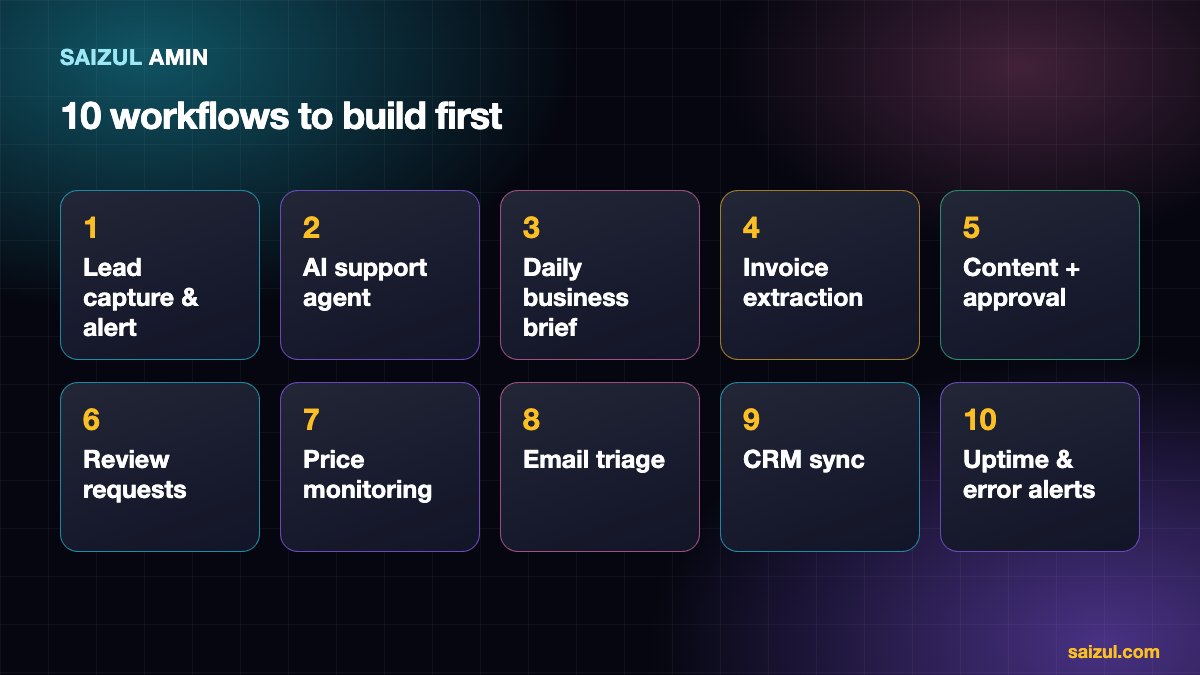
People often ask which automations are actually worth building with n8n. The answer is rarely exotic: the best first workflows are simple, repeat daily and remove a clear pain. This list gives you ten of them, with the trigger, the main nodes, what it saves and how hard it is. I use variations of these for my own systems and clients, so none of them is theoretical.
If n8n is new to you, begin with how to build an AI agent with n8n and run it on a proper server using the self-hosting guide. To decide whether n8n is right, see n8n vs Zapier vs Make.
The anatomy of every workflow
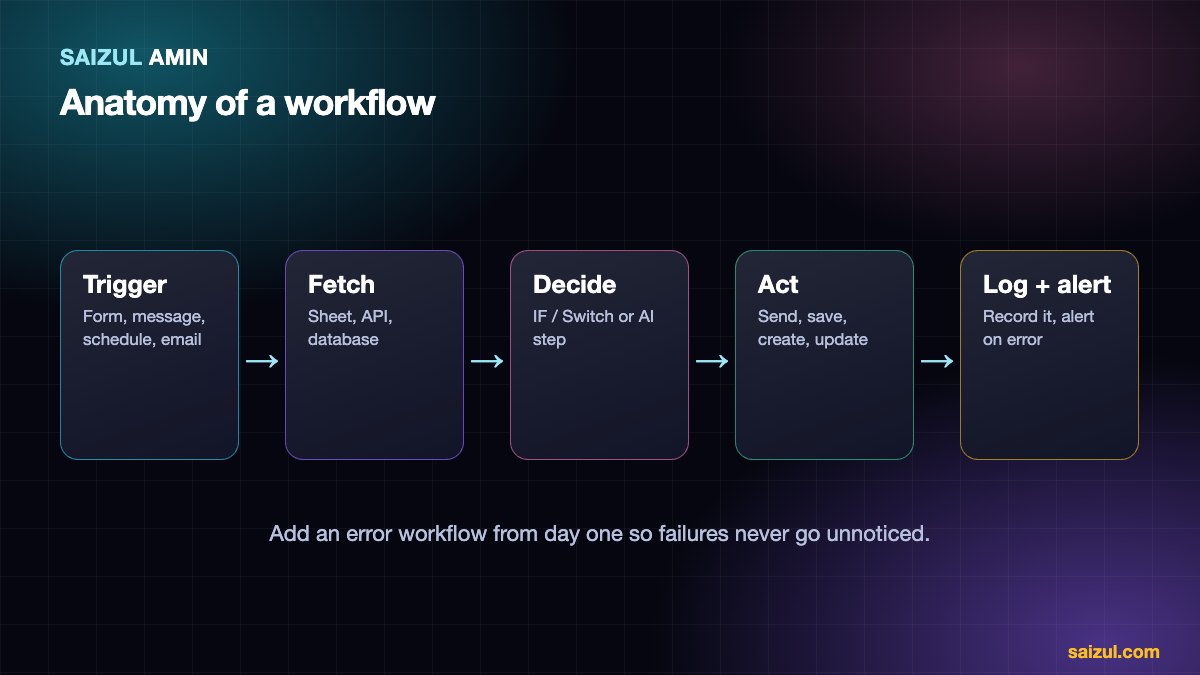
- Trigger: what starts it (a form, a message, a schedule, an email, a webhook).
- Fetch: get the data it needs (a sheet, an API, a database).
- Decide: logic (IF, Switch) or an AI step (classify, summarise, draft).
- Act: do the thing (send, save, create, update).
- Log: record what happened.
- Alert on error: tell a human when it breaks.
1. Instant lead capture and alert
Problem: website and ad enquiries sit in an inbox for hours.
Trigger: a webhook from your form (Contact Form 7, Elementor forms or a landing page).
Steps: validate the fields → save a row in Google Sheets or your CRM → send the lead an instant acknowledgement → alert your team on Telegram, WhatsApp or email.
Nodes: Webhook, Google Sheets, Gmail or SMTP, Telegram.
Saves: response time drops from hours to seconds. Effort: low.
2. AI support agent for WhatsApp or Messenger
Problem: the same ten questions all day.
Trigger: an incoming channel message.
Steps: AI agent with your facts and memory per customer → answer, capture lead or check availability → log → hand over to a human when needed.
Nodes: channel trigger, AI Agent, chat model, memory, Google Sheets tool, send message.
See WhatsApp AI chatbot and Messenger AI chatbot in Bangla. Effort: medium.
3. Daily business brief
Problem: you open five dashboards every morning.
Trigger: Schedule (for example 8:00).
Steps: pull yesterday’s orders, leads and ad spend from sheets or APIs → calculate totals → AI summarises changes and anomalies in a few lines → send to Telegram or email.
Nodes: Schedule Trigger, HTTP Request or Google Sheets, Code, AI Agent or LLM chain, Telegram.
Saves: 20 to 30 minutes a day and surfaces problems earlier. Effort: low to medium.
4. Invoice and document extraction
Problem: retyping data from PDFs and emails.
Trigger: Gmail trigger on emails with attachments.
Steps: extract text (or use an AI model that reads documents) → pull supplier, date, amount and number → validate → append to a sheet or accounting tool → flag low-confidence items for review.
Nodes: Gmail Trigger, Extract from File, AI, IF, Google Sheets.
Important: always keep a human review path for uncertain values. Effort: medium.
5. Content pipeline with approval
Problem: posting consistently takes too much time.
Trigger: a new row in a content-calendar sheet (or a schedule).
Steps: AI drafts captions and variants from the brief → sends to you for approval (Telegram buttons or email) → on approval, schedule or publish.
Nodes: Google Sheets Trigger, AI, Telegram or email approval, social or WordPress nodes.
Rule: never auto-publish unreviewed AI text. Effort: medium.
6. Review request after purchase
Problem: happy customers never leave reviews.
Trigger: a completed order or a delivered status in your sheet or shop.
Steps: wait a set period → send a friendly message with your review link → do not send again if they already replied or reviewed.
Nodes: trigger, Wait, IF, send message or email.
Saves: steady growth of social proof for SEO and trust. Effort: low.
7. Competitor or price monitoring
Problem: you only notice price changes by accident.
Trigger: Schedule (daily).
Steps: fetch the pages or feeds you track → extract prices → compare with the last stored value → alert on changes → update your sheet.
Nodes: Schedule Trigger, HTTP Request, HTML Extract, IF, Google Sheets, Telegram.
Note: respect sites’ terms and robots rules. Effort: medium.
8. Email triage and ticket routing
Problem: a shared inbox with everything mixed.
Trigger: new email.
Steps: AI classifies (sales, support, billing, spam) and sets priority → creates a task or ticket → routes to the right person → drafts a suggested reply for a human to approve.
Nodes: Email Trigger, AI, Switch, task or CRM node, notification.
Effort: medium.
9. CRM and contact sync
Problem: the same customer lives in four places with different details.
Trigger: new or updated contact in any source.
Steps: normalise fields (phone formats, names) → check for duplicates → create or update the master record → tag by source and interest.
Nodes: triggers, Code or Set, IF, CRM or Sheets.
Effort: low to medium.
10. Monitoring and error alerts
Problem: something breaks and you find out from a customer.
Trigger: Schedule (every few minutes) plus n8n’s global error workflow.
Steps: request your website and key APIs → check status and response time → if it fails twice, alert you with details → log uptime.
Nodes: Schedule Trigger, HTTP Request, IF, Telegram, and an Error Trigger workflow.
Effort: low. This is the one I would build before any other.
Which to build first
| If your pain is… | Build |
|---|---|
| Slow replies to new leads | #1, then #2 |
| Too much repetitive messaging | #2 |
| Manual reporting | #3 |
| Paperwork and data entry | #4, #9 |
| Inconsistent marketing | #5, #6 |
| Fear of things breaking silently | #10 |
Mistakes to avoid
- Automating a broken process. Fix the steps on paper first.
- No error handling. Add an error workflow from day one.
- Hard-coding secrets in nodes. Use credentials.
- Building one giant workflow. Split into small, named workflows.
- Letting AI act without review where mistakes are costly.
- No documentation. Note what each workflow does and who owns it.
Want this built for your business?
I design, build, deploy and maintain custom AI agents and automations, on infrastructure I operate myself (self-hosted n8n and Docker), in Bangla and English.
- Customer-support and sales agents on WhatsApp, Facebook Messenger, Telegram, web chat and email.
- Knowledge (RAG) assistants that answer from your documents with sources.
- Workflow automation: lead capture, CRM and sheet sync, reporting, document processing and monitoring.
- Hosting and DevOps for n8n and Docker: security, backups, updates and monitoring.
The process: a free discovery call, a written scope and fixed quote, a focused first version, testing on your real conversations, then deployment with monitoring. See live examples on the AI agent services page, browse the portfolio, or tell me about the job you want automated.
Frequently asked questions
Where can I find ready-made n8n workflows?
n8n has a public workflow template library. Treat templates as a starting point: review every node, replace credentials and test with sample data before using them.
How many workflows should I start with?
One or two. Get them stable and measured, then add the next.
Do these need AI?
No. Several (#1, #6, #9, #10) are plain automation. Add AI where judgement or language is involved.
Can n8n replace my developers?
It replaces a lot of glue code and manual work, but custom systems and complex integrations still benefit from engineering.
Can you build these for me?
Yes. Tell me which one hurts most and I will propose the simplest version that solves it.
Sources and further reading
How this article was written
I wrote this myself from hands-on experience building and running AI agents and automations for clients. Product behaviour, policies and pricing models were checked against the official documentation linked above in October 2026. Tools, policies and prices change quickly; if you notice something out of date, email info@saizul.com and I will correct it.
About the author
Saizul Amin is an AI agent developer, automation engineer and digital growth partner based in Bangladesh. He has built 7 production AI systems on self-hosted n8n, developed 50+ websites and managed 150K+ USD in advertising spend for clients across markets including the UK, the USA and Bangladesh. Learn more about Saizul, see his work, or get in touch.

Md Saizul Amin
Digital Systems Strategist · AI Agent Developer · 9+ years in digital & ITMd Saizul Amin is a digital systems strategist and AI automation engineer from Dhaka, Bangladesh. With 9+ years across IT, web development and digital marketing, he writes practical guides on technology, business, education and online growth — and builds the same kinds of systems (AI agents, websites, SEO and ad campaigns) for clients in Bangladesh, the UK and the USA.
Specialist in
Credentials & experience
- 🎓B.Sc. in Computer Science & EngineeringBangladesh University of Business & Technology (BUBT), 2017–2021
- 🤖AI Automation Engineer · Web Developer · SEO SpecialistUnique Mark Limited, Birmingham UK — 2024 to present
- 🌱IT SpecialistGreen Fund Initiative Inc., USA — 2024 to present
- 🏥Junior IT Consultant — Ministry of Health (DGHS)Built the first national Shareable Health Record website; supported 6,000+ facilities
- 🧭Head of ITWEDO Bangladesh — led IT for 50+ staff, 2021–2023