In this article
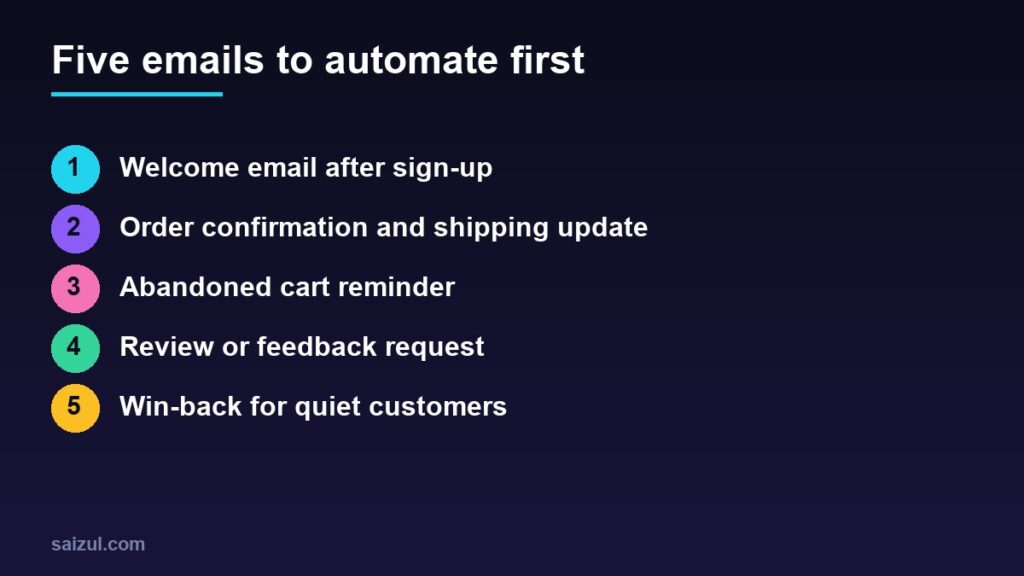
Most small businesses think of email marketing as a newsletter they never find time to write. Automation flips that. You write a handful of emails once, connect them to events such as a sign-up, an order or an abandoned cart, and they go out at the right moment for every customer. In Bangladesh, WhatsApp and Messenger handle much of the daily conversation, but email is still how many customers receive receipts, updates and offers, and it is a channel you fully own. This guide covers the five automations to set up first.
From my own work: When I set up email for online stores, I usually start with the transactional emails the store already sends and make them clearer and better branded. The marketing automations come after that, once the basics are reliable and landing in the inbox.
Before you automate: get the basics right
- Send from your own domain. An address like
hello@yourbusiness.comis trusted more than a free mailbox. See how to create a business email. - Authenticate your domain. Gmail requires all senders to set up SPF or DKIM, and senders of more than 5,000 messages a day to Gmail need SPF, DKIM and DMARC (Gmail email sender guidelines). Your email tool will give you the DNS records to add.
- Only email people who agreed. Add a clear opt-in at checkout and on sign-up forms. Never buy lists.
- Make unsubscribing easy. Gmail requires one-click unsubscribe for marketing emails from bulk senders, and Yahoo asks bulk senders to honour unsubscribes within two days (Yahoo sender best practices).
- Keep complaints low. Both providers set a spam complaint limit of 0.3%, and Gmail recommends staying below 0.1%.
My guide to email marketing for small business covers list building and choosing a tool in more detail.
Choosing a tool that can automate
Most email platforms for small businesses, such as Mailchimp, Brevo or MailerLite, include automation on their plans, with limits that change over time, so check current pricing. If you run WooCommerce or Shopify, look for a tool with a direct integration so it knows about orders, products and carts. The key features to look for are triggers (what starts the email), delays (when it goes out) and conditions (who gets it).
1. The welcome email
Sent immediately when someone joins your list. It is usually the most opened email you will send, because the person has just shown interest.
- Thank them and confirm what they will receive and how often.
- Deliver anything you promised, such as a discount code or a guide.
- Point to your best-selling products or most useful service page.
- Optionally add a second email two or three days later that tells your story or answers common questions.
2. Order confirmation and shipping updates
These are transactional emails, so they are expected and widely read. Make them useful:
- Clear order summary, total, payment method and delivery address.
- Expected delivery time and the courier tracking link when available.
- For cash on delivery orders, the amount to keep ready.
- A contact link for problems. Keep heavy promotion out of these emails.
3. The abandoned cart reminder
When a shopper enters an email at checkout but does not complete the order, a reminder can bring some of them back. It needs your store to capture the email before the order is placed, and the shopper should have agreed to receive messages.
- Send the first reminder within a few hours, while the decision is fresh.
- Show the product image, name and price, with a single button back to the cart.
- Answer the likely objection: delivery charge, delivery time, returns or payment options.
- Use a discount only as a last step, if at all. Customers learn to abandon carts to wait for codes.
Fixing the checkout itself matters even more; see how to reduce cart abandonment.
4. The review or feedback request
Send it a few days after delivery or after the service is completed. Ask one simple question, such as how the order went, and link to where you want the review: your product page or your Google Business Profile. Ask every customer the same way, and never offer a reward for a positive review.
5. The win-back email
Customers who bought once and went quiet are easier to bring back than new ones are to find. Set a trigger based on your normal buying cycle, for example no purchase in 90 days for a skincare store.
- Remind them what they bought and suggest a related product or refill.
- Share something new: arrivals, a restock, an improved service.
- If they still do not open after a couple of attempts, stop emailing them or ask whether they want to stay subscribed. A cleaner list protects your inbox placement.
For more ideas on bringing customers back, read customer retention strategies for online stores.
What to measure
- Clicks and orders from each automation. These matter more than opens.
- Open rate as a rough signal only, since privacy features in some mail apps make it unreliable.
- Unsubscribes and spam complaints. A rise usually means the timing or content needs work.
- Deliverability. If you send to many Gmail users, Google Postmaster Tools shows your spam rate.
Quick checklist
- Sending from your own domain, with SPF, DKIM and DMARC in place.
- Clear opt-in and a one-click unsubscribe.
- Welcome email live.
- Order and shipping emails clear and branded.
- Abandoned cart, review request and win-back set up and tested.
- Results checked once a month.
Need help with this on your own site or business?
I build and secure WordPress sites, web apps and AI automations end to end, in Bangla and English: a free discovery call, a written scope with a fixed quote, a focused first version, then testing, deployment and monitoring.
See the portfolio and the AI agent services, or tell me what you need.
FAQ
Is email marketing still useful in Bangladesh?
Yes, alongside WhatsApp and Messenger. Many customers use email for receipts, account updates and offers, and an email list is a channel you own rather than rent.
How many emails should a welcome series have?
One is enough to start. Add a second or third only if each one has something useful to say.
Do I need DMARC as a small sender?
Gmail requires SPF or DKIM for all senders and DMARC for bulk senders. Setting up all three is good practice for any business domain.
Can I send abandoned cart emails without consent?
Follow your local law and your email provider’s rules. The safe approach is to tell shoppers at checkout that you may email them about their order and to include an unsubscribe link.
Sources

Md Saizul Amin
Digital Systems Strategist · AI Agent Developer · 9+ years in digital & ITMd Saizul Amin is a digital systems strategist and AI automation engineer from Dhaka, Bangladesh. With 9+ years across IT, web development and digital marketing, he writes practical guides on technology, business, education and online growth — and builds the same kinds of systems (AI agents, websites, SEO and ad campaigns) for clients in Bangladesh, the UK and the USA.
Specialist in
Credentials & experience
- 🎓B.Sc. in Computer Science & EngineeringBangladesh University of Business & Technology (BUBT), 2017–2021
- 🤖AI Automation Engineer · Web Developer · SEO SpecialistUnique Mark Limited, Birmingham UK — 2024 to present
- 🌱IT SpecialistGreen Fund Initiative Inc., USA — 2024 to present
- 🏥Junior IT Consultant — Ministry of Health (DGHS)Built the first national Shareable Health Record website; supported 6,000+ facilities
- 🧭Head of ITWEDO Bangladesh — led IT for 50+ staff, 2021–2023