In this article
From my own builds: I’m Saizul Amin, an AI agent developer and automation engineer. I run AI agent systems in production on self-hosted n8n and Docker (Messenger, WhatsApp, Telegram and email), so the advice below comes from operating them, not from reading about them. Last reviewed: October 2026.
n8n is the tool I reach for when a client needs an AI agent that talks to real systems: WhatsApp, Messenger, Telegram, Google Sheets, a booking API. It is visual, it can be self-hosted, and it has a dedicated AI Agent node, so you can get a working prototype in an afternoon.
This guide walks through the same order I follow on client projects, including the mistakes that cost me time so they do not cost you any. By the end you will have an agent that answers questions, remembers each customer separately, saves leads to a sheet and hands over to a human when needed.
What we are building
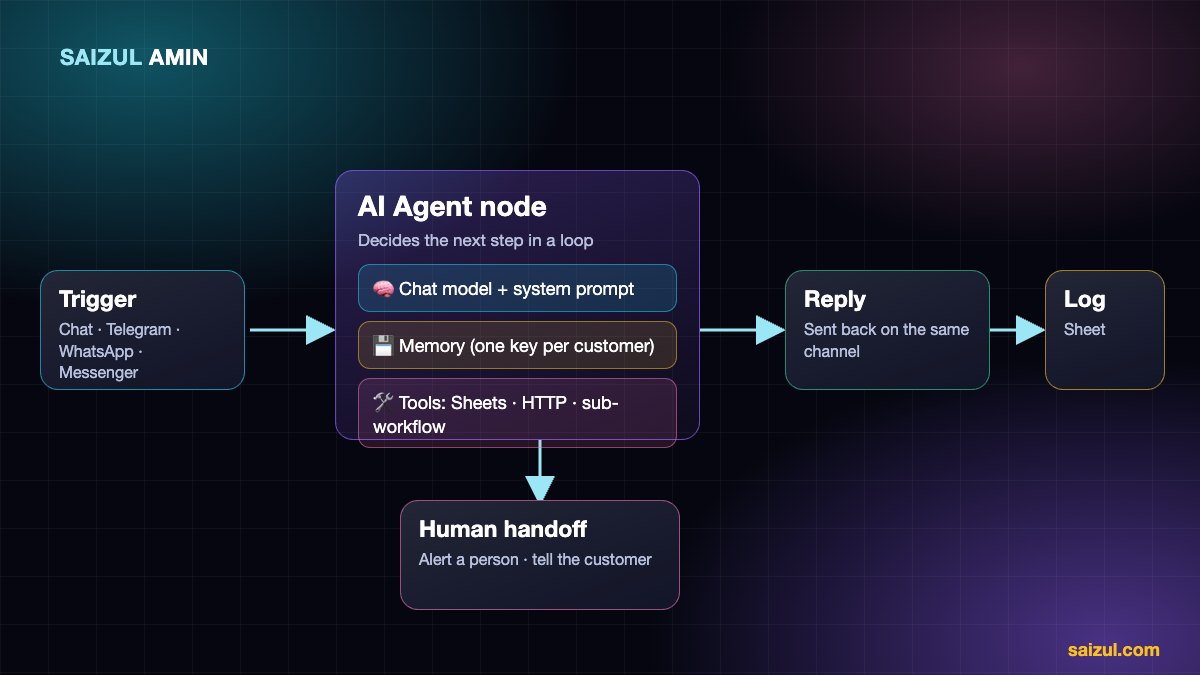
A small-business assistant that:
- receives a message from a customer,
- decides whether to answer from its instructions, look something up, or save a lead,
- replies in the customer’s language,
- logs the conversation, and
- escalates to a person when the customer asks or the agent is unsure.
If you are still deciding what an agent is, start with my plain-English guide to what an AI agent is, then come back.
Before you start
- An n8n instance (cloud or self-hosted, see Step 1).
- An API key for a chat model. Gemini, OpenAI, Anthropic, Groq and OpenRouter all work with n8n’s AI nodes, and you can switch later.
- A Google account if you want to log leads to Google Sheets.
- For a real channel: a Telegram bot token, or a Meta developer app for WhatsApp and Messenger (Step 8).
Step 1: Run n8n (cloud or self-hosted)
n8n Cloud is the fastest way to start. I self-host for client work because it keeps conversation data on a server I control and avoids paying per execution as volume grows. The trade-off is that you own updates, backups and uptime.
A minimal Docker Compose file looks like this. Put it behind a reverse proxy (Nginx, Caddy or Traefik) that provides HTTPS, because Telegram, WhatsApp and Messenger will only call a public HTTPS webhook:
services:
  n8n:
    image: docker.n8n.io/n8nio/n8n
    restart: unless-stopped
    ports:
      - "5678:5678"
    environment:
      - N8N_HOST=n8n.yourdomain.com
      - N8N_PROTOCOL=https
      - WEBHOOK_URL=https://n8n.yourdomain.com/
      - GENERIC_TIMEZONE=Asia/Dhaka
    volumes:
      - n8n_data:/home/node/.n8n

volumes:
  n8n_data:
Why WEBHOOK_URL matters: behind a proxy, n8n otherwise shows webhook addresses with the wrong host, and your channel verification fails in confusing ways. The n8n_data volume holds your workflows and credentials, so back it up. See the official n8n documentation for the current hosting options and environment variables.
Step 2: Start with a chat trigger
Do not connect WhatsApp first. Create a new workflow and add the Chat Trigger node. It gives you a built-in test chat inside n8n, so you can tune the agent before dealing with webhooks, tokens and approvals. Later you will swap this trigger for the real channel and the rest of the workflow stays the same.
Step 3: Add the AI Agent node and a chat model
Connect the trigger to an AI Agent node. Under it, attach a chat model sub-node (for example Google Gemini or OpenAI) and paste in your credentials. Start with a fast, inexpensive model; you can move up only if testing shows you need to. Keep the temperature low (around 0 to 0.3) for support and booking tasks, where consistency beats creativity.
Step 4: Write the system prompt like a job description
The system prompt is where most agents are won or lost. Write it the way you would brief a new employee: role, tone, what to do, what never to do, and what to do when unsure. Here is a trimmed example for a booking assistant:
You are the assistant for [Business Name], a [type of business] in Dhaka.
Reply in the customer's language (Bangla or English). Be friendly and short.

You can: answer questions using ONLY the information provided below,
check availability with the tool, and save a lead with the tool.

Never invent prices, discounts, policies or availability.
If the information is not below, say you will ask a team member,
then use the handoff tool.
If the customer is angry, asks for a person, or asks about a refund,
use the handoff tool immediately.

BUSINESS INFORMATION:
- Services and prices: ...
- Opening hours: ...
- Booking rules: ...
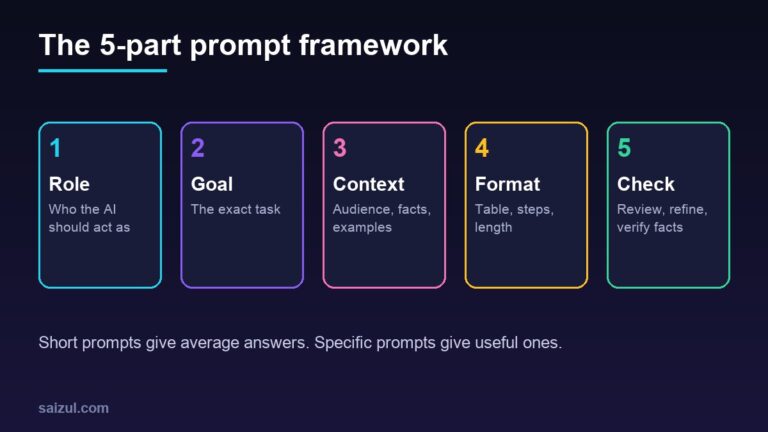
Notice the structure: a role, allowed actions, hard limits, an escalation rule and a block of facts. Putting your real facts in the prompt (or a retrieval tool for larger documents) is what stops the model from guessing.
Step 5: Add memory, and key it per customer
Add a memory sub-node (the simple window-buffer style memory is enough to start) so the agent remembers the last few messages. This is the mistake that cost me the most time early on: the memory needs a session key that is unique per customer, such as the WhatsApp number, Telegram chat ID or Messenger sender ID. If every conversation shares one key, customers will see fragments of each other’s chats. In the Chat Trigger test this is handled for you; when you switch to a real channel, set the session key explicitly.
Step 6: Give the agent tools
Tools are what turn a talking model into an agent. Useful ones for a small business:
- Google Sheets: append row to save a lead (name, phone, interest, summary).
- HTTP Request tool to check availability or prices from your own API or a published sheet.
- Call n8n workflow tool to run a sub-workflow, for example “notify a human on Telegram”.
Write each tool’s description carefully, because the model reads it to decide when to use the tool. “Saves a new lead. Use only after you have the customer’s name and phone number” works far better than “lead tool”.
Step 7: Add guardrails and a human handoff
- Limit iterations so a confused agent cannot loop and burn tokens.
- Handoff path: a tool that pings you or your team (Telegram, email) with the conversation summary, and tells the customer a person will reply.
- Log everything: append every message and reply to a sheet or database. You will learn more from reading real conversations than from any benchmark.
- Error workflow: set an n8n error workflow that alerts you when something fails, so a broken token does not silently end your support.
Step 8: Connect a real channel
Replace the Chat Trigger with the channel trigger and add a final node that sends the reply back.
- Telegram: the easiest. Create a bot with BotFather, add the token as a credential and use the Telegram trigger and send nodes. See the Telegram Bot documentation.
- WhatsApp: use the WhatsApp Business Cloud API from Meta. You will verify a webhook with a token you choose, and you need to know that free-form replies are only allowed inside the 24-hour customer service window; outside it you must use approved templates. Start from Meta’s Cloud API documentation.
- Facebook Messenger: create a Meta app, connect your Page, subscribe the webhook to message events and use a Page access token to reply. Webhook verification is the step that trips most people up, so test it with the n8n “test URL” before switching to production.
Step 9: Test with real conversations
Before launch, build a test set of 20 to 30 real messages from your inbox: normal questions, typos, mixed Bangla and English, angry messages, off-topic requests, attempts to get a discount. Run them through and fix the prompt or tools where it fails. Re-run the whole set after every change, so an improvement in one place does not break another.
Step 10: Deploy and monitor
- Switch the workflow to active and use the production webhook URL.
- Check the execution log daily in week one, then weekly.
- Back up the n8n data volume and your Docker Compose file.
- Update n8n on a schedule rather than ad hoc, and read the release notes first.
- Watch model usage so costs stay predictable.
Five mistakes to avoid
- Starting with the channel instead of the chat trigger, then debugging webhooks and prompts at the same time.
- Sharing one memory key across all customers.
- Letting the agent answer from “general knowledge” instead of your facts.
- No handoff, so an upset customer is trapped with a bot.
- No logging, so you cannot see what is failing.
Keeping costs under control
- Use a smaller model for routing and FAQs; reserve a stronger one for hard cases.
- Keep the prompt tight and put long documents behind a retrieval tool instead of pasting them into every call.
- Cap the number of agent iterations and the length of replies.
- Self-hosting removes per-execution fees, but you still pay for the server and your time to maintain it.
AI agent development services: what I build for clients
I design, build, deploy and maintain custom AI agents for businesses. Everything below runs on infrastructure I operate myself (self-hosted n8n and Docker, with the model and channels chosen for your job), and I work in both Bangla and English.
- Customer-support and sales agents for WhatsApp, Facebook Messenger, Telegram, website chat and email: answer questions, qualify leads, book calls and hand over to a human.
- Voice and call agents that listen and speak: voice-note replies, booking conversations, speech-to-text summaries.
- Knowledge (RAG) assistants grounded in your own documents, price lists and SOPs, with a safe “I don’t know” fallback.
- Document and data agents that read invoices, forms and PDFs and push clean data into Google Sheets, your CRM or accounting tool.
- Marketing, ads and SEO agents for content pipelines, comment moderation, reporting and ad-account audits.
- Back-office and multi-agent systems where several specialised agents (researcher, writer, checker, publisher) work as one team.
The process is simple: a free discovery call, a written scope and fixed quote, a focused first version, testing against your real conversations, then deployment with monitoring. You can see live examples on the AI agent services page, browse the portfolio, or tell me about the job you want automated.
Frequently asked questions
Is n8n free?
n8n can be self-hosted, and the self-hosted community edition is free to run under n8n’s fair-code licence, while n8n Cloud and some enterprise features are paid. Licence terms and plans change, so check the n8n pricing page and licence before you commit a business to it.
Do I need to code to build an AI agent in n8n?
Not to build a working first version. The visual editor covers most of it. Basic understanding of JSON and APIs helps a lot once you connect your own systems, and n8n has a Code node for the cases that need it.
Which AI model should I use?
Test two or three on your own conversation set. For many support and booking jobs a fast, inexpensive model is enough; for complex reasoning or long documents a stronger model may justify its cost. n8n makes it easy to swap models without rebuilding the workflow.
Is self-hosting n8n safe?
It can be, if you use HTTPS, strong credentials, a firewall, regular updates and backups. If you would rather not run servers, use n8n Cloud or have someone maintain it for you.
Can you build and maintain this for my business?
Yes, that is exactly what I do. Send me the job you want automated and I will reply with the best approach and a quote.
Not sure whether n8n is the right tool? Read n8n vs Zapier vs Make.
Sources and further reading
- n8n documentation
- n8n: install with Docker
- n8n documentation: Advanced AI
- Meta: WhatsApp Business Cloud API
- Telegram Bot API
How this article was written
I wrote this myself from hands-on experience building and running AI agents for clients. Product behaviour and pricing models were checked against the official documentation linked above in October 2026. Tools change quickly, so if you spot something out of date, email info@saizul.com and I will correct it.
About the author
Saizul Amin is an AI agent developer, automation engineer and digital growth partner based in Bangladesh. He has built 7 production AI systems on self-hosted n8n, developed 50+ websites and managed 150K+ USD in advertising spend for clients across markets including the UK, the USA and Bangladesh. Learn more about Saizul, see his work, or get in touch.

Md Saizul Amin
Digital Systems Strategist · AI Agent Developer · 9+ years in digital & ITMd Saizul Amin is a digital systems strategist and AI automation engineer from Dhaka, Bangladesh. With 9+ years across IT, web development and digital marketing, he writes practical guides on technology, business, education and online growth — and builds the same kinds of systems (AI agents, websites, SEO and ad campaigns) for clients in Bangladesh, the UK and the USA.
Specialist in
Credentials & experience
- 🎓B.Sc. in Computer Science & EngineeringBangladesh University of Business & Technology (BUBT), 2017–2021
- 🤖AI Automation Engineer · Web Developer · SEO SpecialistUnique Mark Limited, Birmingham UK — 2024 to present
- 🌱IT SpecialistGreen Fund Initiative Inc., USA — 2024 to present
- 🏥Junior IT Consultant — Ministry of Health (DGHS)Built the first national Shareable Health Record website; supported 6,000+ facilities
- 🧭Head of ITWEDO Bangladesh — led IT for 50+ staff, 2021–2023