In this article
Google Search Console is a free tool from Google that shows how your website appears in Google Search: which searches bring visitors, which pages are indexed and what problems Google found while crawling. If you run a business website and do only one technical SEO task this month, set this up. It takes less than an hour, and you do not need to be a developer.
From my own work: Whenever I take on SEO work for a site, Search Console is the first thing I ask for access to. Quite often the property was never verified, so months of search data that could have guided the work simply do not exist.
What Search Console does (and does not do)
- It shows clicks, impressions and average position from Google Search.
- It reports which pages Google has indexed and why others are not.
- It lets you submit sitemaps and ask Google to recrawl a page.
- It warns you about security problems and manual actions.
It does not show what visitors do after they arrive; that is the job of analytics. Use both together (see my Google Analytics 4 setup guide). And if SEO itself is new to you, start with what is SEO.
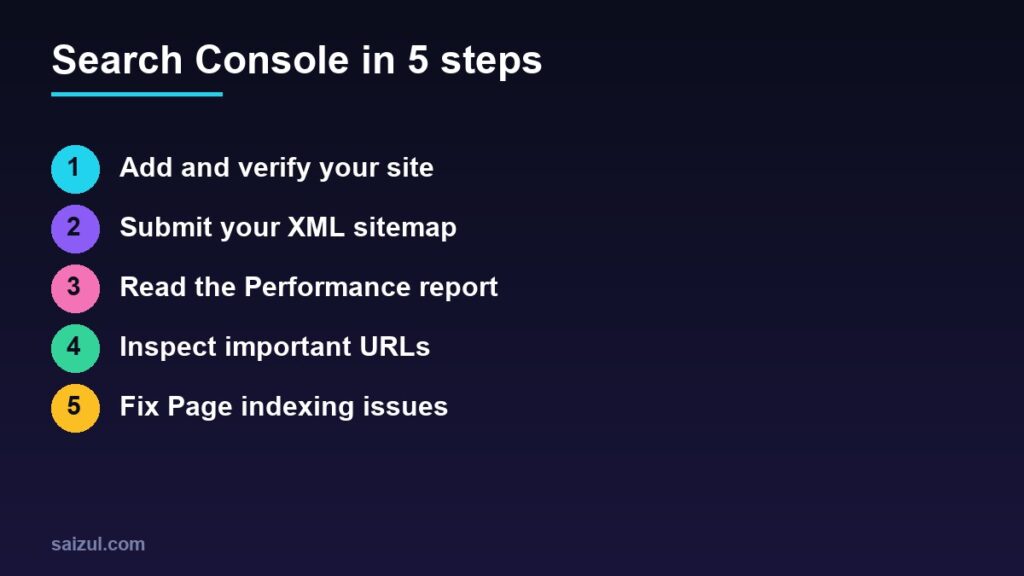
Step 1: Add and verify your site
Go to Search Console, sign in with a Google account the business controls, and add a property. You will be asked to choose a type:
| Property type | Covers | Verification |
|---|---|---|
| Domain | All subdomains, http and https | DNS record only |
| URL prefix | Only URLs under the exact address entered | HTML file, HTML tag, Google Analytics, Tag Manager or DNS |
A Domain property gives the most complete data. Google shows you a TXT record; add it in the DNS settings at your domain registrar or DNS provider, wait a few minutes and click Verify. If you cannot edit DNS, use a URL-prefix property and the HTML tag method: SEO plugins such as Yoast SEO and Rank Math have a field for the verification code. All methods are described in Verify your site ownership.
Two practical points: do not remove the DNS record or tag afterwards, because verification is rechecked; and data starts collecting from the moment the property is added, so reports will look empty for the first few days.
Step 2: Submit your sitemap
A sitemap is a file listing the pages you want Google to know about. WordPress generates one automatically at /wp-sitemap.xml; Yoast SEO and Rank Math use /sitemap_index.xml. Shopify and most site builders create one at /sitemap.xml.
- Open Sitemaps in the left menu.
- Enter the sitemap address and click Submit.
- Come back later and check that the status is “Success” and the number of discovered pages looks right.
A sitemap helps Google discover pages; it does not guarantee they will be indexed.
Step 3: Read the Performance report
This is the report you will use most (Performance report help). It has four metrics:
- Clicks: how many times people clicked through to your site.
- Impressions: how many times your pages appeared in results.
- CTR: clicks divided by impressions.
- Average position: the average ranking of your top result for a query.
Below the chart, the tabs break the data down by queries, pages, countries, devices and dates. Three checks worth doing regularly:
- Almost-there queries: filter for queries with an average position of roughly 8 to 20. These pages are close to the first page; improve their content and internal links using the on-page SEO checklist.
- High impressions, low CTR: the page appears but people do not click. Rewrite the title and meta description to match what the searcher wants.
- Compare periods: use the date filter to compare the last 28 days with the previous period and find pages that lost clicks.
The queries list is also a free source of ideas for keyword research, because it shows the exact words people already use to find you.
Step 4: Use URL Inspection
Paste any URL from your site into the search bar at the top. Search Console tells you whether the page is on Google, when it was last crawled, which canonical URL Google selected and whether the page was found in a sitemap.
- Test live URL checks the page as it is right now, useful after a fix.
- Request indexing asks Google to crawl a new or updated page sooner. There is a daily limit, and requesting again and again does not speed things up.
Step 5: Fix Page indexing issues
Open Indexing → Pages to see how many pages are indexed and the reasons others are not (Page indexing report). Not every item is an error; many are expected.
| Status | What it means | What to do |
|---|---|---|
| Not found (404) | The URL does not exist | Redirect it to a relevant page if it has links or traffic; otherwise leave it |
| Page with redirect | The URL forwards to another URL | Normal; make sure internal links point to the final URL |
| Excluded by ‘noindex’ tag | The page tells Google not to index it | Fine for cart or account pages; remove the tag if the page should rank |
| Blocked by robots.txt | Google is not allowed to crawl it | Check that robots.txt is not blocking important sections |
| Alternate page with proper canonical tag | A duplicate that points to the main version | Usually nothing |
| Crawled – currently not indexed | Google saw the page and chose not to index it yet | Improve the content, make it unique, add internal links |
| Discovered – currently not indexed | Google knows the URL but has not crawled it | Add internal links; be patient on new sites |
After fixing a group of pages, open the issue and click Validate fix so Google rechecks them.
A simple weekly routine
- Read any email alerts from Search Console.
- Check the Performance report for sudden drops.
- Look at the Pages report for new issues affecting important URLs.
- Inspect any page you published or changed this week.
Also add a colleague or your developer under Settings → Users and permissions instead of sharing your password.
Need help with this on your own site or business?
I build and secure WordPress sites, web apps and AI automations end to end, in Bangla and English: a free discovery call, a written scope with a fixed quote, a focused first version, then testing, deployment and monitoring.
See the portfolio and the AI agent services, or tell me what you need.
FAQ
Is Google Search Console free?
Yes. It is free for any site owner; you only need a Google account and a way to verify ownership.
How long does it take for data to appear?
Usually a few days after the property is added. Search Console keeps up to 16 months of performance data, so set it up early.
Does submitting a sitemap or requesting indexing guarantee ranking?
No. They help Google find pages. Whether a page is indexed and where it ranks depends on its quality and relevance.
Sources

Md Saizul Amin
Digital Systems Strategist · AI Agent Developer · 9+ years in digital & ITMd Saizul Amin is a digital systems strategist and AI automation engineer from Dhaka, Bangladesh. With 9+ years across IT, web development and digital marketing, he writes practical guides on technology, business, education and online growth — and builds the same kinds of systems (AI agents, websites, SEO and ad campaigns) for clients in Bangladesh, the UK and the USA.
Specialist in
Credentials & experience
- 🎓B.Sc. in Computer Science & EngineeringBangladesh University of Business & Technology (BUBT), 2017–2021
- 🤖AI Automation Engineer · Web Developer · SEO SpecialistUnique Mark Limited, Birmingham UK — 2024 to present
- 🌱IT SpecialistGreen Fund Initiative Inc., USA — 2024 to present
- 🏥Junior IT Consultant — Ministry of Health (DGHS)Built the first national Shareable Health Record website; supported 6,000+ facilities
- 🧭Head of ITWEDO Bangladesh — led IT for 50+ staff, 2021–2023