In this article
Most small businesses post on social media the same way: when someone remembers, with whatever photo is on the phone, often late at night. Then a busy week comes, the page goes quiet for a month, and followers forget about it. A content calendar fixes that. It is simply a plan of what you will post, where and when, made in advance so that posting becomes a routine instead of a daily scramble. This guide shows how to build one that a small team, or a single owner, can actually keep up.
From my own work: When I help a business plan its social media, the calendar that survives is almost always the modest one. Three good posts a week that go out every week do more than an ambitious daily plan that stops after a fortnight.
Why a calendar helps
- Consistency. Followers and platforms see a page that is active every week.
- Better content. Planning ahead gives you time to take proper photos and write clear captions.
- Less stress. Batching a week or a month of posts in one sitting is faster than starting from zero every day.
- Balance. You can see at a glance if you are only posting offers and never anything useful.
- Timing. Sales, festivals and new stock can be planned weeks ahead, not on the day.
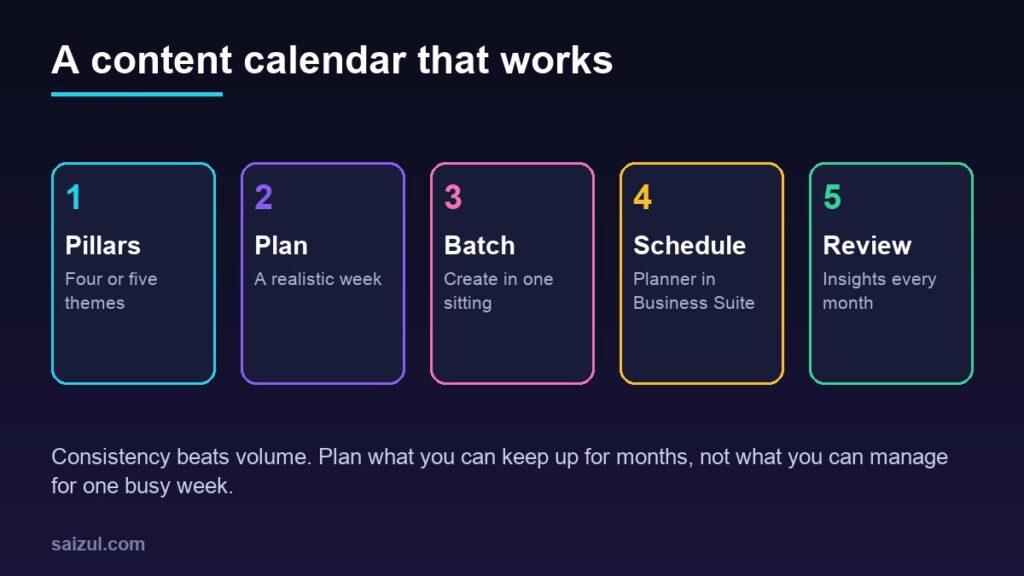
Step 1: Choose four or five content pillars
Content pillars are the recurring themes you post about. They stop you running out of ideas and keep the page balanced. Examples for a small online clothing store:
| Pillar | What it covers | Example posts |
|---|---|---|
| Products | New arrivals and best sellers | A short video of a new kurti in daylight, with price and sizes |
| Help | Answers to common questions | How to choose your size, fabric care tips |
| Behind the scenes | The people and the process | Packing orders, a visit to the supplier |
| Proof | Reviews and real customers | A customer photo shared with permission |
| Offers and dates | Sales, festivals, events | Eid collection launch, free delivery weekend |
A service business might use pillars such as tips, before-and-after work, team, client results and offers. Keep promotional posts to a minority; people follow pages that are useful or interesting, not only pages that sell.
Step 2: Set a posting rhythm you can keep
There is no single correct number of posts. Choose what you can produce well every week for months:
- Starting out: three posts a week on your main platform, plus stories when you have something quick to show.
- With some help: one post a day on weekdays, with a short video or reel at least once a week.
- Focus on one or two platforms where your customers already are, usually Facebook and Instagram for small businesses in Bangladesh, rather than spreading thin across many.
A simple weekly template makes planning quick. For example: Saturday a product post, Monday a help post, Wednesday behind the scenes, Friday proof or an offer.
Step 3: Build the calendar
A spreadsheet is enough. Create one row per post with these columns:
- Date and time
- Platform (Facebook, Instagram, both)
- Pillar
- Format (photo, carousel, reel, story, text)
- Caption and call to action
- Image or video file, with a link to where it is stored
- Status (idea, ready, scheduled, posted)
- Notes on results after posting
Plan a month at a time. First mark fixed dates: festivals such as Pohela Boishakh and the Eids, national holidays, sales, product launches and the days you know orders are busy. Then fill the remaining slots from your pillars.
Step 4: Batch your content
Set aside one or two sessions a month to create content in bulk.
- Write all the captions for the period in one go, using your pillars and the questions customers ask most. Your inbox is the best source of ideas; see customer service for online stores.
- Shoot photos and short videos in one session, in good daylight, with several angles of each product.
- Design any graphics together, using a consistent style. A free tool such as the one in my free Canva alternative guide is enough for most small businesses.
- Save everything in clearly named folders that match the calendar.
Leave a few empty slots each week for things that happen in the moment: a customer’s photo, a news item, a sold-out announcement.
Step 5: Schedule posts in Meta Business Suite
For Facebook and Instagram, the planner in Meta Business Suite is free and built for this. Meta says you can use it to plan your marketing calendar, schedule posts, stories, reels and ads ahead of time, see everything in a weekly or monthly view, and choose to publish to Facebook, Instagram or both (planner best practices).
- Save posts as drafts while you are still working on them, and duplicate posts that follow a format you reuse.
- Give team members access through your business portfolio, so they can create content while you review what has been scheduled.
- Check the scheduled view before each week starts, in case stock or prices have changed.
Scheduling saves time, but it does not replace being present. Someone still needs to answer comments and messages after each post goes live. My guide to Messenger automation helps with the routine questions.
Step 6: Review results every month
Insights in Meta Business Suite shows results for your Facebook Page and Instagram profile, including an overview of the past 28 days with metrics such as views and follows, results such as content interactions and link clicks, a content table for individual posts, and audience information such as when your followers are most active (about Insights).
- Find the five posts with the most interactions and link clicks. Which pillars and formats were they?
- Find the weakest posts and decide whether the topic, the image or the timing was the problem.
- Check when your followers are active and adjust posting times.
- Compare messages and orders in weeks with regular posting against quiet weeks.
- Update next month’s plan: more of what works, less of what does not.
For more on growing reach without ads, see how to grow a Facebook business page. If you sell through Instagram, read the Instagram Shop setup guide.
Get more from each piece of content
- Turn a detailed help post into a short reel, a carousel and a story.
- Turn the most common questions into a blog post on your website; see how to start a business blog.
- Share your best posts in your email newsletter.
- If your team grows, an approval step before scheduling helps. My guide to automating content approval and scheduling covers a more advanced setup.
Common mistakes
- Planning daily posts you cannot keep up with.
- Only posting offers and prices.
- Scheduling and then ignoring comments and messages.
- Leaving no room for timely posts.
- Never looking at Insights, so the plan never improves.
- Sharing customer photos or reviews without permission.
Quick checklist
- Four or five content pillars written down.
- A weekly posting rhythm you can keep for months.
- A monthly calendar with fixed dates marked first.
- Captions and photos batched in one or two sessions.
- Posts scheduled in Meta Business Suite, with space for timely posts.
- Comments and messages answered after each post.
- A monthly Insights review that shapes the next plan.
Need help with this on your own site or business?
I build and secure WordPress sites, web apps and AI automations end to end, in Bangla and English: a free discovery call, a written scope with a fixed quote, a focused first version, then testing, deployment and monitoring.
See the portfolio and the AI agent services, or tell me what you need.
FAQ
How often should a small business post on social media?
Choose a rhythm you can keep up with good quality. For many small businesses three posts a week on one or two platforms is a sensible start, then increase if you have the time and content.
Is Meta Business Suite free for scheduling posts?
Yes, scheduling posts, stories and reels to Facebook and Instagram in Meta Business Suite is free. You pay only if you run ads.
Do I need special software for a content calendar?
No. A spreadsheet with dates, platforms, captions, files and status columns is enough for most small businesses, combined with the free planner in Meta Business Suite.
How far ahead should I plan?
Plan the main topics a month ahead and schedule finished posts one or two weeks ahead, leaving room for timely posts and changes in stock or prices.
Sources

Md Saizul Amin
Digital Systems Strategist · AI Agent Developer · 9+ years in digital & ITMd Saizul Amin is a digital systems strategist and AI automation engineer from Dhaka, Bangladesh. With 9+ years across IT, web development and digital marketing, he writes practical guides on technology, business, education and online growth — and builds the same kinds of systems (AI agents, websites, SEO and ad campaigns) for clients in Bangladesh, the UK and the USA.
Specialist in
Credentials & experience
- 🎓B.Sc. in Computer Science & EngineeringBangladesh University of Business & Technology (BUBT), 2017–2021
- 🤖AI Automation Engineer · Web Developer · SEO SpecialistUnique Mark Limited, Birmingham UK — 2024 to present
- 🌱IT SpecialistGreen Fund Initiative Inc., USA — 2024 to present
- 🏥Junior IT Consultant — Ministry of Health (DGHS)Built the first national Shareable Health Record website; supported 6,000+ facilities
- 🧭Head of ITWEDO Bangladesh — led IT for 50+ staff, 2021–2023