In this article
A website is not “done” at launch. Plugins need updates, backups need testing and small problems grow if nobody looks. This routine takes about an hour a month for a typical business site.
From my own work: I maintain my own sites on a VPS. This month alone, routine checks caught a critical PHP security update, an unused plugin slowing every page and a contact form that had silently stopped sending email.
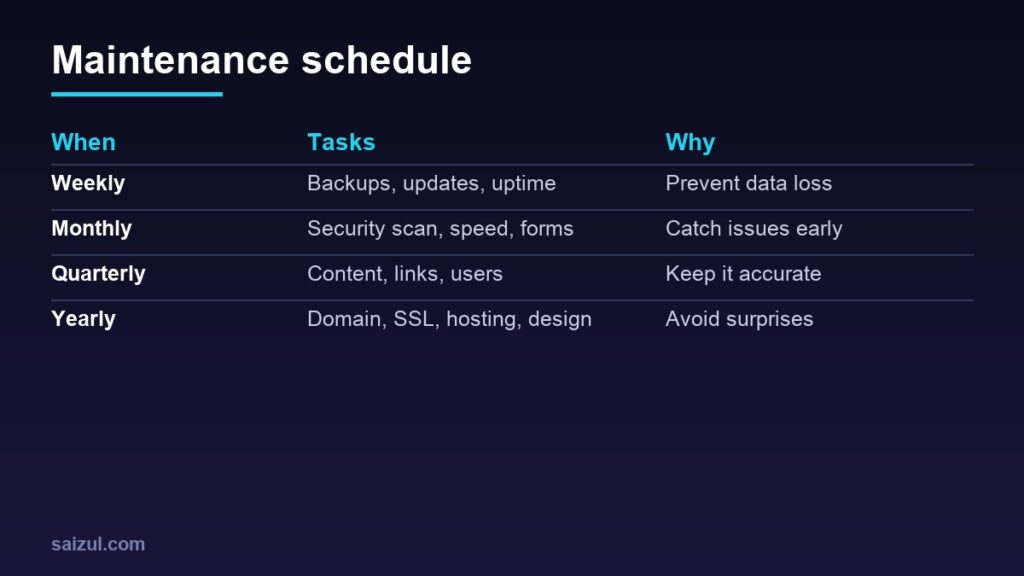
Weekly
- Backups: confirm automatic backups ran and are stored off the server (backup guide).
- Updates: update WordPress core, plugins and themes, ideally after a backup (updating WordPress).
- Uptime: check your uptime monitor for downtime alerts.
Monthly
- Run a security scan and review admin users (see the WordPress security checklist).
- Test contact forms, checkout and email delivery.
- Check speed in PageSpeed Insights and fix regressions (speed guide).
- Review Search Console for errors, indexing issues and security warnings.
- Remove unused plugins and themes.
Quarterly
- Restore test: restore a backup to a staging site to prove it works.
- Update outdated content, prices and team details.
- Fix broken links and redirect deleted pages.
- Review user accounts and remove people who left.
Yearly
- Check domain and SSL renewal dates and payment methods.
- Review hosting plan, PHP version and resource usage.
- Review privacy policy and legal pages.
- Decide whether the design still supports your goals.
Helpful tools
| Task | Tool |
|---|---|
| Backups | Host backups, UpdraftPlus or server-level backups |
| Uptime | UptimeRobot or a self-hosted monitor |
| Security | Wordfence or Solid Security |
| Speed | PageSpeed Insights, a caching plugin |
Need help with this on your own site or business?
I build and secure WordPress sites, web apps and AI automations end to end, in Bangla and English: a free discovery call, a written scope with a fixed quote, a focused first version, then testing, deployment and monitoring.
See the portfolio and the AI agent services, or tell me what you need.
FAQ
How often should I update WordPress plugins?
Weekly is a good rhythm; apply security updates as soon as possible after a backup.
Do I need a staging site?
For business-critical sites, yes; test big updates there first.
How much does website maintenance cost?
It ranges from doing it yourself for free to a monthly plan with a developer, depending on site size and risk.
Sources

Md Saizul Amin
Digital Systems Strategist · AI Agent Developer · 9+ years in digital & ITMd Saizul Amin is a digital systems strategist and AI automation engineer from Dhaka, Bangladesh. With 9+ years across IT, web development and digital marketing, he writes practical guides on technology, business, education and online growth — and builds the same kinds of systems (AI agents, websites, SEO and ad campaigns) for clients in Bangladesh, the UK and the USA.
Specialist in
Credentials & experience
- 🎓B.Sc. in Computer Science & EngineeringBangladesh University of Business & Technology (BUBT), 2017–2021
- 🤖AI Automation Engineer · Web Developer · SEO SpecialistUnique Mark Limited, Birmingham UK — 2024 to present
- 🌱IT SpecialistGreen Fund Initiative Inc., USA — 2024 to present
- 🏥Junior IT Consultant — Ministry of Health (DGHS)Built the first national Shareable Health Record website; supported 6,000+ facilities
- 🧭Head of ITWEDO Bangladesh — led IT for 50+ staff, 2021–2023