In this article
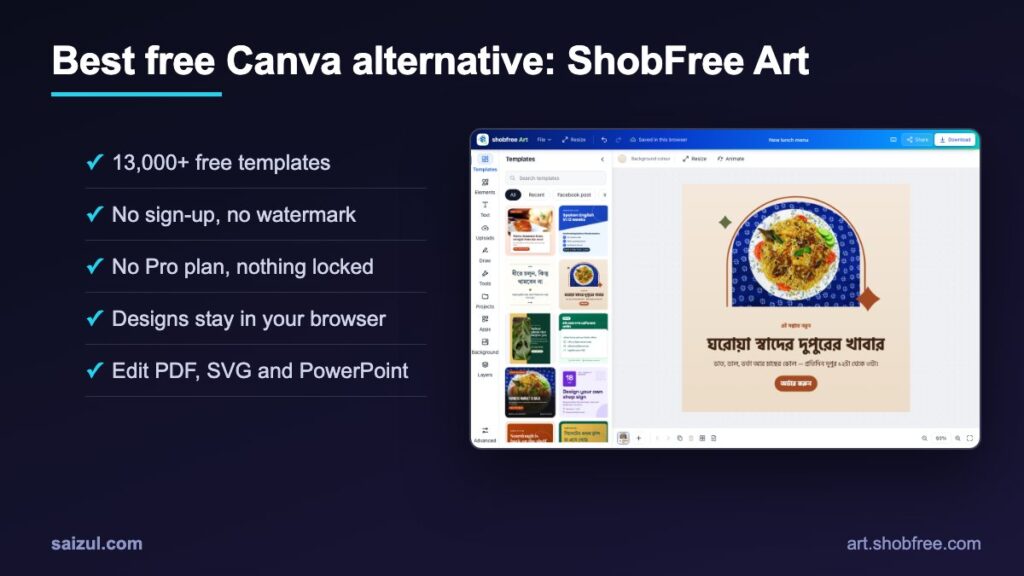
If you search for a best free Canva alternative, you usually find two kinds of tools: ones that are free until you try to download without a watermark, and ones that want your email before you can see a single template. I built ShobFree Art to be neither. It is a design editor that runs in your browser, with 13,000+ original templates, no sign-up, no watermark and no paid plan at all, and your designs never leave your device. This guide shows what it can do, how to make a design in about five minutes, how it compares with Canva, and where its limits are, so you can decide if it fits the way you work.
From my own work: Small businesses and students I work with kept asking the same question: why does a simple poster or Facebook post need an account, a subscription prompt and a watermark check? ShobFree Art is my answer. It is the design side of ShobFree, my platform of free everyday tools, and it follows the same rules: free, private and simple.
What ShobFree Art is
ShobFree Art is a free online design editor, similar in spirit to Canva, that works entirely in your browser at art.shobfree.com. You pick a template or a blank size, edit it, and download it. That is the whole flow.
- 100% free: no paid plan, no “Pro” tier, no trial, no locked templates and no watermark on downloads.
- No account: you never sign up or log in.
- Private by design: designs are processed and saved in your own browser (autosave and version history in IndexedDB). Nothing is uploaded to a server, and the site uses no cookies and no tracking.
- Original templates: 13,000+ templates, every one original rather than copied from Canva or anyone else. Photos are CC0 or public domain. The newest wave adds premium, professional and modern templates in every main format, from posts, reels and decks to resumes, menus, invitations and logo animations.
- Works everywhere: on phones, tablets and computers, and offline after your first visit.
The full product story, including how it was built, is on the ShobFree Art case study page. This article is the practical guide.
Who it is for
- Small businesses and shops that need regular social posts, offers, menus, price lists and flyers without paying for another subscription.
- Students and teachers making presentations, worksheets, flashcards, certificates and report cards.
- Job seekers who want a clean resume or cover letter without handing personal details to a website.
- Creators who need YouTube thumbnails, Reels covers, animated posts and GIFs.
- Anyone in a privacy-sensitive job, such as NGOs, clinics or schools, who would rather not upload drafts and photos to a third-party cloud.
- People who design in Bangla, because Bangla text, including juktakkhor, renders correctly on screen and in PDF and SVG export.
It is less suited to large teams who need several people editing the same file at the same moment. More on that in the limitations section.
How to make a design in 5 minutes
Here is the exact flow I use for a quick social post. It works the same for posters, invitations or a CV.
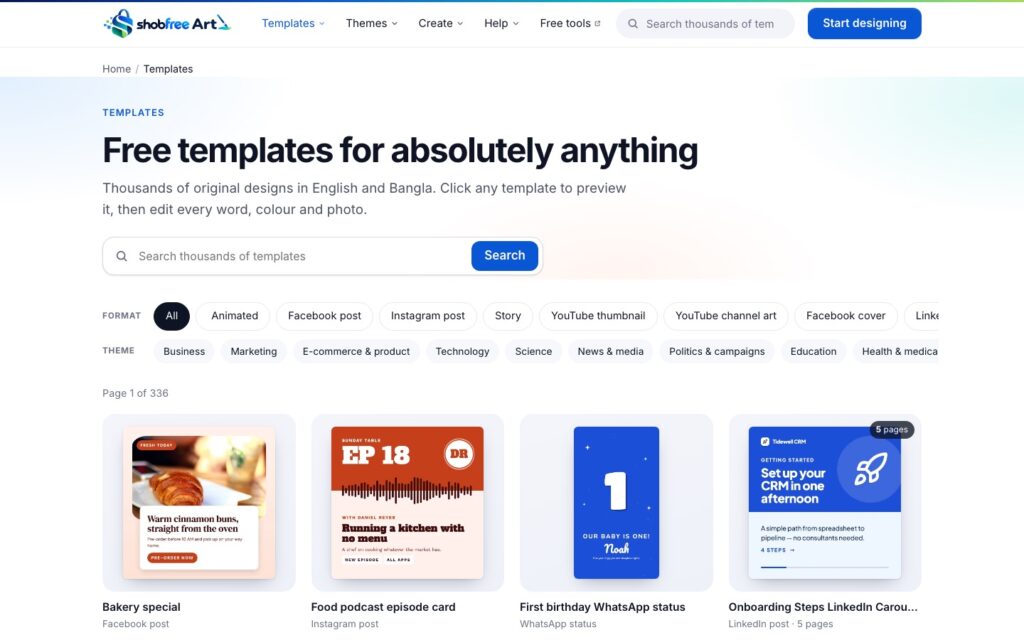
1. Open the template library
Go to art.shobfree.com/templates/. Filter by format (for example Instagram post, Facebook post, story or YouTube thumbnail) and by theme (business, food, education, technology and others). You can also type what you need into the search box; it tolerates typos and always shows something useful rather than an empty page.
2. Preview a template
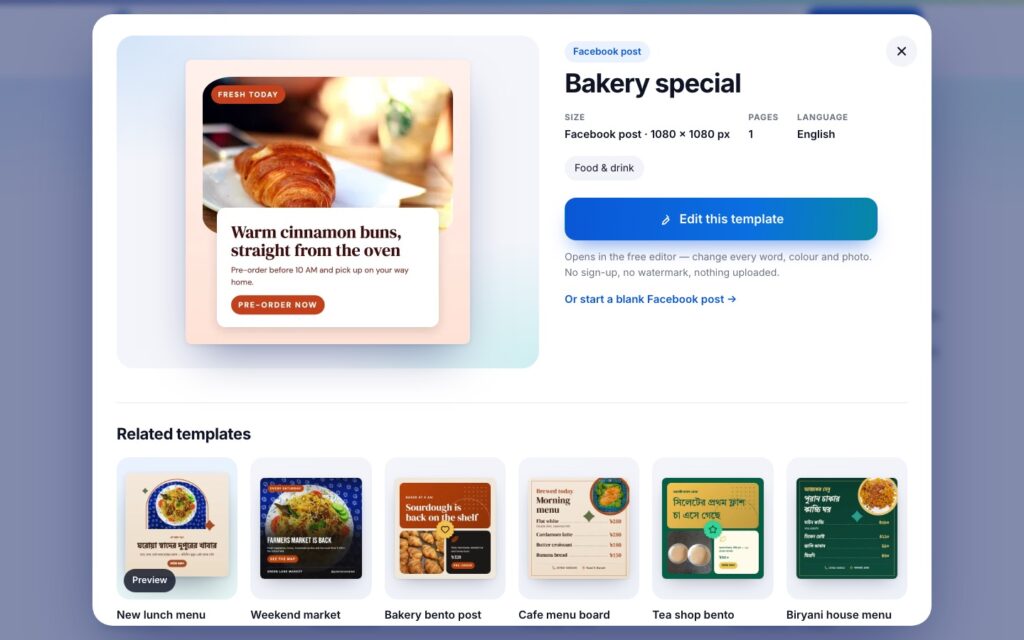
Click any template to open a preview. It shows the size, number of pages and language, plus around 20 related designs in case another one fits better. Animated templates play a short preview when you hover over them.
3. Edit the text, colours and photos
Press Edit this template. The editor opens with the design on the canvas. Click any text to retype it, and pick from 247 fonts (237 Latin and 10 Bangla). Change colours from the toolbar. To replace a photo, drag your own image onto the frame; it fits itself automatically. Everything autosaves in your browser as you work.
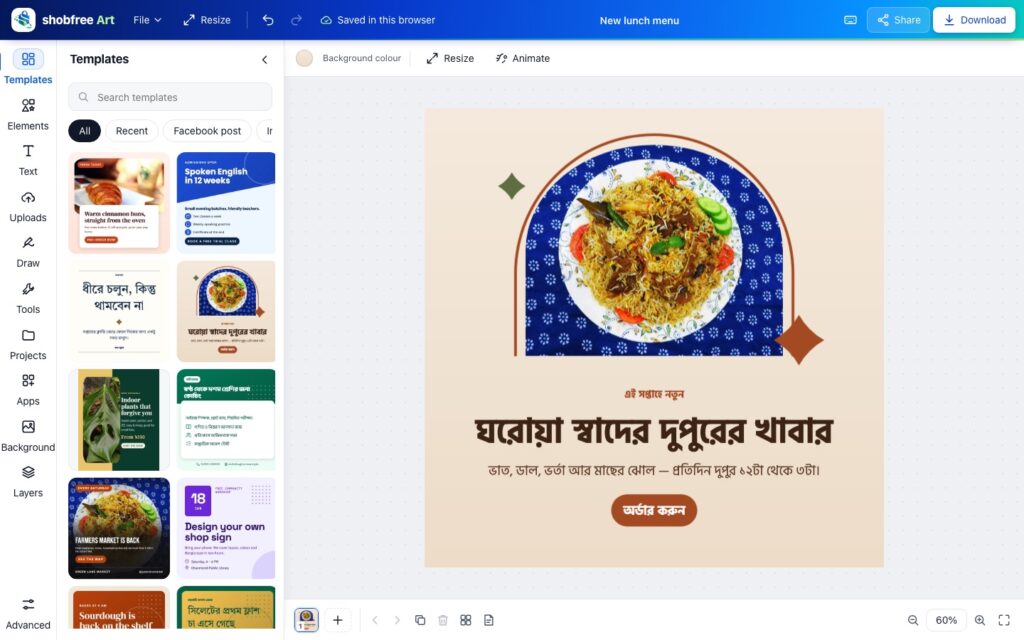
4. Add elements if you need them
Open Elements for more than 38,000 open-licence icons and shapes, 518 vector graphics including phone, laptop and browser mockups, 574 CC0 photos, frames for photos, charts, tables and QR codes. Use the layers panel, alignment guides and grouping to keep things tidy, and undo or redo any step.
5. Download
Press Download and choose a file type. The dialog shows an estimated file size for each option before you download, so you can pick a lighter JPG or WebP for the web, or a print PDF for paper. Done.
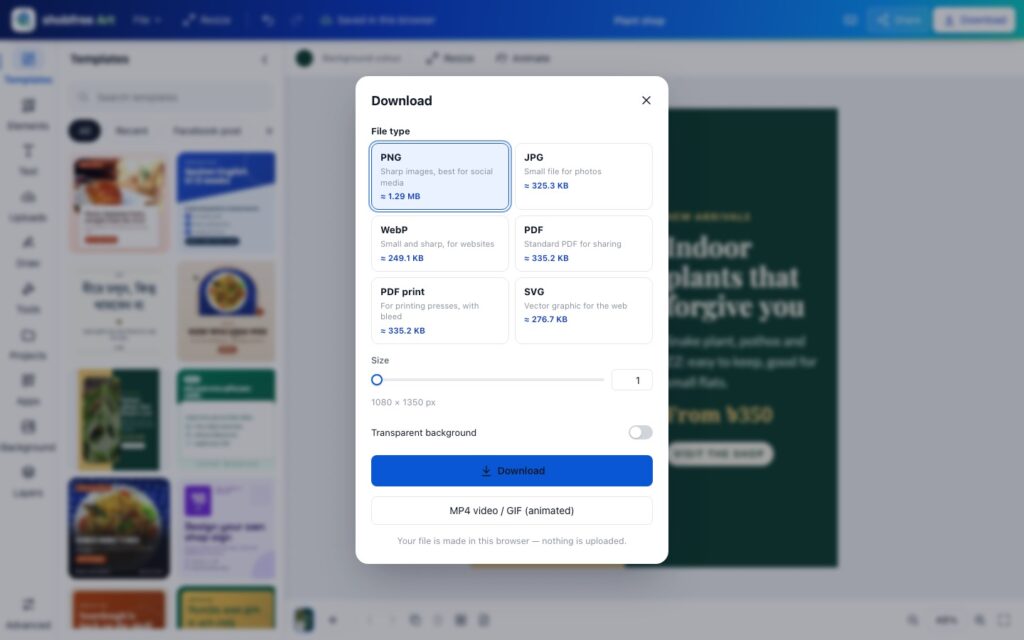
Want to start from a blank page instead? Open the editor directly and choose a size, or use Resize later to turn one design into another format.
Template categories, with direct links
ShobFree Art covers about 110 formats, grouped into six areas, across 32 themes. These links go straight to the matching makers.
Social media
Instagram and Facebook posts, stories, Reels covers, carousels, YouTube thumbnails and channel art, LinkedIn, X and Pinterest graphics, podcast and album covers, memes and quote cards. Try the Instagram post maker, Facebook post maker, Instagram story maker, YouTube thumbnail maker or quote maker.
Business and marketing
Flyers, posters, brochures, menus, price lists, coupons, logos, business cards, letterheads, invoices, display ads in all the standard IAB sizes, blog banners, product images, digital signage, proposals, media kits and “we’re hiring” posts. Start with the poster maker, flyer maker, logo maker, business card maker, banner maker or display ad maker.
Print and cards
Invitations, wedding, greeting, thank-you and save-the-date cards, certificates, tickets, ID cards, name tags, labels, t-shirts, gift cards, door hangers, table cards, recipe cards and loyalty cards. See the invitation card maker, wedding card maker and certificate maker.
Documents and education
Resumes and CVs, cover letters, presentations, reports, newsletters, worksheets, flashcards, lesson plans, report cards, comics, calendars, planners, mind maps and diagrams, mood boards, storyboards and wallpapers. Try the CV maker, presentation maker or mind map maker.
Occasions
Birthday, Eid, Ramadan, Christmas, Valentine’s Day, Halloween, Diwali, Holi, Lunar New Year, graduation, baby shower, Black Friday, back to school, Mother’s Day and more. For Bangladesh, the Eid card maker and Pohela Boishakh card maker are good starting points.
Video and animation
Video templates, Reels and TikTok, animated posts, video invitations, animated logos, GIF stickers, Twitch and streaming graphics, and video-call backgrounds. See the next section.
Import and edit PDF, SVG and PowerPoint files
New in the latest release: ShobFree Art can open existing files, not only templates. Drop in a PDF, an SVG or a PowerPoint (.pptx) file and its text, shapes and images become editable objects on the canvas, ready for the same fonts, colours, animation and export options as any other design.
- PDF: edit the text, shapes and images, or switch on exact-look mode to keep every page looking exactly like the original. Try the free PDF editor.
- SVG: recolour and edit vector logos, icons and illustrations in the free SVG editor.
- PowerPoint: open a .pptx deck, update the slides and export a PDF, images or even a video with the free PowerPoint editor.
As with everything else in ShobFree Art, the file is read and converted in your browser. Nothing is uploaded, which matters when the PDF is a contract, a CV or a school document.
Animation, video and GIFs
About 2,700 templates are animated, each with a hover preview, and you can animate anything you design yourself:
- 50+ animation effects: give each element an enter, emphasis and exit animation.
- 17+ page transitions between pages of a multi-page design, plus one-click page animation styles that animate a whole page at once.
- Timeline preview so you can check the timing before exporting.
- Export as MP4, WebM or GIF, free and without a watermark. MP4 is encoded in the browser with WebCodecs, so your video is not sent to a server to be rendered.
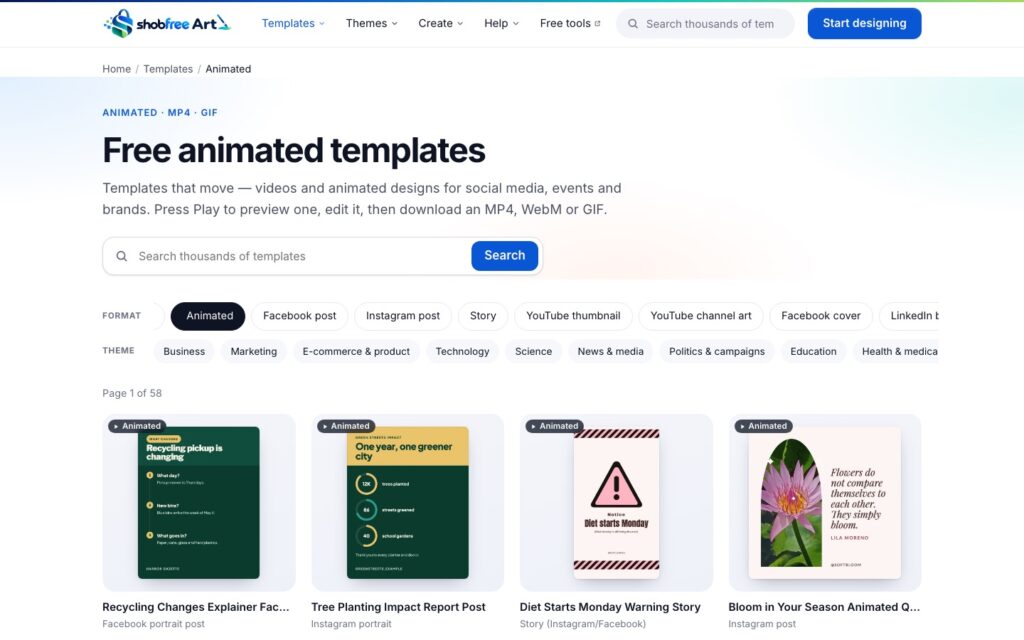
Good places to start are the animated templates, the video maker, the GIF maker, the Reel maker, the animated post maker and the logo animation maker.
The free AI background remover
Removing a photo background is a paid feature in many design tools. In ShobFree Art it is free, and it is private:
- The remover uses open AI models with Apache-2.0 licences that run inside your browser (using onnxruntime-web).
- The model is downloaded once, only after you agree, and then cached, so later uses are quicker.
- Your photo is never uploaded. The cut-out happens on your own device.
- An eraser brush lets you clean up edges by hand, and you can combine it with filters and cropping.
This is ideal for product photos, profile pictures and “we’re hiring” posts where you want the person or product on a clean colour.
Export formats and printing
| Format | Best for |
|---|---|
| PNG | Sharp social media images and graphics with text; transparent backgrounds |
| JPG | Photos and the smallest files for sharing |
| WebP | Website images: small and sharp |
| SVG | Vector graphics for the web, logos and icons |
| Documents, CVs and presentations to share | |
| Print PDF | Print shops: 300 dpi with bleed and crop marks |
| GIF | Short looping animations and stickers; GIF stickers keep transparent backgrounds |
| MP4 and WebM | Reels, stories and video posts |
Two details make a real difference in practice. First, the download dialog shows the file size before you download, which helps when a form or a platform has an upload limit. Second, the print PDF includes bleed and crop marks, so a print shop can trim flyers and cards cleanly without white edges.
You can also share a link that opens an editable or view-only copy of your design in someone else’s browser. The design travels inside the link itself, so no server stores it.
Privacy: everything happens in your browser
Most online editors save your work to their cloud. ShobFree Art does the opposite. The editor, the AI background remover and video encoding all run on your device:
- Autosave and version history are kept in your browser’s IndexedDB storage.
- No account, no cookies, no tracking.
- Uploads stay local. A photo you add is used in your browser; it is not sent anywhere.
- Strict security: a strict Content Security Policy and security headers, with everything running client-side.
- Works offline after the first visit.
This matters for CVs with your address and phone number, for client logos under NDA, for school and health notices, and for anyone who simply does not want a design company to hold their drafts.
ShobFree Art vs Canva: a fair comparison
Canva is an excellent product with a huge library and strong team features. The comparison below sticks to widely known plan facts and focuses on what people usually ask when they search for a Canva alternative with no sign-up.
| Feature | ShobFree Art | Canva |
|---|---|---|
| Price | Fully free, no paid plan | Free plan, plus paid Pro and Teams plans |
| Account | No sign-up | Account required to design |
| Where your designs live | In your browser; nothing uploaded | In your Canva cloud account |
| Premium templates and elements | None locked | Some are Pro-only |
| Watermarks | Never | Pro elements show a watermark on the free plan |
| Background remover | Free, on your device | Paid-plan feature |
| Open PDF, SVG and PowerPoint files | Yes, edited in your browser; nothing uploaded | Yes, imported into your Canva account |
| Team collaboration | Share links (editable or view-only copy) | Real-time co-editing and comments |
| Sync across devices | Manual, via share link | Automatic through your account |
| Library size | 13,000+ original templates | Much larger |
Canva is a trademark of Canva Pty Ltd. ShobFree Art is an independent product and is not affiliated with Canva. Plan details are as publicly described in November 2026; check canva.com for current plans.
In short: if you need a team working on the same file live, or the biggest possible library, Canva is the stronger choice. If you want a free design editor with no account, no paywall and full privacy, ShobFree Art is built for exactly that.
Tips to get better results
- Start from the right size. Pick the format first (post, story, thumbnail, A4). If you need the same design in another size later, use Resize instead of starting again.
- Search by purpose, not style. Searching “bakery offer” or “admission notice” finds closer matches than “nice blue”.
- Use the related designs. The preview window shows around 20 related templates; one of them is often closer to what you had in mind.
- Keep text short. On social posts, one headline and one line of detail read better on a phone than a paragraph.
- Set brand colours once. Save your brand colours and reuse them so every post looks consistent.
- Make many at once. For certificates, name tags or price cards, use bulk create from a CSV file instead of editing each copy by hand.
- Check the file size. The download dialog shows it; choose JPG or WebP when a site or form has an upload limit.
- Print properly. Use print PDF so the print shop gets bleed and crop marks.
- Back up important work. Download the final file, or save a share link, because designs live in this browser only.
If you post regularly for a business, pair this with a simple plan: my guide on getting your first customers online covers what to post and where, and the Instagram shop setup guide explains where product images go.
Honest limitations
- No real-time team collaboration. You can share an editable copy by link, but two people cannot edit the same design live, and there are no comments or approval workflows.
- No automatic sync between devices. Because there is no account, work does not follow you from your laptop to your phone. Use a share link to move a design.
- Browser storage can be cleared. Clearing site data, some “cleaner” apps and private windows remove saved designs. Download what matters.
- Smaller library than Canva. 13,000+ templates cover everyday needs well, but Canva’s catalogue is far larger.
- English interface. Bangla designs are fully supported, but the menus and help are in English.
- The first AI background removal needs a download. The model is fetched once (with your consent) before it can run offline.
FAQ
Is ShobFree Art really free, or is there a catch?
It is free with no paid plan behind it: no Pro tier, no trial, no locked templates and no watermark. There is no account to upsell you on. The honest trade-offs are a smaller library than Canva and no real-time team editing, not a hidden fee.
Do I need to install anything or create an account?
No. It runs in your web browser on a computer, tablet or phone. You do not sign up, and after your first visit the editor also works offline.
What happens to my designs if I clear my browser data?
Your designs are saved in your browser's own storage, not on a server. Clearing site data for art.shobfree.com, or using a private window, removes them. Download the files you need, or keep a share link, because the link itself carries the design.
Can I make a YouTube thumbnail, an Instagram post or a CV with it?
Yes. There are templates and correct canvas sizes for YouTube thumbnails and channel art, Instagram and Facebook posts and stories, LinkedIn, X and Pinterest, and for resumes, cover letters and presentations, among about 110 formats.
Can I edit a PDF or PowerPoint in ShobFree Art?
Yes. Open a PDF, SVG or PowerPoint (.pptx) file and its text, shapes and images become editable. PDFs also have an exact-look mode that keeps every page looking exactly like the original. Everything happens in your browser and nothing is uploaded.
Can I print what I design?
Yes. Choose the print PDF option to get a 300 dpi PDF with bleed and crop marks, which is what most print shops ask for. Standard PDF, PNG, JPG, WebP and SVG are also available.
Does it work for Bangla designs?
Yes. Bangla text, including juktakkhor (conjunct letters), is shaped correctly on screen and in PDF and SVG exports, and there are Bangla templates for things like menus, notices and Pohela Boishakh cards. The site interface itself is in English.
Is the AI background remover private?
Yes. It runs inside your browser. The AI model is downloaded once, only after you agree, and then cached; the photo you are editing is never uploaded.
Can I move my work to another computer?
Designs do not sync between devices automatically, because nothing is stored in a cloud account. Create a share link and open it on the other device to get an editable copy there.
Conclusion: try it on your next design
A free Canva alternative should be free in practice, not only on the pricing page. ShobFree Art gives you 13,000+ templates, a full editor, PDF, SVG and PowerPoint import, animation and video export, a background remover and print-ready PDFs, without an account, a watermark or a paid plan, and it keeps your work on your own device. Its limits are real: no live team editing and a smaller library. For most posters, posts, CVs, invitations and thumbnails, though, it does the job from start to finish.
Open ShobFree Art and make your first design, or browse the free templates. To see how the product was planned and built, read the ShobFree Art case study, and for the engineering side of free tool platforms, see how to build a free online tools website. If you want a product like this for your own business, tell me what you want to build.
Md Saizul Amin
Digital Systems Strategist · AI Agent Developer · 9+ years in digital & ITMd Saizul Amin is a digital systems strategist and AI automation engineer from Dhaka, Bangladesh. With 9+ years across IT, web development and digital marketing, he writes practical guides on technology, business, education and online growth — and builds the same kinds of systems (AI agents, websites, SEO and ad campaigns) for clients in Bangladesh, the UK and the USA.
Specialist in
Credentials & experience
- 🎓B.Sc. in Computer Science & EngineeringBangladesh University of Business & Technology (BUBT), 2017–2021
- 🤖AI Automation Engineer · Web Developer · SEO SpecialistUnique Mark Limited, Birmingham UK — 2024 to present
- 🌱IT SpecialistGreen Fund Initiative Inc., USA — 2024 to present
- 🏥Junior IT Consultant — Ministry of Health (DGHS)Built the first national Shareable Health Record website; supported 6,000+ facilities
- 🧭Head of ITWEDO Bangladesh — led IT for 50+ staff, 2021–2023