In this article
Lead generation automation connects every place leads come from, such as website forms, Facebook and Instagram lead ads, Google Ads lead forms, WhatsApp and Messenger, into one pipeline that cleans, enriches and scores each lead and sends a fast first reply. The goal is simple: no lead waits for someone to notice it, and your team spends time on the leads most likely to buy. This guide shows how to connect each source, what to automate in between and how to follow up quickly without breaking platform rules.
From my own work: When I audit how a business handles leads, ad leads are often sitting in the Meta Leads Center waiting for someone to download a spreadsheet. Connecting that one source directly to the sales team, with an instant reply, is usually the first fix I suggest, before any AI or scoring.
This article is about the plumbing: sources, cleaning, scoring and the first reply. If you want an AI assistant to hold the qualifying conversation itself, read my guide to an AI lead generation agent. For outbound prospecting, see how to automate cold outreach.
What is lead generation automation?
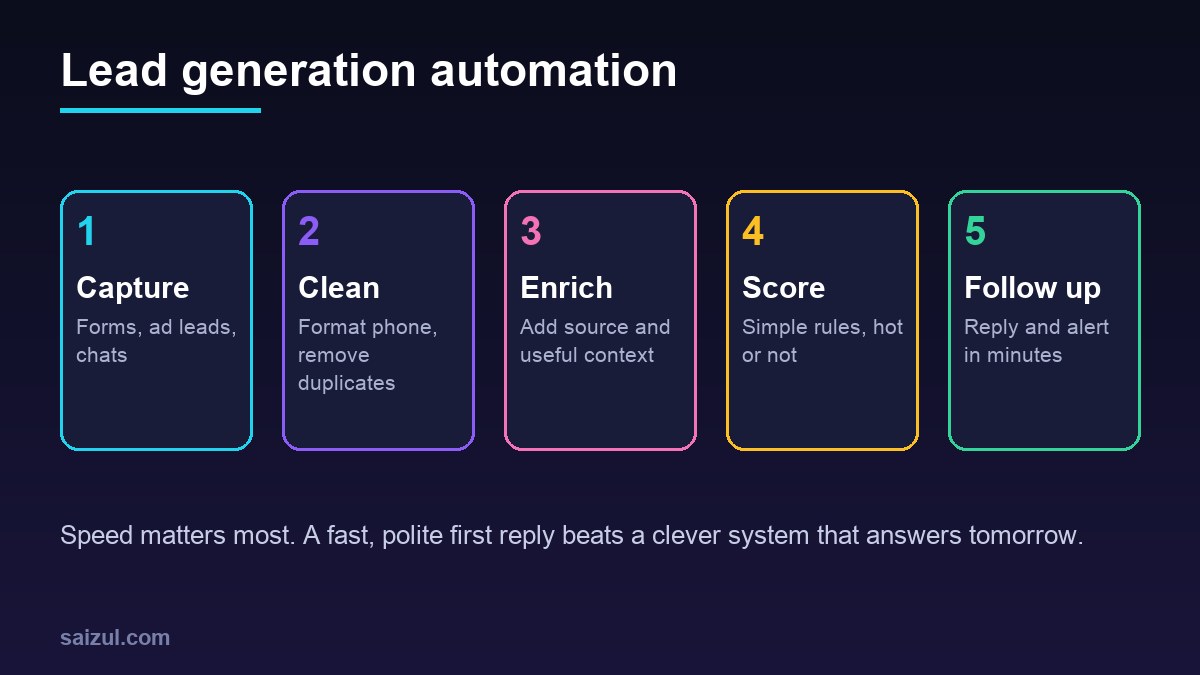
Most businesses already generate leads. The problem is what happens next: leads arrive in five different places, someone copies them into a sheet when they have time, and the reply goes out hours or days later. Lead generation automation replaces those manual steps with a workflow:
- Capture every lead the moment it arrives, from every source.
- Clean the data: format phone numbers, fix names, remove duplicates.
- Enrich it with useful context such as source, campaign, page and location.
- Score it with simple rules so hot leads stand out.
- Follow up instantly with a reply to the lead and an alert to the right person.
- Record it in your CRM, so you can see which sources bring sales, not just leads.
How to connect each lead source
Website forms
Send each submission to a webhook in your automation tool (n8n, Make, Zapier) or straight to your CRM, as well as to email. Add hidden fields for the page URL and UTM campaign tags, so every lead carries its source. A short form with clear fields converts better; my guide to landing page best practices covers form design.
Facebook and Instagram lead ads
Meta lets you retrieve leads in real time with webhooks, which notify your system when a new lead is submitted so you can fetch the details through the Marketing API; you can also bulk read leads, use a supported CRM integration, or download them from the Leads Center. A custom app needs App Review for the leads_retrieval and pages_manage_ads permissions (Meta Lead Ads guide). Without code, n8n’s Facebook Lead Ads Trigger starts a workflow on each new lead; note that Facebook allows only one webhook per app, so test and production URLs overwrite each other (n8n Facebook Lead Ads Trigger).
Google Ads lead forms
Google Ads lead form assets can send each lead to your own URL. Google’s documentation says that after a user submits the form, an HTTP POST request is sent to the configured URL, with a key you set that can be used to validate the leads (Google Ads lead form webhook). Always check that key before accepting the data.
WhatsApp and Messenger
Chat leads are often the warmest, because the person started the conversation. Use the WhatsApp Business Platform or Messenger Platform to capture the name, phone and first message into your CRM. Respect the messaging windows: on Messenger, businesses can usually reply within 24 hours of a user action, and sending later needs an approved message tag or other allowed option (Messenger Platform policy). On WhatsApp, messages outside the customer service window need approved templates and opt-in; see WhatsApp Business API vs app.
Phone calls and walk-ins
Give staff a two-field quick-add form on their phone, so these leads enter the same pipeline.
Clean, de-duplicate and enrich leads
- Phone format: store numbers in one international format with the country code, for example +880 for Bangladesh. This is what makes matching work.
- Duplicates: before creating a new lead, search by phone and email. If found, add the new enquiry to the existing contact instead.
- Source data: save the form name, ad campaign, landing page and time.
- Enrichment, carefully: adding a company name from a work email domain, or an area from a postcode, is useful. Buying personal data or scraping profiles is a privacy and reputation risk. Only collect what you need and mention it in your privacy policy.
- Spam filter: drop obvious junk, such as test entries and invalid numbers, before it reaches sales.
How to score leads with simple rules
You do not need machine learning to start. A points system that your sales team agrees with works well and is easy to explain.
| Signal | Example rule | Points |
|---|---|---|
| Fit | Service you offer, area you serve | + points |
| Intent | Asked for a quote, visited pricing page | + more points |
| Timeline | Wants to start this month | + points |
| Budget | Selected a range that matches your offer | + points |
| Poor fit | Outside service area, student project | – points |
Choose your own numbers, then label leads as hot, warm or cold. Review the rules every month against which leads actually bought. Once the rules are stable, an AI step can summarise free-text messages or suggest a score for a person to check.
Instant follow-up: the part that matters most
- Reply to the lead within minutes: thank them, confirm what they asked for, say what happens next and when. Use the channel they used.
- Alert the owner: hot leads go to a named person immediately, on the app they watch, with a one-line summary and a link to the record.
- Offer a next step: a booking link, a short question or a call-back time.
- Follow up if there is no reply, once or twice, spaced out, then stop. Respect each platform’s rules and opt-ins.
- Escalate if nobody acts: if a hot lead has no contact after a set time, alert a manager.
For longer nurture sequences after the first contact, see email marketing automation for small business.
How to build your lead automation: step by step
- List every lead source and how leads are handled today.
- Choose the destination: a CRM, or a structured sheet for very small teams.
- Connect the busiest source first, often ad leads or the website form.
- Add cleaning and duplicate checks.
- Add the instant reply and owner alert.
- Add scoring rules agreed with sales.
- Connect the remaining sources, one at a time, testing each.
- Add error alerts so you know when a connection breaks, such as an expired token.
- Report weekly: leads, response time, contact rate and sales by source.
If you self-host your automation tool, my guide to self-hosted n8n on a VPS covers a production setup.
Common mistakes
- Leaving ad leads in the Leads Center to download by hand.
- No duplicate check, so one customer gets three calls.
- Phone numbers in mixed formats, so matching fails.
- Instant replies that sound like spam or promise too much.
- Scoring rules nobody on the sales team understands.
- Measuring cost per lead but never sales per source.
- No alert when a connection silently stops working.
Quick checklist
- All lead sources listed and connected to one destination.
- Source, campaign and page saved on every lead.
- Phone numbers in one format; duplicates matched.
- Webhook keys and tokens validated and stored securely.
- Instant reply on the same channel, within platform rules.
- Hot leads alerted to a named owner with escalation.
- Simple scoring rules agreed and reviewed monthly.
- Only necessary data collected; privacy policy updated.
- Error alerts for broken connections.
- Weekly report of sales by source, not just lead count.
Need help with this on your own site or business?
I build and secure WordPress sites, web apps and AI automations end to end, in Bangla and English: a free discovery call, a written scope with a fixed quote, a focused first version, then testing, deployment and monitoring.
See the portfolio and the AI agent services, or tell me what you need.
FAQ
What is lead generation automation?
It is a set of workflows that capture leads from forms, ads and chat channels, clean and score them, store them in a CRM and send an instant reply and alert, so no lead waits for someone to notice it.
How do I get Facebook lead ads into my CRM automatically?
Use a supported CRM integration, a tool such as n8n with its Facebook Lead Ads trigger, or a custom app that receives Meta lead webhooks and fetches lead details through the Marketing API.
Do I need AI for lead generation automation?
No. Capture, cleaning, simple scoring and instant replies work well with rule-based workflows. AI helps later for reading free-text messages, summarising leads or holding a qualifying conversation.
How fast should I follow up with a new lead?
As fast as you reasonably can, ideally with an automatic reply within minutes and a person contacting hot leads soon after. Leads cool quickly, and they often contact several businesses at once.
Can I send WhatsApp follow-ups to leads automatically?
Yes, through the WhatsApp Business Platform, to people who opted in. Outside the customer service window you need approved message templates, and you should stop as soon as the person replies or asks you to.
Sources

Md Saizul Amin
Digital Systems Strategist · AI Agent Developer · 9+ years in digital & ITMd Saizul Amin is a digital systems strategist and AI automation engineer from Dhaka, Bangladesh. With 9+ years across IT, web development and digital marketing, he writes practical guides on technology, business, education and online growth — and builds the same kinds of systems (AI agents, websites, SEO and ad campaigns) for clients in Bangladesh, the UK and the USA.
Specialist in
Credentials & experience
- 🎓B.Sc. in Computer Science & EngineeringBangladesh University of Business & Technology (BUBT), 2017–2021
- 🤖AI Automation Engineer · Web Developer · SEO SpecialistUnique Mark Limited, Birmingham UK — 2024 to present
- 🌱IT SpecialistGreen Fund Initiative Inc., USA — 2024 to present
- 🏥Junior IT Consultant — Ministry of Health (DGHS)Built the first national Shareable Health Record website; supported 6,000+ facilities
- 🧭Head of ITWEDO Bangladesh — led IT for 50+ staff, 2021–2023