In this article
Most businesses set up a Google Business Profile once, add a few photos and never touch it again. Yet the profile has a built-in way to talk to people who are already looking at you on Google Search and Maps: posts. You can share news, announce new stock, publish an offer with a coupon code or promote an event, and the post appears on your profile where searchers decide whether to call, visit or move on. Posts are free, quick to make and easy to forget. This guide explains the three post types, how to create and schedule them, what to write, the rules that get posts rejected, and a simple monthly routine.
From my own work: When I review a local business’s Google profile, I often find the last post is many months old, or there has never been one. Posting does not replace good reviews and accurate details, but a recent post with a real photo shows that the business is active, and it costs nothing but a few minutes.
If your profile is not set up properly yet, start with my Google Business Profile optimization checklist, which covers categories, hours, photos and services. This guide focuses only on posts.
What Business Profile posts are
Google says you can use posts to share announcements, offers, new products or upcoming events directly on Google Search and Maps, and that posts can show text, photos or videos (create posts on Google). They are not a replacement for social media, and they do not guarantee a higher ranking. Their main value is that they reach people at the moment they are looking at your business.
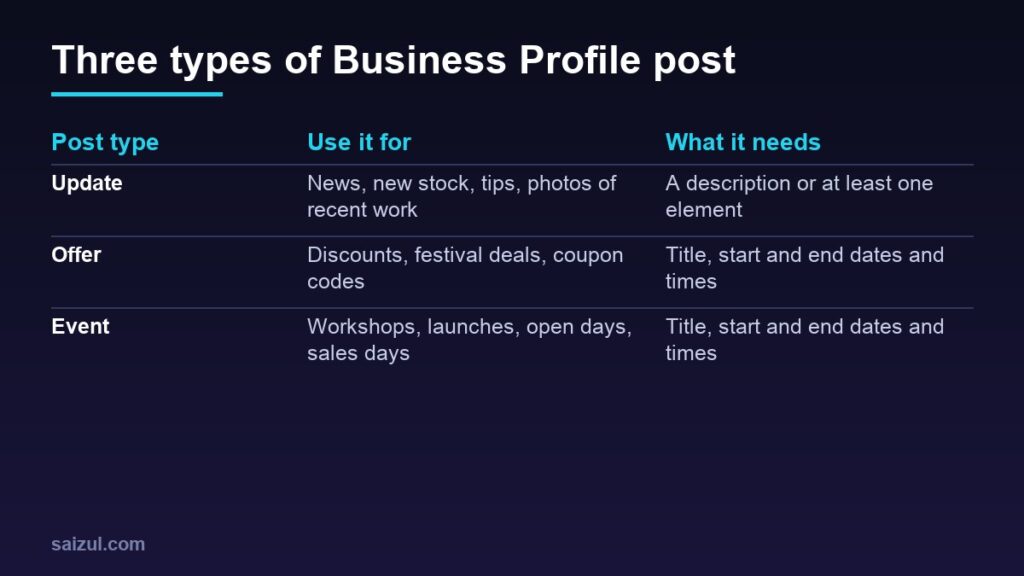
The three post types
| Type | Required | Optional |
|---|---|---|
| Update | A description or at least one element | Photo, video, a button such as book, order or learn more |
| Offer | Title, start and end dates and times | Description, photo, video, coupon code, link, terms and conditions |
| Event | Title, start and end dates and times | Description, photo, video, a button |
According to Google’s help page, an offer automatically gets a “View offer” button, and an event without times is shown as lasting 24 hours on its dates. Posts older than six months are archived unless a date range is set.
Step 1: Create your first post
- Open your Business Profile on Google Search or Maps while signed in to the account that manages it.
- Select Posts, then Add post.
- Choose Update, Offer or Event.
- Add a photo or video and the text, plus any button, coupon code or terms.
- Choose to post now, schedule it for later or set it to repeat.
- Select Post. If you manage several profiles, Google lets you choose which ones to share it to.
After you post, check its status. Google lists statuses such as Live, Pending and Not approved; only live posts appear on Search and Maps. Menus can change, so follow what your profile shows.
Step 2: Write posts people act on
- Lead with the point. The first line is what most people see. “New winter stock: cotton quilts from today” works better than a long greeting.
- Be specific and local. Mention the product, the service or the area: “AC servicing in Uttara this week”.
- Add one clear action with a button: order, book, call or learn more, pointing to the matching page on your website.
- Keep it short. A few sentences are enough. Save long explanations for your website.
- Use English or Bangla, whichever your customers search in, and keep spelling clean.
Step 3: Use real photos and short videos
Every post should have an image. Use your own photos of the product, the shop, the team or finished work, taken in good light and cropped so the subject is clear. Avoid stock images, heavy text on the image and collages that are hard to read on a phone. My guide to product photography with a smartphone shows how to get good results without special equipment.
Step 4: Run offers properly
Offer posts suit festival sales, seasonal discounts and first-order deals. Because an offer needs dates and times, it also tells customers when the deal ends.
- State the offer clearly in the title, such as “10% off all bedsheets until Friday”.
- Add a coupon code if customers redeem it online, and short terms such as minimum order or areas covered.
- Link to the page where the offer applies, not just the home page.
- Make sure your website, shop and staff all honour the same offer. A mismatch costs trust and can lead to bad reviews.
- End the offer on time, and do not run the same offer again and again under a new title.
Step 5: Follow the content rules
Posts are checked against Google’s content policies, and some are rejected. Points that small businesses most often run into:
- Phone numbers in the text. Google says posts with a phone number in the description might be rejected if the number cannot be verified (create posts on Google). Use the call button and the number on your profile instead.
- Unrelated contact details or links. The Maps content policy prohibits email addresses, phone numbers, social media links or links to other websites in posts when they are not related to your business (prohibited and restricted content).
- Repetition. The same policy prohibits posting the same content multiple times, so vary your posts.
- Regulated products. Businesses in regulated industries can post, but Google says posts should not include content about the regulated products themselves, and the policy restricts promotional offers for restricted goods or services.
- Tone and safety. Keep content professional and family friendly, and link only to trusted pages.
Step 6: A simple monthly posting plan
You do not need to post every day. A steady rhythm of one post a week is realistic for most small businesses:
| Week | Post idea |
|---|---|
| Week 1 | Update: new stock, a new service or recent work, with a real photo |
| Week 2 | Update: a useful tip or answer to a common customer question |
| Week 3 | Offer: a time-limited deal, if you have one, or another update |
| Week 4 | Event or update: a sale day, festival hours, a workshop or a customer story shared with permission |
Plan these alongside your social media posts so one photo session serves both; see my social media content calendar guide. Scheduling and repeat options save time, but check scheduled posts before they go live in case prices or stock have changed.
Step 7: Check what works
- Look at your profile’s performance figures for calls, messages, direction requests and website clicks month by month.
- Add tracking parameters to post links so visits show up separately in Google Analytics; see Google Analytics 4 for beginners.
- Ask new customers how they found you, and note when the answer is “Google Maps”.
- Repeat the post types that bring calls and clicks, and drop the ones that do not.
Posts work best with the rest of local SEO
Posts help most when the rest of your profile is strong: the right categories, accurate hours, plenty of recent reviews and a website that matches. See how to get more Google reviews, the local SEO guide and, if you visit customers instead of serving them at a shop, local SEO for service-area businesses.
Common mistakes
- Posting once and then leaving the profile silent for months.
- Putting a phone number in the post text instead of using the call button.
- Using stock photos or images covered in text.
- Publishing offers that the shop or website does not honour.
- Copying the same post every week.
- Linking every post to the home page.
Quick checklist
- Profile details, categories and hours complete and correct.
- One post a week, mixing updates, offers and events.
- A real photo or short video on every post.
- A clear first line and one button pointing to the right page.
- No phone numbers or unrelated links in the text.
- Offers with clear dates, terms and a matching landing page.
- Scheduled posts checked before they go live.
- Calls, clicks and messages reviewed monthly.
Need help with this on your own site or business?
I build and secure WordPress sites, web apps and AI automations end to end, in Bangla and English: a free discovery call, a written scope with a fixed quote, a focused first version, then testing, deployment and monitoring.
See the portfolio and the AI agent services, or tell me what you need.
FAQ
Are Google Business Profile posts free?
Yes. Creating updates, offers and events on your Business Profile does not cost anything.
How long do Google Business Profile posts stay visible?
Google says posts older than six months are archived unless a date range is set. Offers and events use their own dates.
Can I schedule Google Business Profile posts?
Yes. Google’s help page says you can schedule a post for a later time or set it to repeat when you create it.
Why was my Google post rejected?
Common reasons include a phone number in the description that cannot be verified, links or contact details unrelated to your business, repeated content, or content about regulated products. Edit the post to follow the policy and try again.
Sources

Md Saizul Amin
Digital Systems Strategist · AI Agent Developer · 9+ years in digital & ITMd Saizul Amin is a digital systems strategist and AI automation engineer from Dhaka, Bangladesh. With 9+ years across IT, web development and digital marketing, he writes practical guides on technology, business, education and online growth — and builds the same kinds of systems (AI agents, websites, SEO and ad campaigns) for clients in Bangladesh, the UK and the USA.
Specialist in
Credentials & experience
- 🎓B.Sc. in Computer Science & EngineeringBangladesh University of Business & Technology (BUBT), 2017–2021
- 🤖AI Automation Engineer · Web Developer · SEO SpecialistUnique Mark Limited, Birmingham UK — 2024 to present
- 🌱IT SpecialistGreen Fund Initiative Inc., USA — 2024 to present
- 🏥Junior IT Consultant — Ministry of Health (DGHS)Built the first national Shareable Health Record website; supported 6,000+ facilities
- 🧭Head of ITWEDO Bangladesh — led IT for 50+ staff, 2021–2023