In this article
Online, the photo is the product. A buyer cannot touch the fabric or check the size, so they decide from what the pictures show. You do not need a studio or a DSLR to get this right. A recent smartphone, a window and a sheet of white paper are enough, as long as you follow the same simple process for every product.
From my own work: On the stores I build, the image problems I fix most often are not about camera quality. They are mixed backgrounds from one product to the next, and photos uploaded straight from the phone at full size, which slows every product page.
What you need
- A phone with a clean lens. Wipe it before every session; a smudged lens causes most “blurry camera” complaints.
- A window with indirect daylight.
- White chart paper or a plain cloth for the background.
- A white board, foam sheet or even a white shirt as a reflector.
- A small tripod or a stack of books to keep the phone steady.
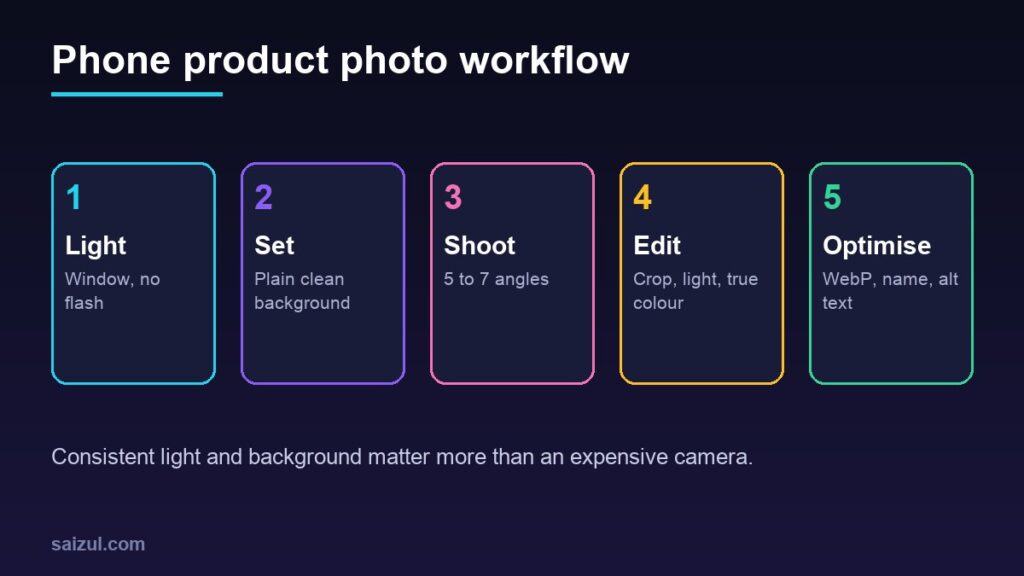
1. Light: use a window, not the flash
- Place the table beside a window so the light falls on the product from the side.
- Avoid direct sun. If the sun is harsh, soften it with a thin white curtain or tracing paper.
- Put the reflector on the opposite side to lift the shadows.
- Switch off the room lights. Mixing daylight with bulbs gives colours a yellow or green cast.
- Never use the phone’s flash; it flattens the product and creates hard reflections.
- Shoot at the same time of day so the whole catalogue looks consistent.
2. Background: keep it plain
For the main image, use a white or light neutral background. Curve the chart paper from the table up the wall so there is no visible line behind the product. A plain background keeps attention on the item, makes the shop grid look tidy, and matches what shopping channels expect: Google asks for a main image that shows the product clearly, without promotional text or watermarks (image link attribute). If you plan to list products on Google, see my Merchant Center setup guide.
Use lifestyle backgrounds for the extra images: the bag on a shoulder, the mug on a desk.
3. Angles: show what a buyer would check in a shop
| Shot | Purpose |
|---|---|
| Front, whole product | Main image for listings and ads |
| Back and side | Shows shape and hidden parts |
| Close-up of detail | Fabric, stitching, texture, ports, label |
| Scale | In a hand, on a model or beside a familiar object |
| In use | Helps the buyer imagine owning it |
| Packaging or what is in the box | Sets expectations for delivery |
4. Phone camera settings
- Use the main rear camera, not the selfie or ultra-wide lens.
- Step back and use 2x if your phone has a telephoto lens; shooting very close with the wide lens distorts the shape.
- Do not pinch-zoom digitally. Move the phone or crop later.
- Tap the product to focus, then lower the exposure slightly if white areas look washed out.
- Turn on the grid and keep the product straight.
- Turn off beauty filters and heavy HDR effects. Use portrait mode with care because it can blur product edges.
- Keep the same distance and height for every product in a category.
5. Editing: correct, do not transform
Free apps such as Snapseed, Lightroom mobile or the phone’s own editor are enough.
- Crop to one ratio for the whole store, for example square.
- Straighten the image.
- Adjust brightness and contrast until the white background looks white.
- Fix white balance so colours match the real product.
- Remove dust spots.
Do not push saturation or change the colour to make the product look better than it is. Photos that do not match the item cause returns and refused parcels.
6. Size and format for the web
A photo straight from a phone can be several megabytes and thousands of pixels wide. That is far more than a product page needs, and heavy images are one of the most common reasons a store feels slow.
| Setting | Practical starting point |
|---|---|
| Dimensions | Around 1,200 to 2,000 px on the longest side, enough for zoom |
| Format | WebP for photos; JPEG as a fallback; PNG only when you need transparency |
| File size | As small as you can get without visible quality loss, ideally well under a few hundred KB |
| Colour profile | sRGB, so colours look the same across devices |
WordPress accepts WebP uploads, and image optimisation plugins can convert and compress automatically. The Learn Images course on web.dev explains formats and responsive images in depth, and my WordPress speed guide covers the plugin side.
7. File names and alt text for SEO
Google uses the file name, the alt text and the text around an image to understand it (image SEO best practices).
- File name: rename
IMG_20260112_4471.jpgto something descriptive likeblue-cotton-panjabi-front.webpbefore uploading. - Alt text: describe what is in the picture in one short phrase, such as “Blue cotton panjabi with embroidered collar, front view”. Alt text is read aloud by screen readers, so write it for people.
- No keyword stuffing: “panjabi buy panjabi best panjabi price” helps nobody.
- Different alt text for each image of the same product: front view, back view, fabric close-up.
Images are one part of a product page. For titles, structured data and the rest, see product page SEO.
Quick checklist
- Lens cleaned, flash off, window light from the side.
- Plain background for the main image.
- At least five angles including a close-up and a scale shot.
- Same crop ratio across the store.
- Resized, compressed and saved as WebP.
- Descriptive file name and alt text on every image.
Need help with this on your own site or business?
I build and secure WordPress sites, web apps and AI automations end to end, in Bangla and English: a free discovery call, a written scope with a fixed quote, a focused first version, then testing, deployment and monitoring.
See the portfolio and the AI agent services, or tell me what you need.
FAQ
Do I need an expensive phone for product photos?
No. Any reasonably recent phone with a clean lens and good window light is enough for web-size product images.
Should I remove the background with an app?
Background-removal tools are fine for main images if the edges look natural. Check hair, fabric edges and transparent items closely before publishing.
How many photos should each product have?
Enough to answer what a buyer would check in person. For most products that is five to seven: front, back, side, detail, scale and in use.
Sources

Md Saizul Amin
Digital Systems Strategist · AI Agent Developer · 9+ years in digital & ITMd Saizul Amin is a digital systems strategist and AI automation engineer from Dhaka, Bangladesh. With 9+ years across IT, web development and digital marketing, he writes practical guides on technology, business, education and online growth — and builds the same kinds of systems (AI agents, websites, SEO and ad campaigns) for clients in Bangladesh, the UK and the USA.
Specialist in
Credentials & experience
- 🎓B.Sc. in Computer Science & EngineeringBangladesh University of Business & Technology (BUBT), 2017–2021
- 🤖AI Automation Engineer · Web Developer · SEO SpecialistUnique Mark Limited, Birmingham UK — 2024 to present
- 🌱IT SpecialistGreen Fund Initiative Inc., USA — 2024 to present
- 🏥Junior IT Consultant — Ministry of Health (DGHS)Built the first national Shareable Health Record website; supported 6,000+ facilities
- 🧭Head of ITWEDO Bangladesh — led IT for 50+ staff, 2021–2023