In this article
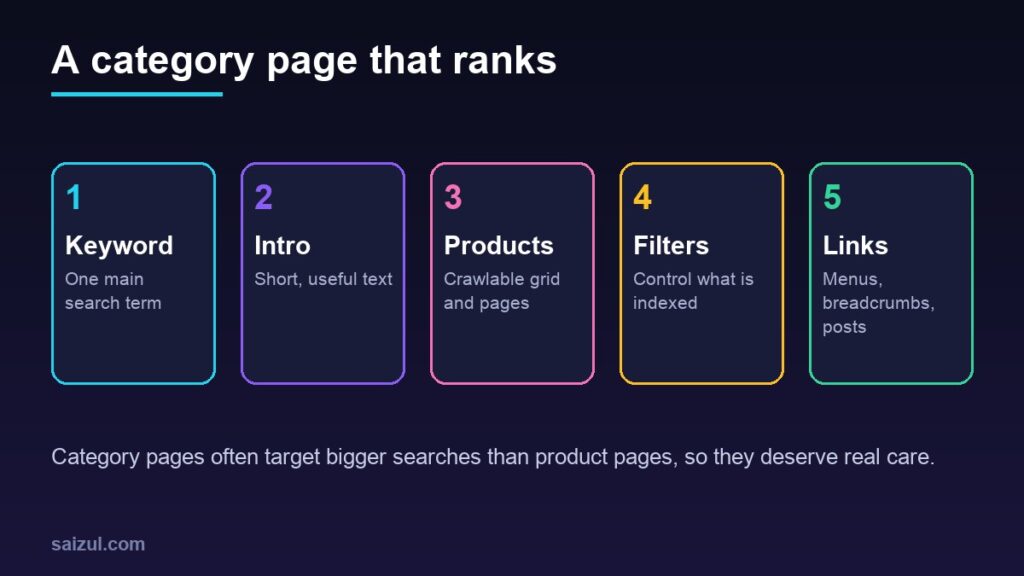
When people search for products, they often search for a type, not a single item: “cotton saree”, “men’s leather wallet”, “baby winter clothes”. The page that best answers those searches on your store is usually a category page, also called a collection page, not a product page. Yet category pages are often the most neglected part of an online store: a title, a grid of products and nothing else, sometimes with dozens of duplicate versions created by filters and sorting. This guide explains how to turn category pages into pages that search engines understand and shoppers find useful, for WooCommerce, Shopify or any other platform.
From my own work: When I audit small online stores, product pages usually get some attention, but category pages are often empty apart from the product grid, and filter links sometimes create far more URLs than the store has products. Fixing the structure and adding a little useful text is usually a better first step than writing more blog posts.
This guide is about category pages. For individual products, see my guide to product page SEO, and for finding the right terms, keyword research for small business.
Why category pages matter
- They match broader searches. Someone searching “kids sandals” wants to compare options, which a category page offers.
- They stay live. Products sell out and get removed; a category page keeps its address and the links it has earned.
- They connect the store. Category pages link to products, so they help search engines discover and understand everything you sell.
Step 1: Plan a clear category structure
Google says it strongly recommends linking to all the products you want indexed, through links from menus to categories, categories to subcategories, and subcategories to products (e-commerce site structure). It also notes that it generally does not use URL structure to work out the structure of a site; it relies on how pages link to each other.
- Organise categories the way shoppers think: by product type first, then by audience or use if needed. For example, Women > Sarees > Cotton sarees.
- Keep it shallow. Most products should be reachable within a few clicks of the home page.
- Avoid near-duplicate categories such as “Sarees” and “Saree collection” that compete with each other.
- Do not create a category for every possible keyword. A category with two products is thin; merge it or wait until you have more.
Step 2: Give each category one main keyword
- Pick the main term people search for each category, plus a few close variations. Use the words shoppers use, in English, Bangla or both, not your internal stock codes.
- Use it in the category name, the title tag, the main heading and naturally in the intro text.
- Write a title tag that says what the page offers, such as “Cotton Sarees: Handloom and Printed | Your Shop”, and a meta description that mentions range, delivery or another real benefit.
- Use a short, readable URL slug such as
/cotton-sarees/, and avoid changing it once the page is live.
My on-page SEO checklist covers titles, headings and descriptions in more detail.
Step 3: Add useful text, but not a wall of it
A category page with only a product grid gives search engines and shoppers little context. A short, helpful introduction above the products, and optionally more detail below them, helps both.
- Above the grid: two to four sentences on what the category includes and who it is for. Keep it short so products stay visible on a phone.
- Below the grid: optional buying help, such as how to choose a size, the difference between fabrics or care tips, and links to related categories or guides.
- Write for shoppers, not search engines. Do not repeat the keyword over and over or paste the same text on every category.
- A short FAQ with real questions customers ask, such as delivery time or sizing, can be useful at the bottom.
Step 4: Make the product grid crawlable
- Each product in the grid should link to its product page with a normal
<a href>link. Google notes that its crawler may miss navigation that depends on JavaScript events (e-commerce site structure). - Show the product name, price, image and availability so shoppers can compare without clicking every item.
- Use descriptive image alt text and compressed images so the page loads quickly; see why speed matters for sales.
- Decide how to show out-of-stock products: keep them visible but marked if they will return soon, or remove them from the grid if they will not.
Step 5: Handle pagination properly
Large categories run across several pages. Google’s pagination guidance says to give each page a unique URL, such as with a ?page=2 parameter, and to link each page to the next with normal links so Google can find the later pages (pagination and incremental page loading). Key points from the same page:
- Do not use the first page as the canonical URL for every page in the sequence. Each page should have its own canonical URL.
- Google no longer uses
rel="next"andrel="prev", although other search engines may. - Do not use URL fragments such as
#page2for page numbers, because Google ignores them. - If you use infinite scroll or a “load more” button, make sure the products are also reachable through crawlable links, because Googlebot does not click buttons. A sitemap or a Merchant Center feed can help Google find all products; see the Merchant Center setup guide.
Step 6: Control filters and sorting
Filters for size, colour, price and brand are helpful for shoppers, but every combination can create a new URL. A store with a few hundred products can end up with many thousands of filter URLs, which wastes crawling on near-duplicate pages.
Google’s guidance on faceted navigation suggests these options (managing faceted navigation):
- If you do not need filtered URLs indexed, use robots.txt to disallow crawling of them, or use URL fragments for filters, which do not affect crawling.
- If filters are part of the URL, keep the order of filters consistent and do not allow duplicate filters.
- Return a 404 status when a filter combination has no results.
rel="canonical"andrel="nofollow"on filter links can reduce crawling of filtered versions, but Google notes these are generally less effective in the long term than robots.txt or fragments.
Google’s pagination page also suggests using a noindex robots meta tag, or blocking the URL patterns in robots.txt, for sort orders and filtered variations you do not want indexed (pagination and incremental page loading). Do not combine robots.txt blocking and noindex on the same URL, because a blocked page cannot be crawled, so Google never sees the noindex.
A practical rule for small stores: if a filtered view matches a real search with demand, such as “black leather wallet”, consider making it a proper subcategory with its own text. Keep all other filter and sort combinations out of the index.
Step 7: Link to your categories from everywhere
- Main menu: your most important categories.
- Breadcrumbs: such as Home > Women > Cotton sarees on every product and subcategory page, with breadcrumb structured data where your theme or SEO plugin supports it.
- Product pages: a link back to the main category and to related categories.
- Blog posts and guides: link to the relevant category with descriptive anchor text. See how to start a business blog.
- Home page: feature best-selling categories. Google notes that pages with more internal links tend to be seen as more important.
Notes for WooCommerce and Shopify
- WooCommerce: product categories have a description field; many themes show it above or below the grid. SEO plugins let you set the title and meta description for each category. Check that tag archives and filter plugins are not creating indexable duplicates.
- Shopify: collections have a description and editable search engine listing fields. Watch for filtered and sorted collection URLs being linked from the theme.
Not sure which platform to use? See WooCommerce vs Shopify.
Step 8: Check results in Search Console
- Use the Performance report to see which queries bring impressions and clicks to each category.
- Use URL Inspection to check that a category page is indexed and that Google chose the canonical you expect.
- Watch the Page indexing report for large numbers of filter or sort URLs.
See Google Search Console for beginners for a walkthrough.
Common mistakes
- Category pages with no text at all, or the same text pasted on every category.
- Long keyword-stuffed paragraphs that push products below the fold.
- Pointing the canonical of every paginated page to page one.
- Letting every filter and sort combination be crawled and indexed.
- Many tiny or overlapping categories that compete with each other.
- Changing category URLs without redirects.
- Product links that only work with JavaScript.
Quick checklist
- A shallow category structure linked from the menu.
- One main keyword per category, used in the name, title, heading and intro.
- A short, useful intro and optional buying help below the grid.
- Crawlable links to every product, with name, price and image visible.
- Unique URLs and self-referencing canonicals for paginated pages.
- Filter and sort URLs kept out of the index, except valuable ones turned into subcategories.
- Breadcrumbs and internal links from products, posts and the home page.
- Indexing and queries checked in Search Console.
Need help with this on your own site or business?
I build and secure WordPress sites, web apps and AI automations end to end, in Bangla and English: a free discovery call, a written scope with a fixed quote, a focused first version, then testing, deployment and monitoring.
See the portfolio and the AI agent services, or tell me what you need.
FAQ
How much text should an e-commerce category page have?
Enough to help shoppers and explain the category, not so much that products disappear. A short intro of a few sentences above the grid, with optional buying help below it, works well for most stores.
Should paginated category pages be noindexed?
Not usually. Google recommends giving each paginated page its own URL and canonical and linking them in sequence. Use noindex or robots.txt rules for filter and sort variations you do not want indexed instead.
Should I let Google index filtered category pages?
Only the ones that match real searches with demand, ideally turned into proper subcategories with their own text. Keep other filter and sort combinations from being crawled or indexed.
Are category pages more important than product pages for SEO?
Both matter. Category pages often match broader searches and stay live when products change, while product pages match specific searches. A good store optimises both and links them together.
Sources

Md Saizul Amin
Digital Systems Strategist · AI Agent Developer · 9+ years in digital & ITMd Saizul Amin is a digital systems strategist and AI automation engineer from Dhaka, Bangladesh. With 9+ years across IT, web development and digital marketing, he writes practical guides on technology, business, education and online growth — and builds the same kinds of systems (AI agents, websites, SEO and ad campaigns) for clients in Bangladesh, the UK and the USA.
Specialist in
Credentials & experience
- 🎓B.Sc. in Computer Science & EngineeringBangladesh University of Business & Technology (BUBT), 2017–2021
- 🤖AI Automation Engineer · Web Developer · SEO SpecialistUnique Mark Limited, Birmingham UK — 2024 to present
- 🌱IT SpecialistGreen Fund Initiative Inc., USA — 2024 to present
- 🏥Junior IT Consultant — Ministry of Health (DGHS)Built the first national Shareable Health Record website; supported 6,000+ facilities
- 🧭Head of ITWEDO Bangladesh — led IT for 50+ staff, 2021–2023