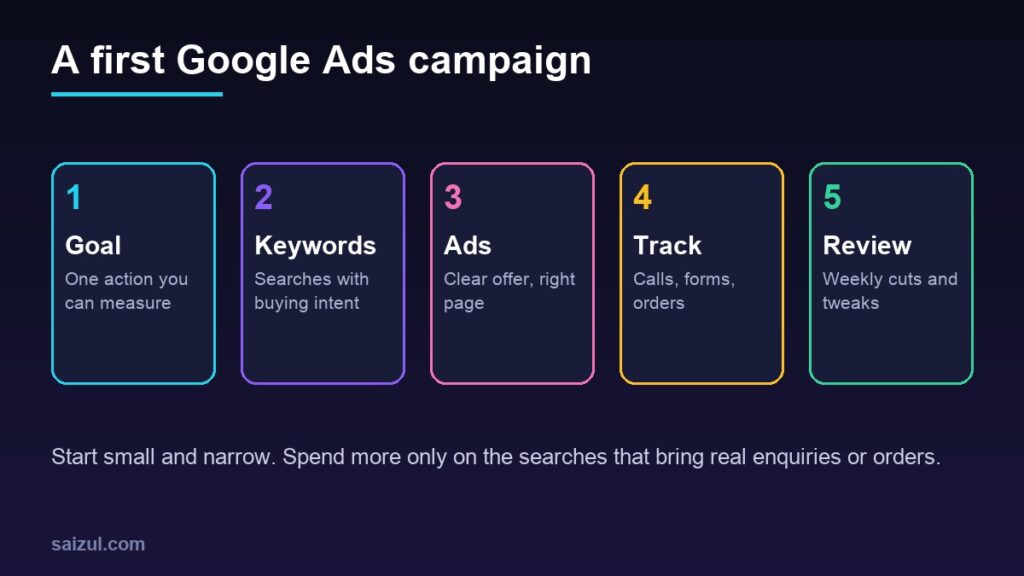
In this article
Google Ads can put a small business in front of people at the exact moment they search for what it sells: “AC repair Mirpur”, “wedding photographer Chattogram”, “buy cotton bedsheet online”. That intent is what makes search ads different from social media ads, where you interrupt people who were doing something else. The same strength makes it easy to waste money: a loose keyword, a missing negative keyword or a weak landing page can spend a month’s budget on clicks that never become customers. This guide gives a beginner’s plan for a first campaign that stays small, measurable and under control.
From my own work: When I look at a small business Google Ads account for the first time, the problems are usually basic rather than clever: no conversion tracking, broad keywords with no negatives, and ads sending people to the home page. Fixing those three things tends to matter more than any advanced setting.
Is Google Ads right for your business?
Search ads work best when people already search for your product or service. Check before you spend:
- People search for it. Type the phrases your customers would use into Google. If you see ads and local results, there is demand. My guide to keyword research for small business shows how to find and size those searches.
- You can serve the searcher. Your delivery area, opening hours and stock should match what the ad promises.
- The value of a customer covers the cost. A plumber who earns a good margin per job can afford more per click than a seller of low-priced items with thin margins. Work out your margin first; see how to price products.
- You have somewhere good to send them. A fast page with the price, the offer and a clear way to call, message or order.
If your product is new and nobody searches for it yet, social ads that create demand may suit you better. Facebook ads for beginners covers that side.
Step 1: Choose one goal you can measure
Decide what a successful click should lead to: a phone call, a WhatsApp message, a quote form, or an online order. One clear goal per campaign keeps the setup simple and makes the results easy to judge. “More brand awareness” is hard to measure for a small budget; “calls from people in my service area” is not.
Step 2: Understand how the budget works
Google Ads asks for an average daily budget per campaign. It is an average, not a strict daily cap. Google says spend can go above it on busy days and below it on quiet ones, but for most campaigns you will not pay more than two times the average daily budget on a single day, and not more than 30.4 times it in a month (about average daily budgets).
- Start with an amount you can afford to spend while learning, and treat the first month as a test.
- Run one campaign first rather than spreading a small budget across several.
- Check the payment options and any taxes shown for your country in the billing settings before you launch.
Step 3: Start with a Search campaign
When you create an account, Google may steer you towards a simplified or fully automated campaign type. For a first campaign, a standard Search campaign usually gives a beginner the most visibility into which searches trigger the ads and what they cost. If the setup offers a simplified mode, look for the option to switch to the full or expert view.
- Choose your goal and select a Search campaign.
- Set your locations to where you actually serve customers, such as a city or a radius around your shop.
- Set the language your customers search in. Many people in Bangladesh search in English and Bangla, so consider both.
- Leave the Display Network unticked for your first search campaign, so the budget goes to search results.
- Add your ad schedule if you only answer calls during certain hours.
Step 4: Pick keywords and match types
Start with a short list of 10 to 20 keywords with clear buying intent, grouped by theme: for example one ad group for “AC repair” and another for “AC installation”.
Match types control how closely a search must match your keyword (keyword matching options):
| Match type | How you write it | What it does |
|---|---|---|
| Broad match | ac repair | The default. Reaches the widest range of related searches. |
| Phrase match | “ac repair” | Searches that include the meaning of the keyword. |
| Exact match | [ac repair] | Searches with the same meaning or intent. Fewest searches. |
Broad match can work well once conversion tracking and smart bidding are in place, but for a small first budget, phrase and exact match make it easier to see and control where money goes.
Step 5: Add negative keywords from day one
Negative keywords stop your ads showing for searches you do not want. Common ones for small businesses:
- Job seekers: job, jobs, salary, vacancy, career.
- Learners: course, training, tutorial, how to, free PDF.
- Bargain hunters, if you are not the cheapest: free, cheapest, second hand, used.
- Services or products you do not offer, and areas you do not serve.
After the first few days, open the search terms report, which shows the real searches that triggered your ads, and add new negatives every week.
Step 6: Write ads that match the search
- Put the main keyword or service in a headline, so the ad clearly matches what the person typed.
- State a concrete reason to choose you: same-day visit, delivery time, warranty, years in business, cash on delivery.
- Include the price or a starting price if it is competitive. It filters out clicks from people who would never buy.
- Add assets such as your phone number, location, extra links to key pages and short callouts.
- Never promise what you cannot deliver. The ad, the landing page and the service must agree.
Step 7: Send clicks to the right page
Send each ad group to the page that answers that search: the AC repair page for repair keywords, the product page for a product. The page should load fast on a phone, show the price or how pricing works, and make calling or ordering obvious. My guides on website speed and sales and product page SEO cover what a good landing page needs, and reducing cart abandonment helps once visitors reach the checkout.
Step 8: Set up conversion tracking before you scale
Without tracking you only know clicks and cost, not which keywords bring customers. Google Ads can measure website actions such as purchases and sign-ups, phone calls from ads or from your site, app actions and offline conversions you upload later (about conversion measurement).
- Track the one action from Step 1 as your main conversion: an order, a form submission or a call.
- If you already use Google Analytics, link it; see the GA4 setup guide.
- For WhatsApp or Messenger enquiries, track the button click and also ask new customers how they found you.
- Test every conversion yourself before launch, and confirm it appears in the account.
Step 9: Review every week
- Check search terms and add negatives.
- Pause keywords that spend without conversions after a fair amount of data.
- Look at cost per conversion against what a customer is worth to you.
- Test one change at a time, such as a new headline or a different landing page.
- Only raise the budget on campaigns that already bring conversions at a cost you can afford.
Be careful with automated recommendations. Some are useful, but read each one and only apply it if it fits your goal and budget.
Do not forget the free options
Paid search works best alongside free visibility. A complete Google Business Profile can bring calls from Maps, and online stores can list products for free through Google Merchant Center. Over time, local SEO can reduce how much you depend on ads.
Common mistakes
- Launching without conversion tracking.
- Using only broad keywords on a tiny budget, with no negatives.
- Sending every ad to the home page.
- Targeting the whole country when you only serve one city.
- Changing many settings at once, so you cannot tell what worked.
- Judging results after two days instead of a few weeks.
Quick checklist
- One measurable goal for the campaign.
- A test budget you can afford, understanding the daily and monthly limits.
- A Search campaign with the right locations, language and schedule.
- 10 to 20 intent-led keywords, mainly phrase and exact match.
- A starter list of negative keywords, updated weekly.
- Ads that match the search and send people to the matching page.
- Conversion tracking tested before launch.
Need help with this on your own site or business?
I build and secure WordPress sites, web apps and AI automations end to end, in Bangla and English: a free discovery call, a written scope with a fixed quote, a focused first version, then testing, deployment and monitoring.
See the portfolio and the AI agent services, or tell me what you need.
FAQ
How much should a small business spend on Google Ads?
There is no fixed number. Start with a test budget you can afford to lose while learning, measure the cost per enquiry or order, and increase it only when that cost makes sense against what a customer is worth.
Can Google charge more than my daily budget?
On a single day, yes, up to two times the average daily budget for most campaigns, but Google says monthly spend will not go above 30.4 times the average daily budget.
Should I use Google Ads or Facebook ads?
Google search ads suit products and services people already search for. Facebook and Instagram ads suit products people discover visually. Many small businesses test both with small budgets.
How long before Google Ads shows results?
Clicks can start within a day of approval, but it usually takes a few weeks of data and weekly adjustments to know which keywords and ads bring customers profitably.
Sources

Md Saizul Amin
Digital Systems Strategist · AI Agent Developer · 9+ years in digital & ITMd Saizul Amin is a digital systems strategist and AI automation engineer from Dhaka, Bangladesh. With 9+ years across IT, web development and digital marketing, he writes practical guides on technology, business, education and online growth — and builds the same kinds of systems (AI agents, websites, SEO and ad campaigns) for clients in Bangladesh, the UK and the USA.
Specialist in
Credentials & experience
- 🎓B.Sc. in Computer Science & EngineeringBangladesh University of Business & Technology (BUBT), 2017–2021
- 🤖AI Automation Engineer · Web Developer · SEO SpecialistUnique Mark Limited, Birmingham UK — 2024 to present
- 🌱IT SpecialistGreen Fund Initiative Inc., USA — 2024 to present
- 🏥Junior IT Consultant — Ministry of Health (DGHS)Built the first national Shareable Health Record website; supported 6,000+ facilities
- 🧭Head of ITWEDO Bangladesh — led IT for 50+ staff, 2021–2023