In this article
Many business owners install Google Analytics 4, open it once, see a wall of numbers and never return. That is a pity, because GA4 can answer simple, valuable questions: where visitors come from, which pages they read, and whether they contact you or buy. You do not need to understand every report. You need a few terms, a few reports and a weekly habit. This guide explains them in plain English.
From my own work: When I hand over a GA4 setup to a business owner, I show them three or four reports and one question for each. Owners who check those regularly get far more value than owners who are shown every menu and then feel lost.
If GA4 is not installed yet, start with my GA4 setup guide for WordPress, then come back here.
The terms you need to know
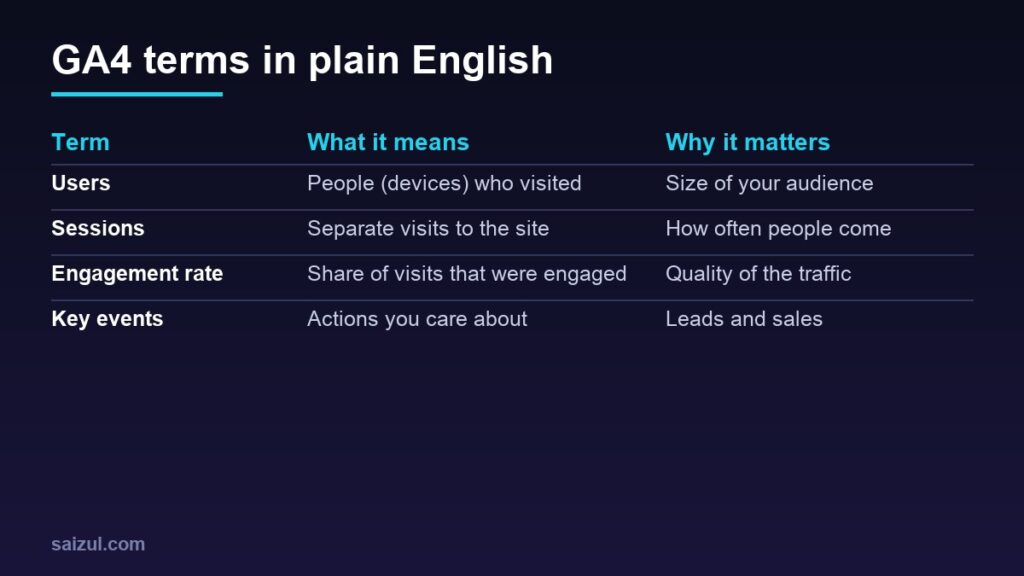
- Users: the people who visited, counted mostly by browser or device. One person on a phone and a laptop may count as two.
- Sessions: separate visits. One user can have many sessions.
- Engaged session: a session that lasted longer than 10 seconds, had a key event, or had two or more page views (engagement rate and bounce rate).
- Engagement rate: the percentage of sessions that were engaged. Bounce rate in GA4 is simply the opposite: the percentage of sessions that were not engaged.
- Events: everything GA4 records, such as page views, scrolls and clicks.
- Key events: the events you mark as important for your business, such as a form submission, a WhatsApp button click or a purchase. Google previously called these conversions.
The reports worth reading
All of these are under Reports in the left menu.
| Report | Question it answers |
|---|---|
| Realtime | Is tracking working right now? Did my post or ad send visitors? |
| Acquisition → Traffic acquisition | Which channels bring visits, and which bring engaged visits and key events? |
| Engagement → Pages and screens | Which pages do people actually read? |
| Engagement → Events | Are my key actions happening, and how often? |
| Monetization (online stores) | Which products sell, and how much revenue comes in? |
Reading the Traffic acquisition report
This is the report most owners should open first. It shows where new and returning visitors come from, grouped by default into channels such as Organic Search, Direct, Organic Social, Paid Social and Email (Traffic acquisition report). The similar User acquisition report shows only how new users first arrived.
- Compare channels by engagement rate and key events, not only by sessions. A small channel that brings enquiries is worth more than a large one that brings none.
- Change the date range to compare this month with last month.
- A high share of Direct traffic often means some visits could not be attributed, for example links opened from some messaging apps. Campaign tags help here.
Tag your own links with UTM parameters
When you share a link in a Facebook post, a WhatsApp broadcast or an email, add campaign tags so GA4 knows where the visit came from. The three to use are utm_source, utm_medium and utm_campaign, for example:
https://yourbusiness.com/offer/?utm_source=facebook&utm_medium=social&utm_campaign=eid_sale
- Use lowercase and the same spelling every time; GA4 treats “Facebook” and “facebook” as different values.
- Keep a simple sheet of the tags you use.
- Do not tag internal links between pages of your own site.
Set up key events that match your goals
Decide what a good visit looks like for your business, then make sure GA4 records it:
- Service business: contact form submitted, phone number clicked, WhatsApp button clicked.
- Online store: purchase, plus begin checkout as an early signal.
- Content site: newsletter sign-up.
Once the event appears in GA4, open Admin, find it in the events list and mark it as a key event. Tracking button clicks may need Google Tag Manager or your site’s tracking plugin.
Settings to check once
- Data retention: standard properties can keep detailed user and event data for 2 months or 14 months. This only affects explorations and funnel reports, not standard reports, but choose 14 months so you can compare longer periods (data retention).
- Time zone and currency: set them to match your business so daily figures and revenue make sense.
- Internal traffic: define your office IP address as internal traffic and filter it out, if your connection has a fixed IP.
- Search Console link: connect it to see search queries alongside GA4 data. See Search Console for beginners.
Common beginner mistakes
- Judging success by total visitors instead of key events.
- Installing the tag twice, through a plugin and the theme, which doubles page views.
- Expecting GA4 numbers to match Facebook Ads or Shopify exactly. Each tool counts differently; look at trends, not single numbers.
- Checking every day and reacting to normal ups and downs.
Weekly 10-minute routine
- Traffic acquisition: which channel brought the most key events?
- Pages and screens: which pages are rising or falling?
- Events: are form, call and WhatsApp clicks being recorded?
- Compare with the previous period and note one action to take.
Need help with this on your own site or business?
I build and secure WordPress sites, web apps and AI automations end to end, in Bangla and English: a free discovery call, a written scope with a fixed quote, a focused first version, then testing, deployment and monitoring.
See the portfolio and the AI agent services, or tell me what you need.
FAQ
Is Google Analytics 4 free?
Yes. The standard version is free for any website; the paid version is aimed at large organisations.
What is a good engagement rate?
It depends on the site and the traffic source, so there is no universal target. Compare your own channels and pages against each other and track the trend over time.
Why does GA4 show fewer users than my other tools?
Tools count differently, and ad blockers or declined cookie consent can prevent GA4 from recording some visits. Use each tool for trends rather than expecting identical numbers.
Where did bounce rate go?
It is still available in GA4, but it now means the percentage of sessions that were not engaged, the opposite of engagement rate.
Sources

Md Saizul Amin
Digital Systems Strategist · AI Agent Developer · 9+ years in digital & ITMd Saizul Amin is a digital systems strategist and AI automation engineer from Dhaka, Bangladesh. With 9+ years across IT, web development and digital marketing, he writes practical guides on technology, business, education and online growth — and builds the same kinds of systems (AI agents, websites, SEO and ad campaigns) for clients in Bangladesh, the UK and the USA.
Specialist in
Credentials & experience
- 🎓B.Sc. in Computer Science & EngineeringBangladesh University of Business & Technology (BUBT), 2017–2021
- 🤖AI Automation Engineer · Web Developer · SEO SpecialistUnique Mark Limited, Birmingham UK — 2024 to present
- 🌱IT SpecialistGreen Fund Initiative Inc., USA — 2024 to present
- 🏥Junior IT Consultant — Ministry of Health (DGHS)Built the first national Shareable Health Record website; supported 6,000+ facilities
- 🧭Head of ITWEDO Bangladesh — led IT for 50+ staff, 2021–2023