In this article
Every online store gets returns. A shirt does not fit, a parcel arrives damaged, a customer orders the wrong colour. How you handle these moments decides whether the customer buys again or tells their friends to avoid you. A clear returns and refunds policy protects both sides: buyers know what to expect before they pay, and your team has a rule to follow instead of arguing case by case. This guide shows what to put in the policy and how to run the process behind it.
From my own work: When I build stores, the returns page is often the last page the owner thinks about and the first one customers look for when something goes wrong. The stores that handle returns calmly are usually the ones that wrote the rules down early.
Why a written policy matters
- Trust before purchase: buyers who cannot touch the product want to know they will not be stuck with a mistake.
- Fewer arguments: staff, riders and customers can all point to the same page.
- Platform requirements: Meta asks sellers on Facebook and Instagram to display refund and return policies clearly (commerce eligibility requirements), and Google Merchant Center expects a return policy URL that matches what you enter in your account (set up return policies).
Your policy cannot remove rights customers already have under consumer protection law in your country, so treat it as your promise on top of those rights, not as a way around them.
What your returns and refunds policy should say
Google’s return policy settings are a useful checklist, because they list the details a buyer needs to decide:
| Item | What to decide |
|---|---|
| Return window | How many days after delivery a customer can ask, for example 3 or 7 days |
| What can be returned | Faulty only, or also change of mind; which items are excluded (custom-made, innerwear, cosmetics once opened) |
| Condition | Unused, with tags and original packaging |
| How to return | Courier pickup, drop-off point or customer sends it |
| Who pays delivery | You pay for your mistakes; decide whether the buyer pays for change-of-mind returns |
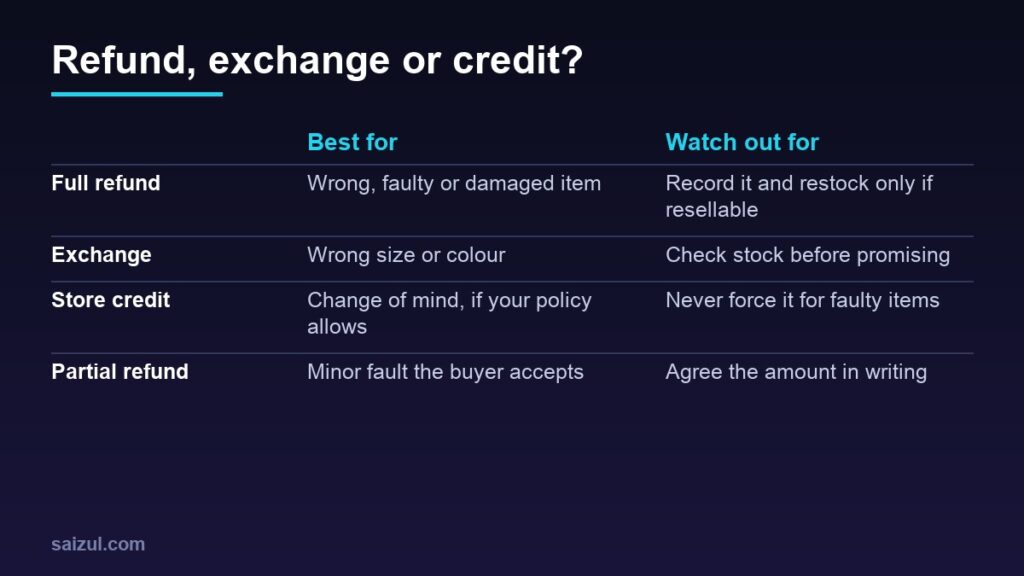
| Remedy | Refund, exchange or store credit, and when each applies |
| Refund method and time | Original payment method or mobile wallet, and how many days it takes |
| Proof | Photos or an unboxing video for damage claims |
Write it in plain language, in the languages your customers read. Link it from the footer, the product page and the order confirmation message.
A simple return process
- Request: the customer contacts you within the window with the order number, the reason and photos if the item is damaged or wrong.
- Approve: check the request against the policy and reply within a day with the next step. Do not ask customers to send items back before you approve.
- Collect: arrange the courier pickup or give the return address. Record the tracking number on the order.
- Inspect: when the item arrives, check its condition against the reason given and take a photo.
- Resolve: issue the refund, send the exchange or add store credit, and tell the customer exactly what was done.
- Restock or write off: put resellable items back into stock and record damaged ones separately.
Refunding correctly in your store system
In WooCommerce, a refund made with the Refund button on the order can be sent automatically through gateways that support it, or recorded as a manual refund when you return the money yourself (WooCommerce refunds documentation). A few details matter:
- Cash on delivery orders: there is no card to refund, so you send the money by mobile wallet or bank transfer and record a manual refund on the order. Keep the transaction ID in the order note.
- Restocking: tick “Restock refunded items” only for items that are actually back on your shelf and resellable.
- Partial refunds: these are allowed and do not change the order status to Refunded.
- Status is not money: changing an order to Cancelled or Refunded by hand does not refund the customer. Use the refund process so your records and your bank match.
For the courier side of cash orders, see my guide to cash on delivery management.
Reduce returns before they happen
- Accurate photos: true colours and several angles. My smartphone product photography guide explains how.
- Size charts in centimetres or inches, with how to measure.
- Honest descriptions that mention material, weight and what is not included. See product descriptions that sell.
- Confirm the order (size, colour, address) before dispatch.
- Pack properly for the courier journey, especially glass and electronics.
Track return reasons
Record a reason for every return: wrong size, damaged, not as described, late delivery, change of mind. Review the list every month. A single product with many “not as described” returns needs new photos or a new description, not a stricter policy. Include the cost of returns in your prices too; my pricing guide shows how.
Quick checklist
- Policy page written in plain language and linked from footer, product pages and order messages.
- Return window, eligible items, condition and exclusions stated.
- Who pays return delivery, for each reason, stated.
- Refund method and timing stated, including for cash on delivery.
- Approval required before items are sent back.
- Every refund recorded on the order with a transaction ID.
- Return reasons reviewed monthly.
Need help with this on your own site or business?
I build and secure WordPress sites, web apps and AI automations end to end, in Bangla and English: a free discovery call, a written scope with a fixed quote, a focused first version, then testing, deployment and monitoring.
See the portfolio and the AI agent services, or tell me what you need.
FAQ
Do I have to accept returns for change of mind?
That is a business decision, but your policy cannot override legal rights customers already have. Many stores accept change-of-mind returns for unused items within a short window and ask the buyer to cover delivery.
How fast should I refund?
Refund as soon as the item is inspected and state the expected time in your policy. A refund that arrives when promised builds more trust than a generous policy that is slow in practice.
How do I refund a cash on delivery order?
Send the money by mobile wallet or bank transfer, then record a manual refund on the order with the transaction ID so your records stay correct.
Can I charge a restocking fee?
You can if it is clearly stated in your policy before purchase and allowed where you sell. Do not charge it when the return is caused by your mistake or a faulty item.
Sources

Md Saizul Amin
Digital Systems Strategist · AI Agent Developer · 9+ years in digital & ITMd Saizul Amin is a digital systems strategist and AI automation engineer from Dhaka, Bangladesh. With 9+ years across IT, web development and digital marketing, he writes practical guides on technology, business, education and online growth — and builds the same kinds of systems (AI agents, websites, SEO and ad campaigns) for clients in Bangladesh, the UK and the USA.
Specialist in
Credentials & experience
- 🎓B.Sc. in Computer Science & EngineeringBangladesh University of Business & Technology (BUBT), 2017–2021
- 🤖AI Automation Engineer · Web Developer · SEO SpecialistUnique Mark Limited, Birmingham UK — 2024 to present
- 🌱IT SpecialistGreen Fund Initiative Inc., USA — 2024 to present
- 🏥Junior IT Consultant — Ministry of Health (DGHS)Built the first national Shareable Health Record website; supported 6,000+ facilities
- 🧭Head of ITWEDO Bangladesh — led IT for 50+ staff, 2021–2023