In this article
From my own builds: I’m Saizul Amin, an AI agent developer and automation engineer. I run AI agent systems in production on self-hosted n8n and Docker (Messenger, WhatsApp, Telegram and email), so the advice below comes from operating them, not from reading about them. Last reviewed: October 2026.
n8n is easy to start: one Docker command and it runs. But a setup that is fine on your laptop is not a production system. Production means HTTPS, a real database, an encryption key you will never lose, backups you have restored, safe updates and someone notified when it breaks. This is the setup I use for self-hosted n8n and Docker, written so you can copy it and understand every line.
I run my own AI agents and automations on self-hosted n8n, so the advice below comes from keeping it running, not from a quick-start page. For the basics of building agents on top, see how to build an AI agent with n8n, and for whether n8n is the right tool at all, n8n vs Zapier vs Make.
Should you self-host?
| Self-host if… | Use n8n Cloud if… |
|---|---|
| You want data and credentials on your own server | You do not want to manage servers |
| Volume is high and per-execution pricing would add up | Volume is low and simplicity matters most |
| You have (or can hire) basic Linux and Docker skills | You want updates, backups and uptime handled for you |
Check n8n’s licence terms for your use. The community edition is free to self-host for internal use under its fair-code licence, but offering n8n itself as a paid service to others is restricted, and some features are paid.
The architecture
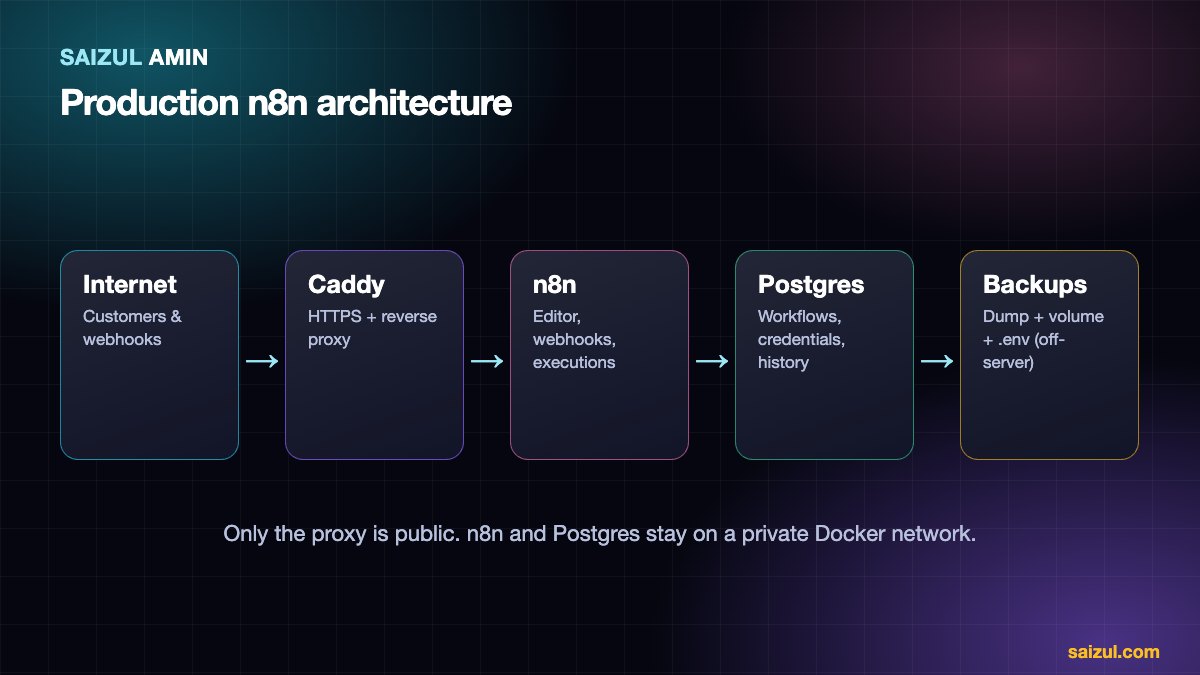
- Reverse proxy (Caddy, Nginx or Traefik) terminates HTTPS and forwards to n8n.
- n8n container runs the editor, webhooks and executions.
- PostgreSQL stores workflows, credentials and execution history (SQLite is the default, and is fine for trying things out, but Postgres is better for production).
- Volumes keep data across container recreation.
1. The server
- A small VPS is enough to start: around 2 vCPU and 2–4 GB RAM for light to moderate workflows. AI-heavy or high-volume setups need more.
- Ubuntu LTS, SSH keys only (disable password and root login), a firewall allowing only 22, 80 and 443, and automatic security updates.
- Choose a location near your users and the services you call.
- A domain or subdomain pointing at the server (for example
n8n.yourdomain.com).
2. Docker Compose file
Create a folder, then docker-compose.yml:
services:
  postgres:
    image: postgres:16
    restart: unless-stopped
    environment:
      POSTGRES_USER: n8n
      POSTGRES_PASSWORD: ${POSTGRES_PASSWORD}
      POSTGRES_DB: n8n
    volumes:
      - pg_data:/var/lib/postgresql/data
    healthcheck:
      test: ["CMD-SHELL", "pg_isready -U n8n -d n8n"]
      interval: 10s
      timeout: 5s
      retries: 10

  n8n:
    image: docker.n8n.io/n8nio/n8n:${N8N_VERSION}
    restart: unless-stopped
    depends_on:
      postgres:
        condition: service_healthy
    environment:
      - DB_TYPE=postgresdb
      - DB_POSTGRESDB_HOST=postgres
      - DB_POSTGRESDB_DATABASE=n8n
      - DB_POSTGRESDB_USER=n8n
      - DB_POSTGRESDB_PASSWORD=${POSTGRES_PASSWORD}
      - N8N_HOST=${N8N_DOMAIN}
      - N8N_PROTOCOL=https
      - WEBHOOK_URL=https://${N8N_DOMAIN}/
      - N8N_ENCRYPTION_KEY=${N8N_ENCRYPTION_KEY}
      - GENERIC_TIMEZONE=Asia/Dhaka
      - EXECUTIONS_DATA_PRUNE=true
      - EXECUTIONS_DATA_MAX_AGE=168
    volumes:
      - n8n_data:/home/node/.n8n

  caddy:
    image: caddy:2
    restart: unless-stopped
    ports:
      - "80:80"
      - "443:443"
    volumes:
      - ./Caddyfile:/etc/caddy/Caddyfile:ro
      - caddy_data:/data
      - caddy_config:/config

volumes:
  pg_data:
  n8n_data:
  caddy_data:
  caddy_config:
And a Caddyfile (Caddy obtains and renews the HTTPS certificate automatically):
n8n.yourdomain.com {
  reverse_proxy n8n:5678
}
And an .env file next to them:
POSTGRES_PASSWORD=use-a-long-random-password
N8N_ENCRYPTION_KEY=use-a-long-random-string-and-back-it-up
N8N_DOMAIN=n8n.yourdomain.com
N8N_VERSION=1.x.x   # pin to a tested version, check the release notes
Start it with docker compose up -d, then open your domain and create the owner account.
Why these settings matter
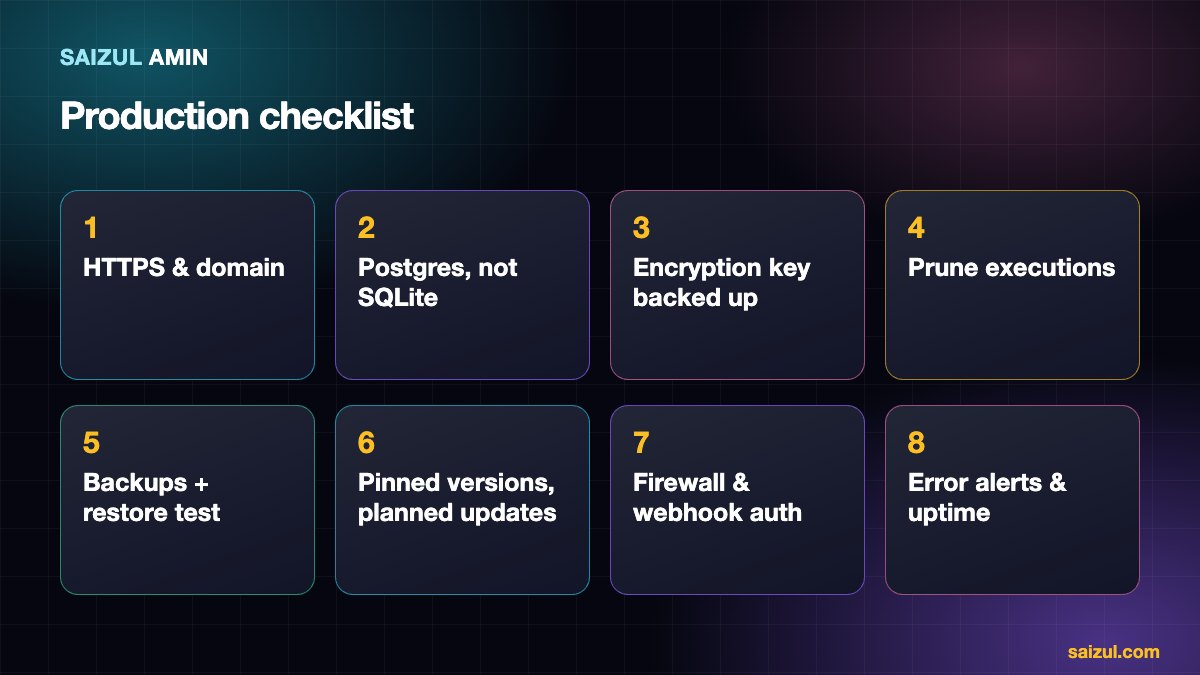
WEBHOOK_URLandN8N_HOST: behind a proxy, n8n must know its public address or webhook URLs and OAuth callbacks will be wrong.N8N_ENCRYPTION_KEY: n8n encrypts the credentials it stores with this key. If you lose it, every saved credential becomes unreadable. Set it explicitly and store a copy somewhere safe, separate from the server.EXECUTIONS_DATA_PRUNEandMAX_AGE(hours): without pruning, the execution history grows until the disk fills. 168 hours is one week.- Do not publish port 5678 to the internet. Only the proxy is public.
- Pin the image version instead of using
latest, so an update never surprises you at 2 a.m.
The official n8n Docker guide and environment variable reference list every option.
3. Backups you have restored
You need three things, stored off the server:
- A database dump of Postgres, for example
docker compose exec -T postgres pg_dump -U n8n n8n | gzip > n8n-$(date +%F).sql.gz. - The n8n data volume (it holds, among other things, the encryption key file if you did not set the variable, and community nodes).
- Your
.envand Compose files, including the encryption key.
Run this nightly with cron and ship it to cloud storage with an encrypted backup tool (I use restic with rclone). Then do the part everyone skips: restore it on a spare machine and confirm workflows and credentials work. A backup that has never been restored is a hope, not a backup. You can also export workflows as JSON and keep them in Git as an extra layer.
4. Updating safely
- Read the release notes for breaking changes.
- Take a fresh backup.
- Change
N8N_VERSIONin.env, thendocker compose pull && docker compose up -d. - Check the editor, a few critical workflows and the logs (
docker compose logs -f n8n). - If something breaks, set the previous version and restore if needed.
Update on a schedule (monthly is a reasonable rhythm for most), not whenever you remember. For critical systems, test the new version on a staging copy first.
5. Security
- Firewall: only 22, 80 and 443; consider restricting SSH to your IP.
- Webhooks are public by design, so protect them: use secret tokens or header authentication, verify signatures from services such as Meta, and validate input.
- Strong owner password and two-factor authentication where available; do not share the owner login.
- Least privilege for credentials: give each service key only the scopes the workflow needs.
- Keep Docker and the OS updated, and do not run unrelated services on the same machine if you can avoid it.
- Be careful with community nodes and untrusted workflow templates: they run code with access to your credentials.
6. Monitoring and reliability
- Uptime check on your domain (any uptime monitor) and on a lightweight webhook workflow.
- Error workflow: in n8n, set a global error workflow that sends you a message (Telegram, email) with the failed workflow and error.
- Disk space and memory alerts. Execution data and Docker logs are the usual culprits for a full disk; limit log size in Docker’s logging options.
- Restart policy
unless-stoppedbrings containers back after a reboot. - Scaling later: n8n supports queue mode with Redis and separate worker containers when a single instance is not enough. Do not start there.
Common problems and fixes
| Symptom | Likely cause |
|---|---|
Webhook URLs show localhost or the wrong host |
WEBHOOK_URL / N8N_HOST not set behind the proxy |
| Credentials show as invalid after a rebuild | The encryption key changed or was not persisted |
| Disk keeps filling | Execution data not pruned, or large binary data and Docker logs |
| OAuth login fails | Redirect URL does not match the public https address |
| Slow or killed workflows | Not enough memory for large payloads, or too many parallel executions |
Need this built for your business?
I design, build, deploy and maintain custom AI agents and automations for businesses, on infrastructure I operate myself (self-hosted n8n and Docker), in Bangla and English.
- WhatsApp, Messenger, Telegram and web-chat agents that answer, qualify leads, book and hand over to a human.
- Knowledge (RAG) assistants that answer from your own documents, with sources and a safe “I don’t know”.
- Voice, document and back-office agents, plus multi-agent teams for research, writing and reporting.
- Hosting and DevOps: secure n8n and Docker setups, backups, monitoring and updates.
The process: a free discovery call, a written scope and fixed quote, a focused first version, testing on your real conversations, then deployment with monitoring. See live systems on the AI agent services page, browse the portfolio, or tell me about the job you want automated.
Frequently asked questions
Is self-hosting n8n free?
The software is free to self-host under its licence for internal use, but you pay for the server, your time and any services you connect.
SQLite or Postgres?
SQLite is fine for trying and for very small setups. For production with real traffic, Postgres is the better choice.
How do I move an existing n8n to a new server?
Restore the database and volume (or export and import workflows), use the same encryption key, update the domain settings, and test before switching DNS.
Can I run n8n without a domain?
For private use, yes, but services such as WhatsApp, Telegram and OAuth providers need a public HTTPS address, so a domain is practically required.
Can you set it up and maintain it for me?
Yes. Tell me what you need and I will propose a setup and a maintenance plan.
Sources and further reading
- n8n documentation: Hosting
- n8n: Install with Docker
- n8n documentation: Environment variables
- Docker documentation: Compose
- Caddy documentation: reverse_proxy
How this article was written
I wrote this myself from hands-on experience building and running AI agents and automations for clients. Product behaviour, policies and pricing models were checked against the official documentation linked above in October 2026. Tools, policies and prices change quickly; if you notice something out of date, email info@saizul.com and I will correct it.
About the author
Saizul Amin is an AI agent developer, automation engineer and digital growth partner based in Bangladesh. He has built 7 production AI systems on self-hosted n8n, developed 50+ websites and managed 150K+ USD in advertising spend for clients across markets including the UK, the USA and Bangladesh. Learn more about Saizul, see his work, or get in touch.

Md Saizul Amin
Digital Systems Strategist · AI Agent Developer · 9+ years in digital & ITMd Saizul Amin is a digital systems strategist and AI automation engineer from Dhaka, Bangladesh. With 9+ years across IT, web development and digital marketing, he writes practical guides on technology, business, education and online growth — and builds the same kinds of systems (AI agents, websites, SEO and ad campaigns) for clients in Bangladesh, the UK and the USA.
Specialist in
Credentials & experience
- 🎓B.Sc. in Computer Science & EngineeringBangladesh University of Business & Technology (BUBT), 2017–2021
- 🤖AI Automation Engineer · Web Developer · SEO SpecialistUnique Mark Limited, Birmingham UK — 2024 to present
- 🌱IT SpecialistGreen Fund Initiative Inc., USA — 2024 to present
- 🏥Junior IT Consultant — Ministry of Health (DGHS)Built the first national Shareable Health Record website; supported 6,000+ facilities
- 🧭Head of ITWEDO Bangladesh — led IT for 50+ staff, 2021–2023