In this article
Introduction
Starting a blog is an exciting and rewarding journey, whether you are doing it for personal expression, business promotion, or to build a community around a shared passion. Among all the available platforms, WordPress stands out as the most popular and versatile Content Management System (CMS) in the world. Learning how to start a WordPress blog is essential for anyone looking to establish an online presence effectively.
With its user-friendly interface, extensive customization options, and SEO capabilities, WordPress powers over 40% of all websites on the internet. This comprehensive guide will walk you through every step of creating a successful WordPress blog from scratch.
Why Choose WordPress for Your Blog?
Before diving into the actual steps, let’s explore why WordPress is the preferred choice for bloggers worldwide.
Key Benefits of Using WordPress
- User-Friendly Interface: Easy to use even for beginners.
- SEO-Friendly: Built-in features that enhance search engine optimization.
- Customization Options: Thousands of themes and plugins to choose from.
- Cost-Effective: WordPress itself is free; you only pay for hosting and premium themes/plugins.
- Scalability: Suitable for blogs of all sizes, from personal journals to professional publications.
How to Start a WordPress Blog: Step-by-Step Guide
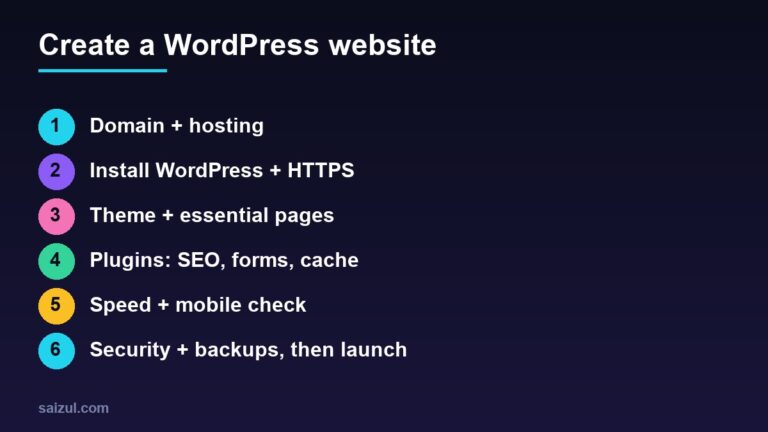
Creating a WordPress blog involves several crucial steps. Follow this comprehensive guide to set up your blog successfully.
Step 1: Choose Your Niche and Audience
Before you start building your blog, it’s essential to decide what you will be blogging about and who your target audience will be.
Tips for Choosing a Niche:
- Pick a topic you are passionate about.
- Ensure there’s a demand for your content.
- Identify your unique perspective or value proposition.
Step 2: Select a Domain Name and Hosting Provider
Your domain name is your blog’s address on the internet, and hosting is where your website’s files are stored.
How to Choose a Domain Name:
- Keep it short and memorable.
- Avoid special characters and numbers.
- Use relevant keywords if possible.
Recommended Hosting Providers:
- Bluehost: Known for affordability and excellent customer support.
- SiteGround: Offers high performance and security features.
- HostGator: Provides a range of affordable plans for beginners.
Step 3: Install WordPress
Once you have your hosting and domain name, the next step is to install WordPress.
Installing WordPress via cPanel:
- Log in to your hosting account.
- Navigate to the cPanel dashboard.
- Click on the WordPress Installer or Softaculous Apps Installer.
- Select your domain name.
- Fill in the required details and click Install Now.
Step 4: Choose and Customize a WordPress Theme
Your theme determines your blog’s appearance and layout.
Tips for Choosing a Theme:
- Opt for a responsive and mobile-friendly theme.
- Choose a theme that suits your niche.
- Check for SEO optimization features.
Popular WordPress Themes:
- Astra: Lightweight and highly customizable.
- GeneratePress: Fast and SEO-friendly.
- Divi: Drag-and-drop builder with countless design options.
Step 5: Install Essential Plugins
Plugins enhance your blog’s functionality and performance.
Must-Have Plugins:
- Yoast SEO: Optimize your blog posts for search engines.
- Jetpack: Provides security, performance, and analytics features.
- Akismet: Protects your blog from spam comments.
- WP Rocket: Improves your blog’s speed and performance.
Step 6: Create Important Pages
Creating foundational pages is crucial for your blog’s credibility and user experience.
Essential Pages:
- Home Page: Introduces your blog and highlights key content.
- About Page: Shares your story and purpose.
- Contact Page: Provides a way for readers to reach you.
- Privacy Policy Page: Explains how user data is handled.
Step 7: Write Your First Blog Post
Content is the backbone of your blog. Start by writing high-quality, engaging, and SEO-optimized articles.
Tips for Writing Blog Posts:
- Use catchy headlines.
- Break content into sections with subheadings.
- Include visuals like images and videos.
- Optimize for keywords.
- Proofread before publishing.
Step 8: Promote Your Blog
Publishing great content is only half the battle; promoting it is equally essential.
Effective Promotion Strategies:
- Share your posts on social media platforms.
- Engage with readers through comments and email newsletters.
- Collaborate with other bloggers for guest posts.
- Utilize SEO techniques to improve search rankings.
Step 9: Monitor and Improve Your Blog
Continuously track your blog’s performance and make improvements as needed.
Recommended Tools:
- Google Analytics: Provides insights into traffic and user behavior.
- Ahrefs: Helps with keyword research and backlink analysis.
- SEMrush: Offers comprehensive SEO tools and performance tracking.
Conclusion
Starting a WordPress blog is a rewarding endeavor that can be achieved by following a systematic approach. From choosing a domain name to writing high-quality content, each step plays a crucial role in your blog’s success. Now that you know how to start a WordPress blog, it’s time to put your knowledge into action.
By implementing the strategies and tips shared in this guide, you will be well on your way to building a successful and engaging blog. Happy blogging!

Md Saizul Amin
Digital Systems Strategist · AI Agent Developer · 9+ years in digital & ITMd Saizul Amin is a digital systems strategist and AI automation engineer from Dhaka, Bangladesh. With 9+ years across IT, web development and digital marketing, he writes practical guides on technology, business, education and online growth — and builds the same kinds of systems (AI agents, websites, SEO and ad campaigns) for clients in Bangladesh, the UK and the USA.
Specialist in
Credentials & experience
- 🎓B.Sc. in Computer Science & EngineeringBangladesh University of Business & Technology (BUBT), 2017–2021
- 🤖AI Automation Engineer · Web Developer · SEO SpecialistUnique Mark Limited, Birmingham UK — 2024 to present
- 🌱IT SpecialistGreen Fund Initiative Inc., USA — 2024 to present
- 🏥Junior IT Consultant — Ministry of Health (DGHS)Built the first national Shareable Health Record website; supported 6,000+ facilities
- 🧭Head of ITWEDO Bangladesh — led IT for 50+ staff, 2021–2023