In this article
Introduction
Creating a website is easier than ever, thanks to platforms like WordPress. Whether you want to start a blog, business site, portfolio, or online store, WordPress provides a powerful and flexible solution. Knowing how to create a site with WordPress will enable you to establish a strong online presence.
This comprehensive guide will walk you through each step required to build a professional website using WordPress, from selecting a domain name to optimizing your content for SEO.
Why Choose WordPress?
Before we dive into the process, let’s explore why WordPress is the preferred choice for millions of users worldwide.
Benefits of Using WordPress
- User-Friendly Interface: Easy-to-use dashboard that makes website management simple.
- SEO-Friendly: Built-in tools and plugins that enhance your site’s search engine visibility.
- Extensive Customization: Thousands of themes and plugins available for customization.
- Scalability: From blogs to e-commerce sites, WordPress supports all kinds of projects.
- Cost-Effective: WordPress itself is free, and hosting plans are affordable.
How to Create a Site with WordPress: Step-by-Step Process
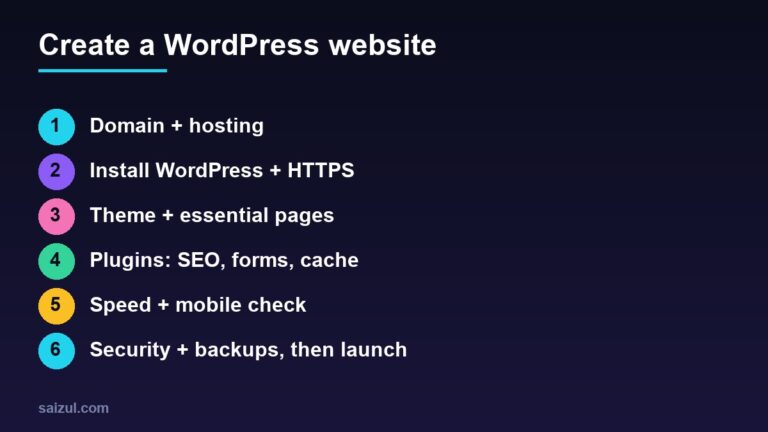
Step 1: Choose a Domain Name and Hosting Provider
Your domain name is your website’s address, while hosting refers to the server where your website files are stored.
Choosing a Domain Name
- Keep it short, memorable, and relevant to your niche.
- Avoid using special characters or numbers.
- Check domain availability using platforms like Namecheap, Bluehost, or GoDaddy.
Selecting a Hosting Provider
Some of the most popular WordPress hosting providers include:
- Bluehost: Affordable and beginner-friendly.
- SiteGround: Known for excellent speed and support.
- HostGator: Budget-friendly plans with reliable performance.
- Kinsta: Premium hosting with high-speed performance.
Step 2: Install WordPress
Most hosting providers offer one-click WordPress installation.
Installation Process
- Log in to your hosting account.
- Navigate to your control panel (cPanel).
- Select the WordPress installer (often named Softaculous or Install WordPress).
- Choose your domain name.
- Click Install Now.
- Set your username, password, and email.
Step 3: Choose a WordPress Theme
Themes determine the appearance and layout of your website.
How to Choose the Right Theme
- Opt for a responsive, SEO-optimized theme.
- Ensure the theme is compatible with the latest version of WordPress.
- Check user reviews and ratings.
Popular Themes
- Astra: Lightweight and highly customizable.
- GeneratePress: Fast and responsive.
- OceanWP: Great for e-commerce sites.
- Divi: Drag-and-drop builder with premium features.
Step 4: Customize Your Website
Make your site unique by customizing your theme’s appearance and layout.
Customization Options
- Change colors, fonts, and background images.
- Add navigation menus and widgets.
- Customize your homepage layout.
Step 5: Install Essential Plugins
Plugins enhance your website’s functionality.
Must-Have Plugins
- Yoast SEO: For improving search engine visibility.
- WPForms: For creating contact forms.
- Jetpack: For security, performance, and marketing tools.
- WooCommerce: For e-commerce websites.
- Elementor: For drag-and-drop page building.
Step 6: Create Important Pages
Every website needs certain fundamental pages to provide a complete experience to visitors.
Essential Pages
- Home Page: The main page visitors see when they land on your website.
- About Page: Information about you or your business.
- Contact Page: A form or email address for visitor inquiries.
- Privacy Policy Page: Detailing how user data is collected and managed.
Step 7: Publish Your Content
Start creating blog posts or pages relevant to your niche.
Content Creation Tips
- Use headings and subheadings for structure.
- Include images, videos, and infographics.
- Optimize your content for keywords.
- Proofread before publishing.
Step 8: Optimize Your Site for SEO
Enhance your website’s visibility on search engines by implementing SEO best practices.
SEO Optimization Tips
- Install an SEO plugin like Yoast SEO.
- Optimize images with ALT tags.
- Use internal linking to guide users.
- Ensure mobile responsiveness.
Step 9: Monitor and Improve
Use analytics tools to track your site’s performance and make improvements as needed.
Recommended Tools
- Google Analytics: Monitor traffic and user behavior.
- Ahrefs: Keyword research and backlink analysis.
- SEMrush: Comprehensive SEO tools for optimization.
Conclusion
Learning how to create a site with WordPress is a straightforward process that requires careful planning, creativity, and consistency. Whether you’re building a personal blog or a business website, WordPress provides all the tools and flexibility you need.
By following the steps outlined in this guide, you can create a professional-looking site that meets your goals and reaches your target audience effectively.

Md Saizul Amin
Digital Systems Strategist · AI Agent Developer · 9+ years in digital & ITMd Saizul Amin is a digital systems strategist and AI automation engineer from Dhaka, Bangladesh. With 9+ years across IT, web development and digital marketing, he writes practical guides on technology, business, education and online growth — and builds the same kinds of systems (AI agents, websites, SEO and ad campaigns) for clients in Bangladesh, the UK and the USA.
Specialist in
Credentials & experience
- 🎓B.Sc. in Computer Science & EngineeringBangladesh University of Business & Technology (BUBT), 2017–2021
- 🤖AI Automation Engineer · Web Developer · SEO SpecialistUnique Mark Limited, Birmingham UK — 2024 to present
- 🌱IT SpecialistGreen Fund Initiative Inc., USA — 2024 to present
- 🏥Junior IT Consultant — Ministry of Health (DGHS)Built the first national Shareable Health Record website; supported 6,000+ facilities
- 🧭Head of ITWEDO Bangladesh — led IT for 50+ staff, 2021–2023