In this article
As organizations handle increasingly sensitive financial records, private client intellectual property, and proprietary codebases, sending unencrypted queries to centralized cloud LLMs (like OpenAI or Anthropic) introduces compliance headaches and data leakage liabilities. In 2026, advances in model quantization (GGUF, AWQ) allow high-performance frontier-grade models—such as Llama 3.3, Mistral NeMo, and DeepSeek-R1—to run locally on consumer and workstation hardware at astonishing speeds.
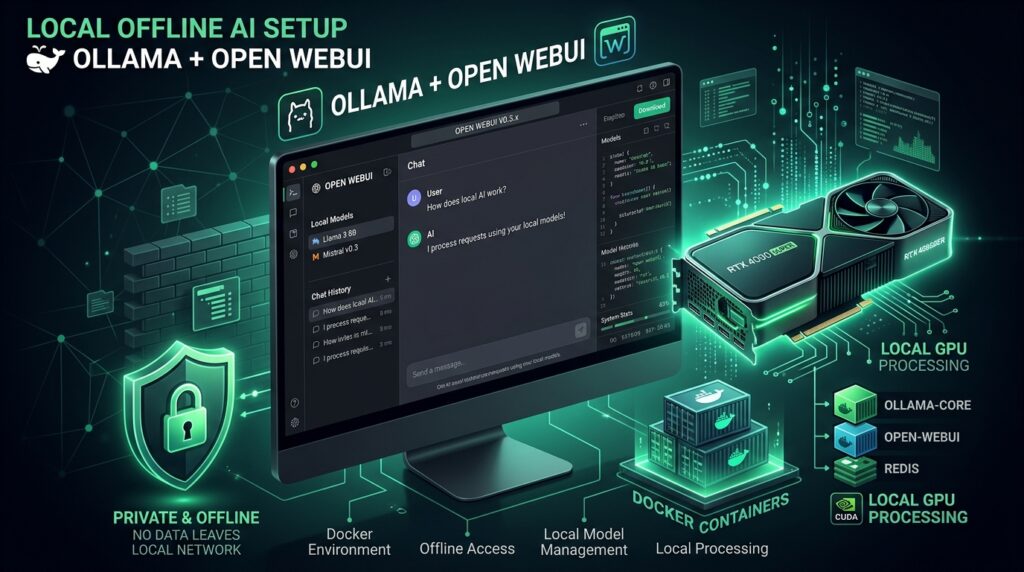
In this technical walkthrough, we configure a completely sovereign, private, and air-gapped local AI workstation by pairing Ollama (the high-performance LLM runtime) with Open WebUI (the ChatGPT-like feature-rich frontend) using Docker Compose with full NVIDIA/Apple Silicon GPU acceleration.
| Component | Function | Hardware Requirement | Privacy Tier |
|---|---|---|---|
| Ollama Core | Model execution & inference API | NVIDIA GPU (CUDA) or Apple M-Series (Metal) | 100% Offline / Localhost |
| Open WebUI | Chat UI, user roles, document RAG | Minimal CPU & 1GB RAM | Self-hosted Docker container |
| Llama 3.3 70B (Q4_K_M) | Primary reasoning & writing model | 40GB+ VRAM or Unified Memory | Zero data exfiltration |
| Mistral NeMo 12B (Q4) | Fast general assistant & code analysis | 12GB – 16GB VRAM | Zero data exfiltration |
1. Hardware Sizing and Quantization Primer
When running local models, System RAM / VRAM capacity determines which parameter class you can comfortably execute:
- 8GB VRAM: Suitable for 7B – 8B parameter models (e.g., Llama 3.1 8B, Qwen 2.5 7B at 4-bit quantization). Fast, lightweight, ideal for laptops.
- 16GB VRAM: The sweet spot for single modern consumer GPUs (RTX 4080 / RTX 4070 Ti Super). Supports 12B – 14B models with large context windows.
- 32GB – 64GB Unified Memory (Apple Mac Studio / MacBook Pro): Capable of loading 70B parameter models quantized at 4-bit, delivering near-GPT-4 level reasoning directly on your desk.
2. Production Docker Compose Deployment
Deploy both services simultaneously with persistent data volumes and GPU pass-through using this clean docker-compose.yml file:
version: '3.8'

services:
  ollama:
    image: ollama/ollama:latest
    container_name: ollama
    restart: unless-stopped
    ports:
      - "11434:11434"
    volumes:
      - ollama_models:/root/.ollama
    deploy:
      resources:
        reservations:
          devices:
            - driver: nvidia
              count: all
              capabilities: [gpu]

  open-webui:
    image: ghcr.io/open-webui/open-webui:main
    container_name: open-webui
    restart: unless-stopped
    ports:
      - "3000:8080"
    environment:
      - OLLAMA_BASE_URL=http://ollama:11434
      - WEBUI_AUTH=true
      - ENABLE_RAG_WEB_SEARCH=false
    volumes:
      - open_webui_data:/app/backend/data
    depends_on:
      - ollama

volumes:
  ollama_models:
  open_webui_data:
3. Pulling Models and Testing Local Inference
Once the containers are active (docker compose up -d), pull your desired foundational models via the Ollama CLI inside the container:
# Pull the lightweight fast general assistant
docker exec -it ollama ollama run llama3.1:8b

# Pull specialized programming model
docker exec -it ollama ollama pull qwen2.5-coder:14b

# Verify active loaded models in memory
docker exec -it ollama ollama ps
Navigate to http://localhost:3000 in your browser. Complete the initial local administrator registration, and you will have an interface with chat history, model switching, document upload RAG, and custom system prompts.
4. Private Document RAG (Retrieval-Augmented Generation)
One of Open WebUI’s greatest strengths is its built-in, local RAG pipeline. You can upload PDFs, spreadsheets, and technical markdown documentation directly into the chat interface. Open WebUI automatically chunks the files, runs them through a local embedding model (e.g., all-minilm), and retrieves relevant snippets to answer questions strictly grounded in your private enterprise documentation—with zero bytes transmitted over the external internet.
Frequently Asked Questions (FAQ)
Does running local AI slow down my operating system?
Inference utilizes GPU compute and dedicated VRAM. When idle, models are swapped out of active memory based on your configured timeout (defaulting to 5 minutes in Ollama), returning memory to your host system.
Can multiple team members access the local WebUI over a LAN network?
Yes. By hosting the container on a dedicated local office server or workstation, any user connected to the same local area network (or private WireGuard / Tailscale VPN) can access the WebUI at http://[server-ip]:3000 with individual user accounts.
Need guidance deploying sovereign on-premise AI models or hardening enterprise security architectures? Discover our technical consulting services or get in touch directly.

Md Saizul Amin
Digital Systems Strategist · AI Agent Developer · 9+ years in digital & ITMd Saizul Amin is a digital systems strategist and AI automation engineer from Dhaka, Bangladesh. With 9+ years across IT, web development and digital marketing, he writes practical guides on technology, business, education and online growth — and builds the same kinds of systems (AI agents, websites, SEO and ad campaigns) for clients in Bangladesh, the UK and the USA.
Specialist in
Credentials & experience
- 🎓B.Sc. in Computer Science & EngineeringBangladesh University of Business & Technology (BUBT), 2017–2021
- 🤖AI Automation Engineer · Web Developer · SEO SpecialistUnique Mark Limited, Birmingham UK — 2024 to present
- 🌱IT SpecialistGreen Fund Initiative Inc., USA — 2024 to present
- 🏥Junior IT Consultant — Ministry of Health (DGHS)Built the first national Shareable Health Record website; supported 6,000+ facilities
- 🧭Head of ITWEDO Bangladesh — led IT for 50+ staff, 2021–2023