In this article
The GTA 6 pre-load began on 10 November 2026, nine days before the game launches on 19 November. Rockstar announced it on 3 November with the Newswire headline “Grand Theft Auto VI Pre-Load Begins on November 10”, followed by “Pre-Load Grand Theft Auto VI Now” when it opened. This guide explains how to pre-load GTA 6 on PS5 and Xbox Series X|S, explains what PlayStation says about the GTA 6 file size, and shares storage and download tips so the game is ready when it unlocks.
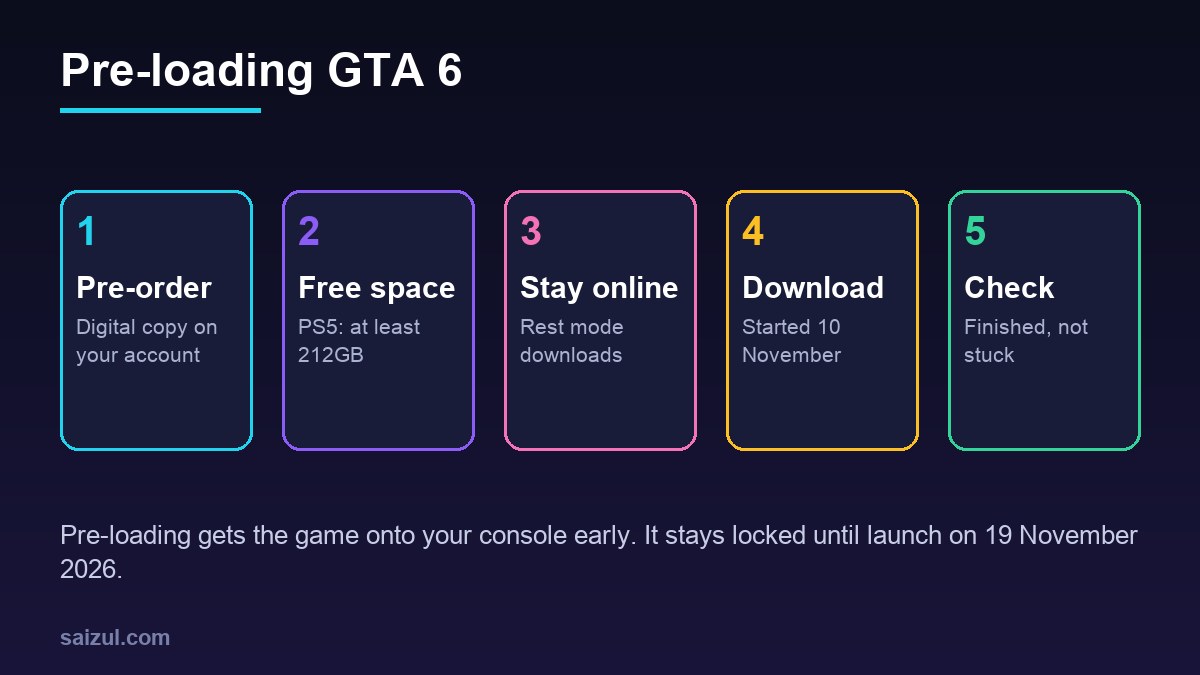
From my own work: I follow big launches closely, and every time the same thing happens: launch night arrives and many people discover their download is stuck or their drive is full. Most of that is avoidable with ten minutes of checking a few days early.
What is pre-loading?
Pre-loading means downloading a game before its release date. The files sit on your console, locked, until the release time. When the game unlocks, you can start playing straight away, without waiting for a huge download on the busiest night of the year.
- Pre-loading is generally for digital pre-orders.
- It does not let you play early. GTA 6 stays locked until it launches on 19 November 2026.
- You may still need a small update when you first start the game, so keep some space free.
GTA 6 pre-load dates
| Date (2026) | What happened |
|---|---|
| 3 November | Rockstar announced pre-loading: “Grand Theft Auto VI Pre-Load Begins on November 10” |
| 10 November | Pre-loading opened: “Pre-Load Grand Theft Auto VI Now” |
| 19 November | Launch on PlayStation 5 and Xbox Series X|S |
On PS5, the PlayStation Blog describes a rolling midnight launch by country on 19 November, starting in New Zealand. See GTA 6 release date and launch time in your time zone for how to check it and convert it.
How to pre-load GTA 6 on PS5
PlayStation’s support page describes how pre-ordered games download automatically (PlayStation Support). In short:
- Pre-order the digital version in PlayStation Store. The pre-order appears in your Game Library.
- Turn on Stay Connected to the Internet for rest mode, so the console can download while it sleeps.
- From your games home, open Game Library and select Grand Theft Auto VI.
- Select the timer on the game. You will see a list of the content included with your pre-order. Content with a ticked checkbox will download automatically.
- Leave the console in rest mode, or on, and check the download progress in your downloads list.
If you bought a code in a box from a shop, redeem the code on your account first. The game should then appear in your library like any digital pre-order.
How to pre-load GTA 6 on Xbox Series X|S
On Xbox, a digital pre-order can generally be installed before release, then stays locked until launch. The general approach:
- Pre-order the digital version in the Microsoft Store on your console, or on xbox.com while signed in with the same account.
- Open My games & apps, find Grand Theft Auto VI in your library, and choose to install it if it has not started on its own.
- Check the queue to see download progress.
- Set the console’s power option so it can download updates and games while it is off or in standby.
Xbox Support has a general page on installing games and apps on an Xbox console (Xbox Support), which covers where installs and the queue appear.
GTA 6 file size: what is known
Rockstar’s page doesn’t list a file size, but PlayStation’s store does give a figure: “Get ready by clearing a minimum of 212GB of storage space on your PlayStation 5.” (PlayStation Store: Grand Theft Auto VI)
- That is PlayStation’s advice for PS5. The Xbox download may differ; check the size your Xbox shows for the install.
- 212GB is a minimum to clear, not a promise of the exact download size. Day-one updates can add more.
- Treat other numbers on social media with caution unless they link to an official source.
If you have a standard PS5 with no extra storage, 212GB is a large share of the internal SSD, so you may need to remove other games first.
Storage tips: make room before launch
- Check your free space now. On PS5, look in the storage section of Settings. On Xbox, use the storage view under My games & apps or Settings.
- Remove games you have finished. Your purchases stay on your account and you can download them again later.
- Move older games to external USB storage. On PS5, USB extended storage can store and play PS4 games, but PS5 games must be played from the internal SSD or a compatible M.2 drive. On Xbox Series X|S, a USB drive can store games, but games optimised for Series X|S need to run from internal storage or an official expansion card.
- Delete old captures. Video clips can take up more space than you think. Back up the ones you want first.
- Leave a buffer. Do not fill the drive to the last gigabyte. Updates need room to install.
Download tips for a smooth pre-load
- Use a wired connection if you can. An Ethernet cable is usually faster and more stable than Wi-Fi.
- Avoid busy hours on shared connections. Downloading overnight helps on home broadband.
- Pause other downloads and updates on the console and other devices.
- Do not cancel a slow download. Pausing and resuming is fine, but starting over wastes time.
- Check the day before launch that the download has finished, not just started.
If the pre-load does not start
- Make sure you pre-ordered the digital version, or redeemed your code.
- Sign out and back in, then check your library again.
- Confirm you are signed in with the same account you bought with.
- Restart the console fully, not just from rest mode.
- Check PlayStation Network or Xbox service status pages for outages.
Once it is done, my GTA 6 beginner guide covers settings and capture to set up before you play.
FAQ
When did GTA 6 pre-load start?
Pre-loading began on 10 November 2026. Rockstar announced it on 3 November with the Newswire headline “Grand Theft Auto VI Pre-Load Begins on November 10”.
How big is the GTA 6 file size?
Rockstar’s page doesn’t list it, but PlayStation’s store page says to clear a minimum of 212GB of storage space on PS5 before pre-loading. The Xbox size may differ, so check what your console shows.
Can I play GTA 6 early after pre-loading?
No. Pre-loading only downloads the game. It stays locked until the official launch on 19 November 2026.
Can I pre-load the disc version of GTA 6?
Pre-loading is for digital pre-orders. If you bought a code in a box, redeem it on your account and the game should then download like a digital pre-order. A disc can only be installed once you have it.
Can I play GTA 6 from an external drive?
On PS5, PS5 games must be played from the internal SSD or a compatible M.2 drive, not USB storage. On Xbox Series X|S, games optimised for the console need internal storage or an official expansion card.
This is an independent fan guide. It is not affiliated with, endorsed by or sponsored by Rockstar Games or Take-Two Interactive. Grand Theft Auto is a trademark of Take-Two Interactive.
More GTA 6 guides
- GTA 6 release date and launch time in your time zone
- Is GTA 6 on PC? Every platform explained
- GTA 6 Ultimate Edition vs the Vintage Vice City Pack
- All 8 GTA 6 characters explained
- GTA 6 map: Leonida and its 6 named places
- GTA 6 soundtrack: The Album and the Justice score
- Every official GTA 6 trailer, in order
- GTA 6 beginner guide: get ready for your first hours
- GTA 6 age rating: a practical guide for parents
- GTA 6 Bangla guide (বাংলায় সম্পূর্ণ গাইড)
Need help with this on your own site or business?
I build and secure WordPress sites, web apps and AI automations end to end, in Bangla and English: a free discovery call, a written scope with a fixed quote, a focused first version, then testing, deployment and monitoring.
See the portfolio and the AI agent services, or tell me what you need.
Sources
- Rockstar Games: Grand Theft Auto VI
- PlayStation Store: Grand Theft Auto VI
- PlayStation Support: Pre-order and auto-download games from PlayStation Store
- Xbox Support: How to install games and apps on an Xbox console
Featured artwork: official GTA VI promotional art © Rockstar Games.

Md Saizul Amin
Digital Systems Strategist · AI Agent Developer · 9+ years in digital & ITMd Saizul Amin is a digital systems strategist and AI automation engineer from Dhaka, Bangladesh. With 9+ years across IT, web development and digital marketing, he writes practical guides on technology, business, education and online growth — and builds the same kinds of systems (AI agents, websites, SEO and ad campaigns) for clients in Bangladesh, the UK and the USA.
Specialist in
Credentials & experience
- 🎓B.Sc. in Computer Science & EngineeringBangladesh University of Business & Technology (BUBT), 2017–2021
- 🤖AI Automation Engineer · Web Developer · SEO SpecialistUnique Mark Limited, Birmingham UK — 2024 to present
- 🌱IT SpecialistGreen Fund Initiative Inc., USA — 2024 to present
- 🏥Junior IT Consultant — Ministry of Health (DGHS)Built the first national Shareable Health Record website; supported 6,000+ facilities
- 🧭Head of ITWEDO Bangladesh — led IT for 50+ staff, 2021–2023